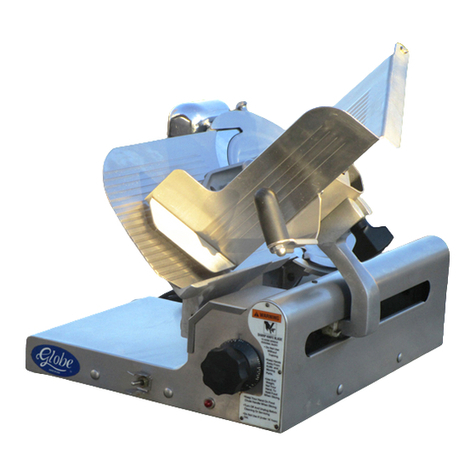
Globe G10 User manual

InstructionManualfortheGlobeSlicer
Models:G10,G12,G12A,andG14
This manual contains important safety instructions that
must be strictly followed when using this equipment.
ForServiceonYourSlicer:
1. Visit our website at www.globeslicers.com
(select the Parts / Support drop down).
2. Or call the Globe Service Department at 937-299-8625 and ask for contact
information for your local service company.
VisitourwebsiteforinformationonadditionalproductsavailablefromGlobe.
www.globeslicers.com
Slicers, Mixers, Countertop Cooking Equipment, Meat Choppers & Scales
-IMPORTANTSAFETYNOTICE-
Model #:
Serial #:
WARRANTY REGISTRATION
SCAN THE QR CODE WITH YOUR MOBILE DEVICE OR GO TO
WWW.GLOBESLICERS.COM TO FILL OUT AND SUBMIT YOUR
WARRANTY REGISTRATION.
http://www.globeslicers.com/site/warranty.asp
2010
ModelG12

Page 2
ATTENTION OWNERS AND OPERATORS ...................................................................................................... 3
KEY COMPONENTS OF THE SLICER ............................................................................................................ 4
GLOBE SLICER SAFETY TIPS ........................................................................................................................ 5
INSTALLATION ................................................................................................................................................. 6-7
OPERATING INSTRUCTIONS .......................................................................................................................... 8-9
CLEANING & SANITIZING ................................................................................................................................ 10-13
KNIFE SHARPENING ....................................................................................................................................... 14-15
SIMPLE MAINTENANCE AND REPAIR ............................................................................................................ 16-17
TROUBLESHOOTING GUIDE .......................................................................................................................... 18
LIMITED SLICER WARRANTY ......................................................................................................................... 20
GLOBEFOODEQUIPMENTCO.
2153DRYDENRD.
DAYTON,OH45439
TollFree:800-347-5423
PHONE:937-299-5493
FAX:937-299-8623
E-MAIL:[email protected]
WEBSITE:www.globeslicers.com
©GlobeFoodEquipmentCompany,2012 PrintedintheU.S.A.10/2012 Ver.1Rev.04-2012
Index

Page 3
AttentionOwnersandOperators
Globe’s equipment is designed to provide years of safe and productive processing of food products as long as the
equipment is used in accordance with the instructions in this manual and is properly maintained. Importantly,
unless the operator is adequately trained and supervised, there is a possibility of serious injury. Owners of this
equipment bear the responsibility to make certain that this equipment is used properly and safely. Strictly follow all
of the instructions contained in this manual and the requirements of local, state and federal law.
Owners should not permit anyone to touch this equipment unless they are over 18 years of age, are adequately
trained and supervised, and have read and understand this manual. Owners should also ensure that no
customers, visitors or other unauthorized personnel come in contact with this equipment. Please remember that
Globe cannot anticipate every circumstance or environment in which its equipment will be operated. It is the
responsibility of the owner and the operator to remain alert to any hazards posed by the function of this equipment,
particularly the sharp knife blade and all moving parts. If you are ever uncertain about a particular task or the
proper method of operating this equipment, ask your supervisor.
To prevent illness caused by the spread of food-borne pathogens, it is important to properly clean and sanitize
the entire slicer as any surface of the slicer can become contaminated. It is the responsibility of the slicer owner/
operator to follow all guidelines, instructions and laws as established by your local and state health departments
and the manufacturers of chemical sanitizers.
When cleaning your slicer, pay particular attention to cracks, broken seams and any area that may collect food
debris. If your slicer, or any of its parts, is damaged or broken, it may become more difcult to properly clean and
sanitize the unit. If your slicer is damaged or needs repair, contact an experienced service individual immediately to
ensure the slicer can be properly sanitized. If you have any questions, please contact Globe at 937-299-5493.
This manual offers information to supplement your procedures to improve the sanitization of your machine and
contains a Safety Tips section listing a number of precautions to follow to help promote safe use of this equipment.
Throughout the manual you will see additional warnings to help alert you to potential hazards.
Warningsaffectingyourpersonalsafetyareindicatedby:
Warningsrelatedtopossibledamagetotheequipmentareindicatedby:
A wall chart with safety instructions is included with this equipment. This wall chart should be posted near the
slicer within easy view of the operator. You should make certain that this manual is available for easy reference
by any operator. Globe has put several warning labels in the English language on the slicer. Spanish labels are
also available and can replace the English labels at the owner’s discretion. If the warning labels, the wall chart, or
this manual are misplaced, damaged or illegible, or if you require additional copies, please contact your nearest
representative or Globe directly for these items at no charge.
Please remember that this manual, the wall chart and the warning labels do not replace the need to be alert,
to properly train and supervise operators, and to use common sense when using this equipment.
or

Page 4
KeyComponentsoftheSlicer
Knife Sharpener
Knife Cover
End Weight
Food Chute
Food Chute Handle
Food Chute Release Knob
Slice Thickness Dial
Rubber Feet
Motor Reset Button
Receiving Area
Slice De ector
Knife Cover Release
Knob
Slicer Table
ModelG12A
Start/Stop Controls
Power Cord
Auto Engage Lever
Power Indicator Light
ModelG12
ModelG12
Sharpener Release Knob
Knife Ring Guard
Warning Label
Power On/Off

Page 5
GlobeSlicerSafetyTips
SHARPKNIFEBLADE
TOAVOIDSERIOUSPERSONALINJURY:
• NEVER touch this slicer without training and authorization from your supervisor or if you are under 18 years
old. Read this instruction manual rst.
• ONLY install the slicer on a level nonskid surface that is nonammable and is located in a clean, well-lit
work area away from children and visitors.
• ALWAYS ground slicer utilizing proper power source.
• NEVERTOUCHKNIFE. Keep hands and arms away from all moving parts.
• NEVEROPERATE slicer without knife cover and knife ring guard securely installed.
• BEFORETURNINGSLICERON,place auto engage lever in “Manual” position (G12A only).
• BEALERT. The food chute moves back and forth during automatic operation and can move in either
direction on start up (G12A only).
• NEVERHOLDTHEFOODPRODUCTWHILESLICING. Hold only the end weight handle to slice.
• DONOTCATCHSLICESWITHYOURHAND. Let slices drop onto the receiving area.
• ALWAYS turn slicer off, return auto engage lever to “Manual” position (G12A only) and turn the
slice thickness dial clockwise until it stops after each use.
• BEFORECLEANING,SHARPENING,SERVICING,ORREMOVINGANYPARTS, always turn slicer off,
turn the slice thickness dial clockwise until it stops, remove food chute and unplug power cord.
• ALWAYSproperlycleanandsanitizeyourslicer.To prevent illness or death caused by the spread of
food-borne pathogens, it is important to properly clean and sanitize the entire slicer as any surface of
the slicer can become contaminated. It is the responsibility of the slicer owner/operator to follow all
guidelines, instructions and laws as established by your local and state health departments and the
manufacturers of chemical sanitizers.
• USEONLYGLOBESLICERACCESSORIES properly installed.

Page 6
Installation
UNPACKING
1. Unpack the slicer immediately after receipt. If the machine is found to be damaged, save the packaging
material and contact the carrier within fteen (15) days of delivery and immediately contact your source of the
equipment. Youhavenorecoursefordamageafterfteen(15)daysofreceipt.
2. With the slicer you should receive: four rubber feet, lubricating oil, and an instruction manual. Contact Globe
or your local supplier if you did not receive all of these items.
TOAVOIDSERIOUSPERSONALINJURY
PROPERLYINSTALLSLICERINADEQUATEWORKAREA
• ALWAYS install equipment in a work area with adequate light and space.
• ONLY operate on a solid, level, nonskid surface that is nonammable.
• NEVER operate slicer with a damaged power cord or power plug.
• NEVER operate slicer with an extension cord.
• NEVER bypass, alter, or modify this equipment in any way from its original condition. Doing so may create
hazards and will void warranty.
• NEVER operate slicer without the knife cover and knife ring guard securely installed.
• NEVER operate slicer without the warning label attached (see page 4 for location).
INSTALLATION:
1. Read this manual thoroughly before installation and operation. DONOT proceed with installation and
operation if you have any questions or if you do not understand anything in the manual. Contact your local
representative or Globe rst. Make sure to clean and sanitize your entire slicer before use. Refer
to this manual for cleaning and sanitizing guidelines.
2. Remove the slicer from the corrugated box.
3. Make sure the rubber feet are rmly tightened.
NEVERUSESLICERWITHOUTRUBBERFEETINSTALLED.
4. Select a location for the slicer that has a level, solid, nonskid surface that is nonammable and is in a
well-lit work area that is away from children and visitors.
USEATLEASTTWOPEOPLETOLIFTTHESLICERUPTOTHEOPERATINGLOCATION.NEVER
ATTEMPTTOLIFTTHESLICERALONE.

Page 7
Installation
THISMACHINEISPROVIDEDWITHATHREE-PRONGGROUNDINGPLUG.THEOUTLETTO
WHICHTHISPLUGISCONNECTEDMUSTBEPROPERLYGROUNDED.IFTHERECEPTACLEIS
NOTTHEPROPERGROUNDINGTYPE,CONTACTANELECTRICIAN.DONOT,UNDERANY
CIRCUMSTANCES,CUTORREMOVETHETHIRDGROUNDPRONGFROMTHEPOWERCORDOR
USEANYADAPTERPLUG(Fig.7-1andFig.7-2).
5. Inspect the slicer to ensure all parts have been provided.
6. Make sure the knife cover, knife ring guard and knife sharpener are in place.
7. Make sure the warning label is properly positioned and legible and the instruction manual is available near
the slicer.
8. Complete the warranty registration online at www.globeslicers.com/warranty.asp.
9. Post the provided wall chart in a visible area near the slicer to be referred to often for cleaning, sanitizing,
and inspecting your slicer. Refer to this wall chart and the Owner’s Manual for proper cleaning, sanitizing
and inspection of your slicer.
10. Clean the slicer using the procedures outlined in the cleaning section (pages 10 and 13) prior to using the
slicer.
11. Contact your local representative, or Globe directly, if you have any questions or problems with the
installation or operation of this slicer.
Figure 7-1 Correct Figure 7-2 INCORRECT

Page 8
OperatingInstructions
SHARPKNIFEBLADE
TOAVOIDSERIOUSPERSONALINJURY:
• NEVER touch this slicer without training and authorization from your supervisor or if you are under 18 years
old. Read this instruction manual rst.
• ONLY install the slicer on a level nonskid surface that is nonammable and is located in a clean, well-lit
work area away from children and visitors.
• ALWAYS ground slicer utilizing proper power source.
• NEVERTOUCHKNIFE. Keep hands and arms away from all moving parts.
• NEVEROPERATE slicer without knife cover and knife ring guard securely installed.
• BEFORETURNINGSLICERON,place auto engage lever in “Manual” position (G12A only).
• BEALERT. The food chute moves back and forth during automatic operation and can move in either
direction on start up (G12A only).
• NEVERHOLDTHEFOODPRODUCTWHILESLICING. Hold only the end weight handle to slice.
• DONOTCATCHSLICESWITHYOURHAND. Let slices drop onto the receiving area.
• ALWAYS turn slicer off, return auto engage lever to “Manual” position (G12A only) and turn the
slice thickness dial clockwise until it stops after each use.
• BEFORECLEANING,SHARPENING,SERVICING,ORREMOVINGANYPARTS, always turn slicer off,
turn the slice thickness dial clockwise until it stops, remove food chute and unplug power cord.
MANUALSLICEROPERATION
1. Make sure all knobs are tightened prior to using the slicer.
2. With the slicer turned off, pull the food chute completely towards you and place the food product onto the
food chute. When using the G12A as a manual slicer, make sure to push down or lower the auto engage
lever to the “Manual” position and keep it in that position at all times. Slice only boneless, unfrozen product
with the slicer. Use the end weight to hold the food product in place.
3. Rotate the slice thickness dial counterclockwise to the desired setting. After slicing is complete, always turn
the slice thickness dial clockwise until it stops to close the slicer table.
4. Turn the slicer on by pushing the start button. The power indicator light, located near the power on button,
will illuminate.

Page 9
DONOTholdthefoodproductwithyourhand.Neverputyouhandonoraroundfoodchutewhen
slicerison.Thefoodchutehandleistheonlypartofthesliceryoushouldtouchwhileslicing.
5. Use the food chute handle to manually push the food chute back and forth. The food chute handle is the only
part of the slicer you should touch while slicing. Do not catch slices with your hand. Let slices drop onto the
receiving area.
Ifaproductneedstobeadjustedduringslicing,ALWAYSpullthefoodchuteallthewaytowards
you.Turnoffslicer,andcloseslicertablepriortoadjustingtheproductandtheendweight.
6. After the last slice stroke, pull the food chute all the way towards you. Turn the slicer off by pushing the stop
button. The power indicator light will go out. Always turn slice thickness dial clockwise until it stops to close
the slicer table.
7. Now you can unload and load food product from the food chute.
AUTOMATICSLICEROPERATION(G12Aonly)
1. Make sure the slicer is turned off (power indicator light not illuminated). Make sure auto engage lever is in
“Manual” position (Fig. 9-1) and the food chute moves freely.
2. Pull the food chute completely towards you and place the food product onto the food chute. Slice only
boneless, unfrozen product with the slicer. Swing the end weight into position to secure food product.
3. Rotate the slice thickness dial counterclockwise to the desired setting. After slicing is complete, always turn
the slice thickness dial clockwise until it stops to close the slicer table.
4. Press the start button. The power indicator light will illuminate (see page 4 for location).
BEALERT.Thenextstepwillcausethefoodchutetomoveautomaticallyanditcanmoveeither
directiononstartup.
NEVERattempttoadjust,loadorunloadfoodchutewhenslicerisinautomaticoperation.
NEVERputhandintothechutearmopeningontherightsideoftheslicer.
5. To make the food chute move automatically, pull up or raise the auto
engage lever into the “Automatic” position (Fig. 9-2).
6. To stop the automatic movement of the food chute, push down or lower
the auto engage lever to the “Manual” position.
Theknifeisstillrotatingeventhoughthechutehasstopped.
7. To turn the slicer completely off and stop the knife, press the stop button.
If the auto engage lever has not already been returned to the “Manual”
position, push down or lower the lever to the “Manual” position.
OperatingInstructions
Figure 9-2
Figure 9-1

Page 10
Cleaning&Sanitizing
SHARPKNIFEBLADE
TOAVOIDSERIOUSPERSONALINJURYTOTHESLICEROPERATORANDCUSTOMERS:
• BEFORECLEANING,SHARPENING,SERVICINGORREMOVINGANYPARTS,always turn slicer off,
turn the slice thickness dial clockwise until it stops, and unplug the power cord.
• NEVERattempt to clean slicer with the knife running.
• NEVERattempt to remove the knife or knife ring guard from the slicer. They must remain on the
slicer for proper operation, sharpening, and cleaning.
To prevent illness or death caused by the spread of food-borne pathogens, it is important to
properly clean and sanitize the entire slicer as any surface of the slicer can become contaminated.
It is the responsibility of the slicer owner/operator to follow all guidelines, instructions and laws as
established by your local and state health departments and the manufacturers of chemical sanitizers.
Onceyourslicermakescontactwithfoodproduct,theentireslicer,includingremovableparts,must
bethoroughlycleanedandsanitized.Thisprocessistoberepeatedatleastevery4hoursusing
theseproceduresandinformation;andmustcomplywithadditionallawsfromyourstateandlocal
healthdepartments.
As with all food contact surfaces, it is extremely important to properly sanitize the entire slicer and toclosely
followtheinstructionsonyourquaternarysanitizercontainertoensurepropersanitationisachieved
tokillpotentiallyharmfulbacteria.
NOTE: It may be desirable to wear non-cutting safety gloves during the cleaning operation.
IMPORTANT:Ifachemicalsanitizerotherthanchlorine,iodineorquaternaryammoniumisused,itshallbe
appliedinaccordancewiththeEPA-registeredlabeluseinstructions.Excessive amounts of sanitizer and use
of products not formulated for stainless steel or aluminum may VOID your warranty.
Sanitizer concentration shall comply with section 4-501.114, Manual and Mechanical Warewashing Equipment,
Chemical Sanitization - Temperature, pH, Concentration, and Hardness of the FDA Food Code.
Formoreinformationonproperkitchenandequipmentsanitation,visitwww.servsafe.comprovidedbythe
NationalRestaurantAssociation(NRA).
• DONOThose down, pressure wash, or pour water on the slicer.
• NEVERuse a scrubber pad, steel wool, or abrasive material to clean the slicer.
• NEVERtrytoclean,sharpen,oroperatetheslicerwiththeliftleverintheraisedposition
(automaticslicersonly).
• ALWAYSturnslicerOFFandunplugthepowercordBEFOREcleaning.
• Itisextremelyimportanttofollowtheinstructionsonthesanitizercontainertoensure
propersanitationisachieved.Allowthepartstoairdrybeforeplacingthembackontheslicer!
DONOT use bleach, products containing sodium hypochlorite or other caustic/strong detergents on the slicer base
or removable parts. These products will discolor and destroy the parts.
Slicer components are easily disassembled without the use of special tools. It may be desirable to wear non-cutting
safety gloves during the cleaning operation.

Other manuals for G10
1
This manual suits for next models
3
Table of contents
Other Globe Kitchen Appliance manuals

Globe
Globe G12-Q User manual

Globe
Globe GPC16 User manual

Globe
Globe G10 User manual

Globe
Globe S13A User manual

Globe
Globe SG13-05 User manual

Globe
Globe Protech 4500 Specifications

Globe
Globe 3600N User manual

Globe
Globe 4600P Instruction Manual

Globe
Globe 3600, 3850, 3975 Assembly instructions

Globe
Globe S13 User manual
Popular Kitchen Appliance manuals by other brands

Tayama
Tayama TYG-35AF instruction manual

AEG
AEG 43172V-MN user manual

REBER
REBER Professional 40 Use and maintenance

North American
North American BB12482G / TR-F-04-B-NCT-1 Assembly and operating instructions

Presto
Presto fountain popper instruction manual

Westmark
Westmark 1035 2260 operating instructions