Salus RT300RF User manual

Instruction Manual
Model No RT300RF
Digital Electronic Thermostat
With RF
Salus RT300RF Manual 002_89 22/07/2013 09:19 Page 1

RT300RF INSTRUCTION MANUAL
2
PRODUCT COMPLIANCE
This product complies with the essential requirements of the
following EC Directives:
•Electro-Magnetic Compatibility directive 2004/108/EC
•Low Voltage Directive 2006/95/EEC
•EC Marking directive 93/68/EEC
SAFETY INFORMATION
These instructions are applicable to the SALUS Controls model stated
on the front cover of this manual only, and must not be used with
any other make or model.
These instructions are intended to apply in the United Kingdom only,
and should be followed along with any other statutory obligations.
This accessory must be fitted by a Competent person, and
installation must comply with the guidance provided in the current
editions of BS7671 (IEE Wiring Regulations) and Part ‘P’ of the
Building Regulations. Failure to comply with the requirements of
these publications could lead to prosecution.
Always isolate the AC Mains supply before opening or removing
the unit from the wall or wall box.
When fitting batteries don’t mix old and new batteries
together. Do not use rechargable batteries.
Please leave these instructions with the end user where they should
be kept in a safe place for future reference.
RT300RF INSTRUCTION MANUAL
Salus RT300RF Manual 002_89 22/07/2013 09:19 Page 2

RT300RF INSTRUCTION MANUAL 3
What is a room thermostat?
... an explanation for householders
A room thermostat simply switches the heating system on and off as necessary. It
works by sensing the air temperature, switching on the heating when the air
temperature falls below the thermostat setting, and switching it off once this set
temperature has been reached.
Turning a room thermostat to a higher setting will not make the room heat up any
faster. How quickly the room heats up depends on the design of the heating system,
for example, the size of boiler and radiators.
Neither does the setting affect how quickly the room cools down. Turning a room
thermostat to a lower setting will result in the room being controlled at a lower
temperature, and saves energy.
The heating system will not work if a time switch or programmer has switched it off.
The way to set and use your room thermostat is to find the lowest temperature setting
that you are comfortable with, and then leave it alone to do its job. The best way to
do this is to set the room thermostat to a low temperature – say 18
°C
– and then turn
it up by one degree each day until you are comfortable with the temperature. You
won’t have to adjust the thermostat further. Any adjustment above this setting will
waste energy and cost you more money.
If your heating system is a boiler with radiators, there will usually be only one room
thermostat to control the whole house. But you can have different temperatures in
individual rooms by installing thermostatic radiator valves (TRVs) on individual
radiators. If you don’t have TRVs, you should choose a temperature that is reasonable
for the whole house. If you do have TRVs, you can choose a slightly higher setting to
make sure that even the coldest room is comfortable, then prevent any overheating
in other rooms by adjusting the TRVs.
Room thermostats need a free flow of air to sense the temperature, so they must not
be covered by curtains or blocked by furniture. Nearby electric fires, televisions, wall
or table lamps may prevent the thermostat from working properly.
Salus RT300RF Manual 002_89 22/07/2013 09:19 Page 3

RT300RF INSTRUCTION MANUAL
4
INTRODUCTION
The RT300RF from SALUS Controls is a stylish and accurate digital thermostat
with a large, easy to read Liquid Crystal Display (LCD). This thermostat has
been specifically designed to be used for both Volt Free and AC heating
applications, can replace most common residential thermostats and is
designed to be used with electric, gas or oil heating control systems. Unlike
ordinary single unit design thermostats, this is a new type of thermostat
separating the operational functions into two units.
The Receiver is used for wiring connections and heat on/off control.
The Control Centre provides the user interface and temperature sensing /
control. The two units are linked together by a Radio Frequency (RF) signal.
Features
•Volt free switching option
•Frost protection
•Large, easy to read LCD
with blue backlight
•Burner on symbol
•User friendly
Salus RT300RF Manual 002_89 22/07/2013 09:19 Page 4

RT300RF INSTRUCTION MANUAL 5
INSTALLATION
Please read the important safety information at the start of this manual
before you begin to install the device.
The RT300RF Control Centre is easily installed using the Industry Standard
back plate supplied with the unit – this is used purely for mounting
purposes, as no wiring is needed for the Control Centre. The back plate can
be mounted directly to the wall surface.
The ideal position to locate the RT300RF Control Centre is about 1.5m above
floor level. It should be mounted in a location where the thermostat is
accessible, reasonably lit and free from extremes of temperature and
draughts. Do not mount the thermostat on an outside wall, above a radiator
or in a location where it may be subjected to direct sunlight.
To ensure trouble free operation of the Radio Frequency (RF) signal, always
ensure that the programmable thermostat is mounted away from any
possible sources of interference (such as radios, TV sets, computers, etc.),
and is not mounted on or in close proximity to large metal objects. Installing
the RT300RF in enclosed areas such as cellars and basements is not
recommended.
CONNECTING THE RT300RF RECEIVER
NOTE: All electrical installation work should be carried out by a suitably
qualified Electrician or other competent person.
If you are not sure how to install this digital thermostat consult either with
a qualified electrician, heating engineer or your boiler / heating system
supplier for advice on how to continue.
Salus RT300RF Manual 002_89 22/07/2013 09:19 Page 5

RT300RF INSTRUCTION MANUAL
6
The RT300RF Receiver should be mounted in a suitable location that is both
accessible for the connection of mains and control wiring, and allows good
reception of the RF signal. The Receiver needs a 230V AC mains supply to
operate, and this should be fused appropriately (13A max.). The Receiver
should be mounted in a location where it will not come into contact with
water, moisture or condensation.
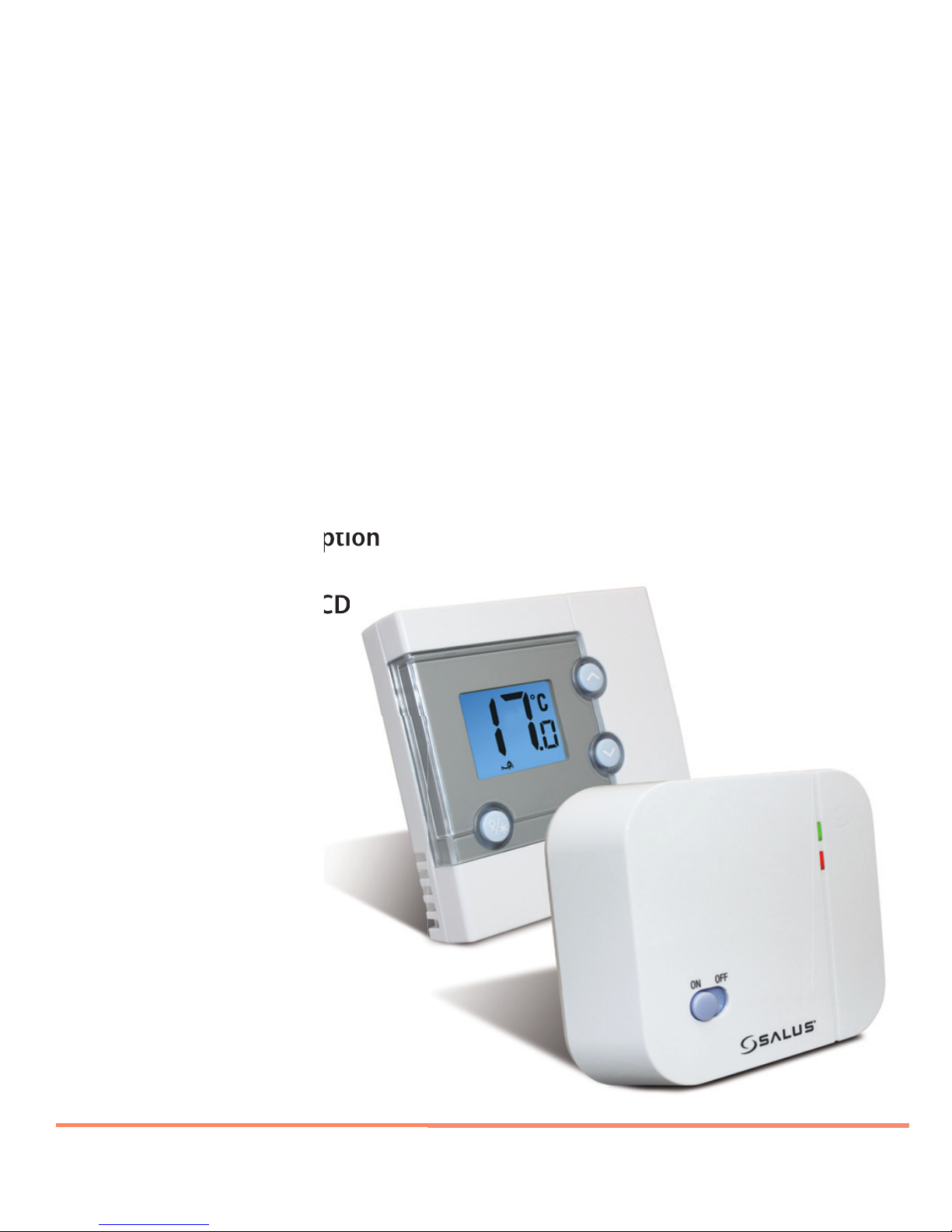
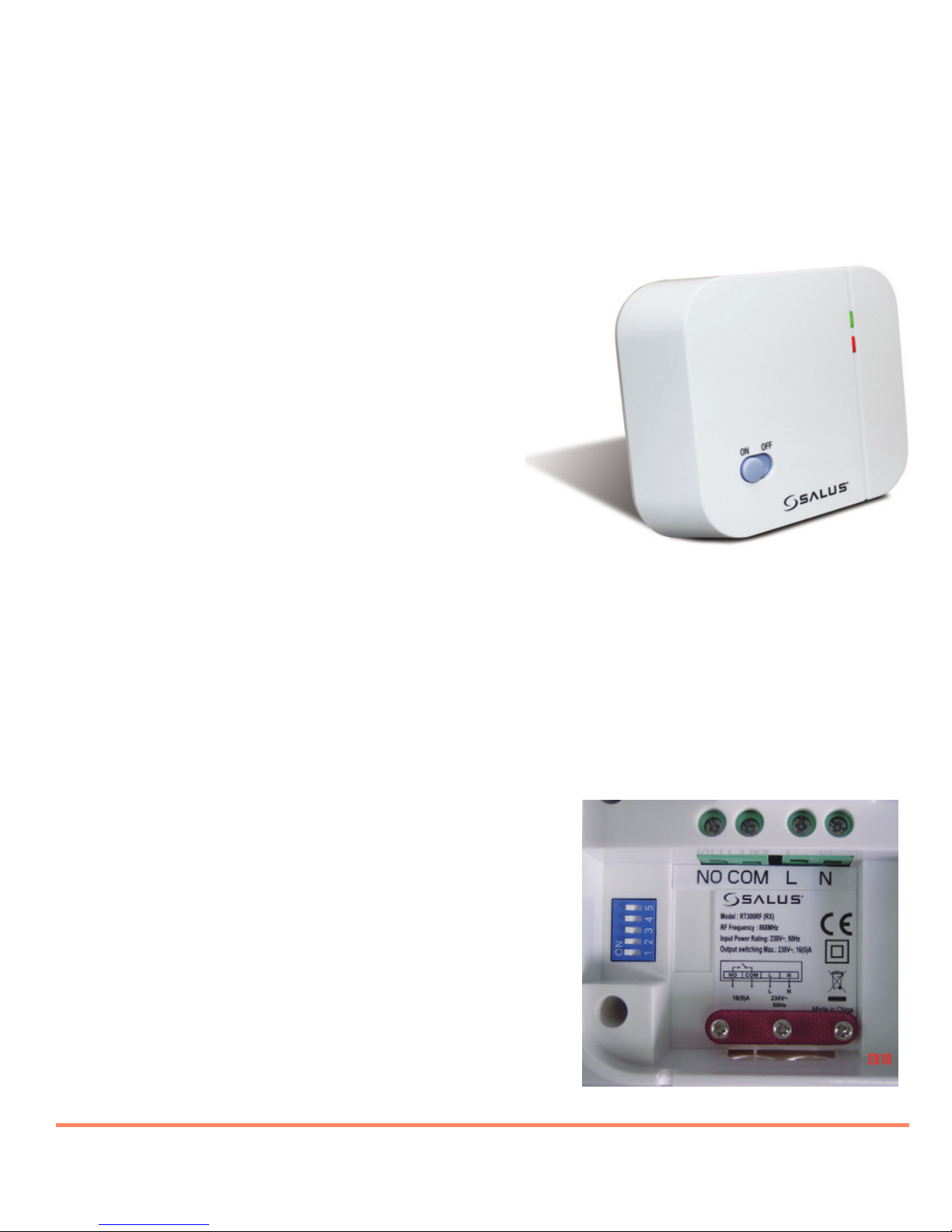
The Receiver On/Off switch is accessible
from the front face of the Receiver, as
shown in this picture:
On the front cover of the Receiver you will see that there is the On/Off switch
and two Light Emitting diodes (LEDs). The switch allows you to turn off the
Receiver if necessary to prevent it calling for heat. The top LED (red) will
illuminate when the switch is in the ‘On’ position and the unit is receiving
power. The bottom LED (green) illuminates when the Receiver unit is
receiving a heat call transmission from the Control Centre.
The wiring terminals and RF Address Code
setting DIP switches are located on the
rear of the Receiver, as shown in this
picture:
Salus RT300RF Manual 002_89 22/07/2013 09:19 Page 6

RT300RF INSTRUCTION MANUAL 7
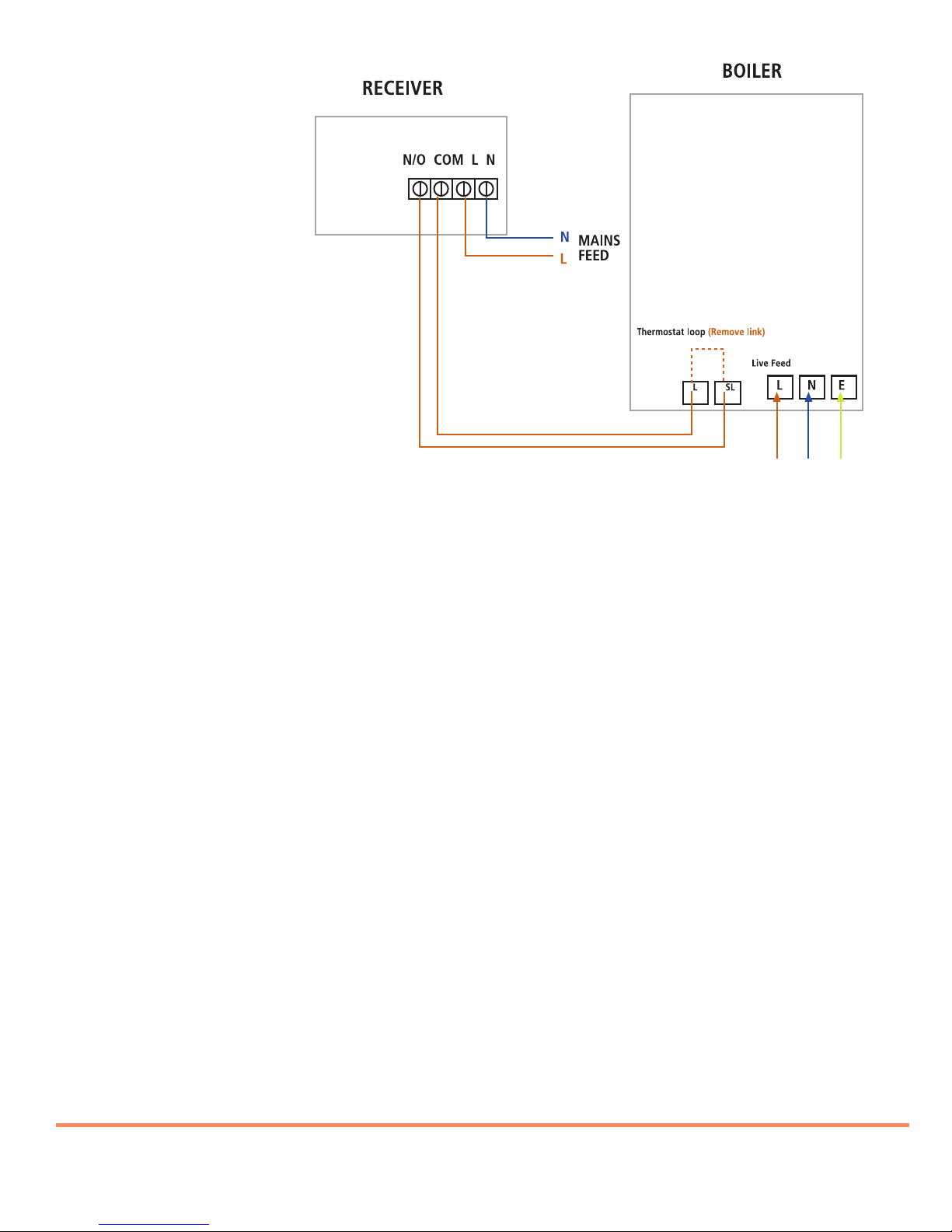
RECEIVER WIRING TERMINALS
Terminal Identifier Description
1 NO Normally Open [N/O]
2 COM Linked Live feed (230V AC heating applications only)
3 L Live feed (230V AC)
4 N Neutral
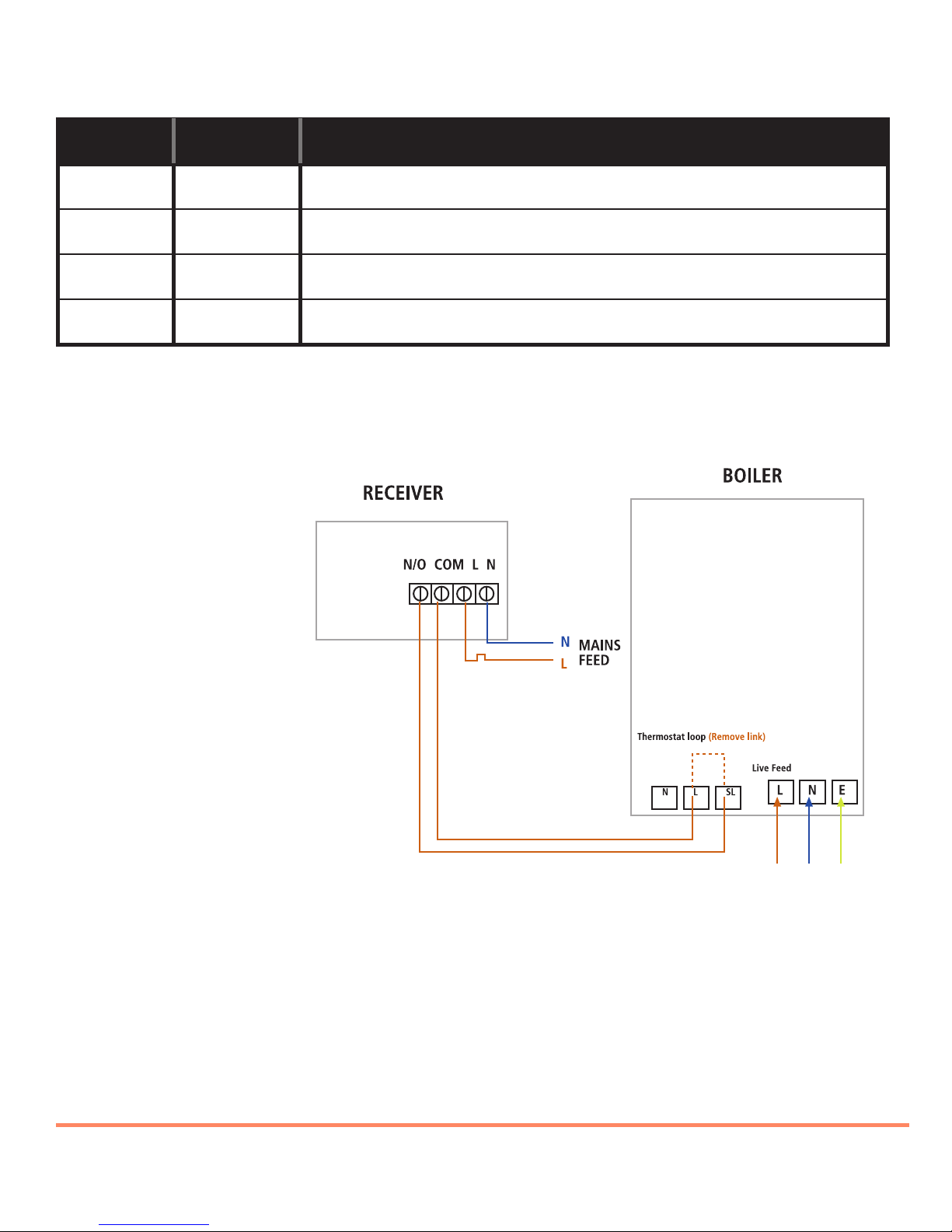
TYPICAL WIRING INSTALLATIONS
a.230V AC Installation
Notes:
• Receiver unit should have a permanent 230V AC main supply
• Confirm that the Boiler has an external thermostat loop and
is configured for 230V switching
• If the boiler has two terminals for the thermostat, remove the
link from the boiler
Salus RT300RF Manual 002_89 22/07/2013 09:19 Page 7

RT300RF INSTRUCTION MANUAL
8
b. 24V Installation
Notes:
• Receiver unit should have a permanent 230V AC main supply
• Confirm that the Boiler has an external thermostat loop
and is NOT configured for 230V switching
• If the boiler has two terminals for the thermostat,
remove the link from the boiler
Salus RT300RF Manual 002_89 22/07/2013 09:19 Page 8

RT300RF INSTRUCTION MANUAL 9
CONTROL CENTRE JUMPER SETTINGS
Changes to the jumper settings should only be made by the Engineer
carrying out the installation or other qualified person.
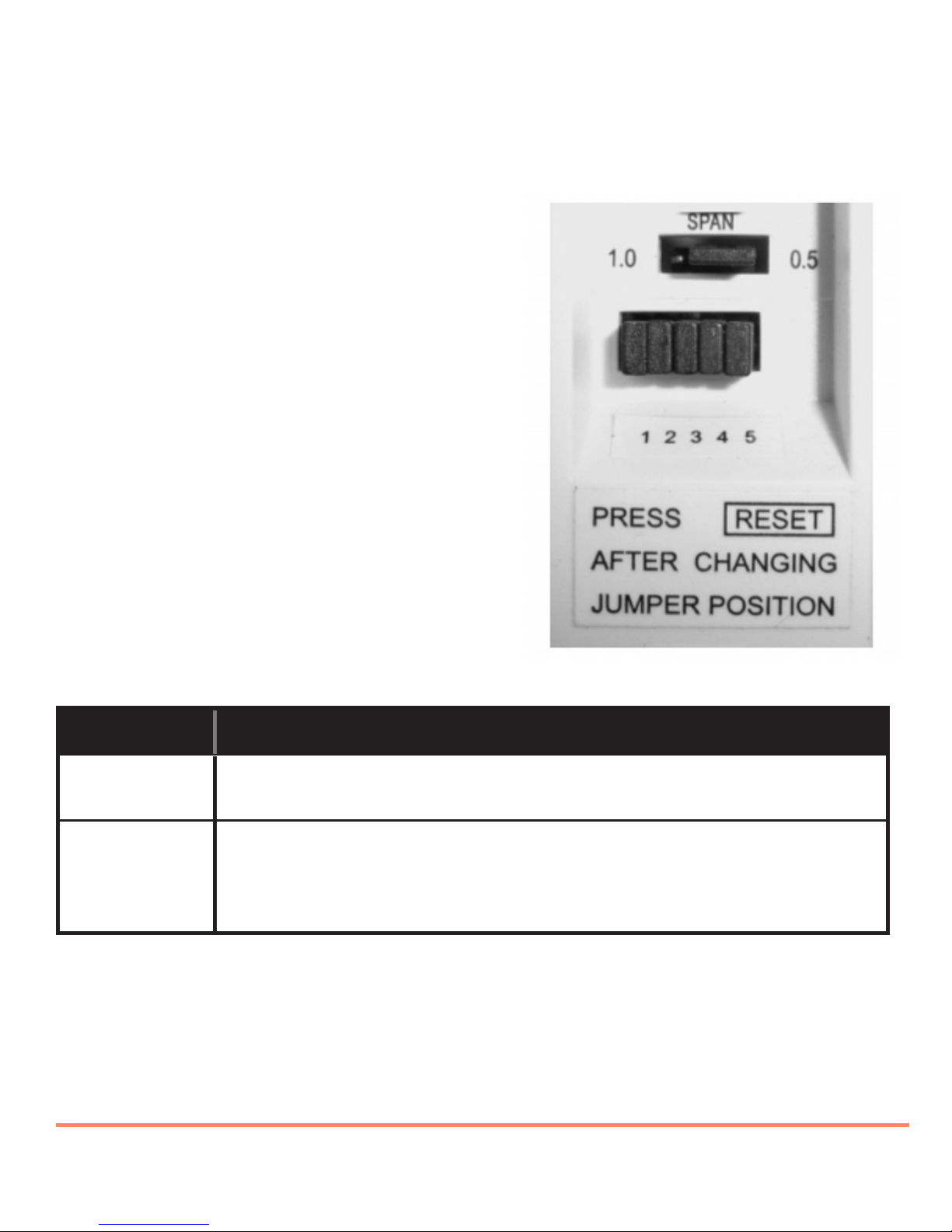
The installer should select the jumper
positions required if changes need to be
made to the factory default settings. These
jumpers are found on the rear of the
Control Centre.
Jumper Function
Span Movable jumper for selecting temperature span
of ± 0.5°C (factory default setting) or ± 1.0°C
1,2,3,4,5 Removable jumpers for altering the RF address
code when used in conjunction with the
corresponding DIP switch on the Receiver.
NOTE:
The Reset button must be pressed after changing jumper positions.
The Reset button is accessible behind the small hinged door on the front
right hand side of the Control Centre.
Salus RT300RF Manual 002_89 22/07/2013 09:19 Page 9

RT300RF INSTRUCTION MANUAL
10
RF ADDRESS CODE SETTING
If there is another unit being used nearby, e.g. in the next house or as part
of a multiple installation, your Receiver may be fault triggered by the other
Control Unit. You can change the RF Address Code to help prevent this
problem.
Each Receiver can only respond to RF transmissions from a Control Centre
that has the same RF address code setting.
Disconnect any AC power to the Receiver, and remove the batteries from the
Control Centre before attempting any adjustment of the RF Address Code
switches and jumpers. If you are not sure how to carry out this operation
correctly, consult either with a qualified electrician or heating engineer.
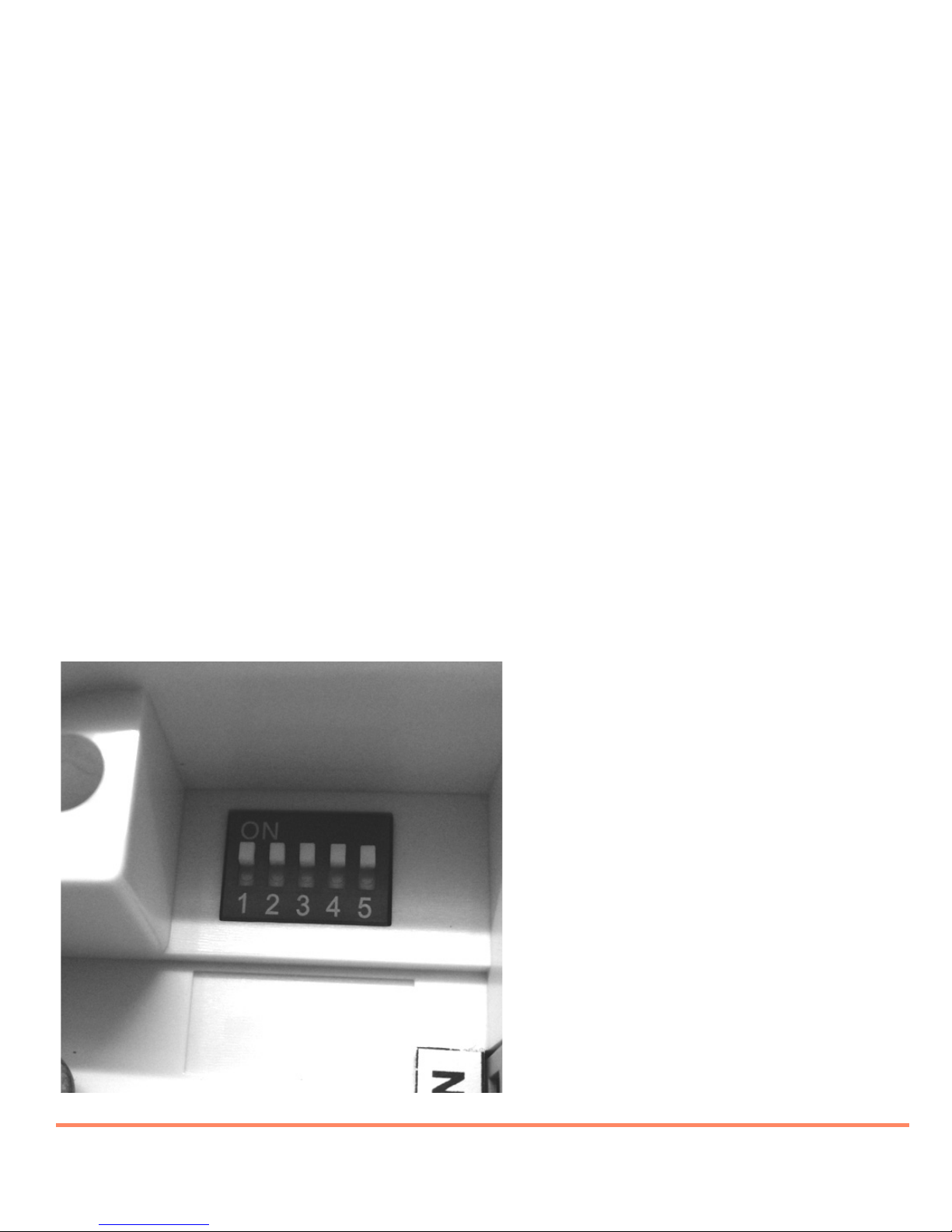
To adjust the RF address code of the Receiver, simply push up one or more
of the 5 DIP switch levers on the DIP switch bank located on the back of the
receiver (the levers are numbered 1 to 5 from bottom to top, as shown in the
picture below), and then make a note of the setting of each switch:
Salus RT300RF Manual 002_89 22/07/2013 09:19 Page 10
Other manuals for RT300RF
1
Table of contents
Other Salus Thermostat manuals
Popular Thermostat manuals by other brands

Saswell
Saswell SAS920XWHB-7-S-RF User manual and warranty card

Aircalo
Aircalo TFP1-ET85P2 operating manual

Honeywell
Honeywell CM721 user manual

Carrier
Carrier DEBONAIR 33CS Installation and operating instructions

Lennox
Lennox iHarmony Zone Thermostat Installation and setup guide

Gemtech
Gemtech GT7000 Operation