NEXCOBOT TP-100-C User manual
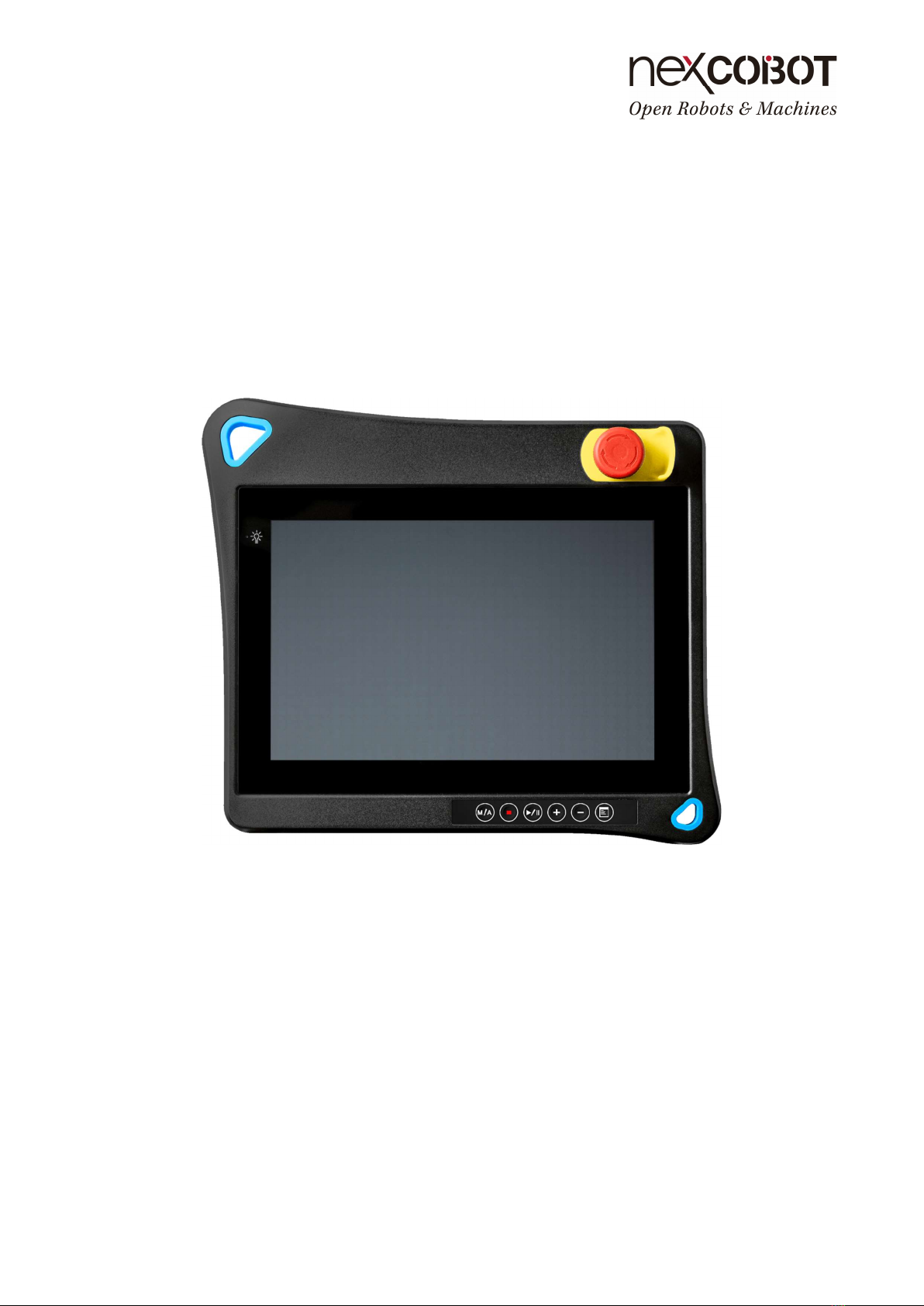
NEXCOBOT Co., Ltd.
www.nexcobot.com
Teach Pendant TP-100-C
User’s Manual
V0.3
12/5/2023

Copyright© 2019 NEXCOBOT Co., Ltd. ii All Rights Reserved.
Copyright Statement and Disclaimer
The contents contained in this document are the proprietary property of NexCOBOT International Co.,
Ltd. (NexCOBOT hereafter) and is subject to the protection of intellectual property law (including, but
not limited to the Copyright Act). The use of any material in relation to this document without the prior
authorization of NexCOBOT is considered infringement. Without the written approval of NexCOBOT in
advance, this document or any part of it shall not be photocopied, sold, distributed, modified, published,
stored or otherwise used.
To keep this document and its contents correct and complete, NexCOBOT reserves the right to change
or revise the document at any time without further notification.
Operating machine or equipment has a certain level of danger. It is the user’s responsibility to pay
special attention and have safety protection in place before operating any machine or equipment.
NexCOBOT shall not be held for any and all direct or indirect damage or loss to the equipment
mentioned in this document due to the use for a purpose other than the intended.
Copyright© 2019 NEXCOBOT Co., Ltd. iii All Rights Reserved.
Revision History
Rev. Description
0.1 Draft released.
0.2 Modify the photo of TP-100-C
0.3 Modify the VGA Of Terminal Block Connector Pin define of Junction Cable
(page4-page 5)
Copyright© 2019 NEXCOBOT Co., Ltd. iv All Rights Reserved.
Contents
Copyright Statement and Disclaimer ........................................................................... ii
Revision History ......................................................................................................... iii
Contents ..................................................................................................................... iv
Product Description ...................................................................................... 1
1.1. Overview of TP-100-C .............................................................................. 1
1.2. Handling of TP-100-C ............................................................................... 2
Technical Data ............................................................................................. 3
2.1. Dimensions ............................................................................................... 3
2.2. Specification ............................................................................................. 6
Connection and Wiring ................................................................................. 7
3.1. Connection ............................................................................................... 7
Terminal Block Connector Pin define of Junction Cable ...................................... 4
3.2. Connecting extension cable to the Junction Cable ................................... 8
Operation Behaviors .................................................................................. 10
4.1. Membrane Keys ..................................................................................... 10
4.2. Emergency Stop Button ......................................................................... 11
4.3. Enabling Switch ...................................................................................... 11
4.4. Switch Button ......................................................................................... 12
Copyright© 2019 NEXCOBOT Co., Ltd. 1 All Rights Reserved.
Product Description
The TP-100-C teach pendant provides the freedom and convenience by
allowing users to move away from the host computer and control the robot
locally. It incorporated the Multi-Touch projected capacitive (PCAP)
touchscreen technology to reduce the number of buttons and consequently
streamlined the operation of the industrial robots.
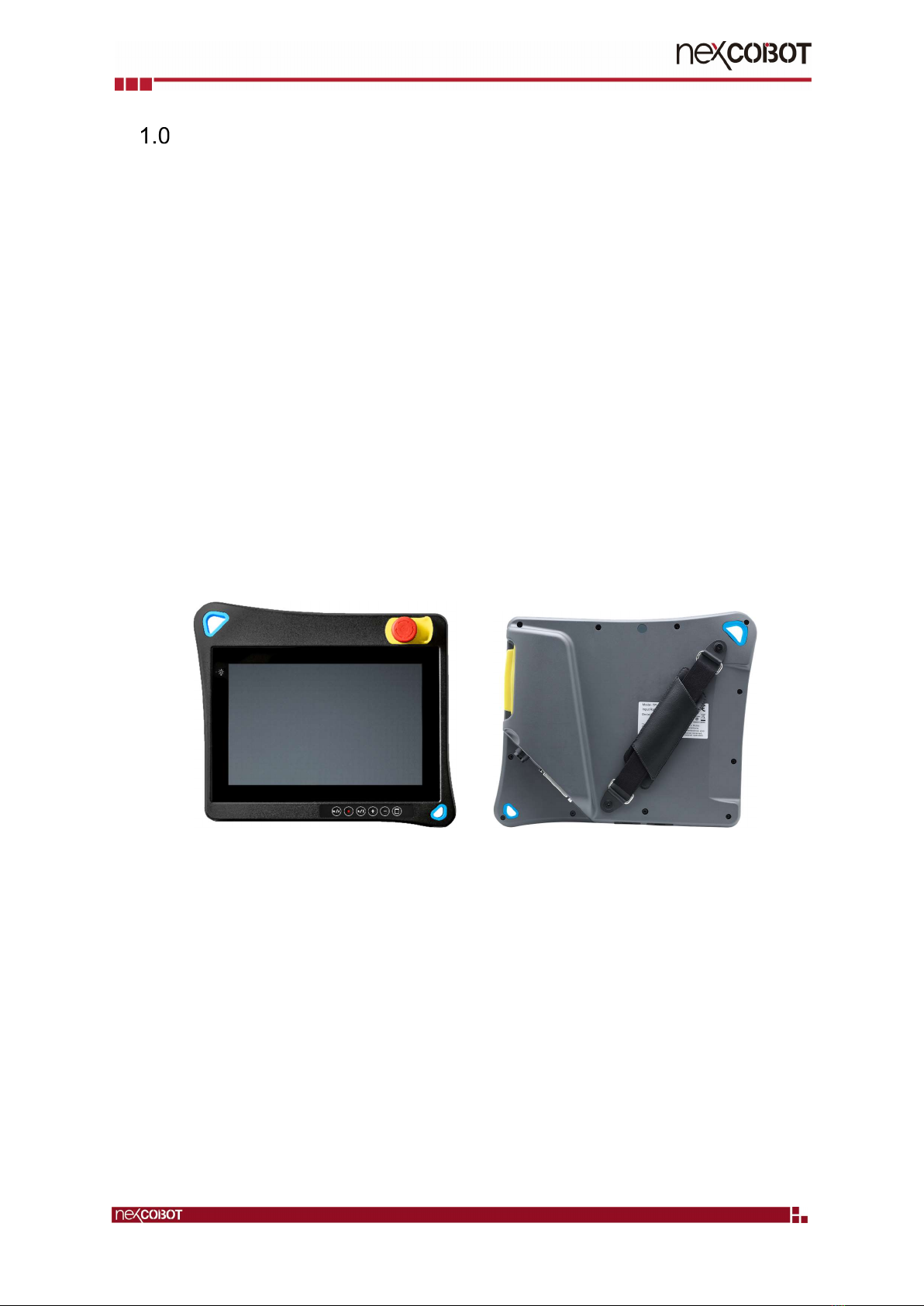
1.1. Overview of TP-100-C
The TP-100-C is a handheld device that controls robot movements, teaches
locations, and runs robot programs. It features an ergonomic housing with
safety elements, a 10.1” WXGA resolution panel, and the Multi-Touch PCAP
touchscreen technology. The control unit is comfortable to use and has an
optional shoulder strap.
Copyright© 2019 NEXCOBOT Co., Ltd. 2 All Rights Reserved.
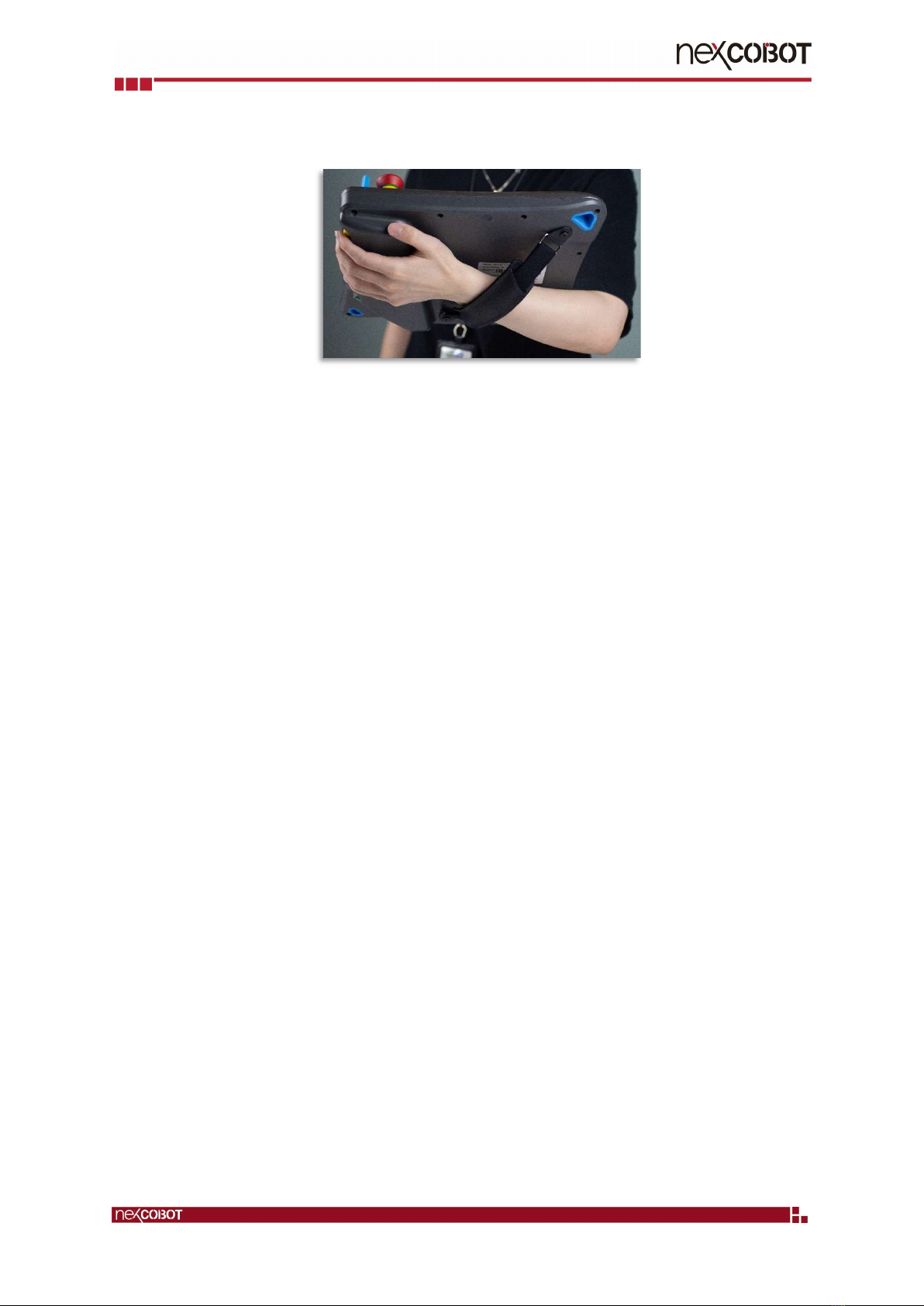
1.2. Handling of TP-100-C
The TP-100-C teach pendant is designed to operate in a horizontal / landscape
format. When operating the device, make sure to connect all necessary cables
from the teach pendant to the host computer.
Copyright© 2019 NEXCOBOT Co., Ltd. 3 All Rights Reserved.
Technical Data
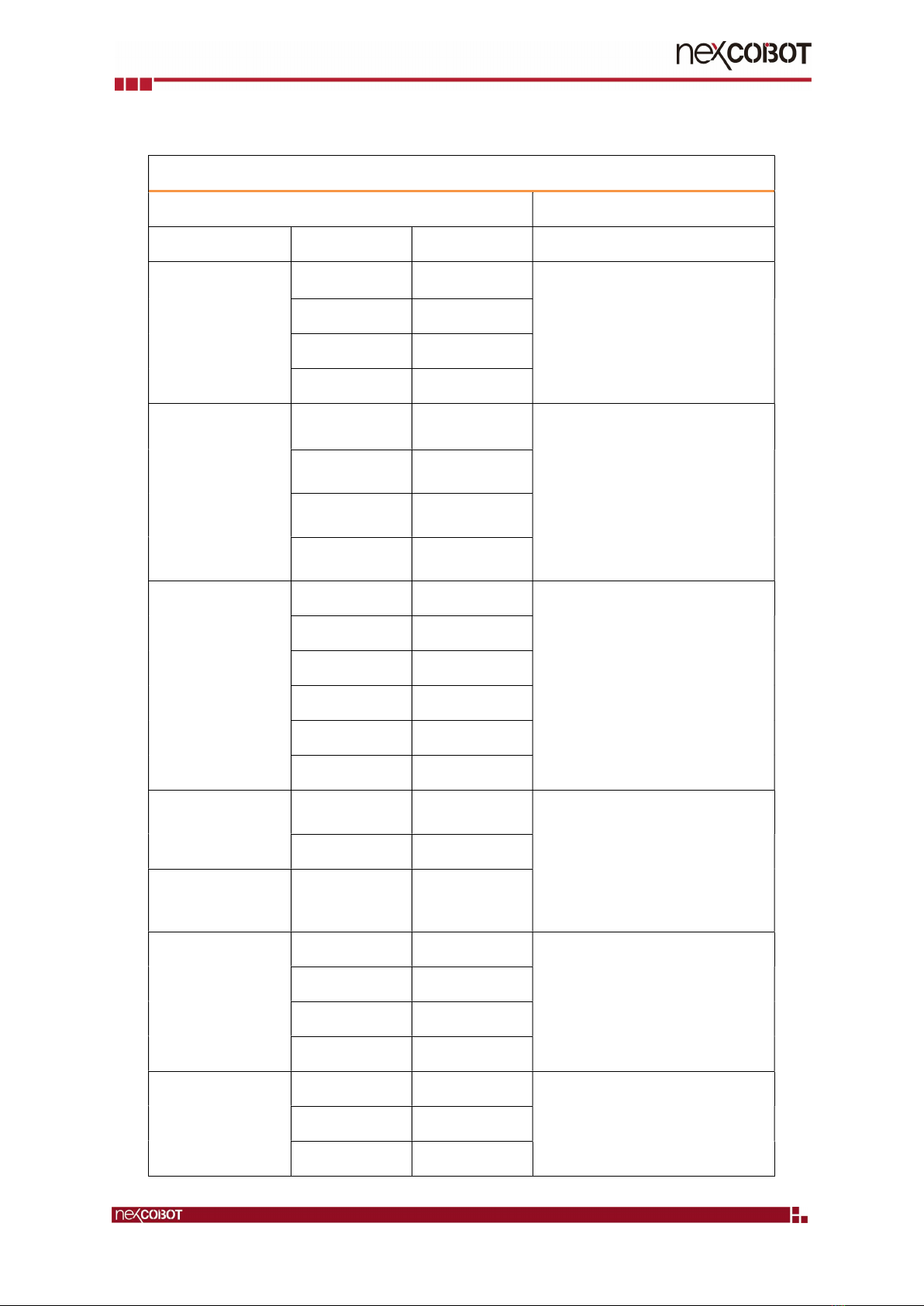
2.1. Dimensions
TP-100-C
Copyright© 2019 NEXCOBOT Co., Ltd. 4 All Rights Reserved.
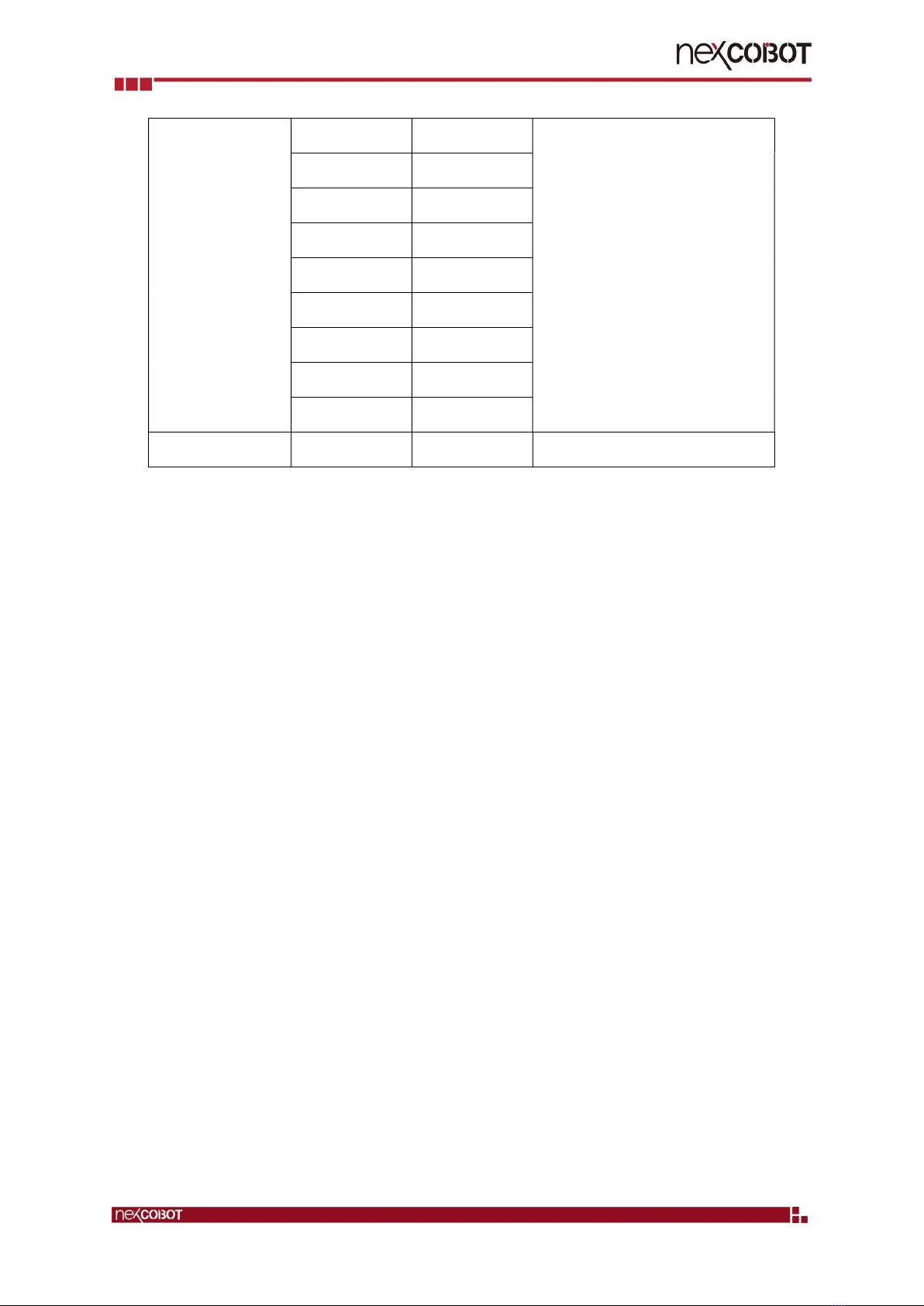
Terminal Block Connector Pin define of Junction Cable
PIN Definition of Junction Cable
Terminal Block connector
Function Junction Cable Side Wire Color / Pin Description
Switch Button
b Red / SW1+ A general-purpose button which
provide two-channel signal and can be
used as power switch of system.
h White / SW1-
g Black / SW2+
n Blue /SW2-
Emergency Stop
Button
L Orange / ES1+ Emergency stop button are switches
that quickly and reliably provide two-
channel signal for switching machines
and systems to a safe state in an
emergency.
U Gray / ES1-
K Purple / ES2+
T Green / ES2-
Enabling Switch
G Red / EN1+ An enabling switch is a 3-position (OFF-
ON-OFF) switch to allow a machine
operation only when the switch is
lightly pressed and held in the middle
position.
H White / EN1-
Z Black / EN2+
N Blue / EN2-
X Yellow / EN3+
W Brown / EN3-
DC 24V
C Orange / 24V+ DC power input (24V, 0V, Shielding)
J Gray / 24V-
GND R Yellow + Green /
CHASSIS_GND1
USB
A P_USB- USB 2.0
E P_USB+
B USB_5V
F GND
VGA
e VGA_RED_GND
d VGA_GREEN_GND
C VGA_BLUE_GND
Copyright© 2019 NEXCOBOT Co., Ltd. 5 All Rights Reserved.
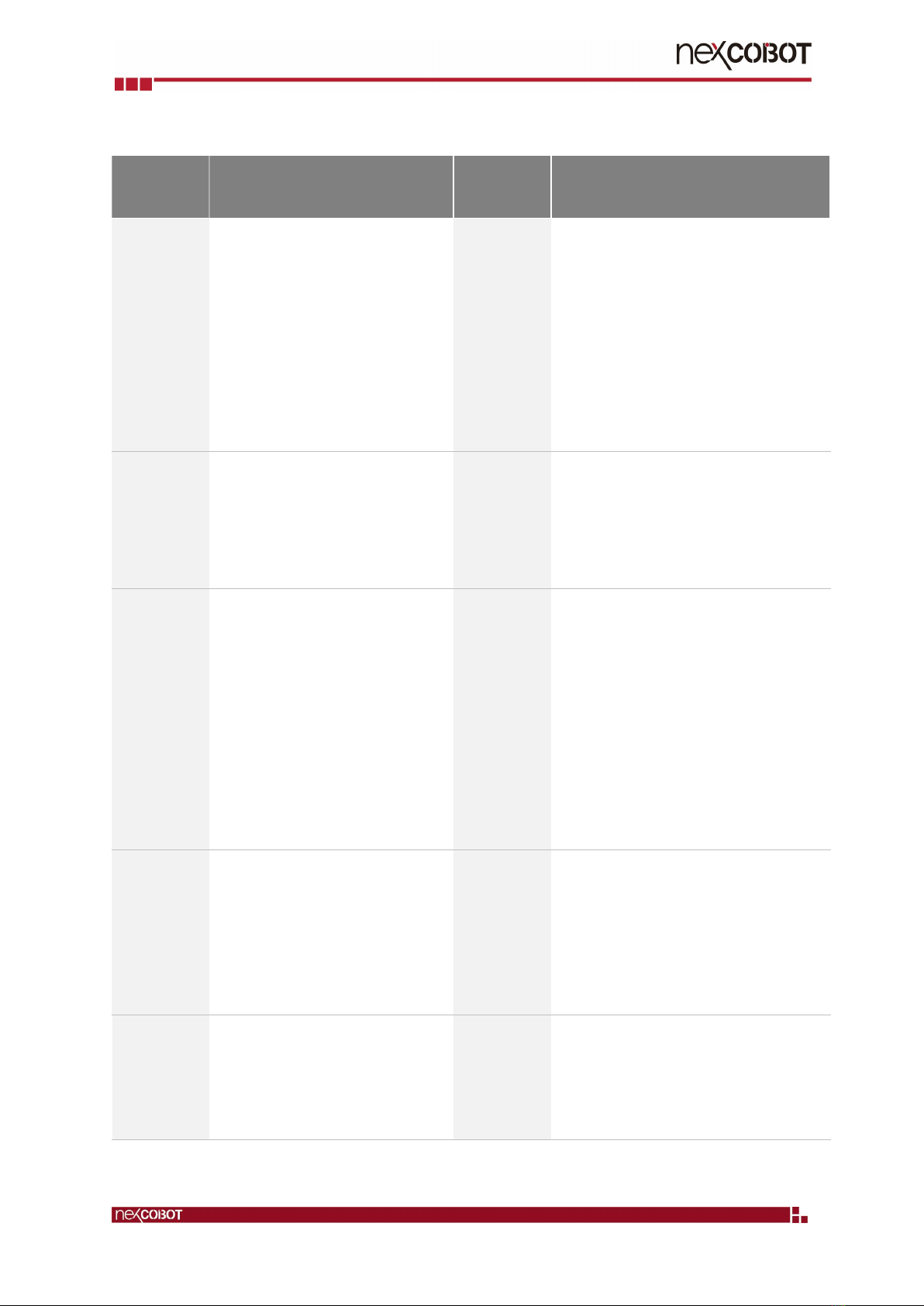
r VGA_VSYNC
m VGA_RND
K VGA_GRN
j VGA_BLUE
S VGA_HSYNC
f VGA_GND
p VGA_5V
M DDC_SDA
V DDC_SCL
R Chassis_GND1
Copyright© 2019 NEXCOBOT Co., Ltd. 6 All Rights Reserved.
2.2. Specification
Technical
Data
TP-100-C Technical
Data
TP-100-C
Panel - 10.1”, 16:10, WXGA, 1280 x 800
- Luminance: 500 cd/m2
- Contrast ratio: 800:1
- LCD color: 16.7M
- Viewing angle: 85 (U), 85 (D), 85 (L),
85 (R)
- Backlight: LED
Interface - Data back-up: 2 x USB 2.0
- Control connector: HDB-44 female
Removable HDB-44 control cable,
including power signal, E-stop button
signal, Enabling switch signal, Switch
button signal, STOP signal, USB 2.0 and
VGA signals
Touch - Touch: 5 points P-Cap
- Touch light transmission: 87%
- Touch interface: USB
- Anti-scratch surface: 7H hardness
Ratings - Power supply voltage: 24 Vdc (19.2 to 28.8
Vdc)
- Current consumption:
> TP-100-C 0.625A at 24Vdc (max.)
Safety
Elements
- Emergency stop button (2 NC
channels,
B10d=100,000)
> Contact function: latching
> Reset: by rotating
- 3-position Deadman switch
(3 channels 2 NO &1 NC,
B10d=100,000)
Mechanical - Dimension: 297.3 x 257.2 x 57.2 mm
(78.5mm including E-stop button)
- Weight (without external control cable):
> TP-100-C 1.5Kg
- TP-100-C IP protection class: Full IP40
- Teach Pendant cable length: 3m
Operating
Elements
Switch button switch (1 NO, 1 NC)
6 membrane key
Environment - Operating temperature: 0°C to 50°C
- Storage temperature: -20°C to 75°C
- Operating humidity: 5%~90% relative
humidity, non-condensing
- Vibration resistance/shock-proof/free-fall
System - TP-100-C: VGA input
- USB 2.0 upstream
Certifications - CE (Emission EN61000-6-4; Immunity
EN61000-6-2 for installation in industrial
environments)
- FCC Class A
Table of contents
Other NEXCOBOT Industrial Equipment manuals