NEXCOBOT TP-100-2 User manual

NEXCOBOT Co., Ltd.
www.nexcobot.com
Teach Pendant
TP-100-2 for TM Plug & Play
User’s Manual
V1.02
6/17/2023
Copyright© 2019 NEXCOBOT Co., Ltd. ii All Rights Reserved.
Copyright Statement and Disclaimer
The contents contained in this document are the proprietary property of NexCOBOT International Co.,
Ltd. (NexCOBOT hereafter) and is subject to the protection of intellectual property law (including, but
not limited to the Copyright Act). The use of any material in relation to this document without the prior
authorization of NexCOBOT is considered infringement. Without the written approval of NexCOBOT in
advance, this document or any part of it shall not be photocopied, sold, distributed, modified, published,
stored or otherwise used.
To keep this document and its contents correct and complete, NexCOBOT reserves the right to change
or revise the document at any time without further notification.
Operating machine or equipment has a certain level of danger. It is the user’s responsibility to pay
special attention and have safety protection in place before operating any machine or equipment.
NexCOBOT shall not be held for any and all direct or indirect damage or loss to the equipment
mentioned in this document due to the use for a purpose other than the intended.

Copyright© 2019 NEXCOBOT Co., Ltd. iii All Rights Reserved.
Revision History
Rev. Description
1.02 Modify Ch2.3
1.01 Modify Ch2.4
1.00 First released
Copyright© 2019 NEXCOBOT Co., Ltd. iv All Rights Reserved.
Contents
Copyright Statement and Disclaimer ........................................................................... ii
Revision History ......................................................................................................... iii
Contents ..................................................................................................................... iv
Product Description ............................................................................................. 1
1.1. Overview of TP-100-2 ............................................................................... 1
1.2. Handling of TP-100-2 ............................................................................... 2
TP-100-2 for OMRON TM Plug & Play ................................................................ 3
2.1. Warning and Caution symbols .................................................................. 3
2.2. Compatibility ............................................................................................. 3
2.3. TP-100-2 plug & play package content .................................................... 4
2.4. Installation ................................................................................................ 5
Technical Data................................................................................................... 22
3.1. Dimensions of TP-100-2 ......................................................................... 22
3.2. Specification ........................................................................................... 24
Operation Behaviors ......................................................................................... 25
4.1. Membrane Keys ..................................................................................... 26
4.2. Emergency Stop Button ......................................................................... 27
4.3. Enabling Switch ...................................................................................... 28
4.4. 2 -Channel Switch Button ....................................................................... 29
Copyright© 2019 NEXCOBOT Co., Ltd. 1 All Rights Reserved.
Product Description
TP-100-2 for OMRON TM Plug & Play is a 10.1” handheld teach pendant and
well integrated with OMRON TM Robot. Users can use TP-100-2 to directly
operate TM Robot from where they have the best view of the process. The
handheld control unit is comfortable to use and supports left-hander.
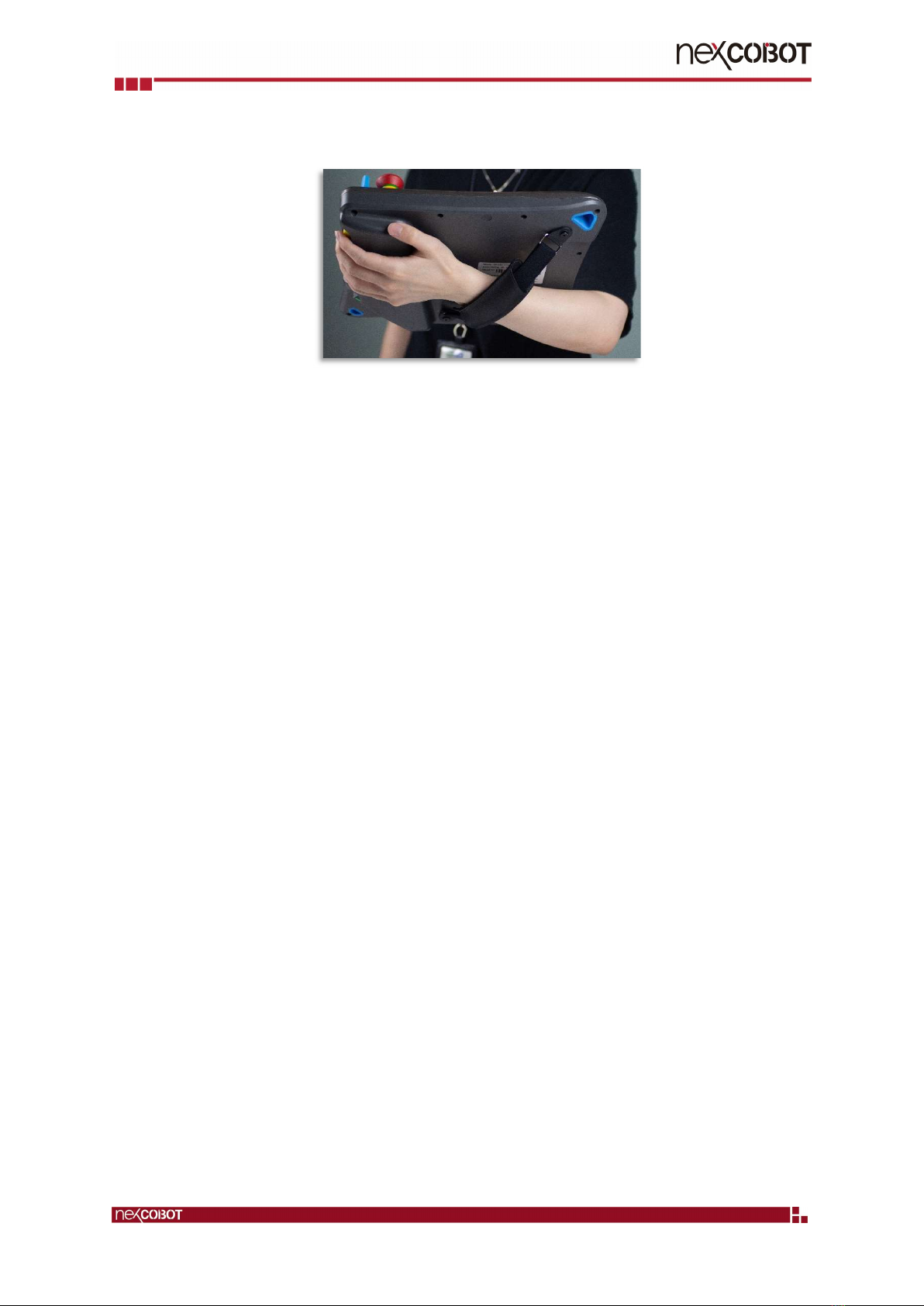
1.1. Overview of TP-100-2
The TP-100-2 is a handheld device that controls robot movements, teaches
positions, and runs robot programs. It features an ergonomic housing with
safety elements, a 10.1” WXGA resolution panel, and the Multi-Touch PCAP
touchscreen technology. The control unit is comfortable to use and has an hand
strap.
Front Back
Copyright© 2019 NEXCOBOT Co., Ltd. 2 All Rights Reserved.
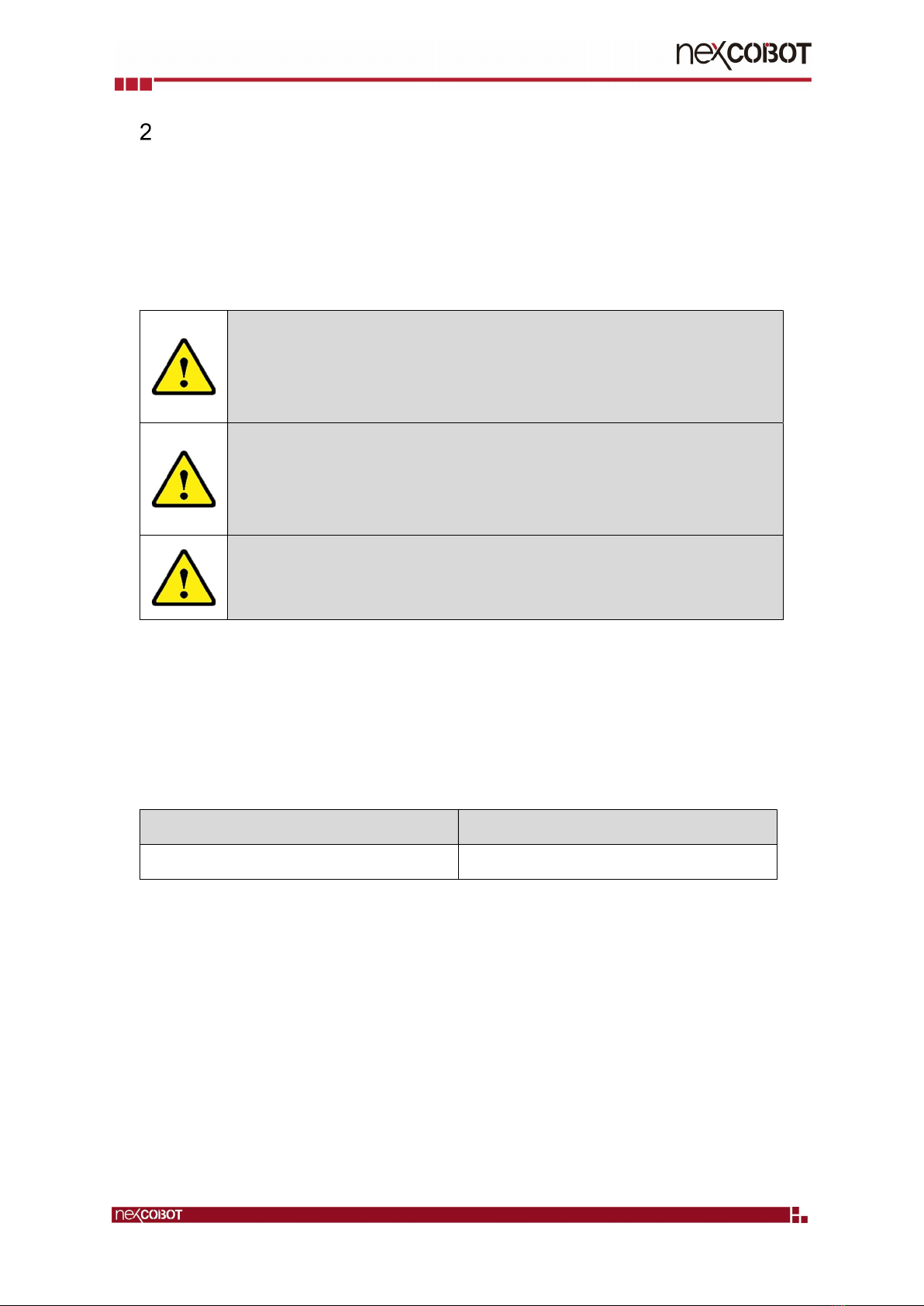
1.2. Handling of TP-100-2
The TP-100-2 teach pendant is designed to operate in a horizonal/landscape
format. When operating the device, make sure to connect all necessary cables
from the teach pendant to the host computer.
Copyright© 2019 NEXCOBOT Co., Ltd. 3 All Rights Reserved.
TP-100-2 for OMRON TM Plug & Play
2.1. Warning and Caution symbols
The Table below shows the definitions of warning and caution levels
described in each paragraph of this Manual. Pay close attention to them when
reading each paragraph, and observe them to avoid personal injuries or
equipment damage.
DANGER:
Identifies an imminently hazardous situation which, if not avoided, is
likely to result in serious injury, and might result in death or severe
property damage.
WARNING:
Identifies a potentially hazardous situation which, if not avoided, will
result in minor or moderate injury, and might result serious injury, death
or significant property damage.
CAUTION:
Identifies a potentially hazardous situation which, if not avoided, might
result in minor injury, moderate injury, or property damage.
2.2. Compatibility
Please use robots shipped with Hardware/Software as table below. Note: If
your robot comes with a software version older than TMflow 1.76.6300, there
are additional installation steps required. In this case, please contact OMRON
service team.
OMRON TM robot hardware version
OMRON TM robot software version
3.2 Series TMflow 1.76.6300 and above

Copyright© 2019 NEXCOBOT Co., Ltd. 4 All Rights Reserved.
2.3. TP-100-2 plug & play package content
NO.
Items Q’ty Figure Note
1 TP-100-2 1
2
EXTERNAL 3M
CABLE FOR TP-
100-2
1
Content:
3M Cable*1
5M / 10M / 20M (option)
3 TP-100-HD-JB 1
Content:
(1) Junction box*1
(2) M3*12mm screw*4
(3) Connector
12P*1 +4P*1+ 3P*1
(4) CAP*1 (Option)
4 TP-100-2 TM Plug
& Play Accessory
1
Content:
(1) Metal Sheet *1
- M4x8mm screws *10
- M3*L6 screws *4
(2) Cable package *1
-HDMI Cable
-USB Cable
-Signal wire
- Power wire
- Ground wire
- Circular connector-24PIN-
0.17M Cable
- External GND stand
-M4*12mm for GND stand
Copyright© 2019 NEXCOBOT Co., Ltd. 5 All Rights Reserved.
5 Option accessory
1
(1) TP-100 Holders*1
6 Option accessory
1 (2) Cap of circular
connector *1
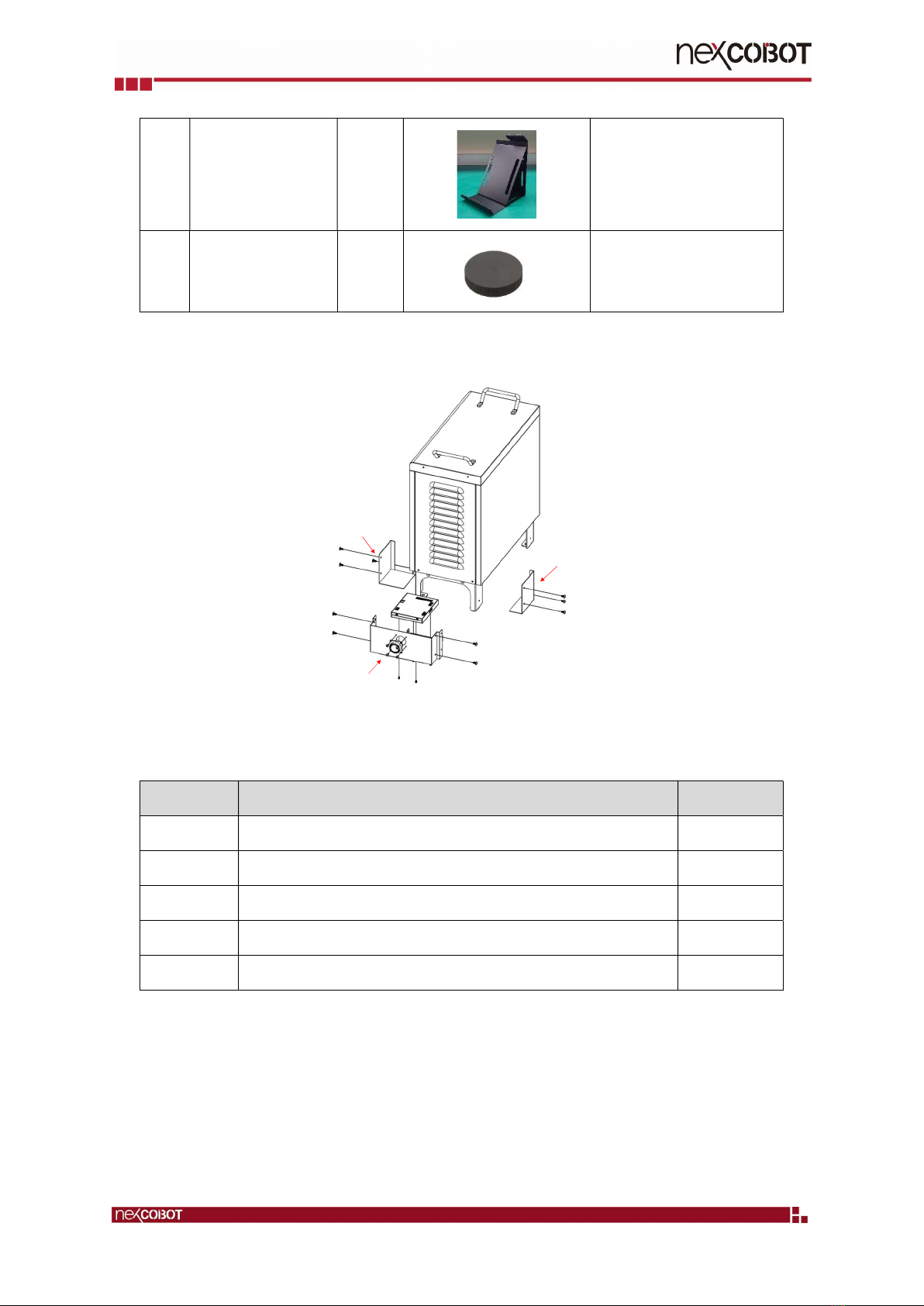
2.4. Installation
(1) Front cover
(2) Right side cover
(3) Left side cover
Content of metal sheet
NO. Metal sheet item Qty.
1 Front cover 1
2 Right side cover 1
3 Left side cover 1
4 M4*8mm screw 10
5 M3*L6 screws 4
Copyright© 2019 NEXCOBOT Co., Ltd. 6 All Rights Reserved.
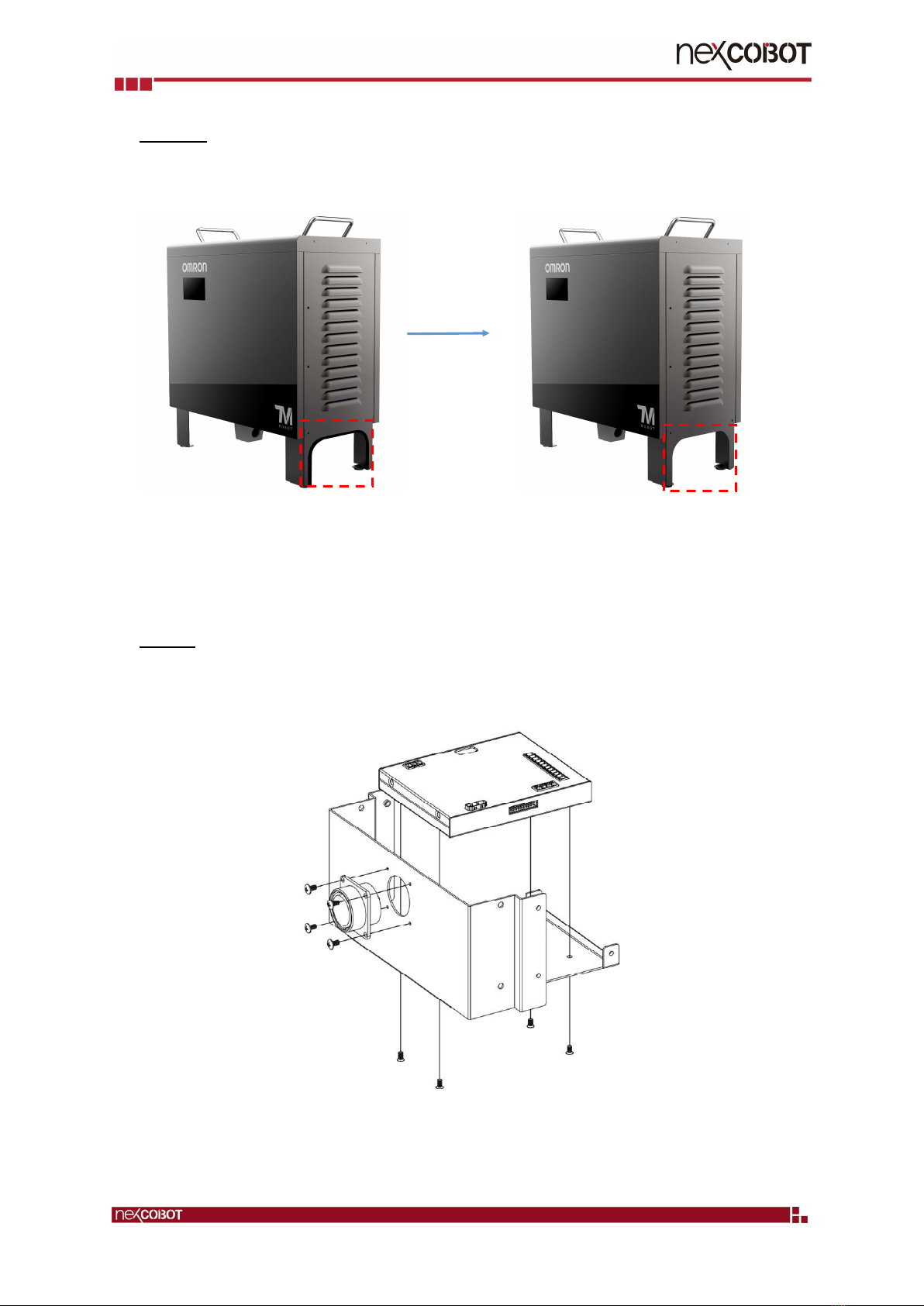
Step 1: Remove the rubber from the controller cabinet
After remove the rubberBefore remove the rubber
Step 2: Fix junction box with front cover with 4 pcs screws
Table of contents
Other NEXCOBOT Industrial Equipment manuals