
ETM Sigicom 770-PRO User manual

Manual
Copyright ©Sigicom AB Art.no
770-PRO
Cellular Signal Analyzer
Art no. 090-07700-0
Manual ver. A

Copyright ©Sigicom AB
1
Table of Contents
1. Introduction .............................................................................................. 3
1.1 Technical data ................................................................................ 3
1.2 Button configuration ...................................................................... 4
1.3 Device Menu Flowchart ................................................................. 5
1.4 Accessories ..................................................................................... 5
2. Device Info, Settings & Testing .............................................................. 6
2.1 SMS remote configuration ....................................................................... 6
2.2 System ............................................................................................ 7
2.2.1 Device Data ................................................................................ 8
2.2.2 Server Address ........................................................................... 8
2.2.3 Check for Firmware (FW) Updates ................................................ 8
Device will connect to the internet to check if the firmware is up to date. ..... 8
2.2.4 Restart Device ............................................................................ 8
2.3 Settings & test ................................................................................ 9
2.3.1 Select APN & Select User/Password ......................................... 9
2.3.2 Logging ...................................................................................... 9
3. Scanning ................................................................................................ 10
3.1 Scanning a signal .......................................................................... 10
3.2 Understanding Signal Parameters ................................................ 12
4. View, Test and Upload/Download Scans .............................................. 13
4.1 Communication Test .................................................................... 13
4.2 Upload Signal (Remote) ............................................................... 13
4.3 Download Signal (Local) ............................................................. 14
4.4 Current Network Data .................................................................. 14
5. Configuration Tool ................................................................................ 15
6. Appendix ................................................................................................ 17
7. Contact Information ............................................................................... 19

2 Copyright ©Sigicom AB
Developed originally by:
ETM Mätteknik (Now part of Sigicom AB)
Glasfibergatan 8
SE-125 45 ÄLVSJÖ
Sweden
Phone (Office): +46 8 449 97 50
Email: sales@etmiot.com

Copyright ©Sigicom AB
3
1. Introduction
The 770-Pro is a tool used for analyzing cellular signals, originally
developed by ETM Mätteknik, which is now a part of Sigicom Group.
770-Pro was developed to support both Cat M1, NB as well as 4G,
3G, 2G technology while also providing GPS positioning together
with cellular data. The tool is battery powered and handheld for easy
carrying around.
1.1 Technical data
Model
770-Pro
Part.no
090-07700-0
Cellular
2G, 3G, 4G, Cat-M1, Cat NB1,2
GNSS (GPS)
GPS/BeiDou/GLONASS/Galileo
Frequencies/Bands
GSM/GPRS (2G) Frequencies:
850/900/1800/1900 MHz
UMTS (3G) Bands:
1, 2, 3, 4, 5, 6, 8, 9, 19
FDD-LTE (4G) Bands:
1, 2, 3, 4, 5, 7, 8, 12, 13, 18, 19, 20, 26, 28, 66
TD-LTE (4G) Bands:
38, 40, 41
FDD-LTE (M1, NB1, NB2) Bands:
1, 2, 3, 4, 5, 8, 12, 13, 18, 19, 20, 25, 26, 27,
28, 66, 71, 85
Dimension
115x69x28mm
Weight
130g
Battery
Lithium Polymer (LiPo) 3Ah
rechargeable
Battery lifetime
Scanning mode: More than 48 hours
Standby mode: More than 6 months
Screen
2,4 inch OLED 128x64px display
Operating temp.
-20°C to +55°C
Antenna
External SMA + Internal GNSS (GPS)
Interface
USB (Mini USB connector)

4 Copyright ©Sigicom AB
1.2 Button configuration
Action/Button
Explanation
Restart device
Hold Arrow down + up 5s or System à
Restart device in the device menu
Power OFF
Hold Power button 3s
Sleep mode
Hold Power button >5s
OK Button
Navigation
Arrow Up
Navigation, doubles as backwards button
at top of menu
Arrow Down
Navigation
Copyright ©Sigicom AB
5
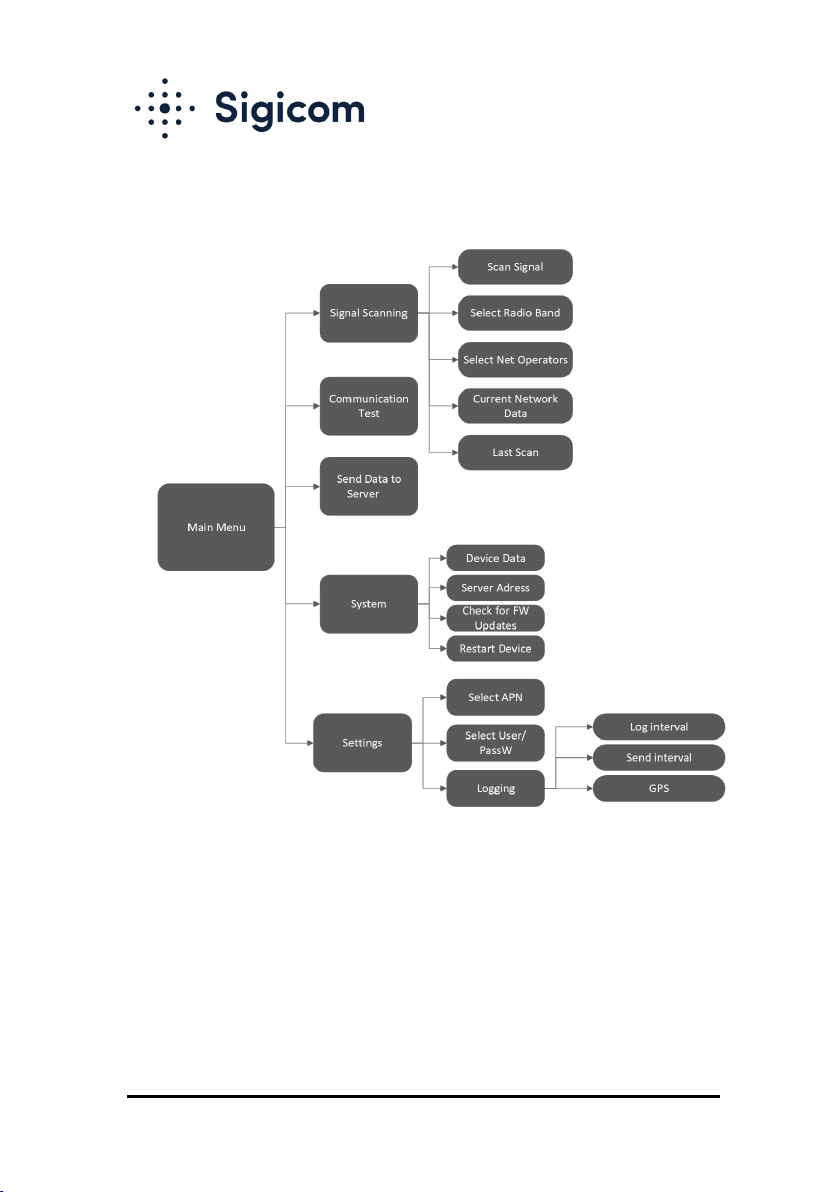
1.3 Device Menu Flowchart
Flowchart showing the entire menu navigation of the tool.
1.4 Accessories
The 770-Pro comes with a carrying case containing USB cable for
programming/charging, charging brick, power adapters, car charger
and quick start guide.

6 Copyright ©Sigicom AB
2. Device Info, Settings & Testing
2.1 SMS remote configuration
SMS COMMANDS
EXPLANATION AND EXAMPLE
ET-IP1=”IP
Address”:”Port”
Change the server address
Example: ET-IP1=54.77.219.177:7162 (EWO server)
ET-IP3=”IP
Adress”:”Port”
Change the PING address
Example: ET-IP3=8.8.8.8:80 (Google)
ETSAPN=“List
position”, “APN name”
Change APN list
Example: ETSAPN=1,m2m.tele2.com
ETSUP=“List position”,
“Username”, “Password”
Change User/Password
Example: ETSUP=1,username1,password23

Copyright ©Sigicom AB
7
2.2 System

8 Copyright ©Sigicom AB
2.2.1 Device Data
Firmware version (TOP)
Hardware number (HW#)
IMEI Number
Date and Time
Module Temperature
Supply Voltage
Battery Voltage
Rolling network Information
2.2.2 Server Address
Add a server to receive data being sent from the device. This can be
configured in the configuration tool shown below or via SMS command
shown above.
Note! The values sent by the devices will be in raw format.
2.2.3 Check for Firmware (FW) Updates
Device will connect to the internet to check if the firmware is up to date.
2.2.4 Restart Device
Restart the device without using buttons.

Copyright ©Sigicom AB
9
2.3 Settings & test
2.3.1 Select APN & Select User/Password
Select which APN to use. APN can be added using the configuration tool
shown below, or via SMS command shown above. The same principle goes
for User and password.
2.3.2 Logging
Log interval is where you activate automatic continuous logging of the signal
measurements. This is also where you specify the interval between logs.
Send interval determines how often the logged data gets transmitted to a
server. The server address can be setup via configuration tool or SMS
command.
Other manuals for Sigicom 770-PRO
1
Table of contents
Other ETM Measuring Instrument manuals


