
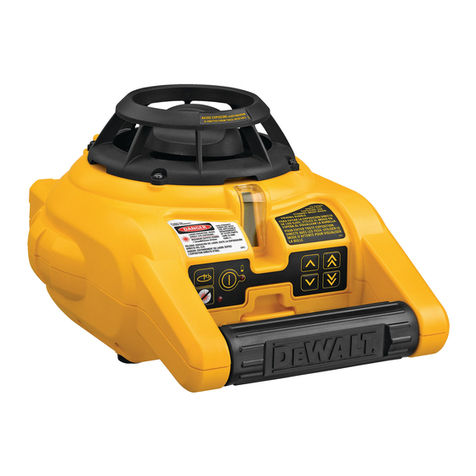
DeWalt DW080LGS User manual

If you have questions or comments, contact us.
Pour toute question ou tout commentaire, nous contacter.
Si tiene dudas o comentarios, contáctenos.
Dúvidas? Visite-nos na Internet em www.DeWALT.com.br
1-800-4-DeWALT
Instruction Manual
Guide d’utilisation
Manual de instrucciones
Manual de Instruções
DW080LRS, DW080LGS
Rotary Laser
Laser rotatif
Láser rotativo
Laser Rotativo
Final page size: A5 (148mm x 210mm)

English 8
Français 18
Español 29
Português 41

24
25 745
9
2
11
3 618
12
RPM
15˚/45˚/90˚
X
Y
7
6
2
5
3
4
A
B
10
13
14
15
1
3

15
LEVEL MODE
MODE NIVEAU
MODALIDAD DE
NIVEL
MODO DE
NIVELAMENTO
PLUMB MODE
MODE APLOMB
MODALIDAD DE
PLOMADAL
MODO NIVELAMENTO
VERTICAL
LEVEL MODE/MODE NIVEAU/MODALIDAD DE NIVEL/
MODO DE NIVELAMENTO
PLUMB MODE/MODE APLOMB /MODALIDAD DE PLOMADA/
MODO NIVELAMENTO VERTICAL
5/8-11"
5/8-11"
20
20
C
D
E F
4

21
26
27
28
53
54
22 22
30
30
23
INDICATORS/INDICATEURS /INDICADORES/INDICADORES
Above Grade/
Au-dessus du niveau /
Por encima del nivel
Acima do grau
Slightly Above Grade/
Légèrement au-dessus du niveau /
Ligeramente por encima del nivel/
Ligeiramente acima do grau
On Grade/
Au niveau /
En nivel/
Um grau
Slightly below Grade/
Légèrement au-dessous du niveau /
Ligeramente por debajo del nive/
Ligeiramente abaixo do graul
Below Grade/
Au-dessous du niveau /
Por debajo del nivel/
Abaixo do grau
audible signals/
signal sonore /
señales auditivas/
sinais audíveis
fast beep /
bip rapide /
bip rápido/
Bipe rápido
fast beep /
bip rapide /
bip rápido/
Bipe rápido
steady tone/
tonalité constante /
tono constante/
Tom estável
slow beep/
bip lent /
bip lento/
Bipe lento
slow beep/
bip lent /
bip lento/
Bipe lento
display icons/
icône affichée /
íconos en pantalla/
ícones da tela
GH
I
J
5

33
32
47
45
40
44
46
42
43
M
K
L
N
42
45
41
39 37
40
44
46
6

BEAM
FAISCEAU
RAYO
RAIO
AB
L
Marks on walls
Reperes sur les murs
Marcas en la pared
Marcas na parede
LASER UNIT ROTATED 180˚
ROTATION DE L’APPAREIL LASER A 180˚
UNIDAD LÁSER ROTADA EN 180º
UNIDADE DE LASER EM ROTAÇÃO DE 180º
BEAM
FAISCEAU
RAYO
RAIO
BB
L
AA
O
P
Q R
7

English
ENGLISH
8
Definitions: Safety Alert Symbols and Words
This instruction manual uses the following safety alert symbols and words to alert you to hazardous situations and your risk of
personal injury or property damage.
DANGER: Indicates an imminently hazardous situation which, if not avoided, will result in death or serious injury.
WARNING: Indicates a potentially hazardous situation which, if not avoided, could result in death or serious injury.
CAUTION: Indicates a potentially hazardous situation which, if not avoided, may result in minor or moderate injury.
(Used without word) Indicates a safety related message.
NOTICE: Indicates a practice not related to personal injury which, if not avoided, may result in property damage.
If you have any questions or comments about this or any
DeWALT
tool, call us toll free at: 1-800-4-
DeWALT
(1-800-433-9258).
Warning: To reduce the risk of injury, user must read instruction manual.
Safety Instructions for Lasers
WARNING! Read and understand all instructions. Failure to follow all instructions listed
below may result in electric shock, fire and/or serious personal injury.
SAVE ALL WARNINGS AND INSTRUCTIONS FOR FUTURE REFERENCE
WARNING! Laser Radiation Exposure. Do not disassemble or modify the laser level. There are no user serviceable
parts inside. Serious eye injury could result.
WARNING: Hazardous Radiation. Use of controls or adjustments or performance of procedures other than those
specified herein may result in hazardous radiation exposure.
•Do not operate the laser in explosive atmospheres, such as in the presence of flammable liquids, gases, or dust.
Power tools create sparks which may ignite the dust or fumes.
•Use the laser only with the specifically designated batteries. Use of any other batteries may create a risk of fire.
•Store idle laser out of reach of children and other untrained persons. Lasers are dangerous in the hands of untrained
users.
•Use only accessories that are recommended by the manufacturer for your model. Accessories that may be suitable for
one laser, may create a risk of injury when used on another laser.
•Tool service must be performed only by qualified repair personnel. Service or maintenance performed by unqualified
personnel may result in injury. To locate your nearest
DeWALT
service center call 1–800–4-
DeWALT
(1–800–433–9258) or go
to http://www.
DeWALT
.com on the Internet.
•Do not use optical tools such as a telescope or transit to view the laser beam. Serious eye injury could result.
•Do not place the laser in a position which may cause anyone to intentionally or unintentionally stare into the laser
beam. Serious eye injury could result.
•Turn the laser off when it is not in use. Leaving the laser on increases the risk of staring into the laser beam.
•Do not position the laser near a reflective surface which may reflect the laser beam toward anyone’s eyes. Serious eye
injury could result.
•Do not operate the laser around children or allow children to operate the laser. Serious eye injury may result.
•Do not remove or deface warning labels. Removing labels increases the risk of exposure to radiation.
•Position the laser securely on a level surface. Damage to the laser or serious injury could result if the laser falls.
WARNING: Use of controls or adjustments or performance of procedures other than those specified herein may result in
hazardous radiation exposure.
WARNING! DO NOT DISASSEMBLE THE ROTARY LASER. There are no user serviceable parts inside.
Disassembling the rotary laser will void all warranties on the product. Do not modify the product in any way.
Modifying the tool may result in hazardous laser radiation exposure.

ENGLISH
9
•The label on your tool may include the following symbols.
V........................volts
mW ....................milliwatts
........laser warning symbol
nm..........wavelength in nanometers
3R..........Class 3R Laser
Warning Labels
For your convenience and safety, the following label is on your laser.
WARNING: To reduce the risk of injury, user must read instruction manual.
WARNING: LASER RADIATION. DO NOT STARE INTO BEAM. Class 3R Laser Product
AVOID EXPOSURE -LASER RADIATION IS EMITTED FROM THIS APERTURE
DW080LGS
DW080LRS
Laser Information
The DW080LRS/LGS Cordless Rotary Laser is a CLASS 3R laser product and complies with 21 CFR 1040.10 and 1040.11
except for deviations pursuant to laser notice No. 50, dated June 24, 2007.
Conforms to UL STDS 61010-1 & 2595
Certified to CSA STD C22.2 No. 61010-1
Complies with IEC 60825-1:2014
These devices comply with Part 15 of the FCC Rules. Operation is subject to the following two conditions: 1) this device may
not cause harmful interference, and 2) this device must accept any interference received, including interference that may cause
undesired operation.
NOTE: This equipment has been tested and found to comply with the limits for a Class B digital device, pursuant to Part 15 of the
FCC Rules. These limits are designed to provide reasonable protection against harmful interference in a residential installation.
This equipment generates, uses and can radiate radio frequency energy and, if not installed and used in accordance with the
instructions, may cause harmful interference to radio communications. However, there is no guarantee that interference will not
occur in a particular installation. If this equipment does cause harmful interference to radio and television reception, which can be
determined by turning the equipment off and on, the user is encouraged to try to correct the interference by one or more of the
following measures:
• Reorient or relocate the receiving antenna.

ENGLISH
10
• Increase the separation between the equipment and
receiver.
• Connect the equipment into an outlet on a circuit
differentfrom that which the receiver is connected.
• Consult the dealer or an experienced radio/TV technician
for help.
Canada, Industry Canada (IC) Notices
Class B digital circuitry of this device complies with Canadian
ICES-003. This device complies with Industry Canada license-
exempt RSS standard(s). Operation is subject to the following
two conditions: 1) this device may not cause interference,
and 2) this device must accept any interference, including
interference that may cause undesired operation of the device.
READ ALL INSTRUCTIONS
Batteries and Power
This
DeWALT
rotary laser will accept all
DeWALT
20 volt
lithium ion batteries, but is built to best resist damage during a
fall when used with the following batteries: All 1.5Ah and 2Ah
DeWALT
20 volt lithium ion batteries.
Charging the Battery
The battery pack is not fully charged out of the carton. You
need to use a
DeWALT
20 volt charger to charge the battery
pack before you can use the rotary laser.
• Refer to the chart at the end of this manual for compatibility
of chargers and battery packs.
• Be sure to read all safety instructions before using your
charger.
WARNING:
•DO NOT attempt to charge the battery pack
with any chargers other than the ones listed
in this manual. The charger and battery pack are
specifically designed to work together.
•Carefully follow all instructions and warnings on
the battery label and package and accompanying
Battery Safety Manual.
1. Slide the battery pack into the charger as described in the
Battery Safety Manual.
2. Wait until the battery pack is fully charged.
3. Slide the battery pack out of the track.
NOTE: When ordering replacement battery packs, be sure to
include the catalog number and voltage.
Installing the 20V
DeWALT
Battery Pack
1. Position the fully-charged 20V
DeWALT
battery pack so the
release button (Figure E15 ) is facing away from you and
to the right.
2. Press and hold down the release button on the battery
pack.
3. Slide the battery pack all the way into the track on the side
of the laser.
4. Release the button on the battery pack.
Removing the Battery Pack
1. Press and hold the release button on the battery pack.
2. Slide the battery pack out of the track on the laser.
3. Release the button on the battery pack.
4. To recharge the battery pack, insert it into the charger, as
described in the Battery Safety Manual.
WARNING: Batteries can explode or leak, and can
cause injury or fire. To reduce this risk, follow the
instructions in the Battery Safety Manual.
Storing Battery Packs
• The best storage place is one that is cool and dry, and
away from direct sunlight and excess heat or cold.
• Long storage will not harm the battery pack or charger.
Under proper conditions, they can be stored for 5 years
or more.
SAVE THESE INSTRUCTIONS FOR FUTURE USE
User Safety
Personal Safety
•Stay alert, watch what you are doing, and use common
sense when operating a laser product. Do not use
the tool while tired or under the influence of drugs,
alcohol, or medication. A moment of inattention while
operating laser products may result in serious personal
injury.
•Use appropriate personal protective equipment,
including eye protection when working in a construction
environment.
Tool Use and Care
•Do not use the tool if the switch does not turn it on or
off. Any tool that cannot be controlled with the switch is
dangerous and must be repaired.
•Store idle laser products out of the reach of children
and do not allow persons unfamiliar with the laser
product or these instructions to operate the laser
product. Laser products are dangerous in the hands of
untrained users.
•Use only accessories that are recommended by the
manufacturer for your model. Accessories that may be
suitable for one tool, may become hazardous when used
with another tool.
This manual suits for next models
1
Table of contents
Other DeWalt Measuring Instrument manuals

DeWalt
DeWalt DW055E User manual

DeWalt
DeWalt DW0165 User manual

DeWalt
DeWalt DW0300 User manual

DeWalt
DeWalt DW074LR User manual

DeWalt
DeWalt DW0822 User manual

DeWalt
DeWalt DW03101 User manual

DeWalt
DeWalt DCE089G18 User manual

DeWalt
DeWalt DW0802 User manual

DeWalt
DeWalt DW0822-XJ User manual

DeWalt
DeWalt DW03050 User manual

DeWalt
DeWalt DW0330S User manual

DeWalt
DeWalt DW088LR User manual

DeWalt
DeWalt DW077-XE User manual

DeWalt
DeWalt DW099E User manual

DeWalt
DeWalt DW03101 User manual

DeWalt
DeWalt DW099E User manual
DeWalt
DeWalt DW074 User manual

DeWalt
DeWalt DCLE34020 User manual

DeWalt
DeWalt DW0165 User manual

DeWalt
DeWalt DW03101 User manual


