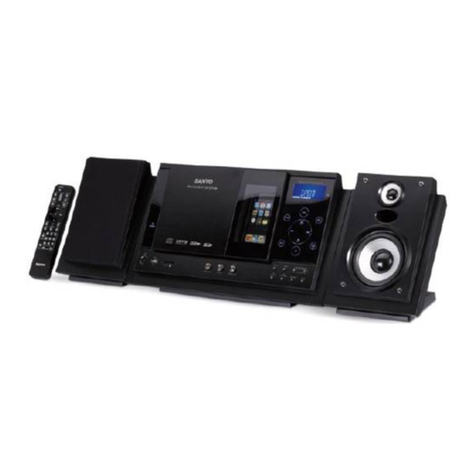
Denver MCB-600 User manual

DENVER MCB-600
User Manual
EngLish

Panel
Front Panel:
1.STOP
2.VOLUME - Adjust the sound output of the amplifier
3.STANDBY - ON/OFF
4.MUTE – In play status,if mute button is pressed,the will be no audio output,the sound is
eliminated
5.DISPLAY DIGITAL
6.FUNCTION - CD / FM / AUX / Bluetooth function conversion
7.PLAY/PAUSE/SCAN - Play a disc/press again to return to normal play/Automatically search for
FM radio.
8.SPEAKER
9.EQ - Select a sound mode:DISCO,POP,ROCK,JAZZ,SOFT,HEAVY,FLAT.
10.PREV/CH- - When playing CD discs, press PREV to go to the previous chapter or e previous
station.
11.OPEN/CLOSE - Press OPEN/CLOSE button, the disc tray opens. Place the disc on the tray
with the title facing up. Press OPEN/CLOSE again to close the disc tray.
12.USB PORT
13.NEXT/CH+ - When playing CD discs, press NEXT to advance to the next chapter. When
playing CD, MP3 discs, press NEXT to advance to the next track or to the next station
14.CD/USB - Press this button to switch the play between DISC and USB.

Rear panel:
15.LINE IN
16.SPEAKER OUTPUT
17.POWER CORD
18.FM ANTENNA

Remote Control
1.STANDBY- ON/OFF
WARNING: If the product is not to be used for long periods of time, ensure that you unplug it for
safety reasons.
2.OPEN/CLOSE - Press OPEN/CLOSE button, the disc tray opens. Place the disc on the tray
with the title facing up. Press OPEN/CLOSE again to close the disc tray.
3.NO.BUTTONS - When playing CD discs, after loading the disc, use the digit key to select the
desired track or chapter directly. Press 10+ key and then another digit key to select a track with
a greater than 10.
4. EQ - Select the sound mode:DISCO,POP,ROCK,JAZZ,SOFT,HEAVY,FLAT.

5.MUTE – Mute the amplifier output sound.
6.SCAN - Automatically search for FM radio.
7.RANDOM - Press random and the CD player will shuffle the songs to play randomly.
8.REPEAT - When playing CD discs,the sequence is track repeat,all repeat,repeat cancel.
9.CH-/CH+ - When in FM radio mode, the PREV& NEXT station.
10. PLAY/PAUSE - Play the disc/press PLAY/PAUSE again to return to normal play.
11.SEEK-/SEEK+ - When in FM radio mode, long press this button for backward & forward
searching.
12.REV/FWD - Press this button for quick rewind & forward search.
13.PREV/NEXT - When playing CD discs, press PREV & NEXT to go to the previous or next
track.
14.STOP - When playing a CD disc, press the stop, the unit will stop playing. Press the PLAY
button to restart playback.
15.FUNCTION - CD / FM / Bluetooth /AUX function conversion.
16.CD/USB - Press this button to switch the play between CD and USB.
17.BASS - Press the BASS button and Press the Volume + - keys to change the bass level.
18.CLOCK - Press the CLOCK key once to display the clock, press twice and the hours will
flash .Press up or down arrow keys to adjust the hour, Press three times and the minutes will
flash. Press up or down arrow keys to adjust the minutes.
19.ALARM - Press ALARM once, the hours will flash, then press the arrow down key to set the
hour. Press a second time, the minutes will flash and press, the arrow down key to set the
minutes. Press OK three times to set the time and four times to cancel the setting.
20.VOL-+ Adjust the sound output of the amplifier.
21.TREBLE – Press the and then press the volume + - keys to change the treble level.
22.SLEEP - Press SLEEP once, the hours will flash, press the arrow down key to set the hour.
Press twice and the minutes will flash, press the arrow down key to set the minutes and OK to
confirm the time. Press four times to cancel the setting.
23.ST/MO - When playing CD discs, press R/L button to select the left, right channels or stereo.
Remote Control Operation
● Insert the batteries into the battery compartment. Aim the remote at the remote sensor on the
front of the player. Ensure that there are no obstacles between the remote and the sensor. The
distance between the remote and sensor must not exceed 5m.
● Take the batteries out of the remote control if it is not going to be used for a long time.
● It will be cancelled automatically within 10s after pressing CLOCK,ALARM and SLEEP.

Basic OPERATION
●Press the FUNCTION button to change between the different functions
Preset radio stations
●You can preset up to 20 FM stations.
A. Tune to your desired radio station (refer to "Tuning to radio station").
B. Use the numeric keypad (1-9, 10/0, 10+) to select the desired preset memory.
C. Press ENTER to store the radio station.
D. Repeat steps A-C to store other radio stations.
●Press SCAN button system automatically tuning top strong radio station and Store the radio
station.
Listening to Preset Radio Stations
●Press CH+/- to select desired preset radio stations.
●Use the numeric keypad (1-9, 10/0, 10+) to select the desired preset memory.
Bluetooth function
-Press the FUNCTION button to change from Bluetooth and Radio mode.
-Then use your mobile phone to search for the bluetooth signal on the unit.
-When the device is requires to enter the identification code please enter "0000" to pair the unit.
-Once successfully connected, the unit will synchronise to play music from your mobile phone.
-When the bluetooth connection is frequently disturbed, the bluetooth connection should be be
reconnected manually.
SPECIFICATION
Discs compatibility: CD/DA – MP3
Playback from USB: MP3 files
Bluetooth function
Intro or random function
FM/FM stereo radio
FM band: 87.5 – 108 MHz
PLL electronic tuner
20 radio channels preset
Max output 60W x 2
Power supply 230V – 50Hz

Electric and electronic equipment and included batteries contains materials, components and
substances that can be hazardous to your health and the environment, if the waste material
(discarded electric and electronic equipment and batteries) is not handled correctly.
Electric and electronic equipment and batteries is marked with the crossed out trash can symbol,
seen below. This symbol signifies that electric and electronic equipment and batteries should not
be disposed of with other household waste, but should be disposed of separately.
As the end user it is important that you submit your used batteries to the approriate and
designated facility. In this manner you make sure that the batteries are recycled in accordance
with legislature and will not harm the environment.
All cities have established collection points, where electric and electronic equipment and
batteries can either be submitted free of charge at recycling stations and other collection sites, or
be collected from the households. Additional information is available at the technical department
of your city.
Importer:
DENVER ELECTRONICS A/S
Stavneagervej 22,
DK-8250 EGAA
DENMARK
www.facebook.com/denverelectronics

DENVER MCB-600
Betjeningsvejledning
Danish

Panel
Frontpanel:
1. STOP
2. VOLUME - Justerer lydstyrken fra forstærkeren
3. STANDBY - TÆND/ SLUK
4. MUTE – Tryk på knappen Mute under afspilning, hvis du midlertidigt vil slå lyden fra
5. DIGITALT DISPLAY
6. FUNCTION - Funktionsvælger for funktionerne CD / FM / AUX / Bluetooth
7. PLAY/PAUSE/SCAN - Afspil en disk/ Tryk igen for at vende tilbage til normal afspilning/ Søg
automatisk efter FM radio.
8. HØJTTALER
9. EQ - Valg af equalizereffekt: DISCO,POP,ROCK,JAZZ,SOFT,HEAVY,FLAT.
10. PREV/CH- - Tryk på knappen PREV under afspilning af en CD, hvis du vil springe til
foregående musiknummer, eller spring til foregående station under afspilning af radio.
11. OPEN/CLOSE - Tryk på knappen OPEN/CLOSE for at åbne diskskuffen. Læg en disk i
afspilleren med labelsiden opad. Tryk på knappen OPEN/CLOSE igen for at lukke diskskuffen.
12. USB-TERMINAL
13. NEXT/CH+ - Tryk på knappen NEXT under afspilning af en CD, hvis du vil springe til næste
musiknummer. Under afspilning af CD eller MP3 skal du trykke på NEXT, hvis du vil springe frem
til næste musikfil, eller til næste station under afspilning af radio.
14. CD/USB - Tryk på denne knap for at skifte mellem afspilning fra DISK eller USB.

Bagpanel:
15. LINE IN
16. HØJTTALERUDGANG
17. NETLEDNING
18. FM ANTENNE
Table of contents
Languages:
Other Denver Stereo System manuals

Denver
Denver MCA-54 User manual

Denver
Denver TCU-209 User manual

Denver
Denver MCA-210 User guide

Denver
Denver MMP-355 User manual

Denver
Denver MCA-160 User manual

Denver
Denver MRP-141 User manual

Denver
Denver MDA-240 User manual

Denver
Denver MCI-102 User manual

Denver
Denver MRD-51 User manual

Denver
Denver MC-5230DAB+ User manual

Denver
Denver MCA-220DAB+ User manual

Denver
Denver MMP-360 User manual

Denver
Denver MCI-103 User manual

Denver
Denver MC-7150 User manual

Denver
Denver MMP 351 User manual

Denver
Denver MCU-5301 User manual

Denver
Denver MCA-171 User manual

Denver
Denver MRD-166 User manual

Denver
Denver MMP-390 User manual

Denver
Denver MCA - 150 User manual