Zoom MULTISTOMP MS-50G+ User manual

Operation Manual
You must read the Usage and Safety Precautions before use.
©2023 ZOOM CORPORATION
Copying or reprinting this manual in part or in whole without permission is prohibited.
Product names, registered trademarks and company names in this document are the property of their respective companies. All trademarks and
registered trademarks in this document are for identification purposes only and are not intended to infringe on the copyrights of their respective owners.
Proper display is not possible on grayscale devices.

Notes about this Operation Manual
You might need this manual in the future. Always keep it in a place where you can access it easily.
The contents of this document and the specifications of the product could be changed without notice.
• Microsoft and Windows are trademarks of the Microsoft group of companies.
• iPad, iPadOS, Lightning and Mac are trademarks of Apple Inc.
• App Store is a service mark of Apple Inc.
• IOS is a registered trademark or trademark of Cisco Systems, Inc. and affiliated companies in the USA
and other countries, and it is used under license.
• USB Type-C is a trademark of the USB Implementers Forum.
• The illustrations and display screens in this document could differ from the actual product.
2

Terms used in this manual
Patch memory
Patch memories store effects along with their on/off states and parameter setting values, allowing easy
recall. Effects are saved and recalled in units of patch memories. Up to 6 effects can be added to a patch
memory, and up to 100 patch memories can be stored.
LIBRARY
Various guitar effects are ready in the LIBRARY. Effects can be selected from the LIBRARY to be added to
patch memories.
Category
Effects are grouped by types into categories. The display backlight color changes according to the category.
AUTO SAVE
This function automatically saves changes to patch memory and effect settings.
ECO MODE
This function will automatically turn the power off 10 hours after the last operation.
PRESELECT
This function allows continued use of the current patch memory sound while switching to another patch
memory at a distant number.
3

Contents
Notes about this Operation Manual........................................................................................................................ 2
Terms used in this manual........................................................................................................................................3
MS-50G+ overview.......................................................................................................................................................6
Signal flow.....................................................................................................................................................................6
Patch memory structure............................................................................................................................................ 7
Functions of parts....................................................................................................................................................... 8
Top..................................................................................................................................................................................8
Back................................................................................................................................................................................9
Overview of operation screens...............................................................................................................................10
Home Screen..............................................................................................................................................................10
LIBRARY Screen..........................................................................................................................................................11
MENU Screen............................................................................................................................................................. 12
Making connections.................................................................................................................................................. 15
Turning the power on/off........................................................................................................................................ 16
Turning the power on...............................................................................................................................................16
Turning the power off.............................................................................................................................................. 17
Adjusting effects........................................................................................................................................................18
Turning effects on/off...............................................................................................................................................18
Switching effects........................................................................................................................................................ 20
Adjusting effect parameters.................................................................................................................................... 22
Adding effects............................................................................................................................................................ 24
Deleting effects.......................................................................................................................................................... 26
Changing the order of effects................................................................................................................................. 28
Tapping to change the tempo.................................................................................................................................30
Changing the tempo................................................................................................................................................. 32
Switching patch memories...................................................................................................................................... 34
Using the preselect function................................................................................................................................... 35
Turning the PRESELECT function ON/OFF............................................................................................................. 35
Selecting patch memories when PRESELECT is ON............................................................................................. 37
Managing patch memories...................................................................................................................................... 38
Changing patch memory names.............................................................................................................................38
Copying and saving patch memories.....................................................................................................................40
Erasing patch memories.......................................................................................................................................... 42
Creating patch memories.........................................................................................................................................44
Restoring patch memories to original settings.................................................................................................... 46
Using the tuner..........................................................................................................................................................48
Activating the tuner.................................................................................................................................................. 48
Changing tuner settings........................................................................................................................................... 49
Operating the MS-50G+ from an iPhone/iPad......................................................................................................53
Making unit settings................................................................................................................................................. 55
4

Adjusting the overall output level.......................................................................................................................... 55
Setting the AUTO SAVE function.............................................................................................................................56
Setting the sound on the LIBRARY Screen............................................................................................................57
Setting the type of batteries used..........................................................................................................................58
Adjusting the backlight brightness......................................................................................................................... 59
Adjusting the display contrast.................................................................................................................................60
Setting the ECO mode.............................................................................................................................................. 61
Managing the firmware............................................................................................................................................62
Checking the firmware version............................................................................................................................... 62
Updating......................................................................................................................................................................62
Restoring factory default settings.......................................................................................................................... 63
Checking MS-50G+ operation procedures.............................................................................................................64
Appendix..................................................................................................................................................................... 65
Troubleshooting.........................................................................................................................................................65
Specifications..............................................................................................................................................................66
5

MS-50G+ overview
Signal flow
❶Patch memory
The input guitar sound passes through effects in order. (→ Adjusting effect parameters)
❷Tuner
Use this to tune the connected guitar. (→ Using the tuner)
❸Master volume
This adjusts the overall volume. This setting is retained even when the patch memory is changed. (→
Adjusting the overall output level)
❹OUTPUT
Connect an amp here.
6

Patch memory structure
Patch memories
These store the effects used, their order, on/off states and parameter settings. Effects are saved and
recalled in units of patch memories. Up to 100 of these can be stored.
Up to 6 effects can be combined freely in the MS-50G+.
7

Functions of parts
Top
❶Display
This shows information, including the names of the selected effect along with its parameter values.
❷Output jacks
Connect an amp or another effect here.
Use MONO for mono connections.
❸Parameter knobs
Use these to adjust effect parameters and make various settings.
❹Direction buttons
Use these to select patch memories and effects, for example.
They can be operated by foot.
❺Input jack
Connect a guitar or another effect here.
❻On/Off indicator
Use this to check if the effect is on or off.
❼Footswitch
Use this to turn effects on and off.
8

Back
❶USB (Type-C) port
Connect this to a computer, iPhone or iPad.
This supports operation on USB bus power.
❷DC 9V AC adapter connector
Connect a dedicated AC adapter (ZOOM AD-16) here.
9

Overview of operation screens
The MS-50G+ is operated by using its buttons and knobs while looking at screens on the display.
This section explains those screens.
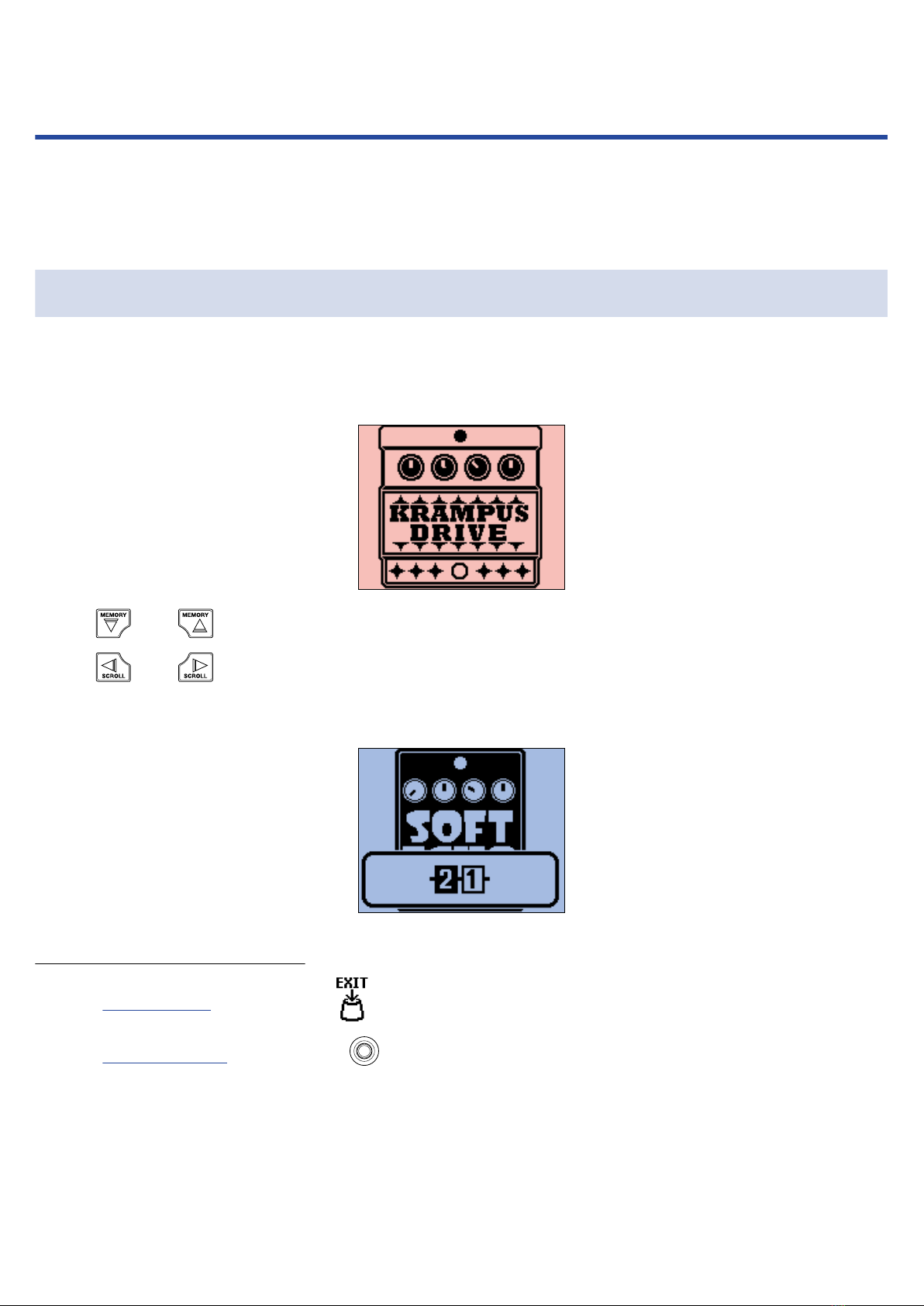
Home Screen
This appears when the power is turned on.
Effects in the selected patch memory are shown. The patch memory can be edited and its effects turned on
and off.
• Use and to select patch memories.
• Use and to select the effects in the patch memory. When selecting effects, numbers will
show their order.
The backlight color changes according to the category of the selected effect.
Opening the Home Screen
• If the MENU Screen is open, press .
• If the LIBRARY Screen is open, press to confirm the selected effect.
10
Other manuals for MULTISTOMP MS-50G+
2
Table of contents
Other Zoom Measuring Instrument manuals

Zoom
Zoom F2-BT User manual

Zoom
Zoom F6 Instructions and recipes

Zoom
Zoom F8 User manual

Zoom
Zoom Handy REcorder H1 Installation guide

Zoom
Zoom F8n Pro Instructions and recipes

Zoom
Zoom Handy REcorder H1 User instructions

Zoom
Zoom H4N User manual

Zoom
Zoom H1essential Mounting instructions

Zoom
Zoom Handy REcorder H1 User manual

Zoom
Zoom F8n Pro User manual