TYAN S5515 User manual

http://www.tyan.com
1
S5515
Version 1.0
Copyright
Copyright © 2011 MiTAC International Corporation. All rights reserved. No part of
this manual may be reproduced or translated without prior written consent from
MiTAC International Corporation.
Trademark
All registered and unregistered trademarks and company names contained in this
manual are property of their respective owners including, but not limited to the
following.
TYAN®is a trademark of MiTAC International Corporation.
Intel®is a trademark of Intel®Corporation.
AMI, AMI BIOS are trademarks of AMI Technologies.
Microsoft®, Windows®are trademarks of Microsoft Corporation.
Winbond®is a trademark of Winbond Electronics Corporation.
Notice
Information contained in this document is furnished by MiTAC International
Corporation and has been reviewed for accuracy and reliability prior to printing.
MiTAC assumes no liability whatsoever, and disclaims any express or implied
warranty, relating to sale and/or use of TYAN®products including liability or
warranties relating to fitness for a particular purpose or merchantability. MiTAC
retains the right to make changes to product descriptions and/or specifications at
any time, without notice. In no event will MiTAC be held liable for any direct or
indirect, incidental or consequential damage, loss of use, loss of data or other
malady resulting from errors or inaccuracies of information contained in this
document.

http://www.tyan.com
2

http://www.tyan.com
3
Contents
Before you begin….................................................................................... 4
Chapter 1: Instruction ................................................................................ 5
1.1 Congratulations ................................................................................. 5
1.2 Hardware Specifications .................................................................. 5
1.3 Software Specifications ..................................................................... 7
Chapter 2: Board Installation..................................................................... 9
2.1 Board Image .................................................................................... 10
2.2 Block Diagram ................................................................................. 11
2.3 Board Parts, Jumpers and Connectors ........................................... 12
2.4 Installing the Processor and Heat sink ............................................ 22
2.5 Thermal Interface Material .............................................................. 25
2.6 Tips on Installing Motherboard in Chassis ...................................... 26
2.7 Installing the Memory ...................................................................... 28
2.8 Attaching Drive Cables .................................................................... 32
2.9 Installing Add-In Cards .................................................................... 33
2.10 Connecting External Devices ........................................................ 34
2.11 Installing the Power Supply ........................................................... 35
2.12 Finishing Up................................................................................... 36
Chapter 3: BIOS Setup ............................................................................. 37
3.1 About the BIOS................................................................................ 37
3.2 Main Menu....................................................................................... 39
3.3 Advanced Menu............................................................................... 40
3.4 PCI/PnP Menu................................................................................. 57
3.5 Boot ................................................................................................. 62
3.6 Security............................................................................................ 63
3.7 Save & Exit ...................................................................................... 64
Chapter 4: Diagnostics............................................................................. 65
4.1 Flash Utility ...................................................................................... 65
4.2 AMIBIOS Post Code (Aptio) ............................................................ 66
Glossary..................................................................................................... 73
Technical Support .................................................................................... 79

http://www.tyan.com
4
Before you begin…
Check the box contents!
The retail motherboard package should contain the following:
1 x S5515 Motherboard
6 x SATA Cable
1 x COM dual-port Bracket Cable
1 x USB dual-port Bracket Cable
1 x IO shielding
1 x S5515 User’s manual
1 x S5515 Quick reference guide
1 x TYAN®Driver CD
IMPORTANT NOTE:
Sales sample may not come with the accessory listed above.
Please contact your sales representative to help order accessory for your
evaluation.

http://www.tyan.com
5
Chapter 1: Instruction
1.1 Congratulations
You have purchased the powerful TYAN® S5515 motherboard, based on the
Intel®Q67 and Nuvoton NCT5577D chipsets. The S5515 is designed to support
single Intel®2
nd Gen. Core i3/i5/i7 series processor, and up to 32GB of un-
buffered non-ECC 1066/1333MHz DDR3 memory. Leveraging advanced
technology from Intel®, the S5515 is capable of offering scalable 32 and 64-bit
computing, high-bandwidth memory design, and lightning-fast PCI-E bus
implementation.
The S5515 not only empowers you in today’s demanding IT environment but also
offers a smooth path for future application upgradeability. All of these rich feature
sets provides the S5515 with the power and flexibility to meet demanding
requirements for today’s IT environments.
Remember to visit the TYAN® website at http://www.tyan.com. There you can
find all the information on all TYAN®products as well as all the supporting
documentation, FAQs, Drivers and BIOS upgrades.
1.2 Hardware Specifications
TYAN S5515 (S5515AG2NR)
Supported CPU
Series Intel 2nd Gen. Core i3/ i5/ i7 series processors
Socket Type / Q'ty LGA 1155/ (1)
Processor
Thermal Design
Power (TDP)
wattage
Max up to 95W
PCH Intel Q67
Chipset Super I/O Nuvoton 5577D
Supported DIMM
Qty (4) DIMM slots
DIMM Type / Speed Unbuffered Non-ECC DDR3 / 1333/1066
Capacity Up to 32GB
Memory channel 2 Channels
Memory
Memory voltage 1.5V
PCI-E (1) PCI-E Gen.2 x16 slot / (1) PCI-E Gen.2 x8 slot (w/
x4 link) / (1) PCI-E Gen.2 x1 slot
Expansion
Slots PCI (1) PCI 32-bit slot
Port Q'ty (2)
LAN
Controller Intel 82583V

http://www.tyan.com
6
PHY Intel 82579LM
Connector (6) SATA
Controller Intel Q67
Speed (2) 6.0 Gb/s (blue color), (4) 3.0 Gb/s (black color)
Storage SATA
RAID RAID 0/1/10/5 (Intel RST)
Connector type D-Sub 15-pin / DVI-D / Display port 1.1 / Only two
video output at the same time
Resolution Up to 1920x1024
Graphic
Chipset Intel Q67
Chipset Realtek ALC888
Audio Feature High Definition Audio
USB (9) USB2.0 ports (4 at rear, 4 via cable, 1 type A
onboard), (2) USB3.0 ports
COM (4) headers
VGA (1) D-Sub 15-pin VGA port / (1) Display port 1.1
DVI (1) connector
Audio LINE_IN, LINE_OUT, MIC_IN connectors
RJ-45 (2) GbE ports
Power SSI EEB/ATX 24-pin + 4-pin power connectors
Front Panel (1) 2x12-pin SSI front panel header
Input /Output
SATA (4) SATA-II and (2) SATA-III connectors
Chipset Nuvoton 5577D
Voltage Monitors voltage for CPU, memory, chipset & power
supply
Fan Total (3) 4-pin headers
System
Monitoring
Temperature Monitors temperature for CPU & system environment
Brand / ROM size 8MB / AMI
BIOS Feature
Plug and Play (PnP) /PCI2.3 /WfM2.0 /SMBIOS2.3
/PXE boot / ACPI 2.0 power management /Power on
mode after power recovery / User-configurable H/W
monitoring / Auto-configurable of hard disk types
Form Factor Micro ATX
Physical
Dimension Board Dimension 9.6"x9.6" (243.8x243.8mm)
Operating
System OS supported list Please visit our Web site for the latest update.
FCC (DoC) Class B
Regulation CE (DoC) Yes
Operating Temp. 0° C ~ 55° C (32° F~ 131° F)
Non-operating
Temp. - 40° C ~ 70° C (-40° F ~ 158° F)
Operating
Environment
In/Non-operating
Humidity 90%, non-condensing at 35° C
RoHS RoHS 6/6 Compliant Yes

http://www.tyan.com
7
Motherboard (1) S5515 Motherboard
Manual (1) User's manual / (1) Quick Ref. Guide
Installation CD (1) TYAN installation CD
I/O Shield (1) I/O Shield
SATA (6) SATA signal cables
(1) COM dual-port bracket cable
Package
Contains
Cable Others (1) USB dual-port bracket cable
1.3 Software Specifications
For OS (operation system) support, please check with TYAN®support for latest
information.

http://www.tyan.com
8
NOTE

http://www.tyan.com
9
Chapter 2: Board Installation
You are now ready to install your motherboard.
How to install our products right… the first time
The first thing you should do is reading this user’s manual. It contains important
information that will make configuration and setup much easier. Here are some
precautions you should take when installing your motherboard:
(1) Ground yourself properly before removing your motherboard from the
antistatic bag. Unplug the power from your computer power supply and
then touch a safely grounded object to release static charge (i.e. power
supply case). For the safest conditions, MiTAC recommends wearing a
static safety wrist strap.
(2) Hold the motherboard by its edges and do not touch the bottom of the
board, or flex the board in any way.
(3) Avoid touching the motherboard components, IC chips, connectors,
memory modules, and leads.
(4) Place the motherboard on a grounded antistatic surface or on the antistatic
bag that the board was shipped in.
(5) Inspect the board for damage.
The following pages include details on how to install your motherboard into your
chassis, as well as installing the processor, memory, disk drives and cables.
NOTE: Do not apply power to the board if it has been damaged.

http://www.tyan.com
10
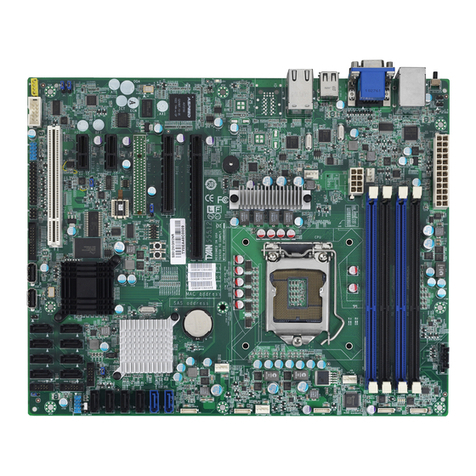
2.1 Board Image
S5515
This picture is representative of the latest board revision available at the time of
publishing. The board you receive may not look exactly like the above picture.
Other manuals for S5515
1
Table of contents
Other TYAN Motherboard manuals

TYAN
TYAN S1570 AT User manual

TYAN
TYAN TOMCAT I875PR User manual

TYAN
TYAN S7053 User manual

TYAN
TYAN TIGER LE User manual

TYAN
TYAN S5221 User manual

TYAN
TYAN Thunder n4250QE-S4985G3NR-E User manual

TYAN
TYAN Tiger MP S2460 User manual

TYAN
TYAN TITAN TURBO AT-2 User manual

TYAN
TYAN Tigercub 100 S1894 User manual

TYAN
TYAN TOMCAT I7221A User manual

TYAN
TYAN TSUNAMI AT User manual

TYAN
TYAN THUNDER N6650W User manual

TYAN
TYAN THUNDER N6650W User manual

TYAN
TYAN Thunder K8W S2885 User manual

TYAN
TYAN Triumph i7520 (S6623) User manual

TYAN
TYAN S1832DL User manual

TYAN
TYAN S5552 User manual

TYAN
TYAN THUNDER K8QSD PRO User manual

TYAN
TYAN S7055 User manual

TYAN
TYAN S8050 User manual