
Trace2O HMUV1825P User manual

UV DIGESTER HMUV1825P
Portable Ultraviolet Heavy Metal Sample Digester


4 www.trace2o.com
Trace2o UV Digester HMUV1825P
Instruction Manual v3.0
2. INTRODUCTION
The HMUV1825P is an Ultraviolet digestion system for the
digestion of water samples with a high organic content. The
process of digestion will break down complex organic compounds
into simpler organic compounds and release metal ions bound
within the organic material into the water sample. Once digested
the Heavy metal content of the samples can be measured using
the Trace2o Metalyser range of instrumentation.

www.trace2o.com 5
Trace2o UV Digester HMUV1825P
Instruction Manual v3.0
3. SAFETY INFORMATION
The UV digester uses Ultraviolet light which is harmful to the human eyes.
To prevent exposure the viewing window is manufactured from a high quality
UV blocking acrylic and the device is fitted with safety interlock switches such
that if an attempt is made to replace the lamp while the unit is switched on it
will switch off automatically.
The unit contains no user serviceable parts and as such no attempt should
be made to open it. Any attempt to do so will invalidate the warranty. All user
serviceable parts are accessible from the outside of the unit.
It is important to note that the system contains a delicate quartz glass
component and as such care should be taken not to allow the unit to be
subjected to vibration or shock. Should the instrument receive a shock for
any reason it should be returned to the dealer for inspection.

6 www.trace2o.com
Trace2o UV Digester HMUV1825P
Instruction Manual v3.0
4. SETTING UP THE UNIT
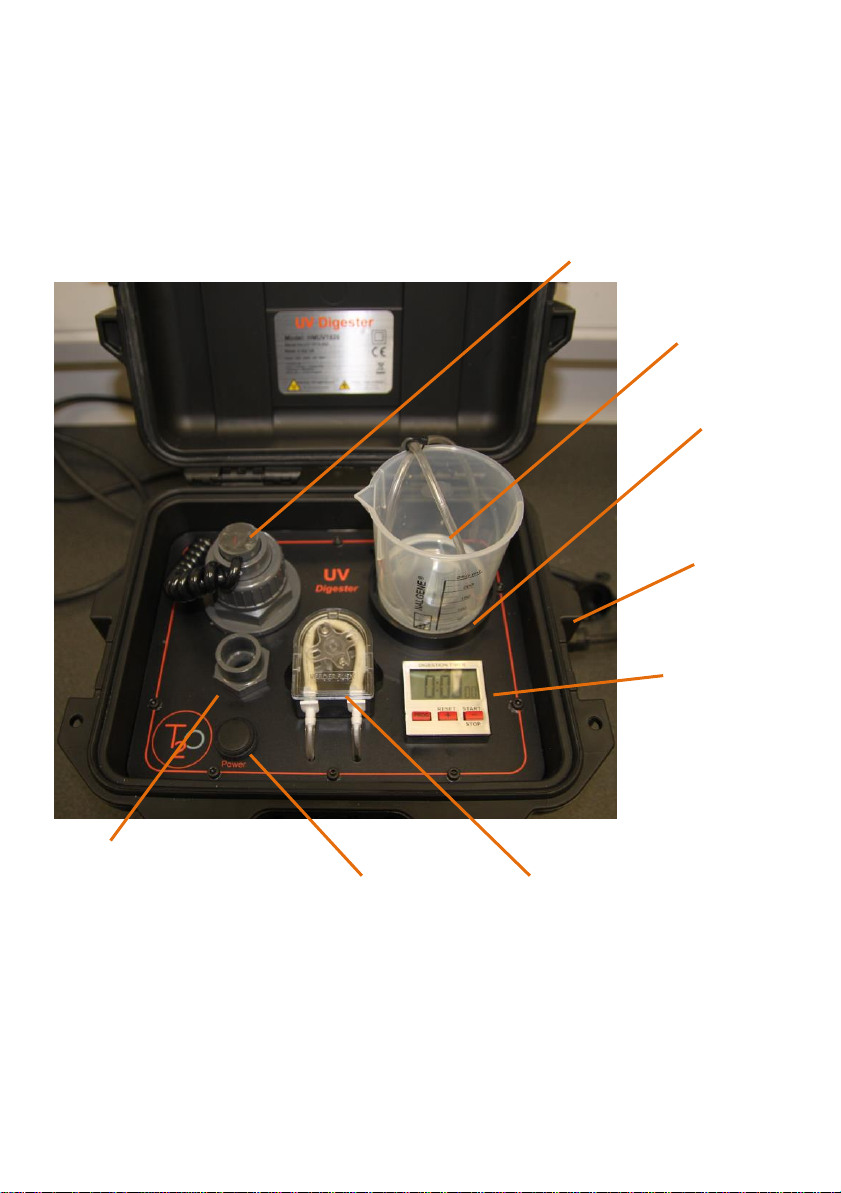
Remove the unit from its packaging and place lid upwards on a flat surface.
Connect the power lead from the power pack to the socket on the right hand
side of the unit.
Open the lid of the unit and locate the ‘Power’ switch
Depress the switch to the on position. The display on the timer will turn on.
Fill the supplied sample beaker with the desired volume of sample and place
the beaker in the holder. Place the two sample tubes into the beaker. The
system is a re-circulating system so only one beaker is required.
www.trace2o.com 7
Trace2o UV Digester HMUV1825P
Instruction Manual v3.0
5. PROGRAMMING THE DIGESTION TIME
The digester is fitted with a programmable countdown timer. A digestion time
up to 10 hours can be programmed although 30 mins to 1 hour is sufficient
for most samples.
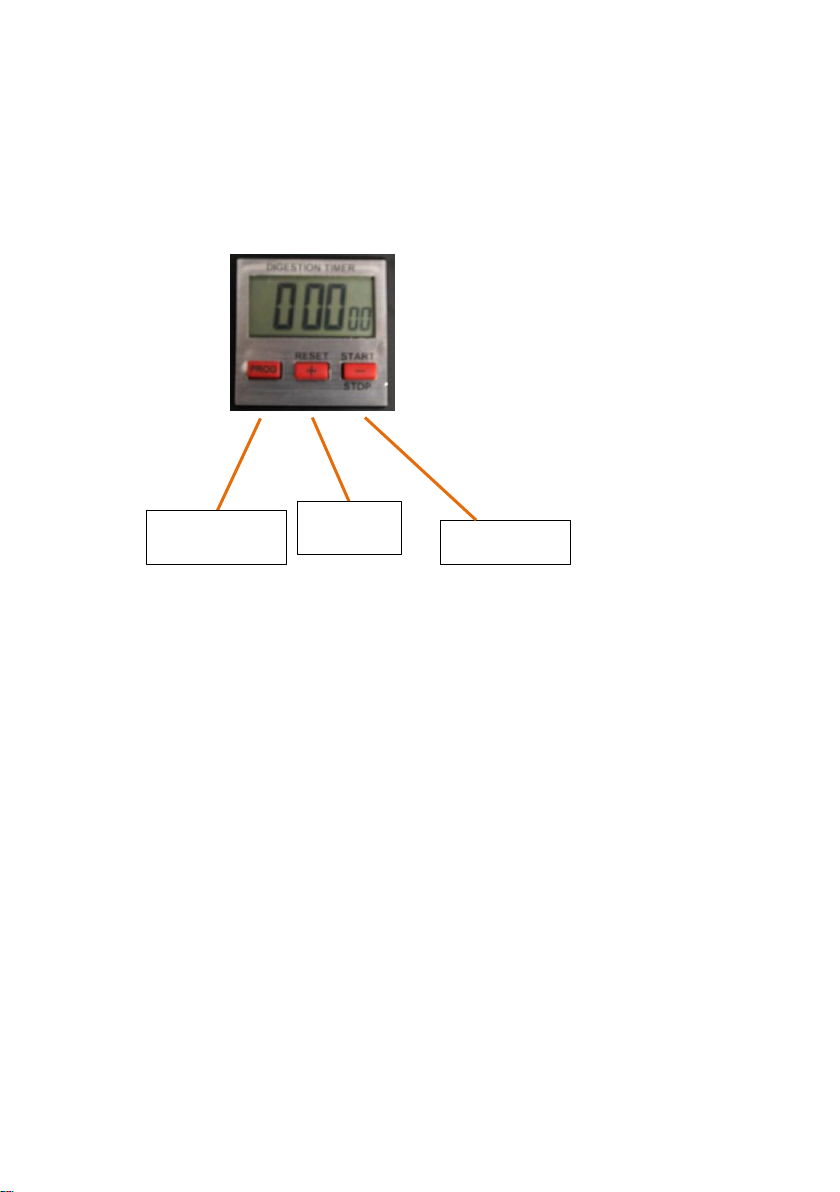
To set the timer press the ‘programme’ button. The seconds will flash. To
adjust the time press the + and - buttons to adjust the time up or down
respectively. Subsequent presses of the ‘programme’ button will step through
from seconds to minutes to hours. Pressing the ‘programme’ button again will
set the time. (If the digits are flashing the timer will not operate).
Once the time is set press the ‘start’ button. The pump will turn on and the
lamp will illuminate. This can be confirmed by looking through the viewing
window. The timer will start counting down and an alarm will sound when the
cycle has completed. If the logo does not illuminate the bulb will need
replacing. (See maintenance section).
After the sample is complete, press reset to set the time back to the pre-
programmed time.
Lift the tubes clear of the sample water and start the timer again. Run until
the tubes are empty of liquid.
Note : Running the pump dry will not harm the system.
Programme
Reset/+
Start/Stop

8 www.trace2o.com
Trace2o UV Digester HMUV1825P
Instruction Manual v3.0
6. CARE AND MAINTENANCE
Routine cleaning.
To avoid any cross contamination of samples the system should be rinsed
through with de-ionised water. Place the inlet tube into a clean beaker filled
with 50ml of de-ionised water and the outlet tube into a second beaker. Run
the instrument for 5 minutes to flush the tubes.
Once a week it is recommended to run a 0.1M solution of hydrochloric acid
through the pipes.
It is not recommended to use acetone or other polar aprotic solvents to clean
the UV Digester enclosure, as these can damage the unit. Trace2o
recommends the use of mild soap solution for routine cleaning of the
enclosure. The use of improper solvents will void the manufacturer’s
warranty.
www.trace2o.com 9
Trace2o UV Digester HMUV1825P
Instruction Manual v3.0
Maintenance
The UV digester requires very little maintenance but periodic replacement of
the pump tubing and Lamp may be necessary.
UV Lamp replacement :
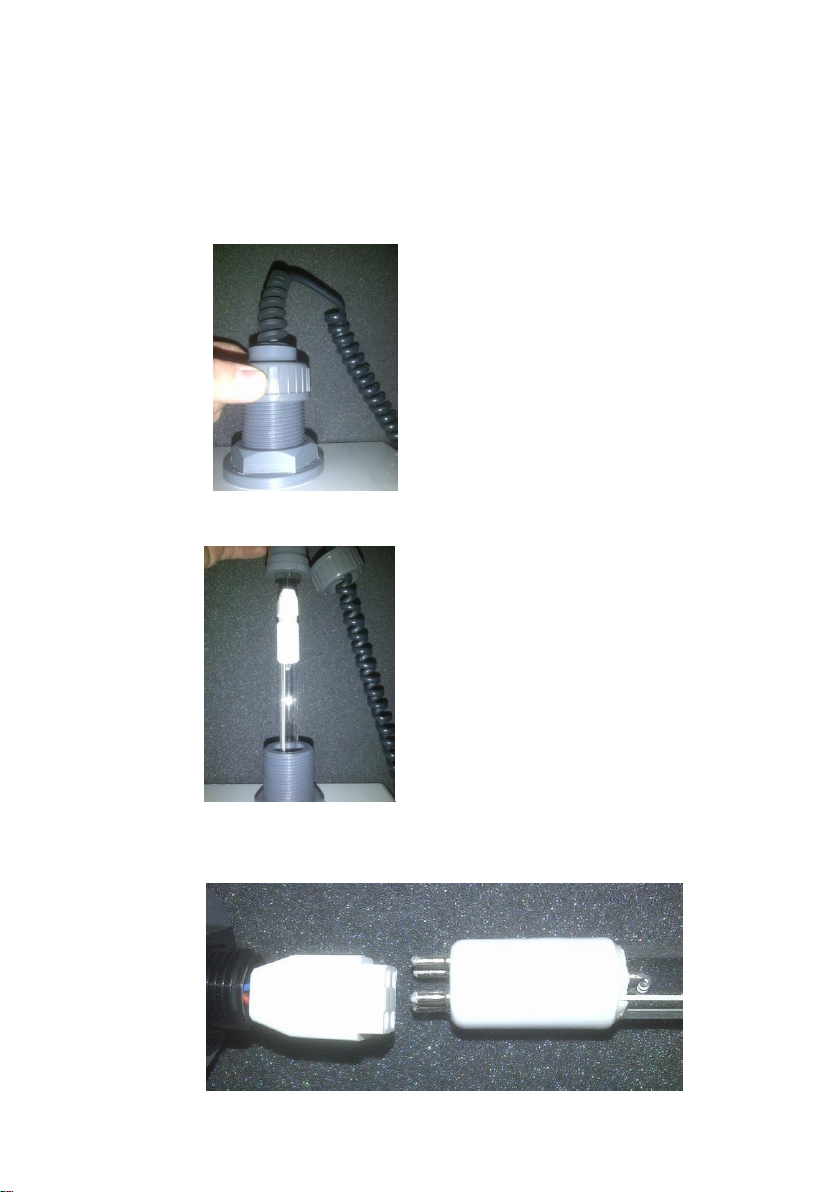
Carefully unscrew the locking ring from the top of the lamp connector.
Slowly remove the lamp from the holding by lifting it vertically. Pull the lamp
clear of the connector and lay it on the bench.

10 www.trace2o.com
Trace2o UV Digester HMUV1825P
Instruction Manual v3.0
Grip the white connector and white end of the bulb between thumb and finger
of each hand and carefully wiggle the two apart.
To fit a new lamp reverse the process taking care to insert the lamp back into
the connector slowly and with no force. If held vertical and lowered carefully
the lamp should slide easily back into position.
When refitting the top of the connector align the arrow on the top of the
connector with the front of the instrument. If the unit fails to turn on slacken
the locking ring and rotate the top of the connector with the arrow on slightly
clockwise or anti-clockwise until a click is heard and the display comes on.
Lock the top in this position.
This manual suits for next models
1
Table of contents
Other Trace2O Measuring Instrument manuals

Trace2O
Trace2O HydroTest HTTURB User manual

Trace2O
Trace2O METALYSER HM1000 User manual

Trace2O
Trace2O METALYSER FIELD PRO HM3000 User manual

Trace2O
Trace2O ARSENOMETER HMAS100 User manual

Trace2O
Trace2O Metalyser HM5000 User manual

Trace2O
Trace2O OMAS User manual

Trace2O
Trace2O METALYSER DELUXE HM2000 User manual

Trace2O
Trace2O HT1000 User manual

Trace2O
Trace2O METALYSER DELUXE HM2000 User manual

Trace2O
Trace2O METALYSER HM4000 User manual


