Swema 3000md User manual

SWEMATWIN FOR BALANCING VENTILATION
Manual ES20150505 Rev. 2
1(7)
SWEMA AB
Pepparvägen 27
123 56 Farsta, SWEDEN
Tel: +46 (0)8 940090
www.swema.se
www.swema.com
1
.
Introduction
2. Instrumentation
3. Connecting
4. Settings
5. Measurement
6. Troubleshooting
7. Balancing Ventilation Systems
2
2
3
4
5
6
6

SWEMATWIN FOR BALANCING VENTILATION
Manual ES20150505 Rev. 2
2(7)
SWEMA AB
Pepparvägen 27
123 56 Farsta, SWEDEN
Tel: +46 (0)8 940090
www.swema.se
www.swema.com
1. INTRODUCTION
Ventilation balancing by modems makes the proportionality method an easy task for just one
user. It takes half the time or less to balance a ventilation system with SwemaTwin. The
balancing contractor can take on more commissions using the same resources. The building
will be ready to use in a shorter time and less interruptions will be caused, leading to high
client satisfaction. Swema Twin generates good references and new commissions.
2. INSTRUMENTATION
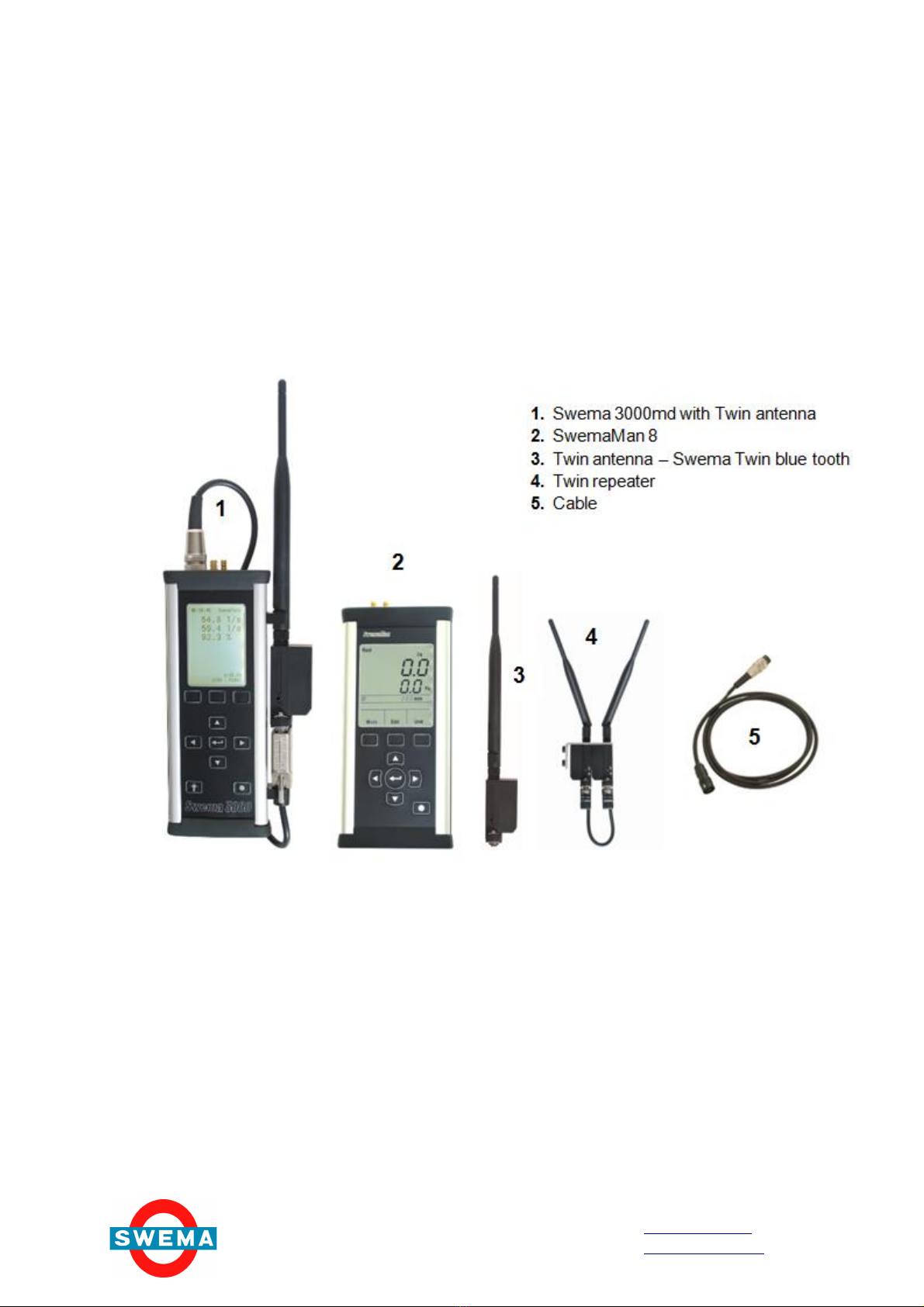
Swema 3000md (Art. No. 764 200)
SwemaMan 8 (Art. No. 768 300)
Bluetooth Moden Kit for 2 units of Swema 3000md (Art. No. 766 361)
Bluetooth Moden Kit for Swema 3000md and SwemaMan 8 (Art. No. 768 730)
Bluetooth Repeater (Art. No. 766 681)

SWEMATWIN FOR BALANCING VENTILATION
Manual ES20150505 Rev. 2
3(7)
SWEMA AB
Pepparvägen 27
123 56 Farsta, SWEDEN
Tel: +46 (0)8 940090
www.swema.se
www.swema.com
3. CONNECTION
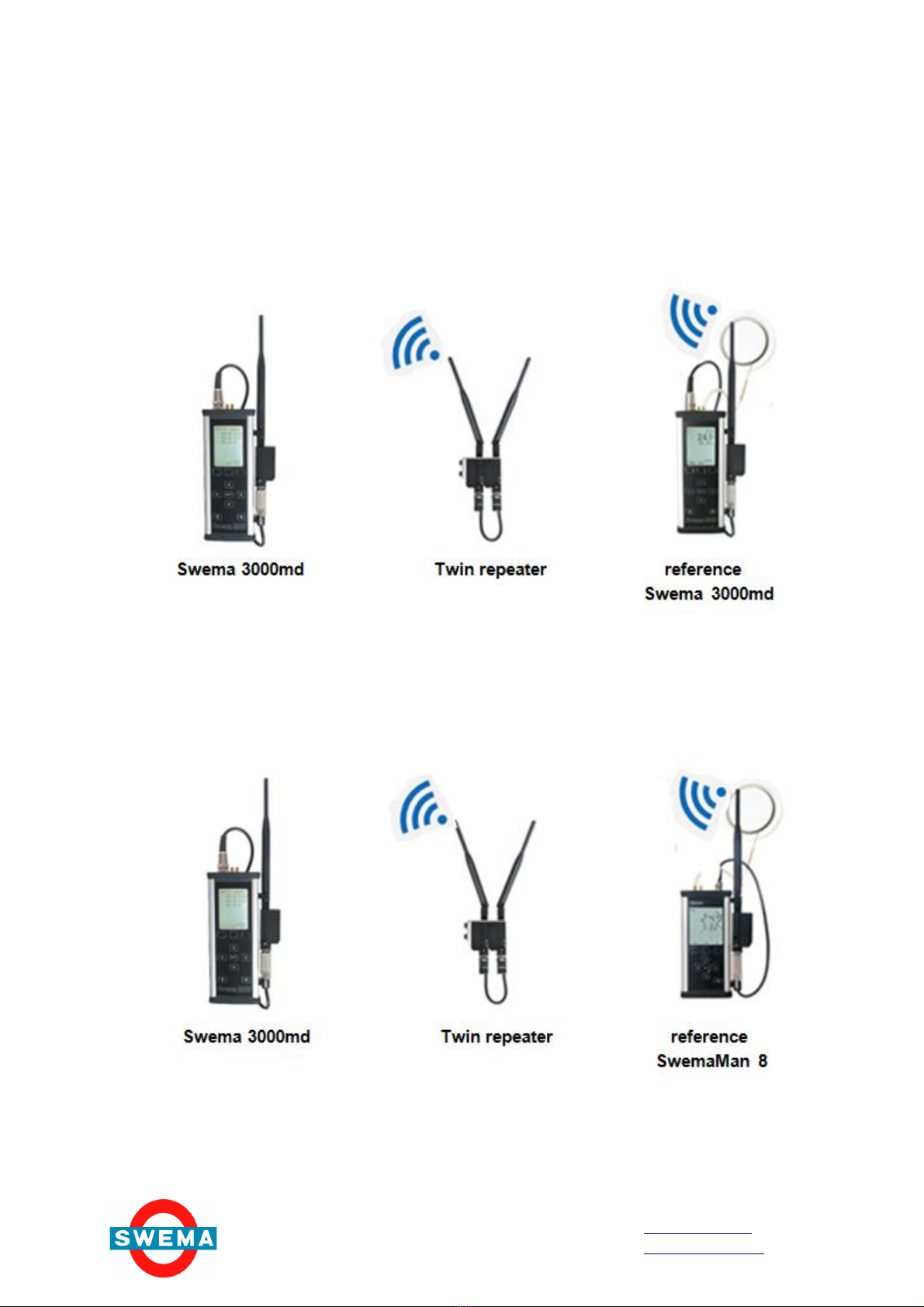
SwemaTwin with Swema 3000md as a reference
SwemaTwin with SwemaMan 8 as a reference

SWEMATWIN FOR BALANCING VENTILATION
Manual ES20150505 Rev. 2
4(7)
SWEMA AB
Pepparvägen 27
123 56 Farsta, SWEDEN
Tel: +46 (0)8 940090
www.swema.se
www.swema.com
4. SETTINGS
a. Two units of Swema 3000md. One unit as master instrument and the other unit as a
slave (reference) instrument.
Balancing of ventilation with 2 universal instruments Swema 3000 and a complete
SwemaTwin BlueTooth modem. A complete SwemaTwin BlueTooth package contains
two BlueTooth modems that are connected to the RS232 contacts on the instruments.
There is also a ”Repeater”that contains 2pcs BlueTooth modems connected to each other
by a cable, the modems are fitted to a holder with a magnet to facilitate the attachment of
the holder with the repeaters on a metalic surface, for example a ventilation duct. The
BlueTooth modems are paired together two and two to communicate with the modem they
are paired to. At delivery the modems are marked with either ”1”or ”2”, the modems
marked with ”1”are paired to each other the same for the two modems marked with ”2”.
They are paired to each other until the reset button on the modem is pressed.
·Connect the BlueTooth modems to the RS232 connectors of both Swema 3000.
·SWITCH ON the modems (including the repeaters, if they are used).The small LEDs
indicating “Connected”flash green on the modems, otherwise the LEDs “Mode”is
green. Make sure that the batteries of the modems are charged otherwise the
modems cannot communicate with each other.
·In the Menu 2 of the master instrument, the instrument you are carrying (Picture 1),
select the communication as follow:
SwemaTwin: ON
Communication: RS232
Baud Rate: 4800
Add Flow: OFF
·In the Menu 2 of the reference instrument (slave unit), the instrument you leave at the
reference valve, (Picture 2) select the communication as follow:
SwemaTwin: OFF

SWEMATWIN FOR BALANCING VENTILATION
Manual ES20150505 Rev. 2
5(7)
SWEMA AB
Pepparvägen 27
123 56 Farsta, SWEDEN
Tel: +46 (0)8 940090
www.swema.se
www.swema.com
b. One unit of Swema 3000md as master instrument and one unit of SwemaMan 8 as a
slave (reference) instrument.
5. MEASUREMENT
The Master instrument displays the measuring values of both instruments, the Master and
the Reference. If the same measuring unit is set on both instruments the master will also
display the ratio of the values of the master and the reference in percentage.
(Master / Reference)*100%
This ratio is very handy for the adjustment of ventilation systems according to the
proportionality method.
Note! If the unit of one of the instruments is set to l/s, and the unit of the other instrument is
set to m3/h, the ratio cannot be calculated percentage of the ratio is set to the other no
percentage will be calculated.
The same procedure as in ais followed, except for
the slave (reference) instrument, SwemaMan 8,
where a Twin mode cannot be selected, see
picture 3.
NOTE!
It is important to select the same measuring
unit in both instruments during the setting and
before the measurement.

SWEMATWIN FOR BALANCING VENTILATION
Manual ES20150505 Rev. 2
6(7)
SWEMA AB
Pepparvägen 27
123 56 Farsta, SWEDEN
Tel: +46 (0)8 940090
www.swema.se
www.swema.com
6. TROUBLESHOOTING
·The modems are connected, (including the repeaters, if they are used).The small LED
indicating “Connected”flash green on the modems, if not the LED “Mode”is green.
Switch the modems OFF and ON again. During the measuring the LEDs “Connected”
and “RS232-Tx/Rx”flash intermittently.
·If the LED “RS232-Tx/Rx”lights red, the measuring data from the reference, is not sent
by the receiver to the master instrument. Switch the modems OFF and ON again. If the
LED continues to lights red
·The switches on the BlueTooth modems are set to Baud Rate 4800 (switches 1 and 3
should be set to the left and switch 2 to the right). (Picture 4)
·”H/W Flow Control”switch is set to OFF (switch 4 to the left). Picture 6)
7. BALANCING A VENTILATION SYSTEM ACCORDING TO THE PROPORTIONALITY
METHOD
Choose the valve where the reference instrument will be measuring. The flow in the chosen
valve is the nominal reference flow. The flows in the other valves (measurement points)
are adjusted with the Master instrument. These nominal flows are called nominal Master
flows.
Calculate for each Master measurement point:
If the modems still do not connect to each other, after
following the steps above, the modems have to be
paired once again. Refer to the manual delivered with
the BlueTooth modems for pairing). Probably it is
necessary to pair again either the modems marked as
“1”or the modems marked as “2”. Please check the
modems that have to be paired again.
T
he Master
instrument
display
s the
symbol
”
--
-
”where
the Reference measurement should be displayed. There
is no connection between the master and the reference
instrument, see picture 5
If so please check as follows:
·The modems are switched ON and their batteries are
charged otherwise the modems cannot communicate
with each other.
·The modems are connected to the instruments and
the antennas are attached to them
·The settings in the menu 2 of the master and menu 2
of the reference instrument are according to 4a
above. When the reference instrument is a
SwemaMan 8 there is not a menu 2 to check on the
reference.

SWEMATWIN FOR BALANCING VENTILATION
Manual ES20150505 Rev. 2
7(7)
SWEMA AB
Pepparvägen 27
123 56 Farsta, SWEDEN
Tel: +46 (0)8 940090
www.swema.se
www.swema.com
(Nominal Master Flow / Nominal Reference Flow) x 100%
This ratio is obtained when balancing two diffusers/inlets/outlets.
Measure with the reference instrument on the reference in/outlet
Measure on the in/outlet to be adjusted with the Master instrument.
The ratio at this point of the measurement is important, not the actual flow. The final flow is
obtained when the final adjustment of the total flow in the ventilation system is done.
For further reading on Proportionality method, download file
Proportionality method with SwemaTwin
From: http://www.swema.com/instrument.php?p=SwemaTwin&k=Air%20Flow
This manual suits for next models
6
Table of contents
Other Swema Measuring Instrument manuals

Swema
Swema SwemaFlow 125 User manual

Swema
Swema 3000 User manual

Swema
Swema SwemaTemp 20 User manual

Swema
Swema SwemaMan 7 User manual

Swema
Swema 03 User manual

Swema
Swema SwemaFlow 126 User manual

Swema
Swema SwemaFlow 4000 User manual

Swema
Swema SwemaAir 40 User manual

Swema
Swema SwemaCO2 User manual

Swema
Swema SwemaTemp 21 User manual