Bi-directional ow sensing
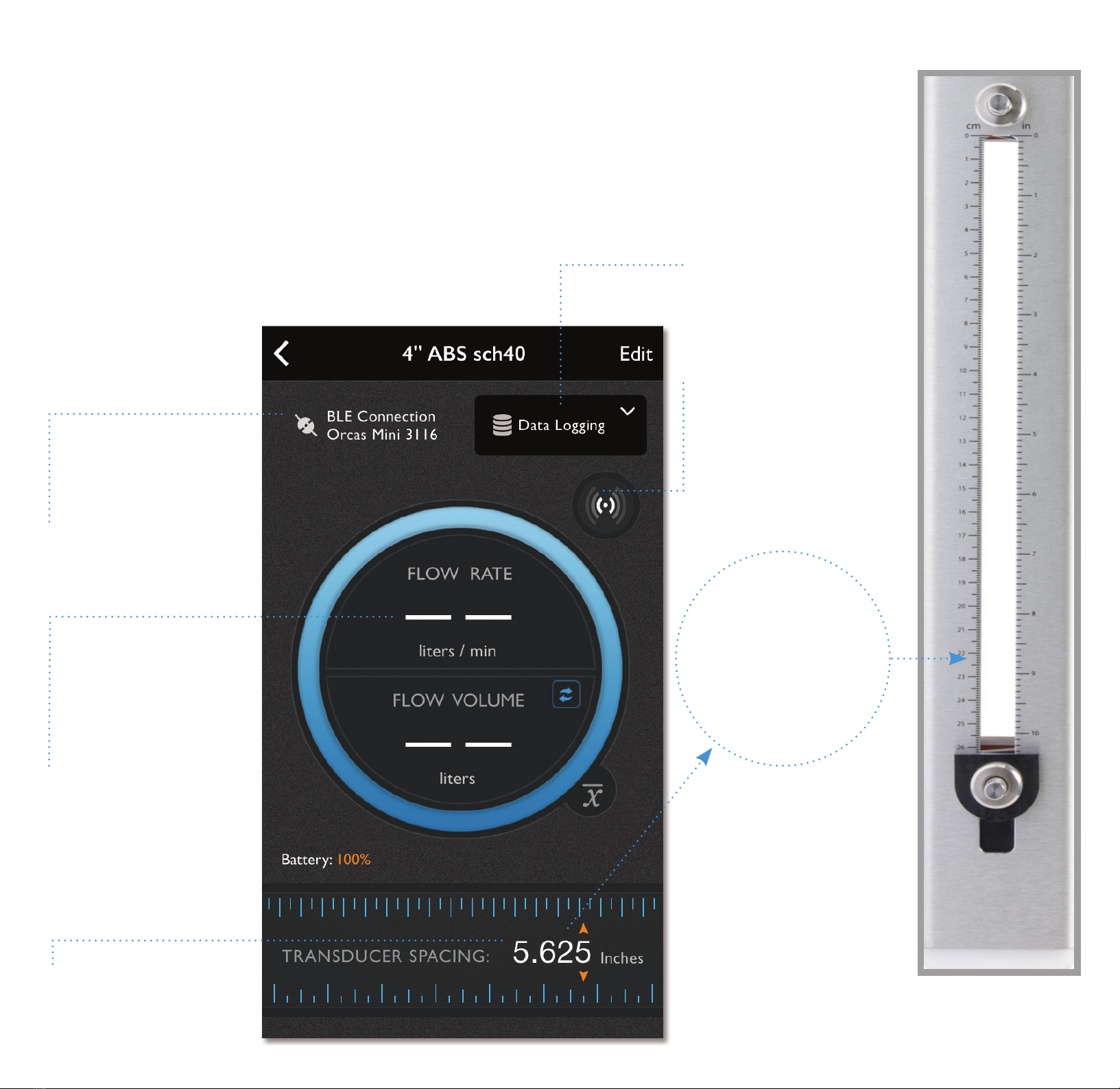
Integrated ruler
Moveable acoustic
transducers
Quick Start Guide
Welcome to SoundWater Orcas SPTM.
This guide shows you how to download the mobile application and helps
you set it up and pair it with the Orcas SP Sensor to start taking readings.
Let’s get started.
Begin by wiring power—use the wire color codes shown below (for your supplied connecting cable).
After your owmeter is powered, download the SoundWater Orcas app to your iPhoneTM or other
bluetooth enabled mobile device from the App StoreTM or Google PlayTM.
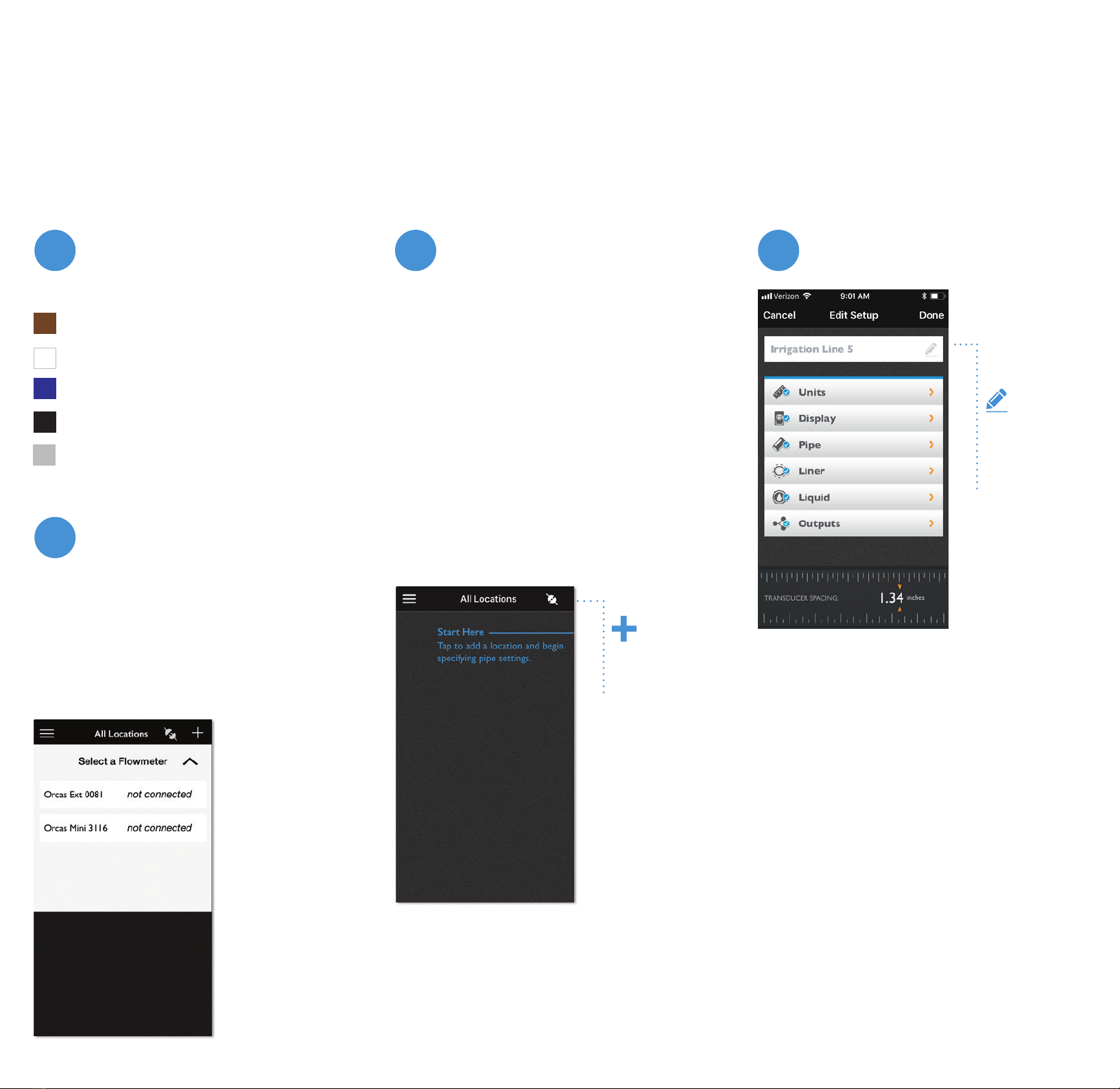
Launching the app lands you
on the locations screen. Begin
by tapping on the add location
(+) button.
The app always begins with
this screen at launch making
it easy to access previously
saved location settings.
Add your location.
Drill-down through the param-
eter selections and choose from
the pre-loaded pipe types, pipe
dimensions and uid databases.
Don’t see the right option? Add
your custom values!
Give your location a name, then
save. Each location’s settings
can be stored in the Orcas app,
ready for reuse.
Set-up your location.
Pipe and liquid parameter selection and input screens:
Units
Toggle between
metric and
Imperial units of
measure.
Select Flow Rate,
Volume and
Velocity from
our pre-loaded
parameter values
or add custom
values.
Display
Drag and drop
the outputs that
you rely on most
to display on the
main screen.
Pipe & Liner
Select Pipe Type
and Wall Clas-
sications from
our pre-loaded
values or add
custom values.
Liquid
Select Liquid Type
from our pre-loaded
parameter values or
add custom values.
Be sure to select a
temperature - just
your best guess will
help the owmeter
calculate transducer
spacing.
Add
location
This device complies with Part 15 of FCC Rules and Industry Canada license-exempt RSS standard(s). Operation is
subject to the following two conditions: (1) this device may not cause harmful interference, and (2) this device must
accept any interference received, including interference that may cause undesired operation. Contains FCC ID:
XDULE40-S2, Contains IC: 8456A-LE4S2. CAN ICES-1/NMB-1; CAN ICES-3 (B)/NMB-3(B)
MODEL: SWT ORCAS-01
34
2
1
At launch the app will nd any
nearby SoundWater owmeters.
Select the owmeter you want
to connect to from the list.
Connect your owmeter.
1 Not connected
2 Pulse output
3 Power 12-24VDC (1.2W Max)
4 Power ground 0V
5 4-20mA output
Connecting cable wire
color codes:
Connector for external
power and communi-
cations`
MADE IN USA
Access ports for
mountings straps
Name your
location
Outputs
Select the Outputs
menu to setup any
optional hardware
outputs such as
MODBUS, 4-20 mA,
and pulse outputs.
The image below
displays the 4-20mA
setup options.