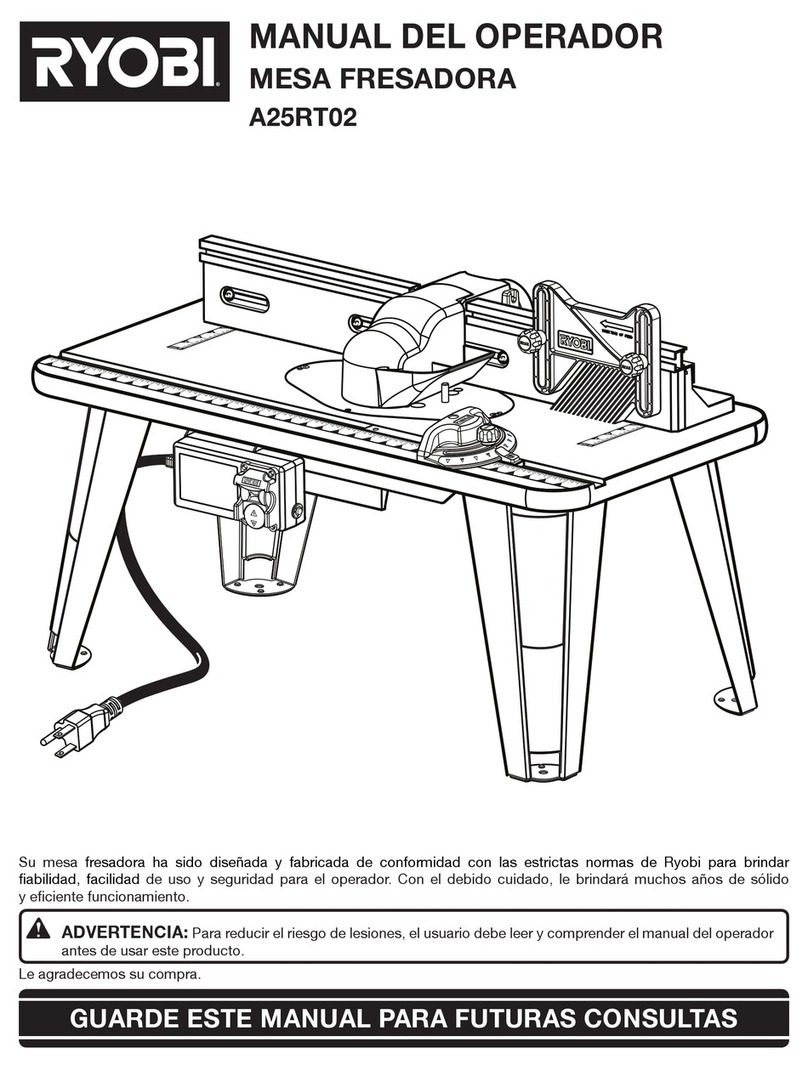
Ryobi RT501W User manual

OPERATOR’S MANUAL
ROUTER TABLE RT501W
Thank you for purchasing a Ryobi router table.
SAVE THIS MANUAL FOR FUTURE REFERENCE
Your new router table has been engineered and manufactured to Ryobi's high standard for dependability, ease of
operation, and operator safety. Properly cared for, it will give you years of rugged, trouble-free performance.
WARNING: To reduce the risk of injury, the user must read and understand the operator’s manual.
Power tools and some accessories Not included.
Bdal 6146.461 3Sprachen 04.06.2005 11:58 Uhr Seite 1

TABLE OF CONTENTS
2
INTRODUCTION
Your router table has many features for making the use of
a router more pleasant and enjoyable.
Safety, performance, and dependability have been given
top priority in the design of this router table making it easy
to maintain and operate.
WARNING:
Do not attempt to use this product until you have read
thoroughly and completely understand the operator’s
manual. Pay close attention to the safety rules,
including Dangers, Warnings, and Cautions. If you
use your router table properly and only for what it is
intended, you will enjoy years of safe, reliable service.
The operation of any power tool can result in foreign objects being thrown into your eyes, which
can result in severe eye damage. Before beginning tool operation, always wear safety goggles
or safety glasses with side shields and a full face shield when needed. We recommend Wide
Vision Safety Mask for use over eyeglasses or standard safety glasses with side shields.
Always wear eye protection which is marked to comply with ANSI Z87.1.
Look for this symbol to point out important safety
precautions. It means attention!!! Your safety is involved.
Introduction . . . . . . . . . . . . . . . . . . . . . . . . . . . . . . . . . . . . . . . . . . . . . . . . . . . . . . . . . . . . . . . . . . . . . . . . . . . . . . .2
Rules for Safe Operation . . . . . . . . . . . . . . . . . . . . . . . . . . . . . . . . . . . . . . . . . . . . . . . . . . . . . . . . . . . . . . . . . . .3-4
Unpacking and checking contents . . . . . . . . . . . . . . . . . . . . . . . . . . . . . . . . . . . . . . . . . . . . . . . . . . . . . . . . . . . . . .4
Features and Specifications . . . . . . . . . . . . . . . . . . . . . . . . . . . . . . . . . . . . . . . . . . . . . . . . . . . . . . . . . . . . . . . . . .5
Package contents and hardware legend . . . . . . . . . . . . . . . . . . . . . . . . . . . . . . . . . . . . . . . . . . . . . . . . . . . . . . . .6-9
Assembly . . . . . . . . . . . . . . . . . . . . . . . . . . . . . . . . . . . . . . . . . . . . . . . . . . . . . . . . . . . . . . . . . . . . . . . . . . . . .10-13
Mounting the router . . . . . . . . . . . . . . . . . . . . . . . . . . . . . . . . . . . . . . . . . . . . . . . . . . . . . . . . . . . . . . . . . . . . .14-17
Switch box . . . . . . . . . . . . . . . . . . . . . . . . . . . . . . . . . . . . . . . . . . . . . . . . . . . . . . . . . . . . . . . . . . . . . . . . . . . .18-20
Operation . . . . . . . . . . . . . . . . . . . . . . . . . . . . . . . . . . . . . . . . . . . . . . . . . . . . . . . . . . . . . . . . . . . . . . . . . . . . .20-23
Accessories . . . . . . . . . . . . . . . . . . . . . . . . . . . . . . . . . . . . . . . . . . . . . . . . . . . . . . . . . . . . . . . . . . . . . . . . . . . . .24
Securing the router table . . . . . . . . . . . . . . . . . . . . . . . . . . . . . . . . . . . . . . . . . . . . . . . . . . . . . . . . . . . . . . . . . . . .24
Repair parts . . . . . . . . . . . . . . . . . . . . . . . . . . . . . . . . . . . . . . . . . . . . . . . . . . . . . . . . . . . . . . . . . . . . . . . . . . .25-26
Bdal 6146.461 3Sprachen 04.06.2005 11:58 Uhr Seite 2

RULES FOR SAFE OPERATION
3
Read all safety instructions before using
Read the owner's manual carefully. Learn its applica-
tions and limitations as well as the specific potential
hazards.
Ground all tools (unless double insulated)
If tool is equipped with an approved 3-conductor cord
and a 3-prong grounding type plug to fit the proper
grounding type receptacle, the green conductor in the
cord is the grounding wire. NEVER connect the green
wire to a live terminal.
Keep away from hazardous materials
Normal sparking of the motor could ignite fumes,
flammable liquids, or combustibles.
Protect yourself against personal injury
DO NOT operate any tool while under the influence of
drugs, alcohol, or any medication.
Dress for safety
Do not wear loose clothing, gloves, neckties, or jewelry,
as these items can get caught and draw you into
moving parts. ALWAYS wear non-slip footwear. Tie back
long hair. Roll long sleeves above the elbow.
Avoid accidental starting
Make sure all switches are in "OFF" position before
plugging in.
Never stand on tool
Serious injury could occur if the tool is tipped or if the
cutting tool is accidentally contacted. DO NOT store
materials above or near the tool, making it necessary to
stand on the tool to reach them.
Protect and use suitable cords
NEVER carry tool by cord or yank it to disconnect from
receptacle. Protect cord from heat, oil and sharp edges.
For outdoor operation, use extension cords intended for
outdoor use.
Avoid a dangerous environment
DO NOT use power tools in damp or wet locations or
expose them to rain. Keep work area well lit and
provide an adequate surrounding work space.
Check direction of feed
Feed workpiece against the router bit’s direction of
rotation.
WARNING:
WARNING:
Means that failure to follow this safety statement may
result in extensive product damage, serious personal
injury, or death.
Check damaged parts
Before further use of the tool, a guard or other part that
is damaged should be carefully checked to ensure that
it will operate properly and perform its intended
function. Check for alignment of moving parts, binding
of moving parts, broken parts, mounting and any other
conditions that may affect its operation. A guard or other
part that is damaged should be properly repaired or
replaced.
Never leave tool running unattended
Turn power off. Do not leave tool until it comes to a
complete stop.
Secure router table
DO NOT attempt to use your router table unless it is
fastened firmly to your workbench or floor.
Disconnect tools before servicing
When changing bits, make sure router is unplugged.
Keep guards in place
Be sure guards are in working order, properly adjusted,
and aligned.
KEEP HANDS AWAY FROM CUTTING AREA
Bdal 6146.461 3Sprachen 04.06.2005 11:58 Uhr Seite 3

RULES FOR SAFE OPERATION
UNPACKING AND CHECKING CONTENTS
4
CAUTION:
Separate all parts from packaging materials and check
each item against the package contents listed in this
manual, found on pages 6-9.
If any parts are damaged or missing, please call
(800) 525-2579 for assistance.
Your RYOBI®router table is shipped complete in one
carton. Make sure all items are accounted for before
discarding any of the packing materials.
CAUTION:
Means that failure to follow this safety statement may
result in minor or moderate personal injury, or property
or equipment damage.
Store properly
Do not store router table outdoors or in a damp location.
Keep work area clean
ALWAYS keep your work area clean, uncluttered, and
well lit. DO NOT work on or place router table legs on
floor surfaces that are slippery from sawdust, oil, water,
or wax.
Do not force the tool
Do not force tool or attachment to do a job for which it
was not designed. It will do the job better and more
safely at the rate for which it was designed.
Use clamps or a vise to hold work when practical
Using clamps or a vise to hold work is safer than using
your hand. It also frees both hands to operate the tool.
Do not overreach
Keep proper footing and balance at all times.
Maintain tools with care
Keep tools sharp and clean for best and safest perfor-
mance. Follow instructions for lubricating and changing
accessories.
Use recommended accessories
Consult this manual for recommended accessories.
Follow the instructions that accompany the accessories.
The use of improper accessories may cause hazards.
Remove adjusting keys and wrenches
Form the habit of checking to see that keys and
adjusting wrenches are removed from the tool before
turning it on.
Ensure safety of others
Keep visitors and children a safe distance away from
the work area, especially when operating a power tool.
Visitors should wear the same safety equipment as the
operator.
SAVE THESE INSTRUCTIONS
Bdal 6146.461 3Sprachen 04.06.2005 11:58 Uhr Seite 4

FEATURES AND SPECIFICATIONS
5
Table weight. . . . . . . . . . . . . . . . . . . . . . . . . . . . . . . . . . . . . . . . . . . . . . . . . . . . . . . . . . . . . . . . . . . . . . . . . . .27,5 lbs.
Table work space. . . . . . . . . . . . . . . . . . . . . . . . . . . . . . . . . . . . . . . . . . . . . . . . . . . . . . . . . . . . . . . .567 square inches
Dimensions . . . . . . . . . . . . . . . . . . . . . . . . . . . . . . . . . . . . . . . . . . . . . . . . . . . . . . . . . . . . . . . .31-1/2"L 18"W x x 14"H
WARNING:
Do not attempt to modify this tool or create accessories not recommended for use with this tool. Any such alteration
or modification is misuse and could result in a hazardous condition leading to possible serious personal injury.
ROUTER TABLE features include:
Fig. 1
Universal router
clamping system
Universal
router adapter
plate
Accessible clamping position
Twin receptacle
electrical switch
Multi-position fence
High contrast
white tabletop
Multi-adjustable
featherboards
Easy to read
miter guide
Bdal 6146.461 3Sprachen 04.06.2005 11:58 Uhr Seite 5

PACKAGE CONTENTS AND HARDWARE LEGEND
6
ITEM DESCRIPTION QTY.
ASafety shield 1 A
BFence 1 B
CTabletop 1 C
DLeg 4 D
EMiter guide 1 E
FAdapter plate 1 F
GSwitch box 1 G
Bdal 6146.461 3Sprachen 04.06.2005 11:58 Uhr Seite 6

PACKAGE CONTENTS AND HARDWARE LEGEND
7
ITEM DESCRIPTION QTY.
HFeatherboard 3 H
JSliding block 3 J
KCap for table top 4 K
LTabletop insert, 1 L
MTabletop insert, 1 M
small hole
NTabletop insert, 1 N
medium hole
PTabletop insert, 1 P
large hole
QSwivel piece 4 Q
RClamp 4 R
SKnob 8 S
TKnob screw 2 T
Bdal 6146.461 3Sprachen 04.06.2005 11:58 Uhr Seite 7

PACKAGE CONTENTS AND HARDWARE LEGEND (Continued)
8
Note: Hardware parts shown (screws, nuts, washers) are actual size.
ITEM DESCRIPTION QTY.
UFlange nut 4 U
VFootpad 4 V
WMiter pointer 1 W
XMiter bar 1 X
YLocating pin 3 Y
ZFlat nut (M 6) 2 Z
AA Carriage bolt 1 AA
(M 6 x 30)
AB Pan head screw 16 AB
(5 x 16)
AC Countersink screw 4 AC
with nose (M 6 x 65)
Bdal 6146.461 3Sprachen 04.06.2005 11:58 Uhr Seite 8

PACKAGE CONTENTS AND HARDWARE LEGEND (Continued)
9
Note: Hardware parts shown (screws, nuts, washers) are actual size.
ITEM DESCRIPTION QTY.
AD Hex nut (M 6) 4 AD
AE Washer (6.4 DIN 9021) 14 AE
AF Self tapping pan head screw 5 AF
(M 5 x 12)
AG Pan head screw 3 AG
(M 6 x 12)
AH Pan head screw 2 AH
(M 6 x 25)
AJ Hex head bolt 3 AJ
(M 6 x 35)
AK Countersink screw 8 AK
(M 4 x 12)
AL Hex nut (M 4) 8 AL
AM Countersink screw 3 AM
(5/16" - 18 x 3/4")
AN Countersink screw 3 AN
(M 8 x 20)
Bdal 6146.461 3Sprachen 04.06.2005 11:58 Uhr Seite 9

ASSEMBLY
10
Fig. 2
3. Attach legs (D) securely to table top with 16 pan head
screws (AB). Use a #3 Phillips screwdriver to keep from
stripping the screw heads.
WARNING:
The router or router table should never be connected to a power supply when you are assembling parts, making
adjustments, installing or removing cutters, cleaning, or when not in use. Disconnecting the router and router table
will prevent accidental starting that could cause serious personal injury.
ASSEMBLING THE ROUTER TABLE
See Figure 2
1. Place router table top (C) upside-down on a flat surface.
Take care not to scratch the table top surface.
2. Place footpads (V) on the bottom of table legs (D) and
fasten together using 8 countersink screws (AK) and 8
hex nuts (AL) provided. Use a #1 Phillips screwdriver to
keep from stripping the screw heads.
AB (16)
AK (8)
AL (8)
AB
AB
AB
AB
D
V
D
AL
V
AK
AK
C
V
D
AB
D
V
D
V
Bdal 6146.461 3Sprachen 04.06.2005 11:58 Uhr Seite 10
Table of contents
Other Ryobi Tools manuals

Ryobi
Ryobi P4001 User manual

Ryobi
Ryobi EHT150RG Operation manual

Ryobi
Ryobi ART3 Operation manual

Ryobi
Ryobi A90PG01 Assembly Instructions

Ryobi
Ryobi RDT1840 User manual

Ryobi
Ryobi ACWB1 User manual

Ryobi
Ryobi EPN6082C User manual

Ryobi
Ryobi D620H Quick setup guide

Ryobi
Ryobi P29016 User manual

Ryobi
Ryobi RB102 User manual

Ryobi
Ryobi JM82K Configuration guide

Ryobi
Ryobi R18TR2 User manual

Ryobi
Ryobi RHS01 User manual

Ryobi
Ryobi BD4601 User manual

Ryobi
Ryobi R18CPS User manual

Ryobi
Ryobi RT401W User manual

Ryobi
Ryobi YN250FSD User manual

Ryobi
Ryobi BT300 User manual

Ryobi
Ryobi RRT100 User manual

Ryobi
Ryobi BD4601 Quick setup guide