RedEarth CopperHead User manual

CopperHead
INTEGRATED BATTERY SYSTEM—ON AND OFF-GRID
Three Phase Model
www.redearth.energy

CopperHead | User Manual Jan 2023
RedEarth Energy Storage
For sales enquiries contact sales@redearth.energy
For technical support: support@redearth.energy
15 Fienta Place, Darra BRISBANE QLD 4076 | 1800 733 637 | www.redearth.energy
2
RedEarth Energy Storage is an Australian-owned and operated manufacturer of energy storage systems
Co-founded by CEO Charlie Walker, CTO Chris Winter, and non-executive director Bruce Ebzery in 2013, RedEarth Energy Storage began as a
start-up doing research and development into battery energy storage systems specifically for the Australian market.
Starting in the off-grid environment with the development of BlackMax, RedEarth has since added on-grid, commercial and industrial, and
residential systems to its suite of products, all designed to be modular and scalable to allow the end-user customer to update their systems
should their needs change.
RedEarth operates with the belief that electricity will be the primary energy source in the future, and that every business and residence can
generate more clean, green electricity than it can consume – meaning they can financially capitalise on their excess solar energy.

CopperHead | User Manual Jan 2023
RedEarth Energy Storage
For sales enquiries contact sales@redearth.energy
For technical support: support@redearth.energy
15 Fienta Place, Darra BRISBANE QLD 4076 | 1800 733 637 | www.redearth.energy
3
Table of Contents
Table of Contents.................................................................................................................................... 3
Safety ..................................................................................................................................................... 4
About Your CopperHead ......................................................................................................................... 5
Dimensions and Clearance/Positioning Information ................................................................................ 6
CopperHead Overview ............................................................................................................................ 7
What is in your CopperHead ............................................................................................................................. 7
CopperHead components and their features ........................................................................................... 9
Battery inverter ............................................................................................................................................... 9
Solar inverter ................................................................................................................................................. 10
By-pass feature ............................................................................................................................................... 10
Battery ........................................................................................................................................................... 10
12-Volt battery charger for the generator starter battery ................................................................................ 11
Generator auto-start ...................................................................................................................................... 11
Generator specifications ................................................................................................................................. 11
How to Operate Your CopperHead ........................................................................................................ 12
Power-up ....................................................................................................................................................... 12
Shutdown ....................................................................................................................................................... 12
Normal operation ........................................................................................................................................... 13
By-pass operation ........................................................................................................................................... 13
Restart under low battery SOC ........................................................................................................................ 14
Understanding the display on the Selectronics inverter ................................................................................... 15
Air-conditioning .................................................................................................................................... 16
Eight steps to remove/replace a failed unit ..................................................................................................... 17
How to Monitor your CopperHead ........................................................................................................ 18
FAQ’s .................................................................................................................................................... 20
Maintenance and End of Life................................................................................................................. 21
Maintenance schedule .................................................................................................................................... 21
End of life recycling ......................................................................................................................................... 21
Services and Options Available for Your CopperHead ............................................................................ 22

CopperHead | User Manual Jan 2023
RedEarth Energy Storage
For sales enquiries contact sales@redearth.energy
For technical support: support@redearth.energy
15 Fienta Place, Darra BRISBANE QLD 4076 | 1800 733 637 | www.redearth.energy
4
Safety
Symbol Explanation
Refer to the operating instructions.
Indicates additional information, emphasized contents or tips that may be helpful.
Caution, risk of electric shock.
Caution, risk of danger.
Do not touch live parts until 10 minutes after disconnection from the power sources.
The wiring diagrams and installation instructions are given as a guide only and compliance to appropriate standards
is the responsibility of the installer. Relevant standards are listed below:
AS/NZS 3000:2018 Wiring rules
AS/NZS 5033:2021 (amdt 1&2) Installation and safety requirements for photovoltaic (PV) arrays
AS/NZS 4509.2:2012 Stand-alone power systems—Design
AS/NZS 1170.2:2011 Structural design actions—Wind actions
AS/NZS1768:2007 Lightning protection
AS/NZS 3008.1.1:2017 Electrical installations—Selection of cables
AS/NZS 4777.2:2020 Grid connection of energy systems via inverters
AS/NZS 5139:2019 Electrical installations—Safety of battery systems for use with power conversion
equipment
The CopperHead must only be installed by suitably qualified personnel who have read and are familiar
with its operation and hazards.
The battery provided with this system must be charged only by the Selectronics inverter. Do not attempt
to charge the batteries with any other charger device or connect any devices directly to the DC battery
bus unless approved by RedEarth.
In the event of a fire evacuate the area and call emergency services. A dry
agent fire extinguisher should be readily available and used. DO NOT use
water.
Note: MSDS document is provided with the system and can be found at
www.redearth.energy
Do not use a damaged battery. Batteries should only be disposed of at an appropriate recycling centre.
Please contact RedEarth for advice.
A battery can present a risk of electrical shock and high short-circuit current. The following precautions
should be observed when working on batteries:
Remove watches, rings, and other metal objects.
Use tools with insulated handles.
Disconnect charging source prior to connecting or disconnecting battery terminals.
In our efforts towards constant product enhancement, this document is subject to change at any time.
Please visit http://www.redearth.energy and download the appropriate and latest version manual.

CopperHead | User Manual Jan 2023
RedEarth Energy Storage
For sales enquiries contact sales@redearth.energy
For technical support: support@redearth.energy
15 Fienta Place, Darra BRISBANE QLD 4076 | 1800 733 637 | www.redearth.energy
5
About Your CopperHead
Your RedEarth CopperHead is an Australian-made ready-to-run energy storage system for On or Off-Grid, three-phase
applications.
The system is designed to be easy to install and use. It is assembled and factory tested prior to shipment and requires only
limited programming on-site for standard configurations.
It uses Selectronics SP Pro battery inverters together with RedEarth’s TROPPO 4841 lithium batteries (LFP). As standard it is
combined with Selectronic-certified Fronius inverters making it an AC-coupled system. DC-coupled options with AERL MPPTs are
possible.
It is supplied with everything needed to connect the PV Solar array and a generator
(either 2-wire auto start or manual start), or the grid for grid-connected versions.
The CopperHead is designed to be installed outside in a shaded area. It has an IP54
rating and Is fitted with two replaceable air-conditioners for hotter climates. A
changeover switch is included in case there is a problem with the system. In this
case the loads are run solely off a generator (or the grid) until the system is
operational again.
Remote monitoring is available subject to mobile phone coverage. This uses
RedEarth’s EMU app. Starlink satellite Internet is an option where no mobile
coverage is available.
Monitoring requires you to register your system by scanning the QR code located on your system, with your mobile phone. This
allows you to register your warranty, activate your remote monitoring and then receive ongoing updates from RedEarth.
This is particularly useful if you choose to subscribe to RedEarth’s
remote monitoring service, RedEarth Optimum, which maximises
the value of your system by ensuring you are receiving all the
benefits available to you through our PPP (Private Power Plant)
offers. Contact RedEarth Customer Support for more details.
During factory testing all parameters have been pre-set for
correct operation between the SP Pro inverter, the Fronius solar
inverters and the battery bank. However, some parameters may
need to be adjusted during installation (e.g., generator size,
maintenance run-time, etc).
Note: Selectronics allows more complex installations to be
installed (such as dual phase or high-power grid T-connections).
To Install these, your installer should have experience with
Selectronics and have received training directly from them.
RedEarth primarily supplies and supports our standard
configurations. If they are modified for a particular installation, then the responsibility for these changes passes to the certified
installer.

CopperHead | User Manual Jan 2023
RedEarth Energy Storage
For sales enquiries contact sales@redearth.energy
For technical support: support@redearth.energy
15 Fienta Place, Darra BRISBANE QLD 4076 | 1800 733 637 | www.redearth.energy
6
Dimensions and Clearance/Positioning
Information
CopperHead Dimensions:
151cm H x 291cm W x 123cm D
CopperHead Weight:
1010 kg without Troppo
batteries (each battery is 42.5kg)
CopperHead Minimum
Clearance:
211cm H x 380cm W x 250cm D
This allows for opening of doors
and easy install/removal of
batteries.

CopperHead | User Manual Jan 2023
RedEarth Energy Storage
For sales enquiries contact sales@redearth.energy
For technical support: support@redearth.energy
15 Fienta Place, Darra BRISBANE QLD 4076 | 1800 733 637 | www.redearth.energy
7
CopperHead Overview
What is in your CopperHead
This is an overview of what is in your CopperHead. The front section
contains the inverters, DC Breakers, AC switch gear, communications,
and has 4 x key-lockable doors. The rear section contains the TROPPO
batteries (between 9 and 33 depending on model) and has 3 x key-
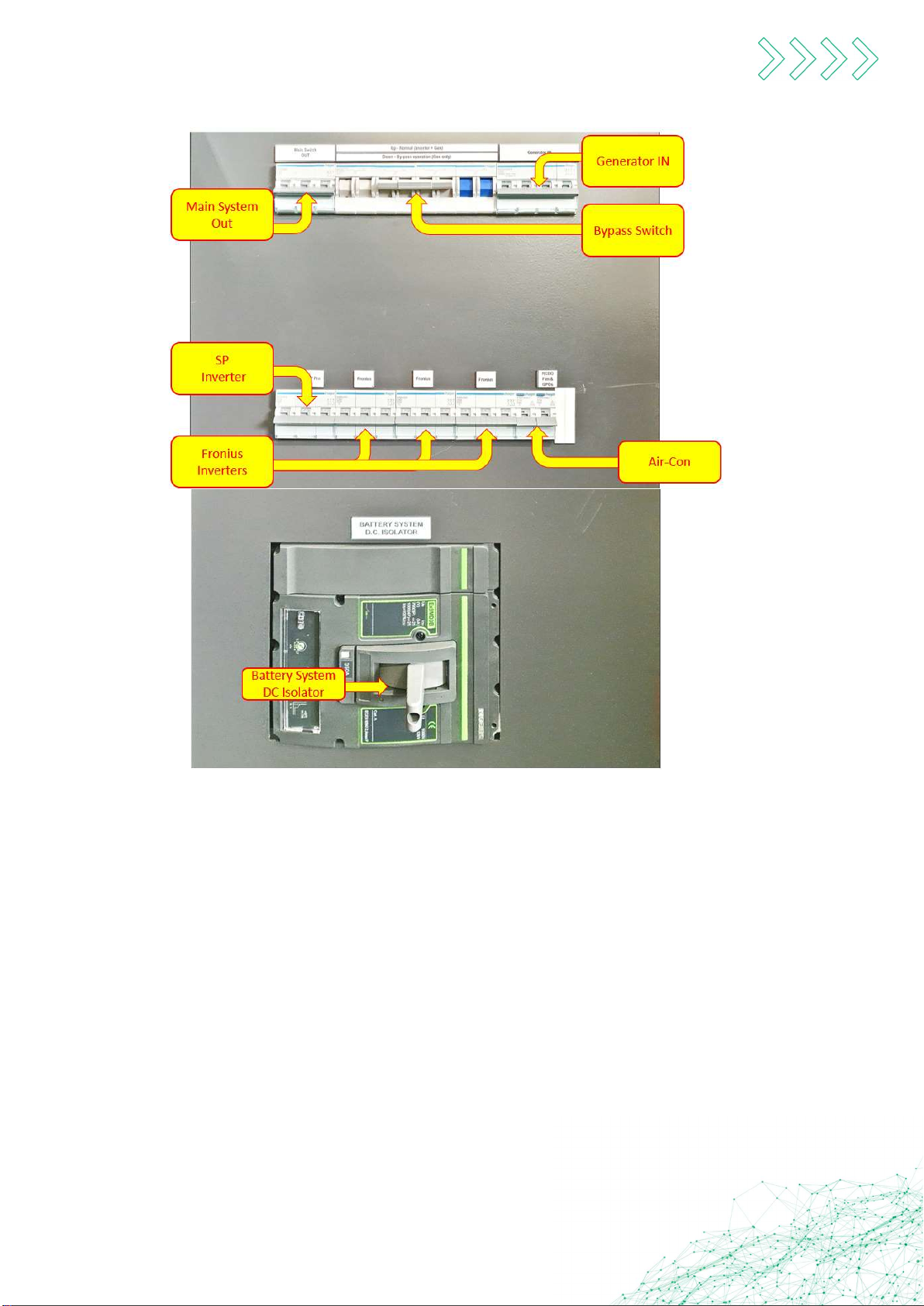
lockable doors. The “AC Switchgear” shown below contains all the AC
protective and isolation points as well as the changeover switch. Each
device is labelled for easy identification.
CopperHead | User Manual Jan 2023
RedEarth Energy Storage
For sales enquiries contact sales@redearth.energy
For technical support: support@redearth.energy
15 Fienta Place, Darra BRISBANE QLD 4076 | 1800 733 637 | www.redearth.energy
8
The switch gear in the front-left section is labelled for easy identification as shown below:
The 22.5kW CopperHead (3x7.5kW inverters) requires a minimum of 12 batteries (49.2kWh) up to 33 batteries (135kWh
nominal capacity). Each battery has a capacity of 4.1kWh.
An optional 15kW CopperHead is available (3x5kW inverters) can be provided with a minimum of 9 up to 33 batteries (4.1kWh
per battery), which provides from 36.9kWh to 135.3kWh nominal capacity.
The rear of the enclosure contains three bays of 19inch racks where the batteries are installed. Screws secure the batteries in
place.
NOTE: The CopperHead is usually shipped without the batteries Installed. When installing the batteries distribute them evenly
across the three racks, starting from the top.
Due to the characteristics of RedEarth’s TROPPO lithium battery, it is possible to install additional batteries in your system at a
later date. Please contact RedEarth to purchase extra TROPPO batteries.
The enclosure is pre-wired with battery cables for all 33 batteries via the built-In bus-bar system. This makes adding additional
batteries a simple process of plugging in the spare battery cables into the connectors on top of each battery and adding the
short earth wire that is provided.

CopperHead | User Manual Jan 2023
RedEarth Energy Storage
For sales enquiries contact sales@redearth.energy
For technical support: support@redearth.energy
15 Fienta Place, Darra BRISBANE QLD 4076 | 1800 733 637 | www.redearth.energy
9
CopperHead components and their
features
Battery inverter
The Selectronics SP Pro in your CopperHead operates as both an
inverter as well as a battery charger. It charges the batteries by
rectifying AC power, from the Fronius Solar inverters or
generator/grid, into DC power to charge the batteries. It also
inverts the batteries DC power into AC power to run your loads.
With many operating modes, our most popular is the "Self-Use"
mode. All the solar power produced will be prioritised to the
loads, the excess will be used to charge the battery and once the
battery is full, the solar will be ramped down to match the
remaining loads.
NOTE: In the event of critically low battery state of charge (SOC),
the inverter will use the generator/grid to support the loads until
sufficient solar power returns. In an "off-grid" application, this
means that the inverter will auto-start the generator. It can also
flash an emergency light if only a manual start generator is
installed.
The LEDs on the front of the SP Pro indicate the health and operational status of your system.
Refer to the ‘How to operate your CopperHead’ section for more details.

CopperHead | User Manual Jan 2023
RedEarth Energy Storage
For sales enquiries contact sales@redearth.energy
For technical support: support@redearth.energy
15 Fienta Place, Darra BRISBANE QLD 4076 | 1800 733 637 | www.redearth.energy
10
Solar inverter
RedEarth supplies Selectronics-certified Fronius inverters with the CopperHead.
The solar inverter converts the solar arrays DC power into usable AC power. This
will then directly power your home appliances first; excess power will then
charge your battery.
In an Off-grid installation, if the system has excess solar power available after the
loads are supplied and the batteries are full, then the incoming power from the
Fronius solar inverter is automatically scaled back.
The Fronius inverters performance can be monitored via the embedded display
or via the RedEarth EMU app.
Note: The use of Fronius inverters that are Selectronics-certified allows more
solar panels to be connected to the system (in off-grid applications or if the system is operating in back-up mode) This is because
a 2:1 ration of Fronius inverter rating to Selectronics inverter rating is allowed. If the solar inverter is not Selectronics-certified,
then only a 1:1 ratio is allowed.
By-pass feature
In the event of a system failure, the CopperHead is fitted with a three-position By-pass
switch, which can allow loads to be run directly from the generator (or grid).
The changeover switch has three positioning option: [1], neutral and [2].
In normal operation this switch is in the up position [1], and the Battery and PV inverter
are operating together and using the generator/grid if available.
By putting this switch down into position 2, the CopperHead will operate in “By-pass”
mode, meaning that the power will by-pass the inverters and “flow” from the
generator/grid directly to the loads.
The middle position is a neutral option, and not normally used. In this position all
terminals are disconnected, and no power will pass through the "By-pass" switch.
For more information, refer to the “How to operate your CopperHead” section in this manual.
Battery
Batteries are a critical part of the CopperHead system as they store energy
generated from the solar panels and back-up Generators or the grid. This power is
used when solar energy is not sufficient or available.
The battery bank has been sized to meet your requirements according to your Load
Profile and energy assessment. If your requirements grow it is easy to add
additional batteries in the future. Up to 33 batteries can be added. (33x4.1kWh =
135.3kWh)
The battery used in the CopperHead is RedEarth’s Australian Made Troppo-4841
lithium battery (LFP) with a nominal capacity of 4.1kWh.
Other manuals for CopperHead
1
Table of contents
Other RedEarth Industrial Equipment manuals