
Radio Shack 21-533 User manual

Cat. No. 21-533
OWNER’S MANUAL
Please read before using this equipment.
CB/Ham Field-Strength
SWR Meter
21-533.fm Page 1 Thursday, August 5, 1999 3:47 PM

© 1998 Tandy Corporation.
All Rights Reserved.
RadioShack is a registered trademark used by Tandy Corporation.
2
INTRODUCTION
Your RadioShack CB/Ham Field-Strength SWR Meter helps
you tune your CB or amateur radio system for the best per-
formance.
CB and amateur radio systems work best when the antenna
system’s impedance matches the transmitter’s output im-
pedance as closely as possible. The meter’s standing wave
ratio (SWR) function helps you trim your antenna to the pre-
cise length you need for the maximum transmitted power.
The meter’s field strength function helps you position your
antenna for the best coverage and determine the effective-
ness of changes you make to your antenna, antenna cable,
and transmitter.
Carefully read all of these instructions to get the best use
from this meter.
Warning: You can use this meter to make measurements
on equipment that uses high voltages. Carefully observe all
safety precautions provided with the equipment you are test-
ing.
Note: You need a separate 50-ohm coaxial cable (such as
RG-58U) with a PL-259 connector connected to both ends
(such as Cat. No. 278-968, not supplied), long enough to
reach from your radio’s antenna jack to the back of the
meter.
21-533.fm Page 2 Thursday, August 5, 1999 3:47 PM

3
CONTENTS
Measuring SWR . . . . . . . . . . . . . . . . . . . . . . . . . . . . . . . . . 4
Connecting the Meter . . . . . . . . . . . . . . . . . . . . . . . . . . 4
Calibrating the Meter/Measuring SWR . . . . . . . . . . . . . 5
Interpreting SWR Readings . . . . . . . . . . . . . . . . . . . 8
Improving SWR . . . . . . . . . . . . . . . . . . . . . . . . . . . . . . 9
Measuring Field Strength . . . . . . . . . . . . . . . . . . . . . . . . 10
Preparing the Antenna Site . . . . . . . . . . . . . . . . . . . . 11
Calibrating the Meter/Measuring Field Strength . . . . . 13
Using Field Strength Readings to Tune Your Radio
and Antenna . . . . . . . . . . . . . . . . . . . . . . . . . . . . . . . . 17
Care and Maintenance . . . . . . . . . . . . . . . . . . . . . . . . . . 19
Schematic Diagram . . . . . . . . . . . . . . . . . . . . . . . . . . . . . 21
Specifications . . . . . . . . . . . . . . . . . . . . . . . . . . . . . . . . . 22
21-533.fm Page 3 Thursday, August 5, 1999 3:47 PM

4
MEASURING SWR
Measuring SWR shows you how muchof your radio’stransmit
power is reflected from the antenna back into the antenna ca-
ble, generating heat and wasting power.With this information,
you can adjust the length of your antenna or antenna cable so
your antenna and radio combination can produce the maxi-
mum power they are capable of producing.
For more information about measuring SWR, see the
ARRL
Handbook
, available at your local library.
CONNECTING THE METER
To connect this meter to your CB or amateur radio and your
antenna, you need RG-58U coaxial cable (not supplied) with
a PL-259 connector on both ends (such as RadioShack Cat.
No. 278-968). The cable must reach from the back of the
meter to your radio’s antenna jack.
Follow these steps to connect the meter to your radio and an-
tenna.
21-533.fm Page 4 Thursday, August 5, 1999 3:47 PM

5
1. Turn off your radio. Then disconnect the antenna from
the radio and plug it into ANTENNA on the back of the
meter.
2. Plug the coaxial cable into the radio’s antenna jack and
into TRANSMITTER on the back of the meter.
CALIBRATING THE METER/
MEASURING SWR
1. Set CALIBRATION/FS/SWR on the front of the meter to
CALIBRATION/FS.
2. Turn on your radio. Then select a channel or frequency
on your transmitter and hold down its transmit key. Do
not
speak into the microphone.
Notes:
• An SWR reading will be different for different frequen-
cies (channels). If you transmit on one channel more
often than any other, select that channel. If you trans-
21-533.fm Page 5 Thursday, August 5, 1999 3:47 PM

6
mit on several channels, choose a frequency in the
middle of the range of channels you use. (For example,
if you transmit on all 40 CB channels, choose Channel
20, because it is midway between Channel 1 and
Channel 40.)
• If you use a CB that has sideband modes (SSB), do not
select any of these modes. (Use only AM for SWR
measurements).
• If you have an amateur radio, select the continuous
wave (CW) or tuning mode to check the SWR.
3. While you hold down the transmit key, rotate the meter’s
knob until the needle points to CAL.
4. Release the transmit key, then set CALIBRATION/FS/SWR
to SWR.
21-533.fm Page 6 Thursday, August 5, 1999 3:47 PM
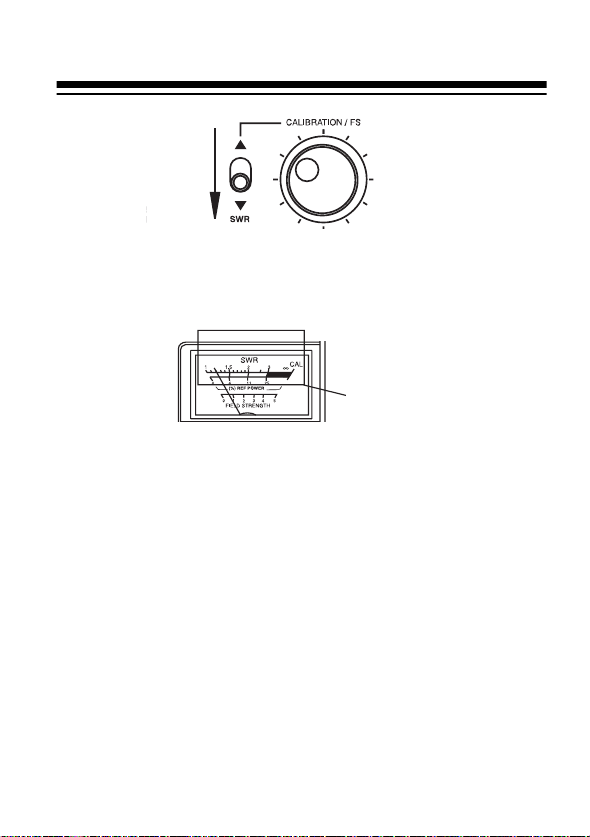
7
5. Press the transmit key again, then read the SWR by not-
ing the needle’s position on the upper SWR scale. A
meter reading of 1 on the upper scale is ideal.
The figure shown between the upper and lower scales on
the meter (% REF POWER) indicates the percentage of
power that is wasted through reflection of the signal from
the antenna back into the antenna cable. For example,
an SWR reading of 1.5 also means that 4% of your signal
power is lost. However, 96% of the radio power is more
than enough for almost all applications.
6. Repeat Steps 1–5 for each channel or frequency you
want to get an SWR reading for.
SWR Scales
21-533.fm Page 7 Thursday, August 5, 1999 3:47 PM

8
Interpreting SWR Readings
An ideal SWR reading is 1.0, but this reading is usually possi-
ble only under laboratory conditions orwith a dummy load.Ac-
tual antenna installations have higher readings. The in-
formation below will help you interpret the readings you get.
SWR Efficiency Interpretation
1.0 to 1.5 Excellent The antenna cable and the
antenna length match the
transmitter’s output require-
ments almost perfectly.
1.5 to 2.0 Very good The antenna, the cable, and
the transmitter operate very
efficiently.
2.0 to 3.0 Acceptable The antenna, the cable, and
the transmitter operate with
some loss. If possible, adjust
your antenna or antenna
mounting system to improve.
Above 3.0 Inefficient Adjust your antenna or
antenna mounting system to
improve efficiency.
21-533.fm Page 8 Thursday, August 5, 1999 3:47 PM

9
IMPROVING SWR
There are several ways to improve the SWR of your radio/an-
tenna combination. Try these first.
• Be sure you are using the type of cable recommended for
your equipment. If the manufacturer recommends a 50-
ohm cable, do not substitute another type that has a dif-
ferent impedance.
• Confirm that you mounted your antenna according to the
manufacturer’s instructions. The angle and the base
arrangement can affect the SWR reading.
• Adjust the length of your antenna according to the
instructions provided by the manufacturer. A change of
as little as 1/8inch can make a measurable difference.
• See your radio’s and antenna’s owner’s manuals.
21-533.fm Page 9 Thursday, August 5, 1999 3:47 PM

10
MEASURING FIELD STRENGTH
Your metercan measure the low levels of radio frequency (RF)
generated by a radio transmitter. You can use these measure-
ments to map the transmitting direction and coverage pattern
of your antenna, or to compare your radio and antenna’s effi-
ciencybefore and afteran adjustment. You donot needto con-
nect the meter to the antenna or the radio to measure field
strength.
It takes two people to measure field strength. For an accurate
measurement, you willneed to map the site around your anten-
na. Then, while someone presses the radio’s transmit key, you
will need to walk around the site around your antenna with the
meter, marking the readings you see.
Hints:
• In addition to the meter, we recommend you use the fol-
lowing items to help you measure field strength:
— Several photocopies of the template on Page 11
— 36 objects such as rocks or weighted pieces of paper
— 25 feet of rope or strong cord
— Calculator
— Pencil
— Compass
•Make sure there is at least 25 feet of open space in all
directions around your antenna.
21-533.fm Page 10 Thursday, August 5, 1999 3:47 PM
Table of contents
Other Radio Shack Measuring Instrument manuals

Radio Shack
Radio Shack 22-811 User manual

Radio Shack
Radio Shack 33-2055 User manual

Radio Shack
Radio Shack 21-534 User manual

Radio Shack
Radio Shack 33-2055A User manual

Radio Shack
Radio Shack Sound Level Meter User manual

Radio Shack
Radio Shack TRS-80 User manual

Radio Shack
Radio Shack 22-601 User manual

Radio Shack
Radio Shack Sound Level Meter User manual


