QED ODORGAS User manual

OMODORGAS Iss 01
Page 1 of 20
ODORGAS
Digital instrument for Odorant measurement.
For professional use only

OMODORGAS Iss 01
Page 2 of 20
Contents
EU Declaration of Conformity ............................................................................... 3
Warnings ATEX ................................................................................................. 4
General Description ........................................................................................... 4
Safety Instructions ............................................................................................ 5
Overview of the instrument ................................................................................. 6
User Interface ............................................................................................ 6
Battery Charger Connections ........................................................................... 7
Display ..................................................................................................... 7
Instrument functions .......................................................................................... 8
Switch On ................................................................................................. 8
Switch OFF ................................................................................................ 8
Pump Function ........................................................................................... 8
Backlight .................................................................................................. 8
TAKING READINGS ............................................................................................. 9
Measuring and storing readings ........................................................................ 9
Recommended accessories ................................................................................. 11
RC-1 Adapter for high pressure & flow. ............................................................. 11
Odorsoft Download PC software. H-707068 ......................................................... 11
Function Key Menu .......................................................................................... 13
User calibration ......................................................................................... 13
Escape Option ........................................................................................... 14
To alter the passcode? ................................................................................. 15
WARRANTY ................................................................................................... 15
APPENDIX A – Safe Use of The Instrument ............................................................... 16
Other precautions for the usage ........................................................................ 16
Testing and maintenance ................................................................................ 16
Repair .................................................................................................... 17
Conformity ............................................................................................... 17
APPENDIX B – Technical Specifications ................................................................... 18
APPENDIX C - Information On Disposal For Users Of Waste Electrical & Electronic Equipment . 19

OMODORGAS Iss 01
Page 3 of 20
E U D e c l a r a tio n of C o n f o r m i ty

OMODORGAS Iss 01
Page 4 of 20
W a rnin g s A T EX
The operating manual must be read and fully understood before using the equipment
This warning is in place so that the operator fully understands the product and its use within
the application.
Battery must be replaced in a non-hazardous, safe area
Do not charge the device in a hazardous area OR only charge in a non-hazardous, safe area
Battery charging and communication (USB) must only be done in a non-hazardous, safe area
with adapter
Do not use any other charging device
Do not open the device
Only the manufacturer or its authorised representatives can open the device for maintenance
and repair
Unauthorised opening of the device invalidates the integrity, certification and guarantee of the
product
Special conditions for safe use
The equipment is intended to be used in ambient temperatures range from -20°C to
+40°C. / -4°F to +104°F
Data communication shall be performed in non-hazardous area with the appropriate
accessory. Recharging of the equipment is only allowed in non-explosive environments by
using the original recharging equipment.
For maintenance or repair purposes the equipment may only be opened by the
manufacturer
G e ne r a l De s c r i p ti o n
The ODORGAS is a hand-held digital gas detection instrument manufactured by QED
Environmental Systems Ltd. The intended use of the ODORGAS is to measure concentrations of
odorants in piped gas network applications.
The primary odorant measured is THT (Tetrahydrothiophene), the instrument is available with or
without an integral pump.
With an internal memory for data storage of up to 3,000 readings, size of 145 x 70 x 33 mm / 5.7
x 2.75 x 1.3 inches and a weight of 350g / 12.34 Oz, the ODORGAS is an excellent and convenient
instrument for measuring odorants.
ODORGAS has been certified with the intrinsic safety protection mode and has obtained the
following marking:
II 2G Ex ib d IIC T4 Gb

OMODORGAS Iss 01
Page 5 of 20
Sa f e t y I n st r u c ti on s
It is the responsibility of the owner of the equipment to ensure that all personnel are adequately
trained and the equipment is serviced and maintained in accordance with the applicable code of
practice and this operating manual.
It is the responsibility of the owner to ensure that all personnel are adequately trained in the
safety aspects of the gases being surveyed and appropriate procedures are followed.
The equipment should not be altered in any way other than described within this operating
manual. Alterations or changes outside of this operating manual could make the equipment
unsafe and invalidate the hazardous area certification.
Repair and maintenance of this equipment should be carried out in accordance with the
applicable code of practice and this operating manual.
Only QED approved components are to be used with this equipment.

OMODORGAS Iss 01
Page 6 of 20
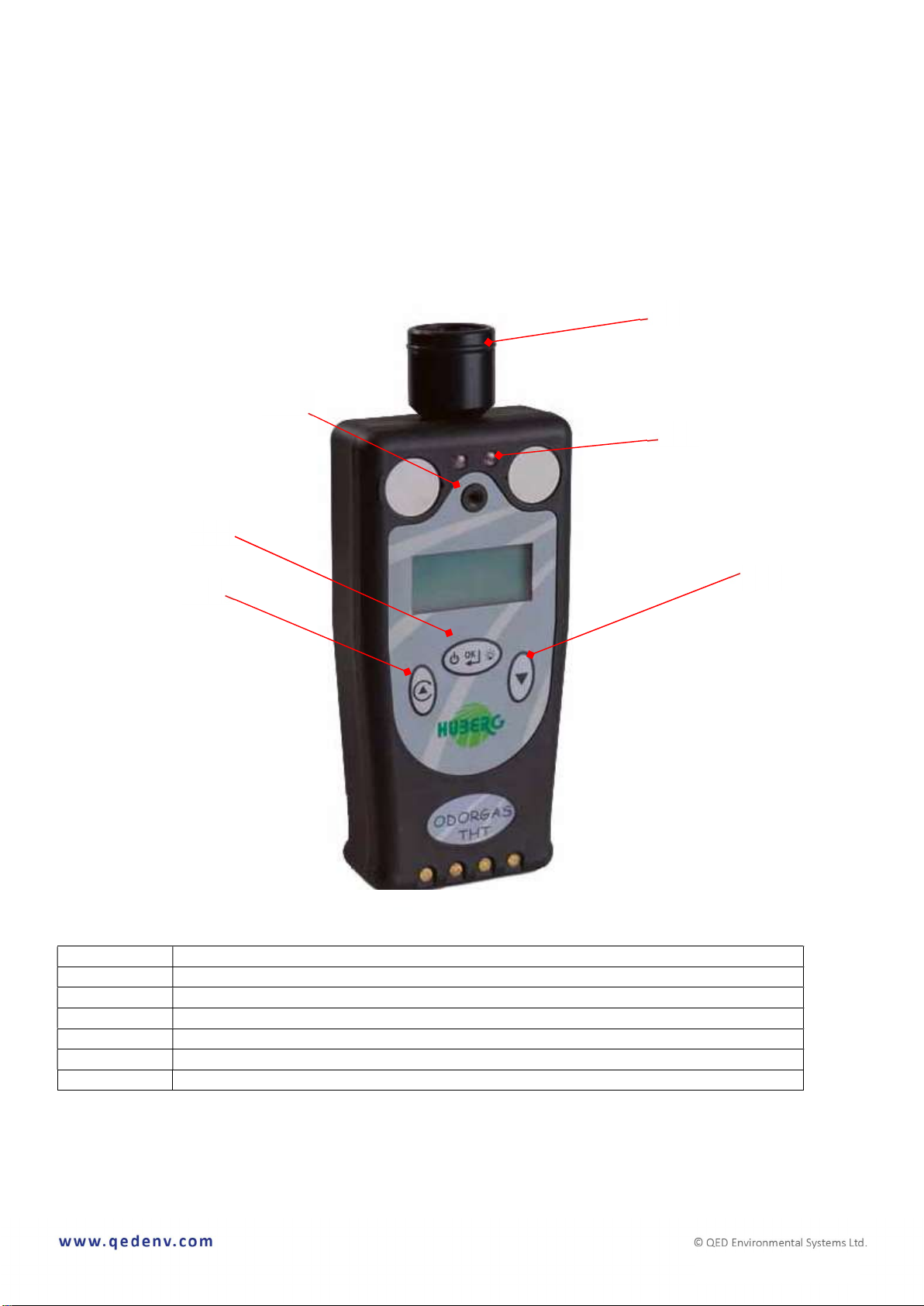
O v e rv ie w o f t h e i n s t r u m e n t
User Interface
Description
[1]
ON/OFF button +
Backlight + Enter key
[2]
Function button
[3]
Scroll Key
[4]
Buzzer
[5]
LED Alarm Lights
●●
[6]
Gas inlet port
1b
[1]
[2] [3]
[4]
[5]
[6]
1a

OMODORGAS Iss 01
Page 7 of 20
Battery Charger Connections
The ODORGAS comes complete
with its own charging base. Simply
locate the ODORGAS into the
charging cradle and switch on the
power supply.
Display
SECTOR
DESCRIPTION
[A]
Pump status
[B]
Battery status
[C]
Unit of measurement
[D]
Odorant type
[E]
Measurement of
Odorant
2b
[A]
[
B
]
[C]
[D]
[E]
2a

OMODORGAS Iss 01
Page 8 of 20
I n s t ru m e n t f u nc t i o n s
Switch On
Press the ON/OFF [1] button for 2
seconds, until the display is activated.
The start sequence includes several steps:
- Display check.
- Information about the firmware
version of the instrument, serial
number of the instrument and next
calibration date.
The instrument will warm up and calibrate
itself. This typically will take up to 30
seconds. The instrument’s functions are not
available during the warm up period.
Once the warm up and calibration are
complete, the two LED lights ●● [5] will
blink and the alarm will sound.
The ODORGAS is now ready for use.
Switch OFF
Press and hold the ON/OFF key for a few seconds.
A counter on the display will count down from 4 to 0 and the instrument will then power down.
You must hold the ON/OFF key for the duration of the count down.
Pump Function
The pump (if fitted) will automatically begin to run when the instruments enters its main read
screen.
Backlight
To operate the backlight, short-press the ON/OFF key once.

OMODORGAS Iss 01
Page 9 of 20
T A KI NG RE A D IN G S
Measuring and storing readings
To begin the measurement process,
press and hold the function key.
The screen will display these symbols.
Press the ON/OFF key to begin the
measurement process.
If successfully measuring, the screen
will display two arrows moving in a
circular motion.
The reading process will take
approximately 4 minutes.
Once the reading cycle is complete, the
two LED lights ●● [5] will flash and the
buzzer [4] will sound intermittently.

OMODORGAS Iss 01
Page 10 of 20
The user will be prompted to save the
reading against an identification
number.
At the identification number prompt,
the digit ready to be altered will flash.
To change the number, use the scroll
key.
To move to the next number, use the
function key.
To store the reading, short-press the
ON/OFF key.
Table of contents
Other QED Measuring Instrument manuals