
Power Fist 8727521 User manual

V4.0 8727521
Please read and understand all instructions before use. Retain this manual for
future reference.
User Manual
DigitalMoistureMeter

8727521 Digital Moisture Meter V4.0
2 For technical questions call 1-800-665-8685
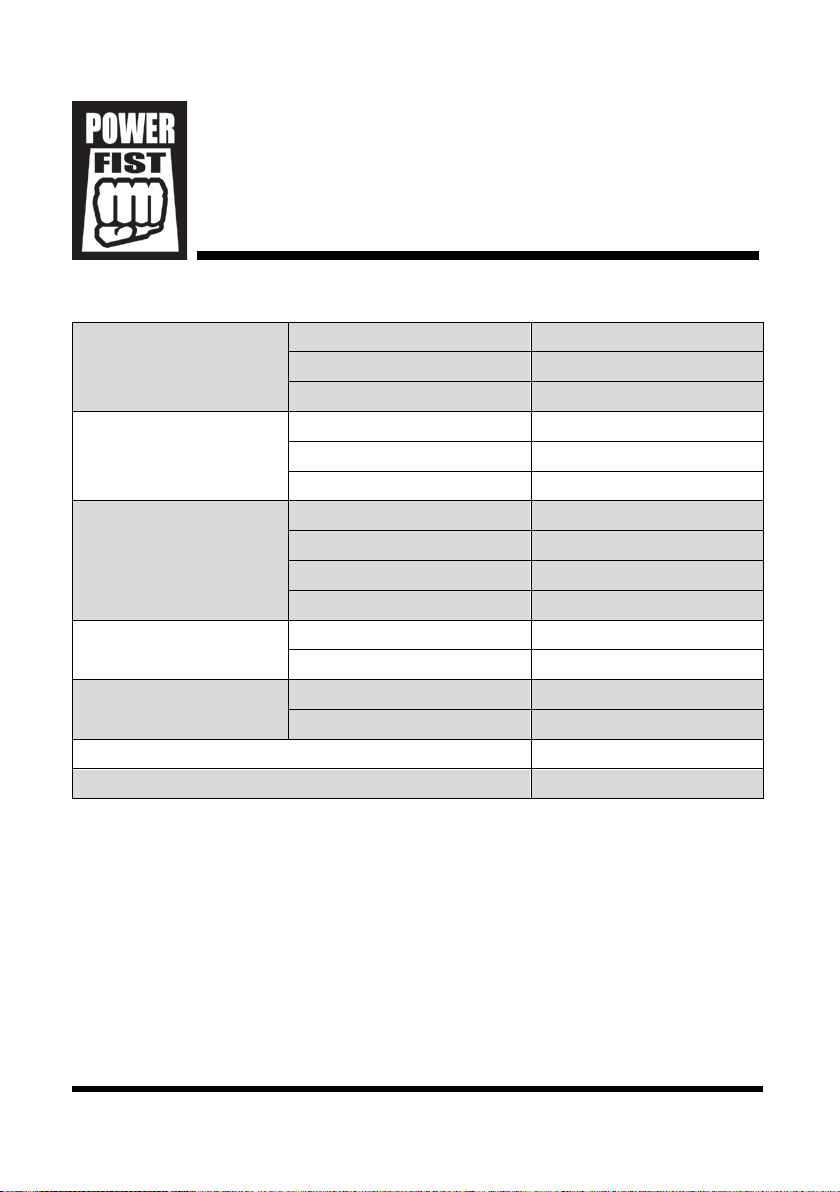
SPECIFICATIONS
Measurement Range Wood 6~42%
Hard Material 0.2~2.0%
Ambient Temperature 0~40ºC (32~99ºF)
Resolution Wood 1%
Hard Material 0.1%
Temperature 1ºC/2ºF
Accuracy
Wood < 30% ±2%
Wood ≥ 30% ±4%
Material < 1.4% ±0.1%
Material ≥ 1.4% ±0.2%
Operating Environment Temperature 0°C ~ 40°C
Relative Humidity < 85%
Storage Environment Temperature -10°C ~ 50°C
Relative Humidity < 85%
Auto Power Off Yes
Battery 1.5V LR44 x 4
INTRODUCTION
The Digital Moisture Meter can measure the moisture level in lumber, also paper
or cardboard. Measuring hard materials like mortar, concrete and plaster is also
possible. The tool also has the option to directly measure the environmental
temperature.
DigitalMoistureMeter

V4.0 Digital Moisture Meter 8727521
Visit www.princessauto.com for more information 3
SAFETY
WARNING! Read and understand all instructions before using this tool. The
operator must follow basic precautions to reduce the risk of personal injury
and/or damage to the equipment.
Keep this manual for safety warnings, precautions, operating or inspection and
maintenance instructions.
HAZARD DEFINITIONS
Please familiarize yourself with the hazard notices found in this manual. A notice
is an alert that there is a possibility of property damage, injury or death if certain
instructions are not followed.
DANGER! This notice indicates an immediate and specific hazard that will
result in severe personal injury or death if the proper precautions
are not taken.
WARNING! This notice indicates a specific hazard or unsafe practice that
could result in severe personal injury or death if the proper
precautions are not taken.
CAUTION! This notice indicates a potentially hazardous situation that may result
in minor or moderate injury if proper practices are not taken.
NOTICE! This notice indicates that a specific hazard or unsafe practice will
result in equipment or property damage, but not personal injury.
WORK AREA
1. Operate in a safe work environment. Keep your work area clean, well-lit
and free of distractions. Place lights so you are not working in a shadow.
2. Keep anyone not wearing the appropriate safety equipment away from the
work area.
3. Store unused tools properly in a safe and dry location to prevent rust or
damage. Lock tools away and keep out of the reach of children.

8727521 Digital Moisture Meter V4.0
4 For technical questions call 1-800-665-8685
PERSONAL SAFETY
WARNING! Wear personal protective equipment approved by the Canadian
Standards Association (CSA) or American National Standards Institute (ANSI).
PERSONAL PROTECTIVE EQUIPMENT
1. Wear gloves that provide protection based on the work materials or to
reduce the effects of tool vibration.
2. Wear protective clothing designed for the work environment and tool.
PERSONAL PRECAUTIONS
Control the tool, personal movement and the work environment to avoid
personal injury or damage to tool.
1. Do not operate any tool when tired or under the influence of drugs, alcohol
or medications.
2. Do not overreach when operating a tool. Proper footing and balance
enables better control in unexpected situations.
SPECIFIC SAFETY PRECAUTIONS
WARNING! DO NOT let comfort or familiarity with product (gained from
repeated use) replace strict adherence to the tool safety rules. If you use
this tool unsafely or incorrectly, you can suffer serious personal injury.
1. Use the correct tool for the job. This tool was designed for a specific function.
Do not modify or alter this tool or use it for an unintended purpose.
a. The measurement value displayed may require correction due to
factors such as the material type and the temperature when the
reading was taken. This tool is not appropriate for inspections or
reference purposes.
2. Do not use the tool if any parts are damage broken or misplaced. Repair or
replace the parts.
3. Keep the instrument dry.
4. Keep the probe tines (B) clean of dirt and sap.
5. Replace the batteries when the battery symbol (H) appears on the LCD (C).

V4.0 Digital Moisture Meter 8727521
Visit www.princessauto.com for more information 5
UNPACKING
WARNING! Do not operate the tool if any part is missing. Replace the
missing part before operating. Failure to do so could result in a malfunction
and personal injury.
Remove the parts and accessories from the packaging and inspect for damage.
Make sure that all items in the contents are included.
Contents:
• Moisture Meter • Probe Cover
IDENTIFICATION KEY
A Probe Cover
B Probe Tines
C Liquid Crystal Display (LCD)
D Button
E Battery Compartment
F Reading
G Material Moisture
Measurement
H Battery Power Indicator
I Wood Moisture Measurement
J Percentage of Moisture
K Temperature Measurement (Fahrenheit or Celsius)
OPERATION
Letter references in parenthesis (A) refer to the included Identification Key.
SELECT MEASUREMENT MODE
1. Press the button (D) once to turn the tool ON.
2. Press and hold the button down for about 3 seconds to enter Settings
Mode. The reading will disappear and the displayed symbols will start
to flicker.

8727521 Digital Moisture Meter V4.0
6 For technical questions call 1-800-665-8685
3. Press the button repeatedly until the desired measurement mode symbol
flickers on the display. The four measurement modes are as follows:
a. Wood Moisture (I)
b. Material Moisture (G)
c. Celsius Temperature (K). A C will appear.
d. Fahrenheit Temperature (K). An F will appear.
4. Wait 3 seconds after the measurement mode is selected. The tool will
automatically exit the setting mode.
USING THE PROBE
1. Selecting the temperature measurement (K) will display the current
environment’s temperature.
2. Select the moisture measurement for wood (I) or a hard material (G). The
selection must match the type of material for a proper reading.
3. Push the probe tines (B) into the wood or material. The reading (E) will
display. The measurement only applied to the material in direct contact
with the tines. Multiple measurements in different parts of the material is
recommended for a better idea of the material’s moisture level.
4. Remove the tines and wipe clean immediately to remove debris such as
dirt, wood chips or sap.
AUTOMATIC POWER FEATURES
1. The tool will switch OFF after 15 seconds of inactivity or no change in
the measurement, when in wood moisture or material moisture
measurement mode.
2. The tool will switch OFF automatically about 15 seconds after a reading
in Fahrenheit or Celsius measurement mode.
3. The tool will switch off automatically 15 seconds after the battery
symbol appears on the display. Replace the batteries.
4. Pressing the button (D) after the tool is on will activate the backlight.
The backlight will remain on about 3 seconds before automatically
switching off.

V4.0 Digital Moisture Meter 8727521
Visit www.princessauto.com for more information 7
CARE & MAINTENANCE
1. Maintain the tool with care. A tool in good condition is efficient, easier to
control and will have fewer problems.
2. Inspect the tool components periodically. Repair or replace damaged or
worn components. Only use identical replacement parts when servicing.
3. Maintain the tool’s labels and name plates. These carry important information.
If unreadable or missing, contact Princess Auto Ltd. for replacements.
4. Replace the batteries when the battery symbol (H) appears on the LCD. Ensure
that battery polarity connections are correct when replacing batteries.
5. Remove the batteries if storing the tool for a long time.
WARNING! Only qualified service personnel should repair the tool. An
improperly repaired tool may present a hazard to the user and/or others.
DISPOSAL
Recycle a tool damaged beyond repair at the appropriate facility.
Contact your local municipality for a list of disposal facilities or by-laws for
electronic devices, batteries, oil or other toxic liquids.
TROUBLESHOOTING
Visit a Princess Auto Ltd. location for a solution if the tool does not function
properly or parts are missing. If unable to do so, have a qualified technician
service the tool.

8727521 Digital Moisture Meter V4.0
8 For technical questions call 1-800-665-8685

V 4,0 8727521
Vous devez lire et comprendre toutes les instructions avant d'utiliser l'appareil.
Conservez ce manuel afin de pouvoir le consulter plus tard.
Manuel d'utilisateur
Humidimètrenumérique
8727521 Humidimètre numérique V 4,0
2 En cas de questions techniques, appelez le 1-800-665-8685
SPÉCIFICATIONS
Plage de lecture Bois 6~42 %
Matériau dur 0.2~2.0 %
Température ambiante 0~40 ºC (32~99 ºF)
Résolution Bois 1 %
Matériau dur 0,1 %
Température 1 ºC/2 ºF
Exactitude Bois < 30 % ±2 %
Bois ≥ 30 % ±4 %
Matériau < 1,4 % ±0,1 %
Matériau ≥ 1,4 % ±0,2 %
Environnement
d'exploitation
Température 0°C ~ 40°C
Humidité relative < 85%
Environnement de
stockage
Température -10°C ~ 50°C
Humidité relative < 85%
Mise hors tension automatique Oui
Pile 1,5 V LR44 x 4
INTRODUCTION
L’humidimètre numérique peut mesurer le taux d’humidité du bois, du papier ou
du carton. La mesure des matériaux durs comme le mortier, le béton ou le
plâtre est aussi possible. L’appareil vous permet aussi de mesurer directement
la température ambiante.
Humidimètrenumérique
Table of contents
Languages:
Other Power Fist Measuring Instrument manuals


