
MYIRO MYIRO-1 User manual

Spectrophotometer
En Instruction Manual
Please read before using the
instrument.
Scan the 2D code to access the most
recent instruction manual.
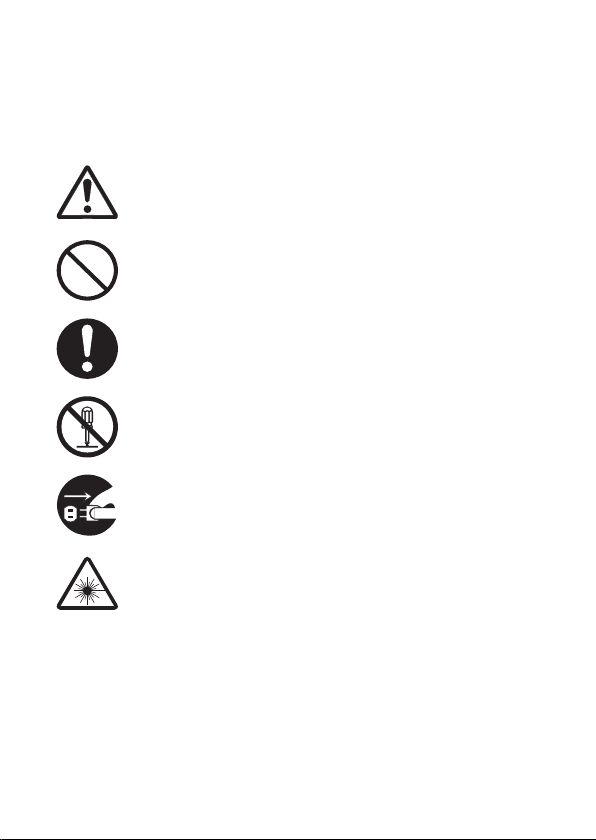
Safety Symbols
The following symbols are used in this manual to prevent accidents that
may occur because of incorrect use of the instrument.
Denotes an instruction regarding a safety warning or note.
Read the instruction carefully to ensure safe and correct
use.
Denotes a prohibited operation.
This operation must never be performed.
Denotes an instruction.
This instruction must be strictly adhered to.
Denotes a prohibited operation.
Never disassemble the instrument.
Denotes an instruction.
To turn the power OFF, unplug the USB cable from the
connected device.
Denotes a warning about the LED.
Read the instruction carefully to ensure safe and correct
use.

Notes on this Manual
• Copying or reproduction of all or part of the contents of this manual
without the permission of THE MANUFACTURER OF THIS PRODUCT is
strictly prohibited.
• The contents of this manual are subject to change without prior notice.
• Every eort has been made in the preparation of this manual to ensure
the accuracy of its contents. However, should you have any questions or
find any errors, please contact your retailer.
• THE MANUFACTURER OF THIS PRODUCT will not accept any
responsibility for consequences arising from the use of the instrument.

1
Safety Precautions
To ensure correct use of this instrument, read the following points carefully and
adhere to them. After you have read this manual, keep it in a safe place where it
can be referred to anytime a question arises.
WARNING (Failure to adhere to the following points may result in death or serious injury.)
Do not use the instrument in places where flammable or combustible
gases (gasoline, etc.) are present. Doing so may cause a fire.
Do not disassemble or modify the instrument.
Doing so may cause a fire or electric shock.
Do not allow liquid or metal objects to enter the instrument. Doing so
may cause a fire. Should liquid or metal objects enter the instrument,
turn the power OFF immediately, disconnect the USB cable and
contact your retailer.
Do not forcibly bend, twist, or pull the USB cable. Also, do not scratch,
fabricate, or place heavy objects on the USB cable. Doing so may
damage the USB cable and cause a fire or electric shock.
The instrument should not be operated if it is damaged, or if smoke or
odd smells occur. Doing so may cause a fire. If smoke, odd smells, or
damage occurs, turn the power OFF immediately, disconnect the USB
cable from the connected device, and contact your retailer.
Always hold the USB cable plug itself when disconnecting the USB
cable. Pulling on the cable may damage it and cause a fire or electric
shock.
Do not insert or disconnect the USB cable with wet hands. Doing so
may cause electric shock.

2
WARNING (Failure to adhere to the following points may result in death or serious injury.)
If the instrument will not be used for a long time, disconnect the USB
cable. Accumulated dirt or water on the USB cable connector may
cause a fire. Clean o any dirt or water on the USB cable connector
before use.
Firmly push the USB cable completely into the socket. Incomplete
insertion may cause a fire or electric shock.
If the instrument is found to be leaking or emitting an unusual odor,
keep the instrument away from any open flames. The electrolytic
solution from the battery may catch fire, causing rupture or fire.
Do not place lenses, reflective objects, or optical elements in the path
of the UV-LED. Doing so may cause the light from the LED to become
concentrated, which may cause injury to the eyes or burning. In
addition, the back of the object should be blocked by a wall or other
object capable of blocking the LED, thus preventing the above from
happening inadvertently.
Do not look directly into the LED light (including the beam, marker,
and projection window). Doing so may injure the eyes.
Be sure to turn the instrument OFF in areas where use is prohibited,
such as in airplanes or hospitals. Using the instrument in such areas
may aect the electronics and medical equipment, which may cause
an accident.

3
CAUTION (Failure to adhere to the following points may result in injury or damage to the
instrument or other property.)
Take care not to pinch yourself on the areas of the instrument that
open and close. Doing so may result in injury.
Do not use the instrument if the limiting aperture (measuring port) is
in the line of sight. Doing so may result in injury to the eye.

4
Table of Contents
Safety Symbols ................................................................................................ i
Notes on this Manual .................................................................................. ii
Safety Precautions.......................................................................................... 1
Introduction ................................................................................................... 5
Notes on Use .................................................................................................. 5
Standard Accessories.................................................................................... 10
Optional Accessories .................................................................................... 11
System Diagram ........................................................................................... 12
Names and Functions of Parts ....................................................................... 13
Charging ...................................................................................................... 15
Connecting to a Computer............................................................................ 16
Turning the Power ON/OFF .......................................................................... 17
Calibration ................................................................................................... 18
Calibration Method....................................................................................... 19
Measurement ............................................................................................... 20
Scan Measurement................................................................................... 20
Spot Measurement ................................................................................... 22
Display Measurement (Brightness Measurement)..................................... 23
Ambient Light Measurement .................................................................... 23
Cleaning the Protection Glass ....................................................................... 24
Storage Method............................................................................................ 26
Troubleshooting ........................................................................................... 27
Specifications............................................................................................... 29
Dimensions .................................................................................................. 32

5
The MYIRO-1 is a compact, lightweight hand-held spectrophotometer
designed for measuring color and density in the printing and digital imaging
industries with just one device.
Packing materials of the product
Be sure to keep all packing materials used for shipping the product
(cardboard box, cushioning material, plastic bags, etc.). This instrument is a
precision measuring instrument. When transporting the instrument to a
service facility for maintenance or for other reasons, be sure to use the
packing materials to minimize shock or vibration. If the packing materials
are lost or damaged, contact your retailer.
Notes on Use
Operating Environment
• Use the instrument at an ambient temperature of between 10°C and 35°C
and a relative humidity of between 30% and 85% with no condensation.
• Be sure to use the instrument within this range. Do not use it in areas of rapid
temperature changes.
• Do not leave the instrument in direct sunlight or near heat sources such as a
stove. Doing so may cause the internal temperature of the instrument to
become much higher than the ambient temperature.
• Do not use the instrument in areas where dust, cigarette smoke, or chemical
gases are present. Doing so may cause deterioration in performance or a
malfunction.
• Do not use the instrument near equipment that produces a strong magnetic
field (such as speakers).
• The instrument is a pollution level 2 product (equipment that may cause
temporary electrical hazards due to contamination or condensation or
products that are used in such an environment).
• Do not use the instrument at altitudes higher than 2,000 m.
• This instrument has been designed exclusively for indoor use. It should
never be used outdoors because rain or other factors may damage the
instrument.
Introduction

6
Measurement
• Make sure no dust gets into the instrument ports.
• When not using the instrument for a long period of time, remove the limiting
aperture, and blow o dirt or dust on the protection glass with a blower
before use.
• Over extended periods of use, changes in the surrounding environment may
result in the measured values shifting. Performing calibration periodically is
recommended to ensure measurements are accurate.
White Calibration Plate
• Make sure the white calibration plate being used includes the same serial
number as that of the instrument being used.
• The calibration data for the white calibration plate was measured at 23°C.
• To achieve the highest accuracy when measuring absolute values
(colorimetric values), calibration and measurement should be performed at
23°C.
• Do not allow the white calibration plate to become scratched or dirty.
• When the calibration cap is not in use, keep the white calibration plate away
from external light and dust.
Ruler
• The sliding surface has a special coating that facilitates sliding. If there is
dust or dirt on the ruler, use a blower to blow it o or gently wipe it with a
soft, clean dry cloth. Never use solvents such as thinner or naphtha.

7
Ambient Light Adapter
• Make sure the ambient light adapter being used includes the same pairing
number as that of the instrument being used.
• Do not allow the ambient light adapter to become scratched or dirty.
• Keep the ambient light adapter away from external light and dust when not
in use.
Power Source
• When the instrument is not being used, turn the power switch OFF.
• To charge the instrument, connect it to a computer using the USB cable.
System
• Do not subject the instrument to strong vibrations or impacts. Doing so may
cause deterioration in performance or a malfunction.
• The limiting aperture (measuring port) of this instrument is a particularly
precise component of the optical system. Do not allow the aperture to
become dirty or subject the aperture to impacts. When the instrument is not
in use, make sure to attach the calibration cap to protect the limiting
aperture (measuring port).
• The instrument may cause interference if used near a television, radio,
transceivers, etc.
• Communication with connected external devices may be interrupted if the
instrument is exposed to strong external static electricity. In such cases, turn
the power OFF and then ON again.
• When turning the power OFF and then ON again, wait several seconds after
turning the power OFF before turning the power back ON.
Table of contents


