
Haglof DP II User manual

Doc: Exhibit 8, User manual
Product: Digitech Professional II
FCC ID: 2AA WDPII

1
© Haglöf Sweden 2014
User Guide
The Digitech Professional II
Version 1.0
Revised: 2014-01-14

Contents
User Guide..................................................................................................... 1
Version 1.0........................................................................................................ 1
The Digitech Professional
II (DP II .............................................................. 1
Digitech Professional II .................................................................................. 2
System Descri tion DP II................................................................................ 6
Com uter Terminal ........................................................................................ 7
Detachable Computer Terminal ............................................................................ 8
How to Assemble the Computer Terminal............................................................ 8
How to Assemble the Computer Terminal............................................................ 9
How to Disassemble the Computer Terminal........................................................ 9
The Buttons on the Keyboard..............................................................................10
Example Multi Function Button..........................................................................10
DP Radio Button................................................................................................11
Changing the Battery ......................................................................................11
Synchronizing the DP Radio Enter Button ...........................................................11
Turn off/on the DP Radio Function.....................................................................11
Synchronization with the DP II Smart Scale ..........................................................12
Display.............................................................................................................12
Battery Indicator.............................................................................................12
Charging the Computer Terminal.........................................................................13
How to Charge................................................................................................14
PC Communication ............................................................................................15
Connection to PC...............................................................................................15
BLUETOOTH®...............................................................................................16
Master .............................................................................................................16
Look for other devices........................................................................................16
Pair (BONDING ................................................................................................16
PC ...................................................................................................................16
Example: Send File to the Computer Terminal with Bluetooth® ............................17
Program........................................................................................................18
Older programs ..............................................................................................18
Updating programs .........................................................................................18
Transfer programs to the DP II .........................................................................18
Activate the program license ............................................................................19
Starting a new program ...................................................................................19
Upgrading the BIOS ........................................................................................20
Angle Measuring ...........................................................................................21
Calibrating the inclinometer .............................................................................21
Calibrate the zero angle (0 ................................................................................21
System menus...............................................................................................22
RESET..............................................................................................................22

LANGUAGES .....................................................................................................22
START..............................................................................................................22
SELECT PROGRAM .............................................................................................22
Delete all .......................................................................................................22
LICENSE ........................................................................................................22
Delete program ..............................................................................................23
Files ................................................................................................................23
File expolorer menu ........................................................................................23
File list ..........................................................................................................23
USB ..............................................................................................................24
Information....................................................................................................24
Receive file ....................................................................................................24
FORMAT C:> ..................................................................................................24
Settings ...........................................................................................................25
Serial port ........................................................................................................25
Bluetooth® ....................................................................................................25
Com cable......................................................................................................25
Language .........................................................................................................25
Contrast...........................................................................................................25
CLOCK .............................................................................................................25
Calibrate ..........................................................................................................25
Test Menu .....................................................................................................26
Scale ...............................................................................................................26
Long timer 600 .................................................................................................26
No timer...........................................................................................................26
Read Time ........................................................................................................26
AD-channels .....................................................................................................26
Backlight..........................................................................................................26
Charger info .....................................................................................................26
Flashdisc c:> ....................................................................................................26
Blue terminal ....................................................................................................26
DP II Smart Scale ..........................................................................................27
Unique jaw design .............................................................................................28
Robust Design...................................................................................................28
Rechargeable Batteries - Environmental Concern...................................................29
Charging the DP II Smart Scale ........................................................................30
Foldable Jaws .................................................................................................31
How to adjust jaws angle .................................................................................32
Handle lock ....................................................................................................32
Adjusting the Handle .......................................................................................33
Calibration........................................................................................................33
Controlling the DP II Smart Scale ........................................................................34
Maintenance .................................................................................................34
Technical S ecification.................................................................................35
Packet Contents............................................................................................36
Product and Safety S ecifications ................................................................37
Regulatory compliance FCC statement .................................................................37
Note..............................................................................................................37
CAUTION .......................................................................................................37

European compliance statement..........................................................................37
Juridical information .....................................................................................38
Haglöf Sweden® ...........................................................................................39

DP II Version 1.0/JN
User Manual
Revision: 2014-01-14
1
© Haglöf Sweden 2014
The Digitech Professional
II (DP II
The DP II caliper incorporates the experience and know-how from Haglöf
Sweden’s over 70 years of developing and manufacturing professional
field measuring instrument solutions for use in forests all over the world.
Our long experience combined with great innovation capacity and new
ideas have resulted in this revolutionary computer caliper. The DP II
includes these and more unique features:
•The lightest and most modern computer caliper on the market:
Only 890g or 35.6oz for 500mm/18” scale.
•Built-in metal chassis in computer terminal for high stability
•Patented foldable jaws with new design for easier use in confined
spaces
•Built-in rechargeable Li-ion batteries for environmental concern
•DP II Smart Scale measuring system with wireless radio
communication
•Flexible use and optional placing of computer terminal
•Built-in USB communication for quick and safe data transmission
•Serial RS232 communication
•Built-in Bluetooth®
•Updated technology, secure data storage (SD card and great
memory capacity (>1GB
•Extensive software library and adaptable and compatible
software options for all types of work
•Built-in clinometer and communication with Haglöf Sweden
height measuring instruments
•Low energy consumption with over one work week on one single
charge
•Backlit graphical black/white display with excellent visibility

DP II Version 1.0/JN
User Manual
Revision: 2014-01-14
2
© Haglöf Sweden 2014
Digitech Professional II
The Digitech Professional II system contains from the DP II Computer
Terminal , the DP II Smart Scale and DP Radio Button.
DP II Computer Terminal
DP II Smart Scale and DP Radio Button

DP II Version 1.0/JN
User Manual
Revision: 2014-01-14
3
© Haglöf Sweden 2014
Arrow buttons
(4ea
Measuring scale,
cm/mm/inch
LCD Display
Enter button
Digitech Professional II, front view
Handle
Enter button
Holder
Jaws
Digitech Professional II, upper view
Adjustment screw
handle (2ea
IR receiver
DP II Version 1.0/JN
User Manual
Revision: 2014-01-14
4
© Haglöf Sweden 2014
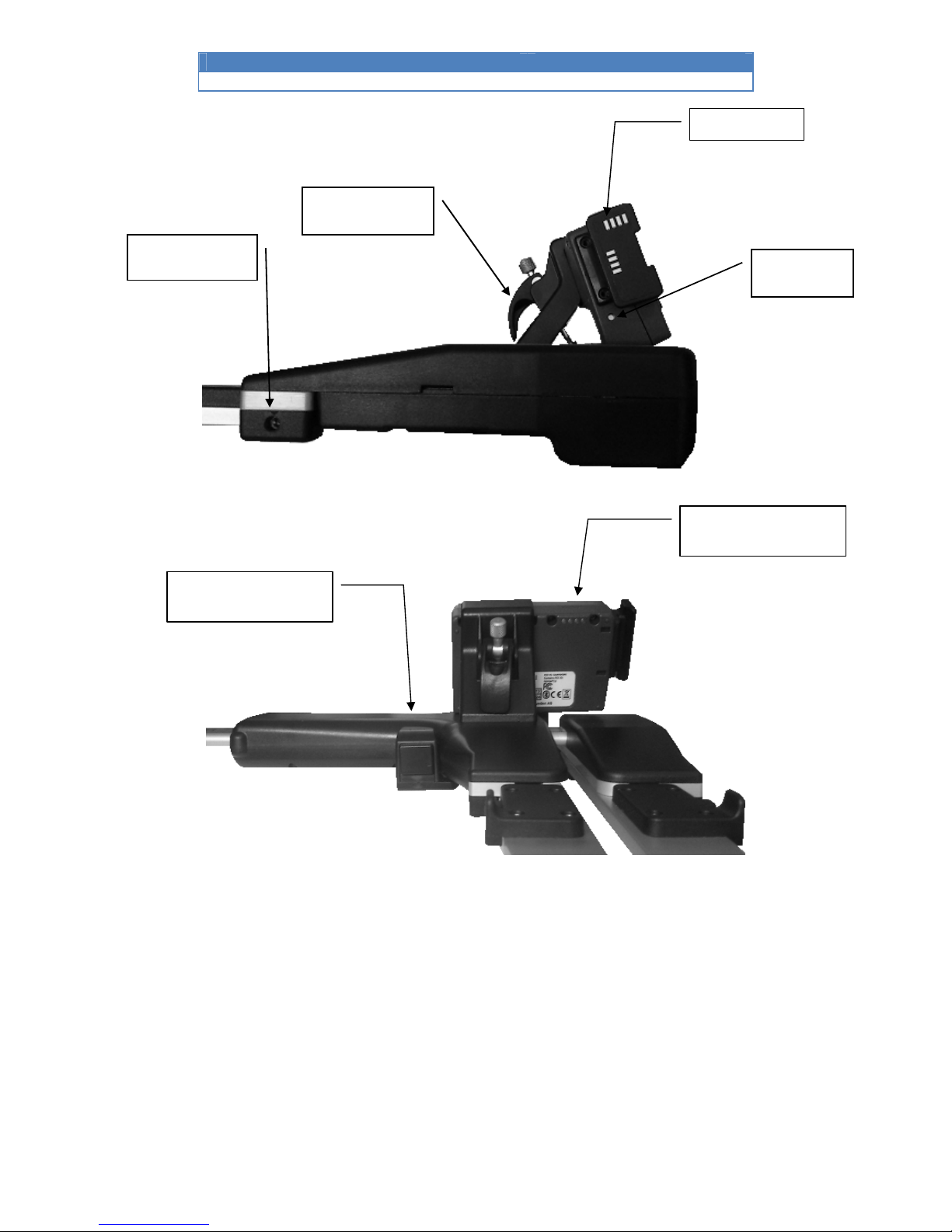
Digitech Professional II, side view
Digitech Professional II, backside view
Serial port
Holder
USB interface and contact
for battery charge
Adjustment screw
jaw angle (2ea
Loudspeaker
Enter button

DP II Version 1.0/JN
User Manual
Revision: 2014-01-14
5
© Haglöf Sweden 2014
Digitech Professional II, backside viewfrom under
Handle lock
Battery
charge
contact
Other manuals for DP II
1
This manual suits for next models
1
Table of contents
Other Haglof Measuring Instrument manuals

Haglof
Haglof Vertex Laser II VL402 User manual

Haglof
Haglof DME User manual

Haglof
Haglof HCH User manual

Haglof
Haglof Mantax Digitech II User manual

Haglof
Haglof Digitech User manual

Haglof
Haglof Vertex Laser Geo User manual

Haglof
Haglof Vertex 5 User manual

Haglof
Haglof Vertex III V1.5 User manual

Haglof
Haglof Postax User manual

Haglof
Haglof MD II User manual


