
Fluke 1773 User manual

1773/1775/1777
3 Phase Power Quality Analyzer
Users Manual
É
September 2021 (English)
© 2021 Fluke Corporation. All rights reserved.
Specifications are subject to change without notice.
All product names are trademarks of their respective companies.

LIMITED WARRANTY AND LIMITATION OF LIABILITY
Each Fluke product is warranted to be free from defects in material and workmanship under normal use
and service. The warranty period is 2 years and begins on the date of shipment. Parts, product repairs,
and services are warranted for 90 days. This warranty extends only to the original buyer or end-user
customer of a Fluke authorized reseller, and does not apply to fuses, disposable batteries, or to any
product which, in Fluke's opinion, has been misused, altered, neglected, contaminated, or damaged by
accident or abnormal conditions of operation or handling. Fluke warrants that software will operate
substantially in accordance with its functional specifications for 90 days and that it has been properly
recorded on non-defective media. Fluke does not warrant that software will be error free or operate
without interruption.
Fluke authorized resellers shall extend this warranty on new and unused products to end-user customers
only but have no authority to extend a greater or different warranty on behalf of Fluke. Warranty support is
available only if product is purchased through a Fluke authorized sales outlet or Buyer has paid the
applicable international price. Fluke reserves the right to invoice Buyer for importation costs of repair/
replacement parts when product purchased in one country is submitted for repair in another country.
Fluke's warranty obligation is limited, at Fluke's option, to refund of the purchase price, free of charge
repair, or replacement of a defective product which is returned to a Fluke authorized service center within
the warranty period.
To obtain warranty service, contact your nearest Fluke authorized service center to obtain return
authorization information, then send the product to that service center, with a description of the difficulty,
postage and insurance prepaid (FOB Destination). Fluke assumes no risk for damage in transit. Following
warranty repair, the product will be returned to Buyer, transportation prepaid (FOB Destination). If Fluke
determines that failure was caused by neglect, misuse, contamination, alteration, accident, or abnormal
condition of operation or handling, including overvoltage failures caused by use outside the product’s
specified rating, or normal wear and tear of mechanical components, Fluke will provide an estimate of
repair costs and obtain authorization before commencing the work. Following repair, the product will be
returned to the Buyer transportation prepaid and the Buyer will be billed for the repair and return
transportation charges (FOB Shipping Point).
THIS WARRANTY IS BUYER'S SOLE AND EXCLUSIVE REMEDY AND IS IN LIEU OF ALL OTHER
WARRANTIES, EXPRESS OR IMPLIED, INCLUDING BUT NOT LIMITED TO ANY IMPLIED WARRANTY OF
MERCHANTABILITY OR FITNESS FOR A PARTICULAR PURPOSE. FLUKE SHALL NOT BE LIABLE FOR ANY
SPECIAL, INDIRECT, INCIDENTAL OR CONSEQUENTIAL DAMAGES OR LOSSES, INCLUDING LOSS OF
DATA, ARISING FROM ANY CAUSE OR THEORY.
Since some countries or states do not allow limitation of the term of an implied warranty, or exclusion or
limitation of incidental or consequential damages, the limitations and exclusions of this warranty may not
apply to every buyer. If any provision of this Warranty is held invalid or unenforceable by a court or other
decision-maker of competent jurisdiction, such holding will not affect the validity or enforceability of any
other provision.
11/99
Fluke Corporation
P.O. Box 9090
Everett, WA 98206-9090
U.S.A.

i
Table of Contents
Title Page
Introduction ............................................................................................... 1
How to Contact Fluke................................................................................ 2
Safety Information ..................................................................................... 2
Specifications ............................................................................................ 2
Before You Start........................................................................................ 3
WiFi/BLE Module................................................................................ 4
GPS Time Synchronization................................................................. 6
Magnet Hanger Kit.............................................................................. 8
Voltage Test Leads............................................................................. 8
iFlexi Current Probe............................................................................ 9
Tilt Stand ............................................................................................ 10
Storage...................................................................................................... 10
Accessories............................................................................................... 11
User Interface............................................................................................ 11
Power ........................................................................................................ 13
Mains Power Source........................................................................... 13
Measurement Line Power Source ...................................................... 14
Battery Power Source......................................................................... 15
USB-C Power ..................................................................................... 16
Touchscreen/Basic Navigation.................................................................. 16
Home Screen...................................................................................... 16
Info Overview...................................................................................... 17
Memory............................................................................................... 18
Memory Used............................................................................... 18
Logging Sessions......................................................................... 18
Screen Captures .......................................................................... 18

ii
1773/1775/1777
Users Manual
Energy Analyze Plus Software .................................................................. 20
System Requirements......................................................................... 20
How to Connect to Energy Analyze Plus ............................................ 21
USB Cable.................................................................................... 21
Ethernet ........................................................................................ 22
WiFi Direct Connect...................................................................... 23
WiFi to Infrastructure .................................................................... 23
Auto-Copy Data to USB................................................................ 24
First-time Use/Setup Wizard...................................................................... 24
First Measurements................................................................................... 25
Measurement Configuration ...................................................................... 26
PQ Meter Mode................................................................................... 26
Setup ............................................................................................ 27
Topology....................................................................................... 27
Nominal Voltage and Frequency .................................................. 27
Voltage and Current Ratio ............................................................ 28
Flicker ........................................................................................... 28
K Factor ........................................................................................ 28
Event Trigger Settings .................................................................. 29
PQ Logger Mode................................................................................. 31
PQ Logger Measurement Settings ............................................... 31
Power Quality Standard................................................................ 31
Harmonics Grouping..................................................................... 32
Mains Signaling ............................................................................ 32
AUX .............................................................................................. 32
PQ Logger Event Trigger Settings................................................ 33
Session Settings........................................................................... 33
Measurement Data Review ....................................................................... 35
PQ Health ........................................................................................... 35
Overview ............................................................................................. 35
V/A/Hz................................................................................................. 35
Power.................................................................................................. 36
Dips and Swells................................................................................... 36
Harmonics........................................................................................... 36
Transients ........................................................................................... 36
Events ................................................................................................. 37
Flicker ................................................................................................. 37
Unbalance........................................................................................... 37
Scope.................................................................................................. 37
Phasor................................................................................................. 37
Basic Setup ............................................................................................... 37
Instrument Settings ............................................................................. 37
Communication Settings ..................................................................... 39
Tools ................................................................................................... 41

3 Phase Power Quality Analyzer
Table of Contents
iii
Maintenance.............................................................................................. 42
How to Clean ...................................................................................... 42
Battery Replacement .......................................................................... 42
Calibration........................................................................................... 43
Glossary .................................................................................................... 44

iv
1773/1775/1777
Users Manual

1
Introduction
The 1773/1775/1777 3 Phase Power Quality Analyzer (the Analyzer or Product) is a rugged,
portable device for troubleshooting power quality. The compact size and power supply from
the measurement line makes it a versatile tool for live measurements and long-term logging.
Features:
3-Phase voltage measurement inputs with reference to N and N-to-PE measurement
4 current measurement inputs for 3-phases and Neutral
2 auxiliary measurement inputs for measurements of non-electrical units: temperature,
humidity, light intensity
Power supply 100 V ac to 600 V ac and 100 V dc to 660 V dc with safety sockets for
powering from measurement line
7-inch display with capacitive touch
GPS time synchronization
USB interfaces: Type A for Flash drives and USB-C for wired connection to PC and power
supply
Slot for Wi-Fi/BLE module
Slot for LTE-4G module
Ethernet 1000Base-T
User-accessible micro SD slot for flash memory expansion

1773/1775/1777
Users Manual
2
How to Contact Fluke
Fluke Corporation operates worldwide. For local contact information, go to our website:
www.fluke.com
To register your product, view, print, or download the latest manual or manual supplement, go
to our website.
Fluke Corporation
P.O. Box 9090
Everett, WA 98206-9090
+1-425-446-5500
fluke-info@fluke.com
Safety Information
General Safety Information is in the printed Safety Information document that ships with the
Product and at www.fluke.com. More specific safety information is listed where applicable.
Specifications
Complete specifications are at www.fluke.com. See the 1773/1775/1777 Product
Specifications.
3 Phase Power Quality Analyzer
Before You Start
3
Before You Start
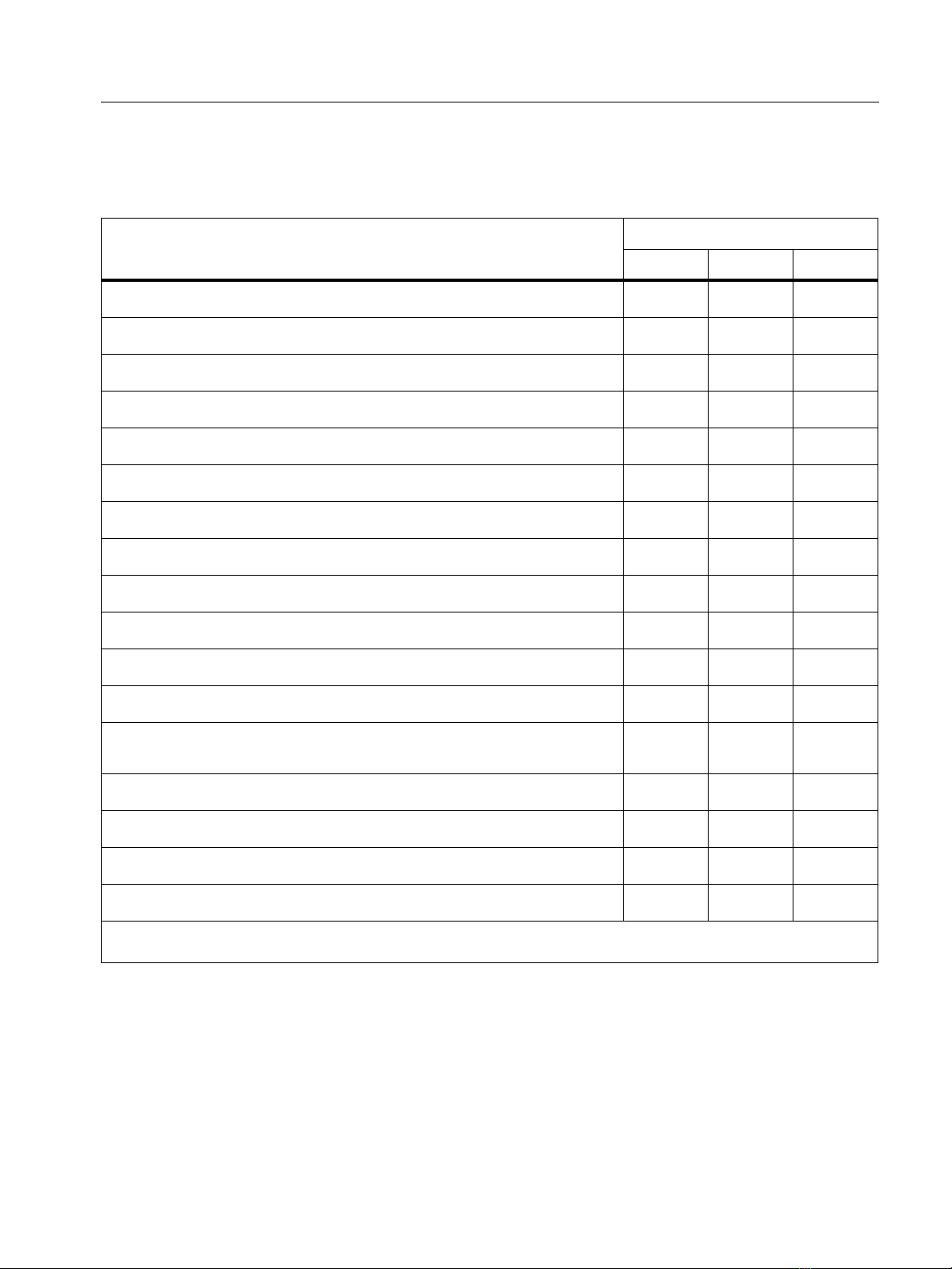
Table 1 is a list of items included with your purchase.
Note
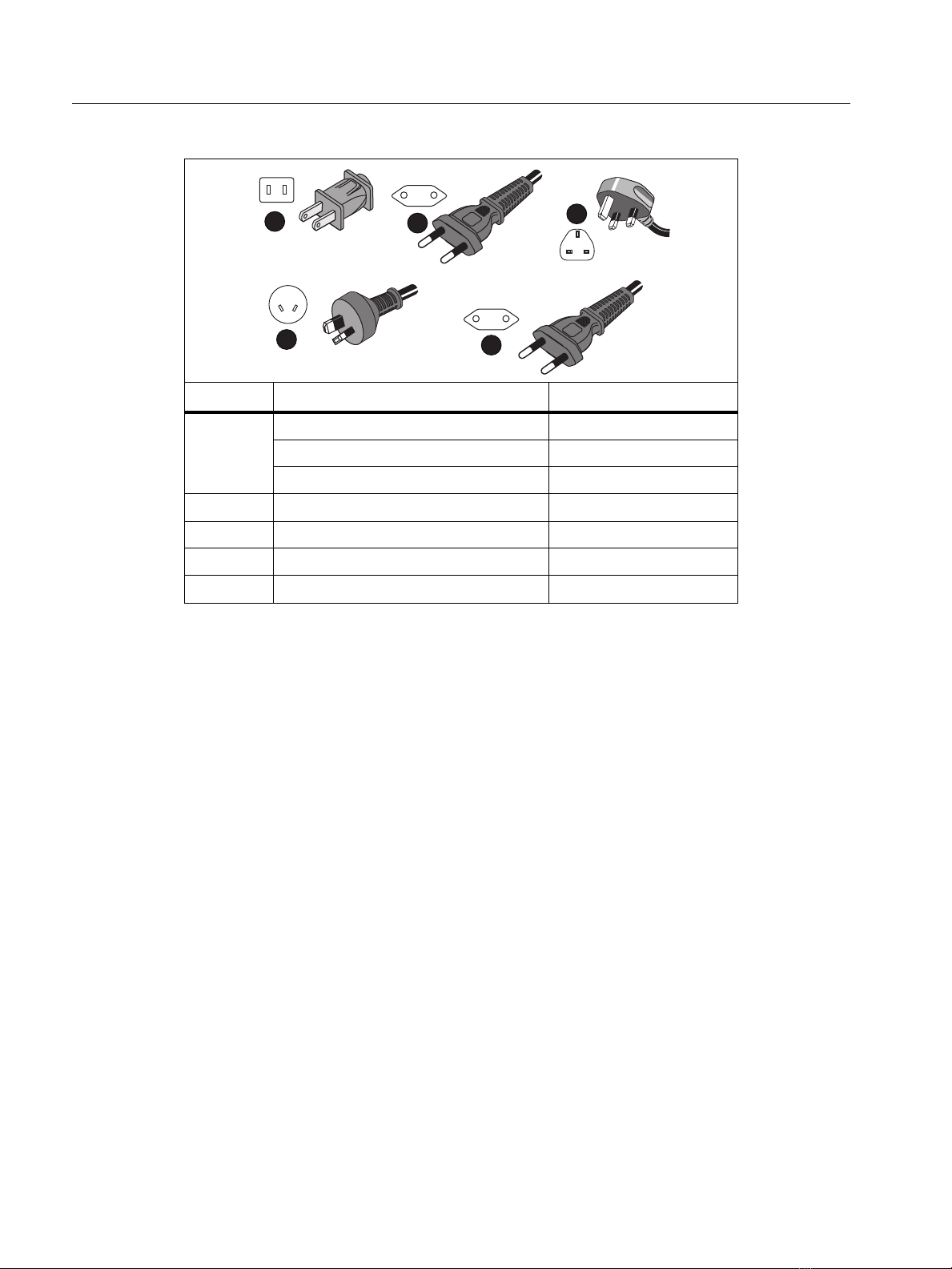
The power cord is country specific and varies according to the order destination.
Table 1 . Acce s so ries
Item Model
1773 1775 1777
3 Phase Power Quality Analyzer •••
Voltage Test Lead, 3-phase + N •••
Test Lead, Green •••
Set of Wire Clips •••
4x Dolphin Clips, Black •••
1x Dolphin Clip, Green •••
Set of 2 test leads, Blue 18 cm (7 in) •••
Thin-Flexi Current Probe 4x i17xx-flex1500, 61 cm (24 in)[1] •••
Mains Power Cable (see Tab l e 2 )•••
Mains Adapter MA-C8 •••
USB Cable type A to USB C •••
Magnet Hanger Kit •••
Documentation Info Pack (Quick Reference Card, Safety
Information, iFlex Probe Safety Information) •••
Hard Case •
Wi-Fi/BLE Module (pre-installed)[2] ••
Soft Case •
4x Magnet Probes ••
[1] The basic models (1773/B, 1775/B, and 1777/B) do not include the current probes.
[2] The basic models (1775/B and 1777/B) do not include the WiFi/BLE Module.
1773/1775/1777
Users Manual
4
WiFi/BLE Module
The WiFi/BLE module enables the wireless connectivity. Wireless connectivity is the preferred
data transfer method when the Product is installed in hazardous environments, such as,
cabinets.
The WiFi/BLE module enables these features:
Wireless data transfer to Energy Analyze Plus PC software.
Time synchronization with NTP
Remote control via Virtual Network Computing (VNC). See Remote Display for more
information about VNC.
A WiFi/BLE Module is included and pre-installed. If necessary, the module is removable or you
can install a module to upgrade a basic model.
To remove the adapter:
1. Open the protection cap of the WiFi/BLE module. See Figure 1.
Table 2. Country-Specific Mains Power Cable
Item Location Part Number
North America 1552374
Japan 2437458
China 4894155
Universal Euro 1552388
United Kingdom 1552342
Australia 1552339
Brazil 4322049
123
45
Other manuals for 1773
1
This manual suits for next models
2
Table of contents
Other Fluke Measuring Instrument manuals

Fluke
Fluke a3001 FC User manual

Fluke
Fluke 345 Instruction manual

Fluke
Fluke 1587 FC Use and care manual

Fluke
Fluke 914 Series User manual

Fluke
Fluke ScopeMeter 192 Configuration guide

Fluke
Fluke 9000A-006 User manual

Fluke
Fluke FOM Operating and installation instructions

Fluke
Fluke 368 Use and care manual

Fluke
Fluke 80i-110s User manual

Fluke
Fluke 481 User manual


