
Doran SMARTLINK 360SLT2 User manual

MANUFACTURINGLLC
Please Read This Manual Carefully
Before Using This Product
360SLT
2
SMARTLINK
TM
TPMS TABLET
USER MANUAL

1. INTRODUCTION.......................................................................................................................................3
1.1.PACKINGANDACCESSORIES............................................................................................................3
1.2.TABLETCOMPONENTS.....................................................................................................................3
1.3.INITIALPOWERUP...........................................................................................................................4
1.4.CONNECTTHETABLETTOTHEINTERNET.......................................................................................4
1.5.CONNECTTOACOMPUTERFORFILETRANSFER............................................................................5
2. FUNCTIONSANDAPPLICATIONS.............................................................................................................6
2.1.INTRODUCTION................................................................................................................................6
3. FUNCTIONSANDAPPLICATIONS.............................................................................................................7
3.1.PROGRAMINGATRANSCEIVER........................................................................................................7
3.2.READTIRESENSORDATA.................................................................................................................8
3.2.1.READONE‐CLICKTRANSCEIVERS..........................................................................................9
3.2.2.READINDIVIDUALTIRESENSOR.........................................................................................10
3.2.3.RECORDTIREDATA.............................................................................................................10
3.3.SAVEDFILES...................................................................................................................................11
3.4.APPSETTINGS................................................................................................................................12
3.5.YARDCHECK360WEBPORTAL.......................................................................................................13
4. FAQSANDTIPS......................................................................................................................................14
5. SPECIFICATIONS....................................................................................................................................15
6. SPECIFICATIONS....................................................................................................................................16
7. LIMITEDWARRANTY.............................................................................................................................16

360SLT2SMARTLINKTabletManual
DoranMfg.LLC–2851MassachusettsAve–Cincinnati,OH45225–866‐816‐7233–Doranmfg.com
3
1. INTRODUCTION
TheDoran 360SLT2 is a SMARTLINK™ TPMS Tablet used to communicate with all Doran
TPMS products with a RF or LF transmitting capability. TheseTPMSproducts cover the
Truck and Trailer
Fleets, OFF Road Equipment, and Multi‐Trailer applications. It can be
used to programa
transceiver configuration and also access current tire data on the
transceiverandindividualsensors.
TheDoran 360SLT2 usesthe Google Android OperatingSystem.With aresponsive touch
screencustomersareabletonavigatethefunctionalitiesquicklyand
easily.
The360SLT2canalsobeconnectedtocomputersviaaUSB‐Cconnectionsothatusers
candownloadsaveddatafor
documentationandanalysis.
1.1. PACKINGANDACCESSORIES
Theproductcomeswiththefollowingcomponents:
•SMARTLINK™TPMSTablet
•USB‐Ccable
•Poweradapter
•USBOTGAdapter
•Quickreferenceguide
•Operationmanual(Onthetabletasane‐copyordownloadedfromDoranmfg.com)
1.2. TABLETCOMPONENTS

360SLT2SMARTLINKTabletManual
DoranMfg.LLC–2851MassachusettsAve–Cincinnati,OH45225–866‐816‐7233–Doranmfg.com
4
1.3. INITIALPOWERUP
Beforepoweringonthedevice,makesureitisfullycharged.Ifthebatteryisnotfullycharged,
thetabletwillnotbeabletoupgradethesoftwaretothelatestversion.Tochargethedevice,
usetheUSBadapterandUSB‐Ccableprovided.
Topoweronthetablet,pressandholdthepowerbuttononthetopleftofthetabletuntilthe
displaylightturnsonandtheDoranlogoappears.
Thetabletwillautomaticallyshutofftoconservebatteryifitisnotusedfor30minutes.
1.4. CONNECTTHETABLETTOTHEINTERNET
Toconnectthetablettotheinternet,firstclickAppSettingsonthehomescreen.Next,hit
TabletSettings.ClickontheWLANbutton,browseforyourWi‐Finetwork,andconnect.

360SLT2SMARTLINKTabletManual
DoranMfg.LLC–2851MassachusettsAve–Cincinnati,OH45225–866‐816‐7233–Doranmfg.com
5
1.5. CONNECTTOACOMPUTERFORFILETRANSFER
ThedevicecanbeconnectedtoacomputerwithaUSB‐Ccabletotransferstoreddata.To
connectthetabletandcomputer,inserttheUSB‐CcableintothetableandtheUSBendtothe
computer.
Onthetablet,anAndroidSystemnotificationwillappear.Swipedownfromthetopnotification
barandselecttheoptionbelow.
SelecttheTransferFilesradiobutton.Thiswillallowthecomputertoaccesstheinternal
storageofthetablet.
Thetabletwillnowbeaccessibleonthecomputeritisconnectedto.ThefoldernamedDoran
TPMSDatawillhaveallexporteddata.

360SLT2SMARTLINKTabletManual
DoranMfg.LLC–2851MassachusettsAve–Cincinnati,OH45225–866‐816‐7233–Doranmfg.com
6
2. FUNCTIONSANDAPPLICATIONS
2.1. INTRODUCTION
TheDORAN360SLT2SMARTLINK™TPMSTABLETisanall‐in‐onetoolthatcanbeusedwithall
oftheDORANTPMSproducts.Themainmenufeaturesthefollowingoperations.
PROGRAMTRANSCEIVER
UsedtoprogramanyTPMStransceiversinstalledonavehicle
READTIRESENSOR
Allowstheusertoreadsensordatafromtransceivers,LFATPMSsensors,orrecordtire
data
SAVEDFILES
Accesssaveddatafromrecordedtiredata
APPSETTINGS
AccessAndroidsettings,changetheunitofmeasure,checkingforsoftwareupdates,and
settingupanemailaccount.
ACCESSWEBPORTAL
AccesstheYardCheck360™webportal(OnlyforusewithYardCheck360™products).
360SLT2SMARTLINKTabletManual
DoranMfg.LLC–2851MassachusettsAve–Cincinnati,OH45225–866‐816‐7233–Doranmfg.com
7
3. FUNCTIONSANDAPPLICATIONS
3.1. PROGRAMINGATRANSCEIVER
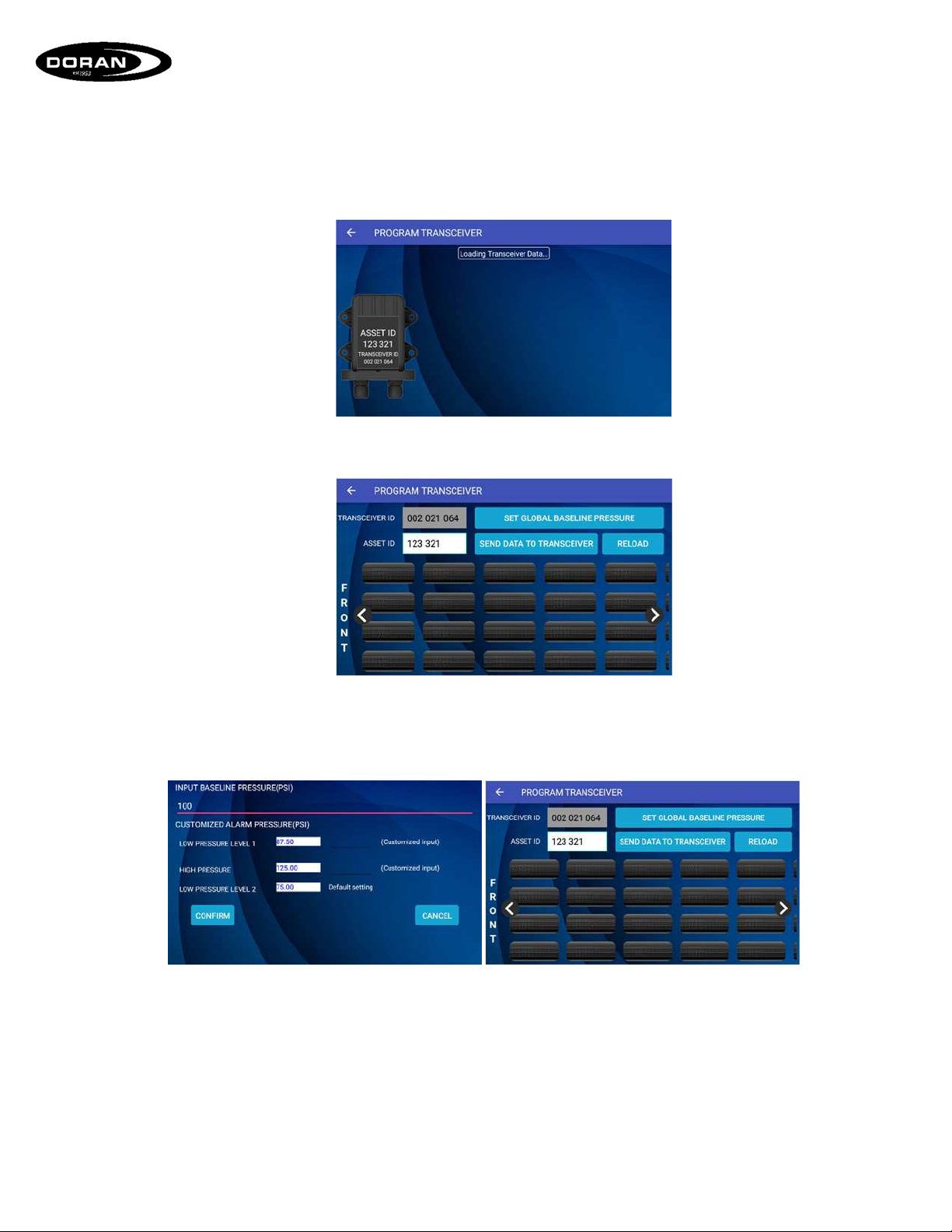
AfterclickingtheProgramTransceivericononthehomescreen,thetabletwillsearchforand
listanyactivetransceiverswithinrange.
Theappropriatetransceiverisselectedandatirelayoutscreenisdisplayed.Onthisscreen,the
usercansetaglobalbaselinepressuretoallprogrammedtirepositions,changetheassetID,
andprogramsensorsontothetransceiver.
Tosettheglobalbaselinepressure,thebuttonispressedandthenewlydesiredvaluesare
entered.ConfirmthepressurelevelsbypressingtheConfirmbuttonandthentheSendDatato
Transceiverbuttonispressedtotransferthenewsettingsandsavetheglobalbaselinepressure
tothetransceiver.

360SLT2SMARTLINKTabletManual
DoranMfg.LLC–2851MassachusettsAve–Cincinnati,OH45225–866‐816‐7233–Doranmfg.com
8
Toprogramatiresensor,thedesiredpositionispressed.ThesensorIDistypedinatthetopof
thescreen.Ifthebaselinepressureoralertlevelsneedcustomized,itcanbedoneonthisscreen
aswell.AfterconfirmingtheIDandalarmlevelsarecorrect,thedatacanbesenttothe
transceiverandsavedbypressingtheSendDatatoTransceiverbutton.
3.2. READTIRESENSORDATA
AfterclickingtheReadTireSensorDataonthehomescreen,theuserispresentedwiththree
differentoptions.

360SLT2SMARTLINKTabletManual
DoranMfg.LLC–2851MassachusettsAve–Cincinnati,OH45225–866‐816‐7233–Doranmfg.com
9
3.2.1. READONE‐CLICKTRANSCEIVERS
ClickingontheReadOne‐ClickTransceiversbuttonwillbringupalisttransceivers.Oncea
transceiverisselected,thetiredatawillbeloaded.
Onceatransceiverisselected,thetiresthatarecurrentlyprogrammedonthetransceiver
willbedisplayed.
Clickingonatirewillbringupthetiredetails.Theusercanalsoaddinformationsuchasa
serialnumber,positionID,treaddepth,andphotos.Afterinformationisadded,simply
pressConfirmandthentheSavebuttontosavethedatatothetablet.

360SLT2SMARTLINKTabletManual
DoranMfg.LLC–2851MassachusettsAve–Cincinnati,OH45225–866‐816‐7233–Doranmfg.com
10
3.2.2. READINDIVIDUALTIRESENSOR
UserscanalsoreadindividualtiresensorsiftheyhaveaLFAmarkingonthem.Thisisa
specialtypeoftiresensorthatfeatureslowfrequencycommunicationtoallowthetablet
tocommunicatedirectlytothesensor.
3.2.3. RECORDTIREDATA
Inadditiontodisplayingthecurrentpressureandtemperatureofasensor,the360SLT2
canalsorecordtiredata.AfterpressingtheRecordTireDatabuttonontheReadData
Menu,twoaxlesareshown.AnassetIDisfirstassignedandthenthevehicleconfiguration
canbemodified.Usingthe+and–buttons,theusercanaddorsubtractaxelstomatch
theconfigurationofthevehicle.
Other manuals for SMARTLINK 360SLT2
1
Table of contents
Other Doran Measuring Instrument manuals


