
DeWalt DW055PL-KR User manual

Please read these instructions before operating the product.
www.DeWALT.co.kr
DW055PL-KR
User Manual/ 사용 설명서
DEWALT Laser Safety, Maintenance
DEWALT 레이저 안전, 유지 보수
제품을 사용하기 전에 이 설명서를 읽어 주십시오.

1
2
C
D
A
1
2
3
B
E
4
DW055PL-KR 5VDC
SER.
300mAIP54
www.DEWALT.co.kr
MADE IN CHINA
ᵝ᮹ᔍ⧎
౩ᯕᱡŲᮥᩍ݅ᅕḡษ᪅
౩ᯕᱡŲᮥᔍ௭ᨱí⨆⦹ḡษ᪅
อᖙၙอ᮹ℎᗭ֥ᨕฑᯕaᔍᬊ⦹ḡ
ᦫí⦹᪅
༉ߙ%81-
ᱽ⣩⮕ݡᬊ౩ᯕᱡᬊ⣩
ᯙჩ⪙#3
ᱶĊ7#᳦❭ᰆჵ᭥ON
ᔢ⪙ት௺ᧅߑ⍅ᦥᦥ⟝⦞⦝❑ᯕญၙ❑
ᵝᗭᕽᬙvԉǍᩎᔝಽᩎᔝ࠺ᰍክঊ⊖
Ł~ḡᬱᖝ░
ᱽ᳑ᯱ#MBDL%FDLFS4V[IPV$P-UE
ᱽ᳑ǎᵲǎᱽ֥᳑ᬵᄥࠥ⢽ʑ
1
3
6.17ft
2
USB
Figures/ 그림
3
ENGLISH
Contents
• User Safety
• Charging the Battery
• Using the Tool
• Warranty
• Specications
Retain all sections of this manual for future reference.
User Safety
WARNING:
Carefully read the Safety Instructions and Product Manual before
using this product. The person responsible for the product must
ensure that all users understand and adhere to these instructions.
WARNING:
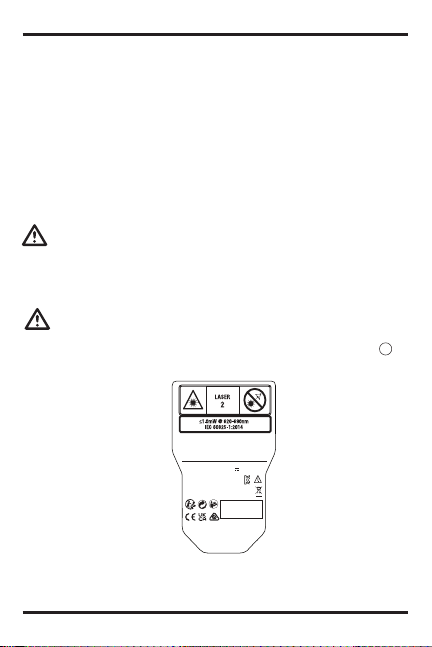
The following label information is placed on your laser tool to inform
you of the laser class for your convenience and safety (Figure B).
DW055PL-KR
5V DC
SER.
300mA IP54
www.D
E
WALT.co.kr
MADE IN CHINA
ᵝ᮹ᔍ⧎
౩ᯕᱡŲᮥᩍ݅ᅕḡษ᪅
౩ᯕᱡŲᮥᔍ௭ᨱí⨆⦹ḡษ᪅
อᖙၙอ᮹ℎᗭ֥ᨕฑᯕaᔍᬊ⦹ḡ
ᦫí⦹᪅
༉ߙ%81-
ᱽ⣩⮕ݡᬊ౩ᯕᱡᬊ⣩
ᯙჩ⪙#3
ᱶĊ7#᳦❭ᰆჵ᭥ON
ᔢ⪙ት௺ᧅߑ⍅ᦥᦥ⟝⦞⦝❑ᯕญၙ❑
ᵝᗭᕽᬙvԉǍᩎᔝಽᩎᔝ࠺ᰍክঊ⊖
Ł~ḡᬱᖝ░
ᱽ᳑ᯱ#MBDL%FDLFS4V[IPV$P-UE
ᱽ᳑ǎᵲǎᱽ֥᳑ᬵᄥࠥ⢽ʑ

4
ENGLISH
Symbol Meaning
V Volts
mW Milliwatts
Laser Warning
nm Wavelength in nanometers
2 Class 2 Laser
WARNING: To reduce the risk of injury, user must read this
instruction manual and the safety manual.
WARNING: LASER RADIATION. DO NOT STARE INTO
BEAM. Class 2 Laser Product.
The DW055PL tool emits a visible laser beam, as shown in Figure A1.
The laser beam emitted is Laser Class 2 and complies with 21 CFR
1040.10 and 1040.11 except for conformance with IEC 60825-1, Ed. 3, as
described in Laser Notice 56, dated May 8, 2019.
WARNING:
While the laser tool is in operation, be careful not to expose your
eyes to the emitting laser beam (red light source). Exposure to a
laser beam for an extended time period may be hazardous to your
eyes. Do not look into the beam with optical aids.
Supplier’s Declaration of Conformity
47 CFR § 2.1077 Compliance Information
Unique Identier: DW055PL
Responsible Party – U.S. Contact Information
DEWALT
701 East Joppa Road
Towson, Maryland 21286
www.DEWALT.com

5
ENGLISH
FCC Statement
These devices comply with Part 15 of the FCC Rules. Operation is subject
to the following two conditions: 1) this device may not cause harmful
interference, and 2) this device must accept any interference received,
including interference that may cause undesired operation.
NOTE: This equipment has been tested and found to comply with the
limits for a Class B digital device, pursuant to Part 15 of the FCC Rules.
These limits are designed to provide reasonable protection against harmful
interference in a residential installation. This equipment generates, uses
and can radiate radio frequency energy and, if not installed and used in
accordance with the instructions, may cause harmful interference to radio
communications. However, there is no guarantee that interference will
not occur in a particular installation. If this equipment does cause harmful
interference to radio and television reception, which can be determined by
turning the equipment off and on, the user is encouraged to try to correct
the interference by one or more of the following measures:
●Reorient or relocate the receiving antenna.
●Increase the separation between the equipment and receiver.
●Connect the equipment into an outlet on a circuit different from that which
the receiver is connected.
●Consult the dealer or an experienced radio/TV technician for help.
Canada, Industry Canada (IC) Notices
Class B digital circuitry of this device complies with Canadian ICES-
003. This device complies with Industry Canada license-exempt RSS
standard(s). Operation is subject to the following two conditions: 1) this
device may not cause interference, and 2) this device must accept any
interference, including interference that may cause undesired operation of
the device.

6
ENGLISH
Charging the Battery
Fully charge the battery before initial use and whenever the tool has not
been used for 6 months or longer.
WARNING:
Only charge product using a certied power adapter that is
compliant with applicable country regulations and international/
regional safety standards. Using adapters that do not meet
applicable safety standards could result in injury.
1. Locate the port cover on the bottom of the tool (Figure A4).
2. Using your finger, gently pull the port cover up (Figure C1).
3. Insert the small end of the USB Recharge Cable into the port on the
bottom of the tool, making sure to insert the flat side of the cable into
the flat side of the port (Figure C2).
4. Insert the USB end of the cable into a USB port in a computer or USB
power outlet (Figure C3).
5. Wait approximately 2.5 hours for the battery to fully charge and then
disconnect the USB Recharge Cable.
When the tool is ON, the battery level appears in the display window
(Figure D1).
Using the Tool
1. Point the laser at the top of the tool (Figure A1) toward the wall
whose distance you need to measure (Figure E1).
2. Click (Figure A3) to turn the tool on and display a laser dot on
the wall (Figure E1).
3. When the bottom of the tool is positioned at the correct distance from
the wall, click to take the measurement (Figure E2).

7
ENGLISH
4. View the measurement on the display window (Figure D3).
Changing the Unit of Measure
Once the current measurement is taken, you can change the unit of
measure from decimal ft (6.21 ft) to fractional ft (6’02”9/16), fractional ft to
meters (1.894 m), meters to inches (74 9/16 in), or inches to decimal ft.
To change the unit of measurement, press and hold until you see the
measurement change (3 seconds).
NOTE: If you continue to hold after the measurement changes, the
tool will turn off.
Re-measuring
1. When you need to take a new measurement, point the laser toward the
wall whose distance you need to measure.
2. Click .
●The previous measurement (Figure D3) will be cleared from the
display window.
●will change to in the display window (Figure D2).
3. When the bottom of the tool is positioned at the correct distance from
the wall, click to take the measurement (Figure
E2).
Turning Off the Tool
The tool can be turned off in either of these ways:
●After taking a measurement, press and hold for 5 seconds (until the
display window clears).
●If you do not use the tool for 120 seconds, it will automatically turn off.
(After 60 seconds, the laser (red dot) will turn off and then after another
60 seconds the unit will turn off.)

8
ENGLISH
Warranty
Go to www.DEWALT.com for the latest warranty information.
Specications
Range 6.5in to 55ft (.165m to 16.75m)
Measuring Accuracy* Typically ± 1/4in (± 6mm)*
Resolution** 1/16in (1mm)**
Laser Class Class 2 (IEC/EN60825-1: 2014)
Laser Wavelength ≤ 1.0mW @ 620-690nm
Auto Power Switch-off After 120s
Battery Life Up to 1000 Measurements
or 30 days (if the tool is not used)
Dimension (H x D x W) 2.56 x 0.83 x 1.49in (65 x 21 x 38mm)
Weight 1.39oz (39.5g)
IP Rating Water & Dust Resistant to IP54
Storage Temperature Range 19° F ~ 158° F (-7° C ~ +70 C)
Operating Temperature
Range 32° F ~ 104° F (0° C ~ +40° C)
*Measuring Accuracy depends on the current conditions. Under
favorable conditions (good target surface, low background illumination,
and good room temperature) up to 30ft (10m). The measurement error
can increase by up to ± 0.5mm/m for distances over 30ft (10m).
**Resolution is the nest measurement you can see. In inches, that is
1/16". In mm, that is 1mm.

9
ENGLISH
Laser Safety, Maintenance
Congratulations!
You have chosen a DEWALT tool. Years of experience, thorough
product development and innovation make DEWALT one of the most
reliable partners for professional tool users.
Definitions: Safety Guidelines
The definitions below describe the level of severity for each
signal word. Please read the manual and pay attention to
these symbols.
DANGER: Indicates an imminently hazardous situation
which, if not avoided, will result in death or serious injury.
WARNING:Indicates a potentially hazardous situation
which, if not avoided, could result in death or serious injury.
CAUTION:Indicates a potentially hazardous situation
which, if not avoided, may result in minor or moderate injury.
CAUTION:Used without the safety alert symbol indicates
a potentially hazardous situation which, if not avoided, may
result in property damage.
IF YOU HAVE ANY QUESTIONS OR COMMENTS ABOUT THIS OR
ANY DEWALT TOOL, CALL US AT: Tel: 01753-56 70 55 Fax: 01753-
57 21 12 OR VISIT OUR WEBSITE:
www.DEWALT.co.kr

10
ENGLISH
WARNING:To reduce the risk of injury, read this Safety
Manual as well as the Operator Instruction Manual.
SAVE ALL WARNINGS AND INSTRUCTIONS
FOR FUTURE REFERENCE
Definitions: Safety Guidelines
The definitions below describe the level of severity for each signal
word. Please read the manual and pay attention to these symbols.
DANGER: Indicates an imminently hazardous situation
which, if not avoided, will result in death or serious injury.
WARNING: Indicates a potentially hazardous situation
which, if not avoided, could result in death or serious
injury.
CAUTION: Indicates a potentially hazardous situation
which, if not avoided, may result in minor or moderate
injury.
NOTICE: Indicates a practice not related to personal
injury which, if not avoided, may result in property
damage.
Denotes risk of electric shock.
Denotes risk of fire.
Safety Instructions for Lasers
WARNING! Read and understand all instructions. Failure
to follow all instructions listed below may result in electric
shock, fire and/or serious personal injury.
WARNING! Laser Radiation Exposure. Do not disassemble or
modify the laser level. There are no user serviceable parts inside.
Serious eye injury could result.
Table of contents
Languages:
Other DeWalt Measuring Instrument manuals
DeWalt
DeWalt DW0822 User manual

DeWalt
DeWalt DW040 User manual

DeWalt
DeWalt DW055E User manual

DeWalt
DeWalt DCE088G18 User manual

DeWalt
DeWalt DCE822G18 User manual

DeWalt
DeWalt DW077-XE User manual

DeWalt
DeWalt DCE080RS User manual

DeWalt
DeWalt DW030 User manual

DeWalt
DeWalt DW089K-KR User manual

DeWalt
DeWalt DW03050-XJ User manual

DeWalt
DeWalt DW073 User manual

DeWalt
DeWalt DCE0825R User manual

DeWalt
DeWalt DW03101 User manual

DeWalt
DeWalt DW08302 User manual

DeWalt
DeWalt DW077 User manual

DeWalt
DeWalt DW088LR User manual

DeWalt
DeWalt DW089 User manual

DeWalt
DeWalt DW030 User manual

DeWalt
DeWalt DW078 User manual

DeWalt
DeWalt DCE088G18 User manual


