
Chargery BM16LP User manual

Operating Instructions
CHARGERY
BM16LP
V2.0
Microprocessor controlled high performance Battery Monitor
or 3S~16S LiPoly battery pack.
Chargery Power Co., Ltd.
Head Office
Add: Chuangye
Road, Nanshan Shenzhen, 518054, China.
Zip code: 518054
Tel: +86 755 2643 6165
ax: +86 755 2641 2865
Email: admin@ hargery. om. n
Web: www. hargery. om
3S-16S LiPolymer battery Monitor and Saver BM16LP V2.0
www. hargery. om
page 2 total 5
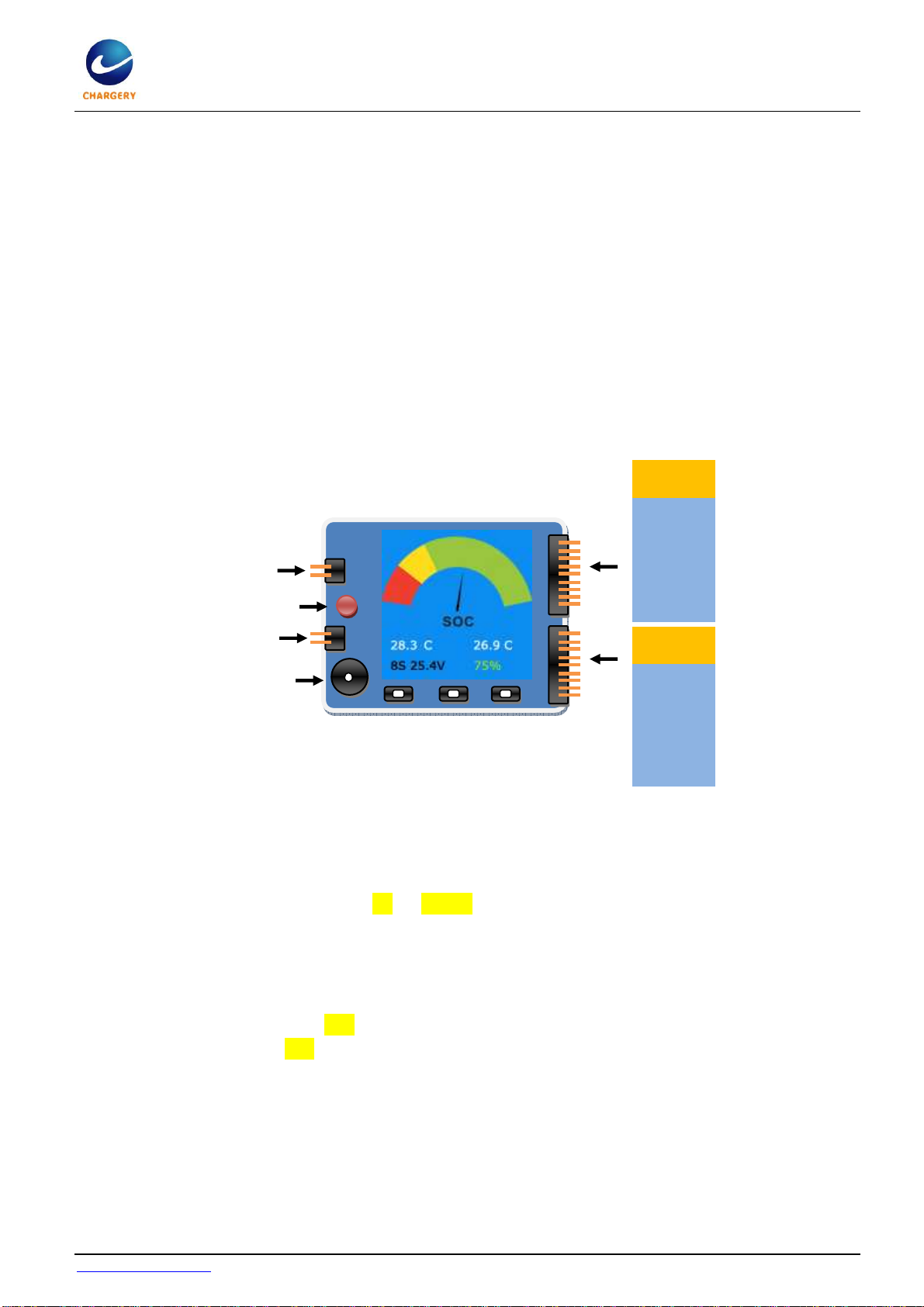
Chargery Battery Saver BM16LP is for 3S ~ 16S LiPolymer battery applied to E-bike, E-s ooter et .,
High light red LED and loud beepers (85Db) make sure battery operation safety. The unit is with TFT
olor LCD display battery voltage, ell voltage, 2 battery temperature, and battery SOC (State of
Charge). You an setup over dis harge warning ell voltage,
over harge warning voltage
, the
highest battery temperature and the lowest battery gauge for warning.
During battery dis harge, if any ell voltage under setup value, or battery temperature over setup or
battery gauge under setup, the BM16LP an sound and LED flash alternately prevent any ell from
over dis harged.
During battery harge, if any ell voltage over setup value, or battery temperature over setup, the
BM16LF an sound and LED flash alternately prevent any ell from over harged.
When you stop driving your bike or s ooter, you an he k the lowest ell voltage, so you an find the
worst ell---the lowest voltage ell.
New features
BM16LP an indi ate battery SOC or alled battery gauge similar with ar dashboard. Cell ount,
battery pa k voltage and battery gauge (%) is displayed simultaneously.
BM16LP will re ord the lowest voltage of ea h ell during dis harge, after you stop driving your
bike, s ooter et ., you an press UP or DOWN button to display these voltages (cell number
background color is green, and the lowest cell voltage displayed in RED text), press the
button again display real voltage.
Beeper sound and LED flash alarm alternately while any ell over harged or over dis harged.
Two temperature sensors monitor battery temperature during harge or dis harge.
At any time, you an press SET button shortly turn off the display and press again resume.
While alarming, press SET button shortly turn off alarm.
Operating guideline
1. Conne t the battery to BM16LP, keep the polarity orre t. The detailed onne tion diagram is as
the following figure 1 and figure 2.
2. The unit will initialize the beeper and LED, beeper sounds on e time, warning LED flash on e time.
3. 2 se onds later, the BM16LP will display battery SOC (State Of Charge) as same as ar dashboard.,
two battery temperatures, ell ount, battery pa k voltage, and battery gauge in digital
Socket 1
Socket 2
C
ell
1
-
Cell 2-
Cell 3-
Cell 4-
Cell 5-
Cell 6-
Cell 7-
Cell 8-
C
ell
8
+
C
ell
9
-
Cell 10-
Cell 11-
Cell 12-
Cell 13-
Cell 14-
Cell 15-
Cell 16-
C
ell 16+
SET DOWN UP
LED
BEEPE
T
emperature sensor
T
emperature sensor

3S-16S LiPolymer battery Monitor and Saver BM16LP V2.0
www. hargery. om
page 3 total 5
per entage on the bottom line from left to right.
4. Press UP or DOWN button to he k with ea h ell voltage and lowest voltage during driving.
In driving, BM16LP an alarm loudly and a RED LED flash alternately when any ell voltage under
over
dis harge warning voltage
till the ell voltage over the value.
If the ell voltage is still under warning voltage, the unit will beep and flash repeat for 20S.
The unit in ludes reverse polarity dete tion, and 2.54mm pin distan e balan e onne tor for all kinds
of battery.
Connection Diagram
There are 2 so kets onne ting to battery pa k, so ket 1 is for 3S~8S and so ket 2 for 9S~16S
battery.
1. One 3S to 8S battery an plug into the so ket 1 dire tly, 6S onne tions as following.
igure 1
2. For two battery pa ks, onne t them in series first and then plug battery 1# into so ket 1, and
battery 2# into so ket 2 separately. Take one 8S battery and one 4S sample as following:
igure 2
SET
cell 1
cell 2
cell 3
Socket 1
DOWN UP
LED
BEEPE
T
emperature sensor
T
emperature sensor
cell 4
cell 5
cell 6
Socket 2
SET
cell 1
cell 2
cell 3
Socket 1
DOWN UP
LED
BEEPE
T
emperature sensor
T
emperature sensor
cell 4
cell 5
cell 6
cell 7
cell 8
cell 9
cell 10
cell 11
cell 12

3S-16S LiPolymer battery Monitor and Saver BM16LP V2.0
www. hargery. om
page 4 total 5
Specifications:
Battery range: 3S-16S LiPolymer battery pa k
Over dis harge warning ell voltage: 2.80~4.20V
step 0.05V, default 3.00V
Over harge warning voltage: 3.90~4.30V per
ell, step 0.05V, default 4.25V
Delay time when start to warnning:2S
Warning time:20S per period
A urate s ope of the ell voltage: -5mV/+5mV
Cell voltage display range:0.50V~4.99V, NO
display when under 0.50V
Temperature display range:0.0℃~99.9℃,
Display 0.0 when under 0.0℃
Display 99.9 when over 100℃
SOC indi ator:
RED area @ 0~15% of SOC
YELLOW area @ 16~35% of SOC
GREEN area @ 36~100% of SOC
Pins distan e: 2.54mm
Size:70*65*11 (L*W*T, mm)
Weight: 30g
Warning LED: 11000mCd, @ 2.0V, 20mA
Warning beeper: 85dB @ 12V, 25mA
Pa kage: transparent heat shrink tube or
Customized AL alloy ase
Program setup
Before driving your e-bike or e-s ooter et ., you an set up many important parameters prevent your
battery from over harge or dis harge or over temperature.
1. Conne t your battery to BM16LP
2. Press SET button for 3 se onds enter into Program Setup menu.
3. Press UP or DOWN button sele t the item, press SET shortly make the value flash, and press UP
or DOWN hange the value. Press SET button shortly onfirm the hange. After finish all setup,
press SET for 3 se onds quit the setup menu.
4. Over harge warning voltage range is 3.90~4.30V per cell, step 0.05V, default 4.25V. During
harge, when any ell voltage over the value, the unit will alarm.
5. Over dis harge warning voltage range is 2.80~4.20V step 0.05V, default 3.00V. During driving,
when any ell voltage under the value, the unit will alarm.
6. Battery temperature range is 30~80℃
℃℃
℃ step 1℃, default 50℃. During driving, when battery
temperature over the value, the unit will alarm.
7. Battery gauge (SOC) range is 5~90% step 1%, default 30%. During driving, when battery gauge
under the value, the unit will alarm..
8. LCD ba k-light time range is 1, 5, 10,20min and always ON, default 5min. when LCD ba k-light
ON time rea h setup value, it will turn off, and press any button to resume. Press SET button save
setup and quit setup mode.
9. When quit setup mode, the devi e will remember all parameters till next hange.

3S-16S LiPolymer battery Monitor and Saver BM16LP V2.0
www. hargery. om
page 5 total 5
Warranty and Service
Chargery Power Co., Ltd. as manufa ture of R/C model power warrants its harger and saver, monitor
et . to be free of defe ts in material and workmanship. This warranty is effe tive for 12 months from
date of pur hase. If within the warranty period the ustomer is not satisfied with the produ ts
performan e resulting from a manufa turing defe t, the a essory will be repla ed or repaired.
Your selling dealer is your first point of onta t for warranty issues. Return postage osts are the
responsibility of the user in all ases. Please submit opy of original re eipt with the return.
Damage due to physi al sho k (dropping on the floor, et .), inappropriate power supply (unstable
output voltage and insuffi ient power, et .), water, moisture, and humidity are spe ifi ally NOT
overed by warranty.
Chargery Power Co., LTD.
Chuangye Road, Nanshan Shenzhen, 518054, China.
Tel: 86 (0)755 26436165, fax: 86 (0) 755 26412865
Email: jasonw[email protected]
Homepage: www. hargery. om
Charging Expert
Table of contents


