
BLT M880 User manual

Product Information
zProduct Model: M880
zProduct Name: Patient monitor
zManufacturer: Guangdong Biolight Meditech Co., Ltd.
zAfter Service Contact Information:
Address: No.2 Innovation First Road, Technical
Innovation Coast, Hi-tech Zone, Zhuhai ,
P.R.China
Fax: +86-756-3399919
Postcode: 519085
Toll-free consultation hot line: +86-400-8818-233
Revision History
This manual has a revision number. This revision
number changes whenever the manual is updated due to
software or technical specification change. Contents of this
manual are subject to change without prior notice.
zDocument No.: J/M880-I-005
zRevision number: V1.0
zRelease time: Oct.2016
Copyright © 2016 Guangdong Biolight Meditech Co., Ltd.
All rights reserved.

II
Statement
Manufacturer holds the copyright of this manual, and we
are also entitled to deal with this manual as confidential files.
This manual is only used for operation, maintenance and
service of product, someone else can not publish the manual.
This manual contains exclusive information protected by
copyright laws and we reserve its copyright. Without written
approval of manufacturer no parts of this manual shall be
photocopied, xeroxed or translated into other languages.
The contents contained in this manual are subject to
amendments without notification.
Manufacturer's Responsibility
Only under the following circumstances will
manufacturer be responsible for the safety, reliability and
performance of the instrument:
zAll the installation, expansion, readjustment,
renovation or repairs are conducted by the personnel
certified by manufacturer.
zThe storage condition, operation condition and
electrical status of the instrument conforms to the
product specification.
zThe instrument is used in accordance with the user’s
manual.

III
About this manual
This manual contains the instructions necessary to
operate the product safely and in accordance with its
function and intended use. Observance of this manual is a
prerequisite for proper product performance and correct
operation and ensures patient and operator safety.
This manual is based on the maximum configuration and
therefore some contents may not apply to your product. If
you have any question, please contact us.
This manual is an integral part of the product. It should
always be kept close to the equipment so that it can be
obtained conveniently when needed.
All illustrations in this manual serve as examples only.
They may not necessarily reflect the setup or data displayed
on your product.
Conventions:
zBold Italic text is used in this manual to quote
the referenced chapter or sections.
z【】is used to enclose screen texts.
z→is used to indicate operational procedures.

IV
Signs in this manual:
Warning: Indicates a potential hazard or unsafe
practice that, if not avoided, will result in death or
serious injury.
Caution: Indicates a potential hazard or unsafe
practice that, if not avoided, could result in minor
personal injury or product/property damage.
Note: Provides application tips or other useful
information to ensure that you get the most from
your product.
)
0

Contents
Chapter 1 General Introduction...........................................1-1
1.1Intended Use ..............................................................1-1
1.2Main Unit...................................................................1-1
1.3Display Views............................................................1-6
Chapter 2 Safety.....................................................................2-1
2.1Safety Information.....................................................2-1
2.2Explanation of Symbols ............................................2-5
Chapter 3 Basic Operations..................................................3-1
3.1Unpacking and Checking ..........................................3-1
3.2Getting Started...........................................................3-1
3.3Starting the Monitor ..................................................3-2
3.4Screen Brightness Setting..........................................3-3
3.5Auto-Rotate Setting...................................................3-3
3.6Date & Time Setting..................................................3-3
3.7Patient Information Setting .......................................3-4
3.8Demo Mode Setting...................................................3-5
3.9Language Setting .......................................................3-5
3.10Checking the Version ................................................3-6
3.11Restoring the Factory Configuration.........................3-6
3.12Shutting off the Monitor............................................3-6
Chapter 4 Alarm ....................................................................4-1

VI
4.1Alarm Categories.......................................................4-1
4.2Alarm Levels .............................................................4-2
4.3Alarm Indicators ........................................................4-3
4.4Alarm Status Symbol.................................................4-6
4.5Alarm Tone Configuration ........................................4-6
4.6Pausing Alarms ..........................................................4-7
4.7Shutting off the Alarm Volume..................................4-8
4.8Alarm Reset ...............................................................4-9
4.9When an Alarm Occurs .............................................4-9
Chapter 5 Measuring CO2....................................................5-1
5.1Introduction ...............................................................5-1
5.2Safety Information.....................................................5-1
5.3Monitoring Procedure................................................5-2
5.4CO2 Display ..............................................................5-6
5.5Respiratory Rate ........................................................5-7
5.6Setting CO2 ...............................................................5-7
5.7CO2 Zero .................................................................5-10
5.8Calibration ...............................................................5-11
5.9Removing Exhaust Gases from the System ............5-12
Chapter 6 Measuring SpO2..................................................6-1
6.1Introduction ...............................................................6-1
6.2Safety Information.....................................................6-2

VII
6.3Monitoring Procedure................................................6-4
6.4SpO2 Display.............................................................6-5
6.5PR Display.................................................................6-6
6.6Setting SpO2..............................................................6-7
6.7Setting Desat Limit....................................................6-8
Chapter 7 Trend Review .......................................................7-1
7.1Introduction ...............................................................7-1
7.2Review Interface........................................................7-1
7.3Review Setup.............................................................7-2
Chapter 8 Battery ..................................................................8-1
8.1Introduction ...............................................................8-1
8.2Charging the Battery..................................................8-2
8.3Optimizing Battery Performance ..............................8-2
8.4Checking the Lithium Battery ...................................8-3
8.5Disposing of the Batteries .........................................8-4
Chapter 9 Maintenance and Cleaning.................................9-1
9.1Introduction ...............................................................9-1
9.2Seasonal Safety Checking .........................................9-2
9.3Cleaning the Monitor.................................................9-4
9.4Cleaning SpO2 Sensor...............................................9-5
9.5Disposal .....................................................................9-5
Chapter 10 Accessories........................................................10-1

VIII
Appendix A Product Specifications.........................................1
A.1 Safety Specifications ..................................................... 1
A.2 Physical Specifications.................................................. 1
A.3 Environmental Specifications........................................ 2
A.4 Charging Specifications................................................. 2
A.5 Hardware Specifications................................................ 3
A.6 Data Storage .................................................................. 4
A.7 Measurement Specifications.......................................... 5
Appendix B Factory Defaults ..................................................9
B.1 Alarm Setup ................................................................... 9
B.2 System Setup.................................................................. 9
B.3 CO2 Setup.................................................................... 10
B.4 SpO2 Setup .................................................................. 10
B.5 Trend Setup .................................................................. 10
Appendix C Alarm Message .................................................. 11
C.1 Physiological Alarm..................................................... 11
C.2 Technical Alarm ........................................................... 12
C.3 Prompt Message........................................................... 14
Appendix D EMC....................................................................15
Appendix E Warranty Registration Card............................16

Patient Monitor User’s Manual
1-1
Chapter 1 General Introduction
1.1 Intended Use
M880 patient monitor is intended for continuously
monitoring or spot checking of CO2, RR, SpO2 and PR signals
of single adult, pediatric and neonatal patient.
This device can be used in institutions or units with health
care capability. For instance, outpatient departments, emergency
rooms and departments of internal medicine in hospitals, and
ordinary departments in clinics, nursing hospitals and medical
institutions for communities.
1.2 Main Unit
1.2.1 Front View
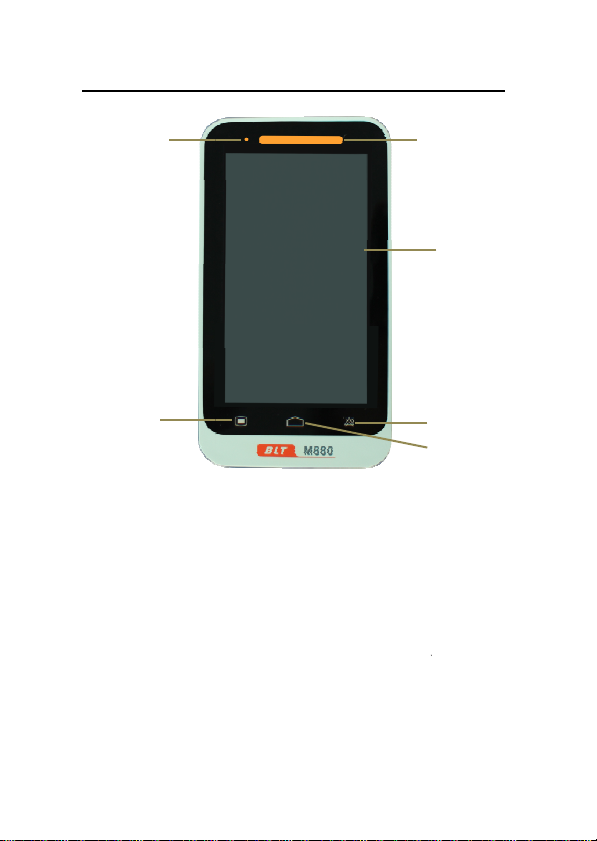
Pat
i
Fig 1
-
1. Alarm indicat
When an alar
m
below:
zHigh level
zMedium l
e
zLow leve
l
flashing.
2. Display scree
n
6
5
i
en
t
Monitor User’s Manual
1-2
-
1 Front View of the Monitor
i
ng lamp
m
occurs, this lamp will light up
alarm: the lamp quickly flashes r
e
e
vel alarm: the lamp slowly flashe
s
l
alarm: the lamp lights yello
w
n
1
3
4
as defined
e
d.
s
yellow.
w
without
2
3
4
Table of contents


