
AU Tool TW 500 User manual

www.autooltech.com
AUTOOL TW 500
Tire Pressure Monitoring System
User Manual


Trademark
AUTOOL Technology Co, Ltd. has registered its trademarks in several
countries including China, the trademark is . With regard
to the other trademark, service logo, domain name, icon and company
name mentioned in this manual, they shall all belong to AUTOOL and
its other affiliated company, in other countries without the registration
yet of these trademark, service logo, domain name, icon and company
name of AUTOOL, here we announce they are owned by AUTOOL. Any
company or person shall not use the trademark, service logo, domain
name, icon and company name of AUTOOL before getting approved by
AUTOOL with written certificates. Please visit our website
www.autooltech.com or email to aftersale@autooltech.com to contact
us.
Welcome
Dear customer,
Thanks for buying our product. It is our great honor to provide our best
service to you. Your satisfaction is our goal and your support will be highly
appreciated and it is the driving force of our progress!
We’re specialized in TPMS products and won good reputations from our
customers because of our good quality and service. Since our company
established, we’re subjected to the " Credit comes first.and the client is the
God. " business philosophy, to fulfill the "Grasp the opportunity to blaze
new trails, developed strong competitive products" as the principle of
service. Regard “People-oriented, Reputation fist" as our corporate
culture.
Please read this manual carefully before using our product. With full
pictures and their accompanying essay in detailed we introduce you the
operation of our product Intuitively. By the way, due to product production
date, different batches, indicating that the actual use of the product may be
different, specifications are subject to the phisycal product.
Thank you again for your choose and support. Meanwhile we hope that

you guys may send us feedback during the course of you use it. Your
suggestion and support are the driving force of our progress! "Happy to go
out, peacefully come back" is our hope, and finally we sincerely wish you
family all happy, everything goes well.
I I . The safety significance of the tire pressure monitoring
system
1. Tires are the most important part of the car, which means significant to
the safety of driving, dues to too much terrible traffic accidents caused by
its problem. As a matter of fact, to keep standard tire pressure and timely
detection of tire leaks is the key to safe driving. For the time being, fix
direct tire pressure monitoring system is the major mature way monitor the
tire pressure.
2. This product is a direct tire pressure monitoring system, it can be
real-time monitoring of tire pressure and temperature status, in time give
out alarm once abnormal situation happen. You needn’t check by eyesight
or percussion tires or other unscientific methods to determine whether the
tire is leak. Don’t worry about the pressure or temperature is too high to be
nervous.
Remark:
Always keep the standard tire pressure, safe driving, not only can prevent
puncture, but also reduce fuel consumption and extend tire life.
III. The working principle of tire pressure monitoring
system
The Tire Pressure Monitoring System (TPMS) is designed to monitor the
internal pressure and temperature of the tire by means of a sensor
mounted on the tire and to transmit the collected data to the driver in the
cab Of the receiver. TPMS can monitor the vehicle tire pressure and
temperature information in real time. Alarm give out as long as low

pressure, high pressure, air leakage, high temperature and other abnormal
situation, to remind the driver who need to take corresponding effective
measures to play a role in safety assistance to achieve car travel more
Safe, reliable, comfortable, and economical.
IV.Product profile:
The TPMS/HUD intelligent integrated machine extends the concept of
combining the HUD car head-up display function with the two functions of
the car slope meter, greatly improving the safety escort level of the product
to the user.
The TPMS/HUD intelligent integrated machine acquires data from the
satellite through the GPS/Beidou dual-channel module. The dual-channel
module has the advantages of strong star search capability and stable
signal. The TPMS/HUD intelligent integrated machine is used in all models
on the market.
With TPMS/HUD intelligent all-in-one machine, you can drive without
bowing, pay attention to the vehicle dynamics at any time, and you can
also see the status of the vehicle tires. The TPMS/HUD intelligent
all-in-one machine uses LCD color display. The effect is dazzling and clear,
and the vision is clear at a glance. TPMS/ HUD intelligent all-in-one
features include (tire pressure, tire temperature, speed, altitude, time, etc.)
V.Product characteristics:
Applicable to domestic cars, Asian cars, American cars,
European cars.
It is equipped with a high-precision dual-channel satellite GPS
signal module.
Fully automatic monitoring of vehicle driving conditions.
Metric (KM/H) and Imperial (MPH) units switch freely.
Tire pressure mode and HUD mode switch.
It adopts color HD LCD display with high resolution.
Solar charging function.

Start with the car, stop automatic sleep function.
Cool mini body design.
VI.Product functions:
Tire pressure display.
Tire temperature display.
Speed display.
Clock display.
Altitude display.
In-vehicle temperature display.
VII.Alarm:
Tire leak alarm.
Tire low pressure alarm.
Tire high pressure alarm.
Tire high temperature alarm.
Tire low temperature alarm.
Tire sensor low battery alarm.
Mainframe low battery alarm.
VIII.Mainframe

1, back key 2, M key 3. Forward key 4. Display
5. Solar charging board 6. USB charging port
IX.Introduction of TPMS fetal pressure monitoring and
display interface
Take the mainframe out and start the TPMS tire pressure monitoring
interface (as shown in the figure below, taking the English unit as an
example), (Note: the product speed, tire pressure display, tire temperature
is synchronous display)
A. This " " picture is to receive the mainframe battery icon. When the
solar energy and USB are supplying current, the icon scroll bar flashes to
indicate that the charging mode is in progress.
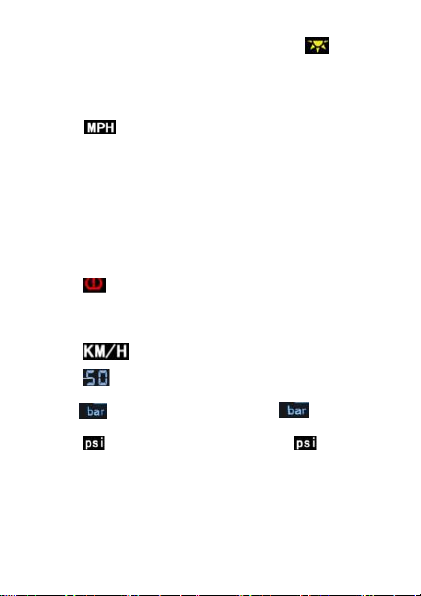
B. When the sun light reaches the charging condition, the “ ” icon will
be lit on the display to indicate that the solar panel has entered the working
state. At this time, the mainframe battery icon scroll bar is blinking,
indicating that the Perform charging mode.
C. This " " picture is the speed English unit icon.
D1, D2, D3, and D4 are tire temperature displays. A total of four groups
represent four tires. When the sensor is normally in the working state, the
temperature will be updated continually.
E1, E2, E3, E4 are tire position icons representing the four tire positions of
the car.
F1, F2, F3, and F4 are tire pressure display icons. The four groups
represent four tires. When the sensor is normally launched, this icon will
display constantly updated data of pressure.
G. This “ ” picture is the sensor alarm icon. When the air pressure
increases or decreases, this icon will flash, and the mainframe will also
send a “drop, drop,” alarm signal.
H. This " " is the speed metric unit icon.
F. This “ ” speed display icon shows the speed of the car when the
car is driving.
I. This " " picture is the air pressure unit icon, " " is the unit of
use in China.
J. This " " picture is the air pressure unit icon, and " " is a unit of
use in foreign countries.

Tire pressure mode metric (KM/H) unit interface display
X.Introduction of HUD display interface
1. Take the mainframe out and turn it on. Press and hold the “forward key”
for 5 seconds to switch to the HUD mode interface (as shown in the figure
below, take the English unit as an example) and press the “forward key” for
5 seconds to return to the tire pressure. interface.
A. This " " picture shows the mainframe battery icon. When the solar
energy and USB are supplying current, the icon scroll bar flashes to
indicate that the charging mode is in progress.
B. When the sun light reaches the charging condition, the “ ” icon will
be lit on the display to indicate that the solar panel has entered the working
state. At this time, the flash of the mainframe battery icon scroll bar is
received. Indicates that charging mode is in progress.
C. This " " is the speed metric unit icon.
D. GPS satellite time display area
E. This " " is a clock display icon. When the HUD mode is displayed,
the icon lights up and the GPS satellite time is displayed.

F. This “ ” speed display icon shows the speed of the car when the car
is driving.
I. The current altitude display area.
J. This " " picture shows the altitude icon. When it is in HUD mode, the
icon lights up and the real-time altitude is displayed.
H. In-vehicle temperature display (units Celsius °C)
HUD mode metric (MPH) unit interface display
XI.The installation steps
1.Receive mainframe installation
* Take out the mainframe, and then place the mainframe with a non-slip
mat or 3M glue on the instrument panel to avoid falling.
* The first time you use this product, first check if there is power. If there is
no power or no power on, you must take out the USB cable and connect it
to the USB port of the car. After charging, you can charge yourself by solar
energy without connecting USB.
Table of contents
Other AU Tool Measuring Instrument manuals

AU Tool
AU Tool X91 TPMS User manual

AU Tool
AU Tool X50 PRO User manual

AU Tool
AU Tool BT60 User manual

AU Tool
AU Tool X90 User manual

AU Tool
AU Tool SDT 206 User manual

AU Tool
AU Tool LM120 Plus User manual

AU Tool
AU Tool X90 User manual

AU Tool
AU Tool LM110 User manual

AU Tool
AU Tool X60 User manual

AU Tool
AU Tool X50 Plus User manual


