AMTAST DO901 User manual

Instruction Manual
AMTAST
Portable Dissolved Oxygen Meter DO901
AMTAST USA INCAMTAST USA INC

1
Introduction
hank you for selecting the AMTASTportable dissolved oxygen meter . This manual provides a step-by-step guide to help you operate the meter, please
carefully read the following instructions before use.
Unpacking
Before unpacking, ensure that the current work environment meets following conditions.
•Relative humidity is less than 80%.
•Ambient temperature is greater than 0°Cand less than 60°C.
•No potential electromagnetic interference.
The following list describes the standard components of the meter. After the unpacking, please check all components are complete. If any are damaged or
missing, please contact nearest distributor.
Bante820 Dissolved Oxygen Meter DO100 Dissolved Oxygen Probe Electrolyte Solution
Membrane Cap Electrode Clip Carrying Case
DO901 Portable Dissolved Oxygen Meter

2
Display
The AMTAST portable dissolved oxygenmeter is equipped with an easy-read LCD display that used to show the measured values and mode icons. The
following table describes the function of each icon.
INDEX:
Measurement mode icon:
Indicates the meter is in the measurement mode.
Low battery alarm:
When the battery is depleted, the icon will disappear.
Calibration mode icon:
Indicates the meter is in the calibration mode.
Hold icon:
Indicates the measuring value has been locked.
Setup mode icon:
Indicates the meter is in the setting mode.
Automatic Temperature Compensation:
Indicates the temperature compensation is enabled.
Memory icon:
Indicates the data is stored into memory.
DO901 Portable Dissolved Oxygen Meter
AMTAST DO901

3
Keypad
KEY FUNCTION
•Switches the meter ON/OFF.
•Locks the measured value, press the key again to resume measuring.
•Exits the calibration or setting and returns to measurement.
•Toggles between % saturation and concentration measurement modes.
•Sets the temperature (Press and hold the key for 3 seconds).
•Starts calibration.
•Enters the setup menu (Press and hold the key for 3 seconds).
•Stores current reading to memory.
•Increase value or scroll up through the menu item.
•Views the data logs.
•Decrease value or scroll down through the menu item.
•Confirms the calibration, settings or displayed options.
•Turn on/off the backlight (Press and hold the key for 3 seconds).
Connectors
INDEX:
NO. CONNECTOR DESCRIPTION
1 6-pin Connector Used for connecting the dissolved oxygen probe
2 USB Used for connecting the USB cable
DO901 Portable Dissolved Oxygen Meter

4
Installing the Batteries
•Remove the battery cover from backside of the meter.
•Insert three AA batteries into the battery compartment, note polarity.
•Replace the battery cover into its original position. Installation is completed.
When the batteries are depleted, the meter allows using the DC5V power adapter with USB cable for power supply. NOTE, take out the batteries.
Filling the Electrolyte Solution
1. Take out the dissolved oxygen probe and electrolyte solution from the packaging. Unscrew the membrane cap.
2. Fill the membrane cap halfway with electrolyte solution.
3. Screw the membrane cap onto the probe, excess electrolyte solution will drain out.
4. Be sure the cathode of probe makes contact with membrane cap, the electrolyte solution in membrane cap should be without an air bubble.
Cathode
DO901 Portable Dissolved Oxygen Meter

5
Connecting the Sensor
Insert the 6-pin connector of the dissolved oxygen probe into the corresponding connector socket on meter. Ensure the connector is fully seated. After
connection is completed, DO NOT pull on the sensor cord. Always make sure that the connector is clean and dry.
Switching the Meter On and Off
•Press the Meas key to switch on the meter, the display shows the measured value.
•Press and hold the Meas key for 5 seconds, the meter will switch off.
To enable the Auto-Power Off feature, please refer to chapter SETUP MENU.
Prior to Use
•Remove the protective cap from the bottom of the probe.
•Switch on the meter 10 to 15 minutes and wait for the probe to polarize.
DO901 Portable Dissolved Oxygen Meter

6
Setup Menu
The AMTAST dissolved oxygen meter contains an integrated setup menu that is used to customize the displayed option to meet measurement requirements.
The following table describes the functions of the menu items.
MENU DESCRIPTION OPTIONS DESCRIPTION DEFAULT
Set the number of calibration points. 1 point
1 point
2 points
Set the barometric pressure coefficient. Range:450~850mmHg or 60.0~113.3kPa 760mmHg
Set the salinity coefficient. Range:0.0~50.0ppt 0.0ppt
Set the default temperature unit. Degrees Celsius
°C
Degrees Fahrenheit
If enabled, the meter will automatically sense a
stable reading and lock the measurements.
Enable
Disable
Disable
If enabled, the meter will automatically turn off
if no key is pressed within 30 minutes.
Enable
Disable
Disable
Delete all stored readings in the memory. Enable
Disable
Disable
If enabled, all of the calibration data and selected
parameters will back to factory default settings,
the meter must be recalibrated.
Enable
Disable
Disable
Setting the default option
1. Press and hold the key for 3 seconds to enter the setup menu and the or key to select the menu item.
2. Press the Enter key, the meter shows an option.
3. Press the or key to select the desired option, press the Enter key to confirm. Setting is completed.
If you want to exit the setting, press the Meas key.
Menu
Page
Option
Menu
DO901 Portable Dissolved Oxygen Meter

7
Setting the barometric pressure
The following table describes the relationship between altitude and barometric pressure. Prior to the calibration or measurement, you need to set the
compatible parameter according to the local altitude.
ALTITUDE (m) kPa mmHg ALTITUDE (m) kPa mmHg
0 101.3 760 1600 82.9 622
100 100.1 750 1700 81.9 614
200 98.8 741 1800 80.9 607
300 97.6 732 1900 79.9 599
400 96.4 723 2000 78.9 592
500 95.2 714 2100 77.9 584
600 94.0 705 2200 76.9 577
700 92.8 696 2300 76.0 570
800 91.7 688 2400 75.0 563
900 90.5 679 2500 74.1 556
1000 89.4 671 2600 73.2 549
1100 88.3 662 2700 72.3 542
1200 87.2 654 2800 71.4 536
1300 86.1 646 2900 70.5 529
1400 85.0 638 3000 69.6 522
1500 84.0 630 3100 68.7 515
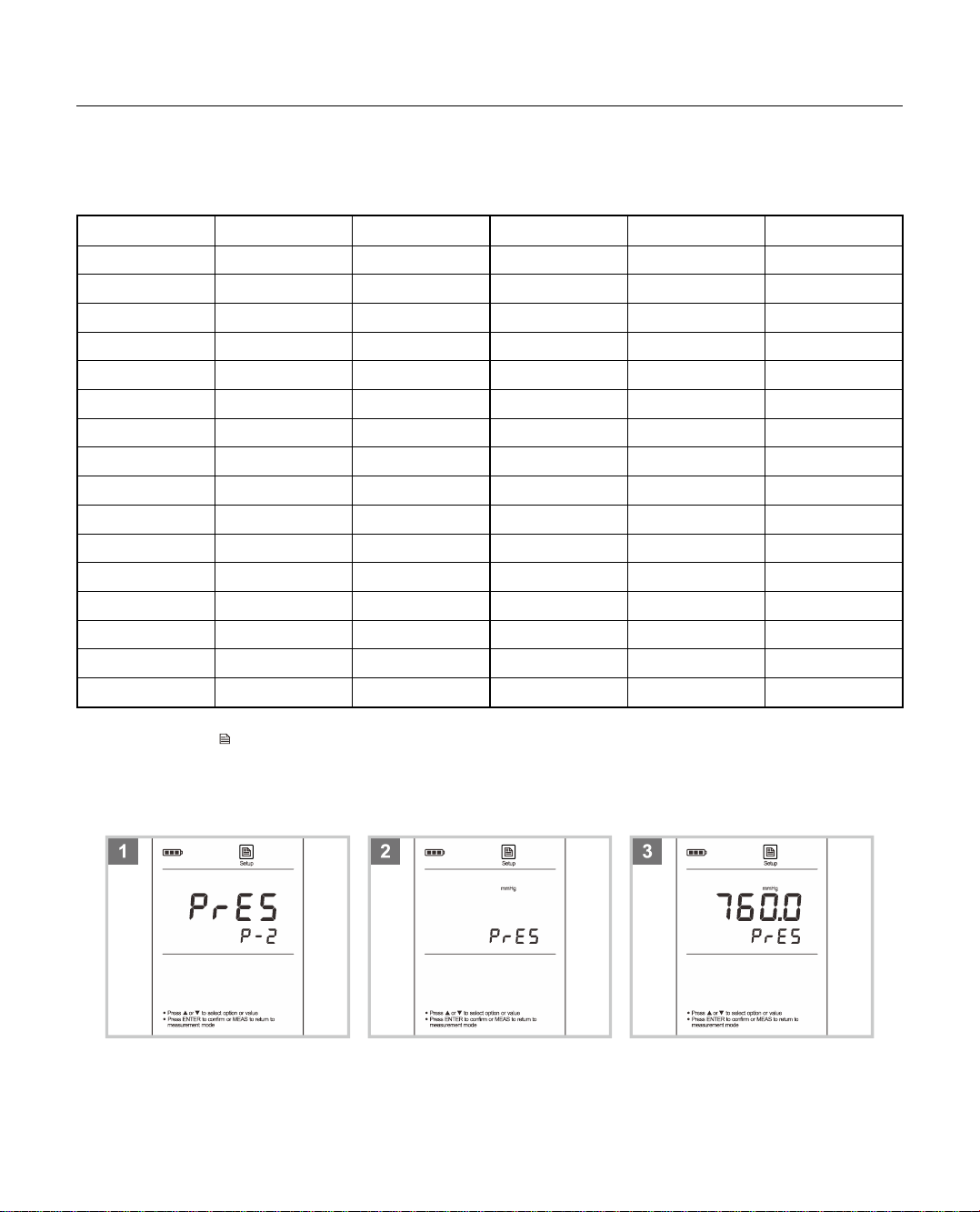
1. Press and hold the key for 3 seconds to enter the setup menu and the or key until the meter shows PRES/P-2.
2. Press the Enter key, the meter shows the default pressure unit (mmHg).
3. If necessary, press the or key to modify. Press the Enter key, the meter shows 760.0mmHg/PRES.
4. Press the or key to set the barometric pressure, press the Enter key to confirm. Setting is completed.
During the setting process, press the or key once, the setting value will increase or decrease by 0.1. Press and hold the or key, the
setting value will increase or decrease by 1.
DO901 Portable Dissolved Oxygen Meter

8
Setting the salinity coefficient
Salt dissolved in water will influences oxygen content of water. If your sample belong to high concentration liquids, please make sure that you have selected
an applicable salinity coefficient before measurement. For the low concentration liquids, please use the default coefficient 0.0 ppt.
1. Press and hold the key for 3 seconds to enter the setup menu and the or key until the meter shows SALT/P-3.
2. Press the Enter key, the meter shows the default salinity coefficient (0.0 ppt).
3. Press the or key to set the salinity of sample, press the Enter key to confirm. Setting is completed.
DO901 Portable Dissolved Oxygen Meter

9
DO Calibration in % Saturation Mode
The AMTAST dissolved oxygen meter is able to perform either 1 or 2 points calibration. For single point calibration, we recommend that you perform 100%
saturation calibration in the air-saturated water. If the 2 points calibration is selected, the zero oxygen solution needs to be used.
Single point calibration - 100% saturation
1.1 Ensure that the meter shows measurement unit “%”and you have selected 1 point calibration in the setup menu. Press the Cal key, the meter shows
100.0%/CAL 1.
1.2 Hold the dissolved oxygen probe in the air at 100% relative humidity or place the probe into the air-saturated water for 15 minutes. Press the Enter
key, the meter begins the calibration, the Calibration icon continuously flashing.
1.3 Wait for the reading to stabilize, the meter automatically shows END. Calibration is completed.
Single point calibration - zero oxygen
2.1 Ensure that the meter shows measurement unit “%”and you have selected 1 point calibration in the setup menu. Press the Cal key and the or
key until the meter shows 0.0%/CAL 1.
2.2 Immerse the dissolved oxygen probe into the zero oxygen solution for at least 10 minutes. Press the Enter key, the meter begins the calibration, the
Calibration icon continuously flashing.
2.3 Wait for the reading to stabilize, the meter automatically shows END. Calibration is completed.
DO901 Portable Dissolved Oxygen Meter
Table of contents
Other AMTAST Measuring Instrument manuals