
Agu Skinny User manual

agu–baby.com
SMART TEMPERATURE
INDICATOR
AGU STI2
EN USER MANUAL
Version 1.0
RU РУКОВОДСТВО ПО ЭКСПЛУАТАЦИИ
Версия 1.0

2
CONTENTS
1 Introduction ................................................................................... 3
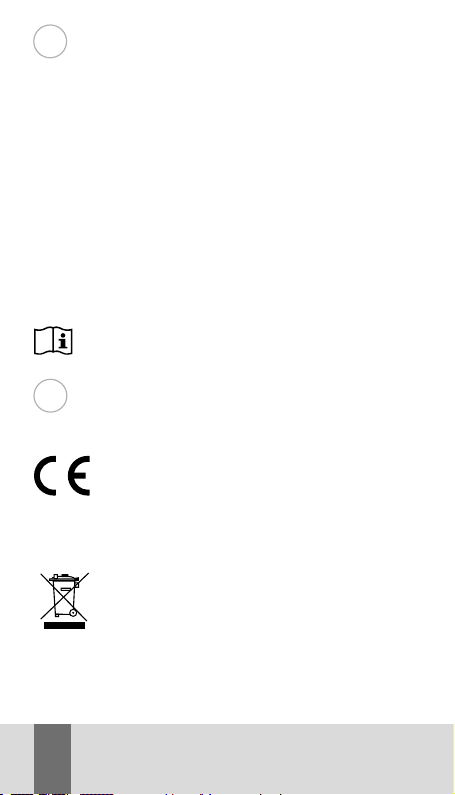
2 List of symbols............................................................................. 3
3 Scope of application.................................................................... 4
4 Completeness............................................................................... 4
5 Technical specications.............................................................. 5
6 Device description ........................................................................6
7 Safe operation instructions .......................................................7
8 Preparation for work...................................................................9
9 Install the application ...............................................................10
10 Methods of wearing the device .............................................10
11 Start measuring.........................................................................13
12 Device Cleaning.......................................................................... 14
13 Possible malfunctions
and ways of their elimination.................................................15
14 Storage, transportation
and operation of the device .................................................... 16
15 Disposal........................................................................................ 16
16 Certication...................................................................................17
17 Manufacturer’s warranty .........................................................17
SMART TEMPERATURE INDICATOR AGU STI2 EN
3
EN
INTRODUCTION
Dear friends, thank you for choosing our products!
Smart temperature indicator AGU STI2 is a «smart» indicator
designed for continuous monitoring and temperature control,
both for children and adults. Smart temperature indicator AGU
STI2 will greatly facilitate the life of caring parents and will
make it easier and more comfortable to conduct a procedure
of monitoring the axillary temperature of a child. The tempera-
ture is monitored every 4 seconds. The monitoring results are
transmitted in real time via Bluetooth® wireless data trans-
mission to your smartphone. With the help of Smart tem-
perature indicator AGU STI2, you have the opportunity
to monitor the child’s temperature for 24 hours a day.
Using the mobile application, you receive notications of
changes in temperature, and you can also see the dynamics
of temperature changes.
Please read this user manual carefully before using
the device.
LIST OF SYMBOLS
Symbols Meaning
The product meets the basic requirements of:
•Directive 2014/53/EU concerning radio equip-
ment;
•Directive 2011/65/EU RoHS on the restriction
of the use of certain hazardous substances in
electrical and electronic equipment.
WEEE (Waste Electrical and Electronic Equip-
ment Directive). The symbol on the product
or on its packaging indicates that this product
is not classied as household waste. To avoid
possible harm to the environment and human
health, separate such wastes from others and
dispose of them in accordance with accepted
norms.
1
2

4
The product complies with the basic require-
ments of TP ТС 020/2011 «Electromagnetic
compatibility of technical equipment», concer-
ning electromagnetic compatibility of technical
equipment.
Warning/Caution.
Read the instruction manual before use.
Manufacturer.
SCOPE OF APPLICATION
Smart temperature indicator AGU STI2 is not a medical de-
vice and designed for home use. Do not use the device for
other purposes. The device is designed for temperature
monitoring for both children and adults. The indicator is xed
on the child’s body with the help of special stickers. These
stickers are included in the kit and they can be purchased
separately.
WARNING
The device is intended for indoor use only.
COMPLETENESS
• Smart temperature indicator AGU STI2 – 1 pc.
• Battery CR1620 – 1 pc.
• Key for battery compartment – 1 pc.
• Stickers for Smart temperature indicator AGU STI2
single-sided – 5 pcs.
• Stickers for Smart temperature indicator AGU STI2
double-sided – 5 pcs.
• User manual – 1 pc.
3
4

5
EN
MAIN TECHNICAL PARAMETERS
Name Smart temperature indicator AGU STI2
Type Household device
Monitoring location Axillary (armpit)
Power source 3V CR1620
Range of controlled
temperatures 32–42 °С
Discreteness
0.1 °С within the range of monitoring
from 35.5 °С to 42.0 °С;
0.2 °С within the range of monitoring
from 32.0 °С to 35.4 °С
Dimensions,
L×L×H, mm 38x38x7
Weight, g Approximately 8 (without battery)
Update of temperature
information Every 4 seconds
Housing material ABS plastic
Sensor material 304 stainless steel
One-sided xative
sticker
Type of adhesive (glue): acryl /acrylate
Base material: polyester spunlace
Double-sided xative
sticker
Type of adhesive (glue): acryl /acrylate
Base material: polyethylene
Auto power o Aer 10 minutes at a temperatur
below 32°C
Radius of signal
reception
up to 10 meters
(depending on conditions)*
Operating temperature 10–40 °С at a maximum relative humidity
of air no more than 65%
Storage temperature 10–30 °С at a maximum relative humidity
of air no more than 65%
Transport temperature from –10 °С to +40 °С at a maximum
relative humidity of air no more than 75%
Operating time
from one battery
About 4 days of continuous work.
Depends on the quality of the battery
5

6
Temperature
stabilization time
10–20 minutes; depends on the adhesion
of skin to the temperature sensor
*The human body naturally screens Bluetooth® signal. In case of disconnection
with the smartphone it is reccomended to check the correctness of indicator
xation (chapter 10 «Methods of wearing the device») and/or carry the smart-
phone closer to the indicator.
Also, the radius of signal reception depends on the Bluetooth® module, set in
a smartphone.
DEVICE DESCRIPTION
The features of Smart temperature indicator AGU STI2:
• compact, thin and light weight indicator (38x38x7 mm,
approximately 8 g (without battery);
• the monitoring is taken every 4 seconds;
• replaceable battery;
• the working radius is up to 10 meters.
6
Temperature
sensor
Bluetooth® indicator
ON/OFF button
Battery cap

7
EN
SAFE OPERATION INSTRUCTIONS
• The device should be used only for its intended pur-
pose in accordance with this instruction manual.
• Any modication of the device is prohibited.
• Do not allow the child to play with the device. This de-
vice is not a toy and is not intended for games!
• Do not disassemble the device.
• Do not expose it to direct sunlight, high or low temper-
ature, moisture or dirt.
• Do not allow penetration of any solutions into the device.
• Replace the battery as needed. When the battery is
low, you will receive a notication in the application.
• The device is not waterproof and can not be used to
monitor the temperature of liquid.
WARNING
One-sided stickers and double-sided stickers for
Smart Temperature Indicator AGU STI2 are dispos-
able and cannot be reused.
Do not use stickers for temperature monitoring for
children with skin hypersensitivity and/or prone to
allergy.
The recommended time of the xative stickers use
on skin is 12 hours maximum. Use another sticker
no earlier than 6 hours aer removing the previous
one when xing it on the same skin area. In case of
long-term temperature monitoring for children (over
12 hours), it is recommended to interchange xation
of the indicator under the right and le underarm.
GUIDELINES FOR FIXATIVE STICKERS APPLICATION
Always x the sticker on clean, dry, intact skin with no tension.
Do not x the sticker with tension. It can injure skin. Make
sure there are no folds when xing the sticker.
REMOVING FIXATIVE STICKERS
Gently li the sticker edge when removing the one-sided
sticker, grasping it along the width and pull it back slowly,
7

8
removing it smoothly parallel to skin in hairline direction.
While pulling the sticker back, keep it closer to the skin
surface and hold the skin near the sticker strip being removed.
Li the smart indicator edge gently when removing the
double-sided sticker, grasping the smart indicator along the
width and pull it back slow and smooth. Hold the skin near
the sticker being removed.
WARNING
Keepthedeviceoutofthereachofchildren.Thedevice
contains small details, dangerous for a child.
WARNING
Do not use abrasive cleaners, solvents or benzine
to
treat the Smart temperature indicator AGU STI2,
and never immerse the device
in liquid – all this can
lead to the failure of the device.
WARNING
Do not use boiling for sterilization! Never wash the
Smart temperature indicator AGU STI2 in a dish-
washer!
Remember that the Smart temperature indicator AGU STI2
should be kept in a room
where the temperature will be
monitored, not less than 2 hours; otherwise the monitoring
result may be incorrect.
PREPARATION FOR WORK
1. Open the battery cover using
the key provided.
8

9
EN
2. Remove the protective layer from
the battery.
3. Reinsert the battery if
necessary.
4. Close the battery cover with
the key.
INSTALL THE APPLICATION
1. Install the application.
Option 1: go to PlayMarket or AppStore
and enter «AGU» into the search box,
then download the application.
Option 2: for direct download scan this
QR-code.
2. Download and run the application.
3. Register or log in through the social network.
4. Select the device you want to connect to.
Battery
protective layer
CR1620
3V
9

10
5. Enter the required information about the child.
6. Turn on the device* and click the «Connect» button.
*The Bluetooth® LED indicator on the device panel will ash green every
4 seconds.
When the device is turned on, the Bluetooth® LED indicator
ashes every 4 seconds.
If the connection fails, press the ON/OFF button to turn o the
device. Aer a few seconds, turn on the device to try again.
If the connection with the device is lost due to a long distance,
bring the phone closer to the device and it will connect au-
tomatically.
METHODS OF WEARING THE DEVICE
WARNING
It is recommended to use Stickers AGU SSTI2.
WARNING
Before using the sticker, please make sure that the
contact surface of the skin is cleaned.
WARNING
With prolonged temperature monitoring, if there is
an allergic skin reaction, you should immediately
stop using stickers.
USING A SMART TEMPERATURE INDICATOR AGU STI2
WARNING
Please carefully read the information provided in
section 7 «Safe operation instructions» prior to
WARNING
Stickers components may cause allergic reaction!
Information regarding composition of stickers is
provided in section 5 «Main technical parameters».
10
This manual suits for next models
1
Table of contents
Languages:


