
SOYO SY-V6BE+ User manual

SY-V6BE+
Mainboard
****************************************************
Pentium®
II Processor supported
AGP/PCI Mainboard
66&100MHz Front Side Bus supported
ATX Form Factor
****************************************************
User's Guide
&
Technical Reference

SOYO™SY-V6BE+
ii
About This Guide
This User's Guide is for assisting system manufacturers and end users in setting up
and installing the mainboard. Information in this guide has been carefully checked for
reliability; however, no guarantee is given as to the correctness of the contents. The
information in this document is subject to change without notice.
Copyright Notice
Copyright 1998, Soyo Computer Inc. All rights reserved. This manual is copyrighted
by Soyo Computer Inc. You may not reproduce, transmit, transcribe, store in a
retrieval system, or translate into any language, in any form or by any means,
electronic, mechanical, magnetic, optical, chemical, manual or otherwise, any part of
this publication without express written permission of Soyo Computer Inc.
Trademarks
Soyo is a registered trademark of Soyo Computer Inc. All trademarks are the property
of their owners.
Disclaimer
Soyo Computer Inc. makes no representations or warranties regarding the contents
of this manual. We reserve the right to revise the manual or make changes in the
specifications of the product described within it at any time without notice and without
obligation to notify any person of such revision or change. The information contained
in this manual is provided for general use by our customers. Our customers should be
aware that the personal computer field is the subject of many patents. Our customers
should ensure that their use of our products does not infringe upon any patents. It is
the policy of Soyo Computer Inc. to respect the valid patent rights of third parties and
not to infringe upon or assist others to infringe upon such rights.
Restricted Rights Legend
Use, duplication, or disclosure by the Government is subject to restrictions set forth in
subparagraph (c)(1)(ii) of the Rights in Technical Data and Computer Software clause
at 252.277-7013.
Product Rights
Products mentioned in this manual are mentioned for identification purpose only.
Product names appearing in this manual may or may not be registered trademarks or
copyrights of their respective companies.
If you need any further information, please come to our home page on the Internet.
The address is "http://www.soyo.com.tw".
Edition: December 1998
Version 1.1
SY-V6BE+ SERIAL
FC
CTested To Comply
With FCC Standards
FOR HOME OR OFFICE USE
POST CONSUMER
RECYCLED PAPER
100%

Table of Contents SY-V6BE+
iii
Table of Contents
SY-V6BE+ MAINBOARD LAYOUT ...............................................1
CHAPTER 1 INTRODUCTION .....................................................2
1-1 KEY FEATURES......................................................2
1-2 HANDLING THE MAINBOARD................................5
1-3 ELECTROSTATIC DISCHARGE PRECAUTIONS....5
CHAPTER 2 HARDWARE SETUP...............................................6
2-1 PREPARATIONS .....................................................6
2-2 UNPACKING THE MAINBOARD..............................7
2-3 INSTALLATION GUIDE............................................7
CHAPTER 3 BIOS SETUP UTILITY...........................................30
3-1 SOYO COMBO SETUP .........................................32
3-2 STANDARD CMOS SETUP ...................................38
3-3 BIOS FEATURES SETUP......................................41
3-4 CHIPSET FEATURES SETUP...............................46
3-5 POWER MANAGEMENT SETUP...........................49
3-6 PNP/PCI CONFIGURATION SETUP......................53
3-7 LOAD SETUP DEFAULTS .....................................56
3-8 INTEGRATED PERIPHERALS...............................57
3-9 SUPERVISOR PASSWORD ..................................61
3-10 USER PASSWORD ...............................................62
3-11 IDE HDD AUTO DETECTION................................63
CHAPTER 4 DRIVERS INSTALLATION......................................64
Mainboard Features SY-V6BE+
1
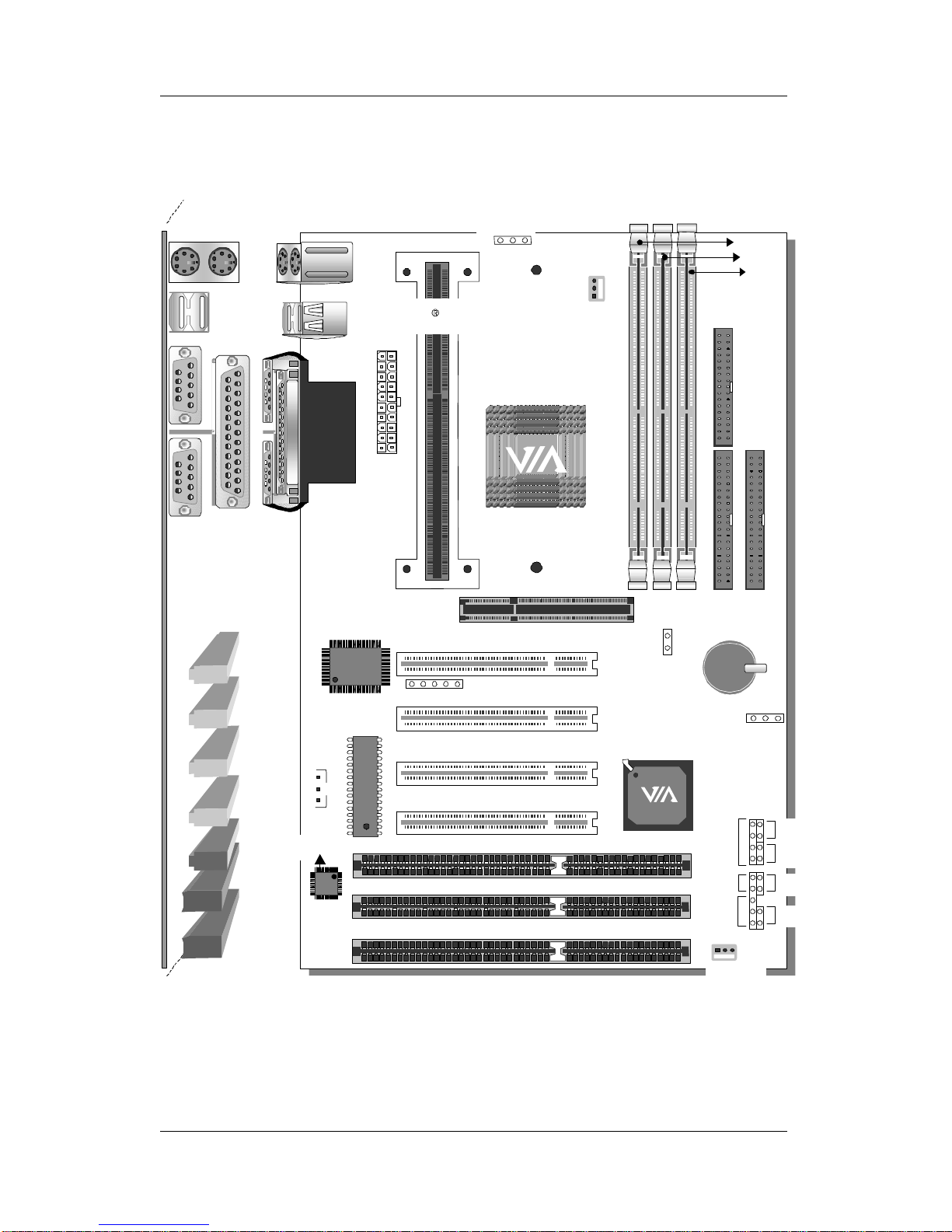
SY-V6BE+ MAINBOARD LAYOUT
Back Panel SY-V6BE+ Platform
COM 1
COM 2
PRT
USB 1USB 2
PS/2 KB
Connector
PS/2 Mouse
Connector
JP10
PCI Slot #1
PCI Slot #2
PCI Slot #3
PCI Slot #4
ISA Slot #2
ISA Slot #1
ISA Slot #3
JP5
JP44
1
3
IR1
15
1
CPUFAN
Ultra
I/O Chipset
CHAFAN
1
IDE 1
IDE 2
11
1
FDC
Slot 1 for
Pentium
IIProcessor
1
3
AGP Slot
ATX
Power
DIMM 1
DIMM 2
DIMM 3
Speaker
Keylock
Power
LED
Reset
PWRBT
Turbo
LED
HDD LED
_
+
_
+
_
+
_
+
3
1
Wake on
LAN
Hardware
Monitoring
Winbond
W83781D
SW1
3V Lithium
Battery
BIOS Flash

Introduction SY-V6BE+
2
Chapter 1
INTRODUCTION
The SY-V6BE+ AGP/PCI mainboard is a high-performance
Pentium®
II processor supported ATX form-factor system board.
SY-V6BE+ uses the VIA Chipset technology and supports Pentium®
II class processors. This mainboard is fully compatible with industry
standards and adds many technical enhancements.
1-1 KEY FEATURES
Supports Intel Pentium® II processor (233-500MHz) & CeleronTM
processor (266~400 MHz)
Auto-detect CPU voltage
PC98, ACPI, Ultra DMA/33
Supports system memory up to 768 MBytes
Power-on by modem or alarm
Supports Wake-On-LAN (WOL)
Supports power-on by keyboard
Supports onboard hardware monitoring (optional)
and includes Hardware Doctor™utility
1 x 32-bit AGP slot
4 x 32-bit bus mastering PCI slots
2 x USB ports onboard
1 x IrDA port
Supports multiple-boot function
DMI utility
SOYO COMBO Setup

Introduction SY-V6BE+
3
SY-V6BE+ PLATFORM FEATURES
Board Size 4-layer PCB, 18x30.5cm(7.1”x12”), ATX Form
Factor
Slot1 Slot 1 for Pentium®
II Processor
ØSupports the following processors
u100MHz FSB
Pentium®
II 350/400/450/500* MHz
u66MHz FSB
Pentium®
II 233/266/300/333 MHz
Celeron300A/333/366/400* MHz
Celeron266/300 MHz
ØSupports both boxed and non-boxed type of CPUs
ØIncludes a CPU mount kit with retention clip
ØAlso includes a CPU Heat Sink support stand used
for heavier non-boxed type CPUs
ØFeatures Auto-detection of CPU voltage
*This main board is designed to be able to support up to 500/400
MHz processors. However, the 500/400MHz processors are not
available yet at this moment for testing.
Chipset VIA AGP Set
ATX Power 20-pin Male Connector
CPUFAN 3-pin CPU Cooling Fan Connector
Memory DIMM Bank (DIMM1~3)
ØThree strips of 168-pin Unbuffered or Registered
SDRAM DIMM
ØSupports 8/16/32/64/128/256MB DIMM modules in
each bank
ØProvides up to 768 MBytes of main memory
ØSupports ECC configuration
BIOS System BIOS built-in, Award BIOS
ØAPM, ACPI and "Plug-and-Play" function
ØSupports multiple-boot function
ØOnboard FLASH memory for easy upgrade
ØDMI utility
Bus Controller Compliant with v2.1 PCI specifications

Introduction SY-V6BE+
4
PCI Slots 4 x 32-bit Bus Mastering Slots
AGP Slot 1 x 32-bit AGP Slot
ISA Slots 3 x 16-bit ISA Slots
IDE1, IDE2 2 x 40-pin Bus Mastering E-IDE/ATAPI Ports
ØIDE1: Primary IDE Device Connector
ØIDE2: Secondary IDE Device Connector
ØSupports Ultra DMA/33MHz
FDC 1 Floppy Disk Drive (FDD) Port
(Supports 1.2MB/1.44MB/2.88MB and LS120/3-mode FDD)
IR1 5-pin Serial Infrared Device Header
Keylock 5-pin KeyLock Header
Reset 2-pin Reset Switch Header
Speaker 4-pin PC Speaker Header
TB_LED 2-pin Turbo LED Header
HDD_LED 2-pin IDE Device LED Header
PWRBT ATX Power On/Off Switch 2-pin Header
JP5 CMOS Clear Jumper
JP10 Power On by Keyboard Jumper
JP44 WOL (Wake-On-LAN) 3-pin Header
SW1 Power up FSB clock and AGP bus clock setting
SY-V6BE+ BACK-PANEL FEATURES
PRT 1 x Onboard 26-pin Female Parallel Printer Port
ØECP/EPP/SPP multi-mode parallel printer port
COM1, COM2 2 x Onboard RS-232 Serial Ports
ØFeature 2 x high-speed UARTs (with 16550 FIFO)
PS/2 KB 1 x Onboard PS/2 Keyboard Port
PS/2 Mouse 1 x Onboard PS/2 Mouse Port
USB1, USB2 2 x Onboard USB
(Universal Serial Bus)
Ports

Introduction SY-V6BE+
5
1-2 HANDLING THE MAINBOARD
To avoid damage to your mainboard, follow these simple rules while
unpacking:
ØBefore handling the mainboard, ground yourself by grasping an
unpainted portion of the system's metal chassis.
ØRemove the mainboard from its anti-static packaging. Hold the
mainboard by the edges and avoid touching its components.
ØCheck the mainboard for damage. If any chip appears loose,
press carefully to seat it firmly in its socket.
Warning: Do not apply power if the mainboard appears
damaged. If there is damage to the board, contact your
dealer immediately.
1-3 ELECTROSTATIC DISCHARGE PRECAUTIONS
Make sure to ground yourself before handling the mainboard or
other system components. Electrostatic discharge can easily
damage the components. Note that you must take special
precautions when handling the mainboard in dry or air-conditioned
environment.
To protect your equipment from electrostatic discharge, take the
following precautions:
ØDo not remove the anti-static packaging until you are ready to
install.
ØGround yourself before removing any system component from its
protective anti-static packaging. (To ground yourself, grasp the
expansion slot covers or other unpainted portions of the computer
chassis.)
ØFrequently ground yourself while working or use a grounding strap.
ØHandle the mainboard by its edges and avoid touching its
components.

Hardware Setup SY-V6BE+
6
Chapter 2
HARDWARE SETUP
Congratulations on your purchase of SY-V6BE+ Mainboard. You are
about to install and connect your new mainboard.
Note: Do not unpack the mainboard from its protective
anti-static packaging until you have made the following
preparations.
2-1 PREPARATIONS
Gather and prepare all the following hardware equipment to
complete the installation successfully:
1. Pentium®
II processor with built-in CPU cooling fan (boxed
type).
Note: This mainboard supports non-boxed type CPUs. The
heavier CPU cooling fan requires the installation of a CPU
support stand included in this mainboard package.
2. DIMM memory module
3. Computer case and chassis with adequate power supply unit
4. Monitor
5. PS/2 Keyboard
6. Pointing Device (PS/2 mouse)
7. Speaker(s) (optional)
8. Disk Drives: HDD, CD-ROM, Floppy drive…
9. External Peripherals: Printer, Plotter, and Modem (optional)
10. Internal Peripherals: Modem and LAN cards (optional)

Hardware Setup SY-V6BE+
7
2-2 UNPACKING THE MAINBOARD
When unpacking the mainboard, check for the following items:
ØThe SY-V6BE+ AGP/PCI Mainboard
ØThis Quick Start Guide *
ØThe Installation CD-ROM *
ØOne IDE Device Flat Cable
ØOne Floppy Disk Drive Flat Cable
* If your board comes with a driver disc and a paper manual, the Quick Start Guide
and the CD-ROM are not included in the package.
Warning: Do not unpack the mainboard from its anti-static
packaging until you are ready to install it.
Like most electronic equipment, your mainboard may be damaged
by electrostatic discharge. To avoid permanent damage to
components ground yourself while working by using a grounding
strap. Otherwise, ground yourself frequently by touching the
unpainted portion of the computer chassis to drain the static
charges.
Handle the mainboard carefully, holding it by the edges.
You are now ready to start the installation.
2-3 INSTALLATION GUIDE
We will now begin the installation of the mainboard. Please follow
the step-by-step procedure designed to lead you to a complete and
correct installation.
Warning: Turn off the power to the mainboard, system
chassis, and peripheral devices before performing any
work on the mainboard or system.
Other manuals for SY-V6BE+
1
Table of contents
Other SOYO Motherboard manuals

SOYO
SOYO SY-6IZM User manual

SOYO
SOYO SY-6KL User manual

SOYO
SOYO Super 7 SY-5EMA User manual

SOYO
SOYO SY-5SSM Use and care manual

SOYO
SOYO SY-P4I875P DRAGON 2 V1.0 User manual

SOYO
SOYO 82430 TX Use and care manual

SOYO
SOYO SY-6BA+ Use and care manual

SOYO
SOYO SY-6BA+ User manual

SOYO
SOYO SY-5EHM Use and care manual

SOYO
SOYO SY-K7VEMPRO User manual

SOYO
SOYO SC-6TLx User manual

SOYO
SOYO Motherboard SY-6ZB User manual

SOYO
SOYO SY-7IWA-F User manual

SOYO
SOYO SY-7VCA2 User manual

SOYO
SOYO SY-7ISA+ User manual

SOYO
SOYO 82440 FX Use and care manual

SOYO
SOYO SY-K7VTA PRO User manual

SOYO
SOYO SY-6ZE+ Use and care manual

SOYO
SOYO DRAGON Lite SY-KT333 User manual

SOYO
SOYO SY-7IWM-X User manual












