
SOYO SY-7VDA User manual

SY-7VDA
Motherboard
****************************************************
VIA Cyrix III, Intel Pentium®
III & Celeron
Processor supported
VIA PRO266 AGP/PCI Motherboard
66/100/133 MHz Front Side Bus supported
ATX Form Factor
****************************************************
User's Manual

SOYO™SY-7VDA
ii
Copyright © 2001 by Soyo Computer Inc.
Trademarks:
Soyo is the registered trademark of Soyo Computer Inc. All trademarks are the
properties of their owners.
Product Rights:
All names of the product and corporate mentioned in this publication are used for
identification purposes only. The registered trademarks and copyrights belong to
their respective companies.
Copyright Notice:
All rights reserved. This manual has been copyrighted by Soyo Computer Inc. No
part of this manual may be reproduced, transmitted, transcribed, translated into any
other language, or stored in a retrieval system, in any form or by any means, such
as by electronic, mechanical, magnetic, optical, chemical, manual or otherwise,
without permission in writing from Soyo Computer Inc.
Disclaimer:
Soyo Computer Inc. makes no representations or warranties regarding the contents
of this manual. We reserve the right to amend the manual or revise the
specifications of the product described in it from time to time without obligation to
notify any person of such revision or amend. The information contained in this
manual is provided to our customers for general use. Customers should be aware
that the personal computer field is subject to many patents. All of our customers
should ensure that their use of our products does not infringe upon any patents. It is
the policy of Soyo Computer Inc. to respect the valid patent rights of third parties
and not to infringe upon or to cause others to infringe upon such rights.
Restricted Rights Legend:
Use, duplication, or disclosure by the Government is subject to restrictions set
forth in subparagraph (c)(1)(ii) of the Rights in Technical Data and Computer
Software clause at 252.277-7013.
About This Guide:
This Quick Start Guide can help system manufacturers and end users in setting up
and installing the Motherboard. Information in this guide has been carefully
checked for reliability; however, to the correctness of the contents there is no
guarantee given. The information in this document is subject to amend without
notice.
For further information, please visit our Web Site on the Internet. The address is
"http://www.soyo.com.tw".
Edition: May 2001
Version 1.2
7VDA SERIAL
FC
CTested To Comply
With FCC Standards
FOR HOME OR OFFICE USE
POST CONSUMER
RECYCLED PAPER
100%

Table of Contents SY-7VDA
iii
Table of Contents
CHAPTER 1 MOTHERBOARD DESCRIPTION .............................1
1-1 INTRODUCTION...........................................................1
1-2 KEY FEATURES............................................................1
1-3 HANDLING THE MOTHERBOARD .............................4
1-4 ELECTROSTATIC DISCHARGE PRECAUTIONS ........5
1-5 SY-7VDA MOTHERBOARD LAYOUT.........................6
1-6 SY-7VDA MOTHERBOARD COMPONENTS...............7
1-7 MICROPROCESSOR......................................................9
1-8 MEMORY.....................................................................10
1-9 CHIPSET ......................................................................11
1-10 I/O INTERFACE CONTROLLER.................................15
1-11 HARDWARE MONITOR..............................................18
1-12 WAKE ON LAN TECHNOLOGY.................................19
CHAPTER 2 HARDWARE INSTALLATION..................................20
2-1 PREPARATIONS ..........................................................20
2-2 UNPACKING THE MOTHERBOARD .........................21
2-3 INSTALLATION GUIDE..............................................22
2-3.1 CPU Installation.........................................................23
2-3.2 DDR RAM Memory Module Installation.....................26
2-3.3 Motherboard Connector..............................................28
2-3.4 CMOS Clear (JP5) .....................................................42
2-3.5 Power On...................................................................43
2-3.6 Quick BIOS Setup.......................................................44
2-3.7 Troubleshooting at First Start .....................................46
2-3.8 Power Off...................................................................49
CHAPTER 3 BIOS SETUP UTILITY ..............................................50
3-1 SOYO COMBO SETUP.................................................53
3-2 STANDARD CMOS SETUP..........................................56

Table of Contents SY-7VDA
iv
3-3 ADVANCED BIOS FEATURES.....................................59
3-4 ADVANCED CHIPSET FEATURES..............................63
3-5 INTEGRATED PERIPHERALS.....................................71
3-6 POWER MANAGEMENT SETUP ................................79
3-7 PNP/PCI CONFIGURATIONS.......................................85
3-8 PC HEALTH STATUS....................................................88
3-9 LOAD FAIL-SAFE DEFAULTS.....................................90
3-10 LOAD OPTIMIZED DEFAULTS...................................91
3-11 SET SUPERVISOR PASSWORD...................................92
3-12 SET USER PASSWORD................................................93
3-13 IDE HDD AUTO DETECTION .....................................94
CHAPTER 4 THE SOYO CD ...........................................................96

Motherboard Description SY-7VDA
1
Chapter 1
MOTHERBOARD DESCRIPTION
1-1 INTRODUCTION
The SY-7VDA AGP/PCI Motherboard is a high-performance, Socket 370
support ATX form-factor system board. The SY-7VDA uses VIA Chipset
technology and supports Socket 370 class processors. This Motherboard is
fully compatible with industry standards and adds many technical
enhancements.
1-2 KEY FEATURES
ØCPU SUPPORT
The SY-7VDA supports a wide range of INTEL CPUs:
nFSB 66MHz: Celeron(400-700MHz)
nFSB 100MHz: Pentium® III (500-850MHz)
nFSB 133MHz: Pentium® III (533MHz-1.13GHz)
Supports Via Cyrix processors
nFSB 100MHz: Cyrix III (500MHz-600MHz)
New released Intel Socket 370 CPUs will very likely be supported by the
SY-7VDA as well.
ØCPU SETTINGS
The SY-7VDA provides the user with a very complete and convenient
CPU setting environment. The CPU settings are all adjusted through the
special SOYO COMBO page in the BIOS, therefore rendering the use of
jumpers obsolete.
nCPU FSB Frequency
The SY-7VDA supports an incredibly wide range of CPU FSB frequency
settings:
66, 75, 81, 83, 90, 95, 100, 105, 110, 112, 113, 115, 117, 118, 120, 122,
124, 126, 133, 135, 137, 138, 140, 142, 144, 150 and 155 MHz.
This ensures that the SY-7VDA has an overwhelming overclocking potential.

Motherboard Description SY-7VDA
2
nCPU Multiplier
The SY-7VDA supports a wide range of multipliers:
2.0x, 2.5x, 3.0x, 3.5x, 4.0x, 4.5x, 5.0x, 5.5x, 6.0x, 6.5x, 7.0x, 7.5x and
8.5x
ØEXPANDABILITY
The SY-7VDA provides all the standard expansion slots, and many more
additional expansion features:
uExpansion slots
n1 x 32-bit bus master AGP slot
n5 x 32-bit bus master PCI slots
uEnhanced IO
nFloppy disk controller
n2x EIDE controllers with support for up to 4 Ultra DMA 33/66
/100 devices
nStandard/EPP/ECP parallel port
n2x 16550 compatible serial ports
nIrDA compatible infrared port
n6x USB (Universal Serial Bus) connectors
nPS/2 mouse connector
nPS/2 keyboard connector

Motherboard Description SY-7VDA
3
ØADVANCED FUNCTIONS
The SY-7VDA supports advanced functions such as:
nWake-On-LAN
Supports Wake-On-LAN (Some advanced network cards can
wake the system up over the network, the WOL connector is
provided by the SY-7VDA to support this function).
nMultiple boot
The SY-7VDA supports booting from devices such as CD-ROM.
nPower on by modem or alarm
If the SY-7VDA system is in suspend mode, it can be switched back
on through the modem or RTC alarm through this function. This
opens a lot of possibilities, such as remote access that switches the
system on only after the modem receives a call.
ØFAIL SAFE
The SY-7VDA comes with added functionality to make managing the
system easy and safe
uHardware Monitor
The integrated Hardware Monitor IC and Hardware doctor software
enables the user to monitor system voltages, temperatures and FAN speeds.
This makes sure that the user is full control of the system
uPower Failure Resume Function
This function can be set in the BIOS, and determines whether the system
will automatically turn on again after a power failure. This function is
indispensable for server systems that need to always be on line.
u5VSB Indicator
This green LED gives an indication of the presence of the 5V Standby
voltage. This voltage is always fed into the motherboard and is used for
functions such as WOL.
ØSOYO Bonus Pack CD-ROM
ØCOMPLIANCE
The SY-7VDA complies with all important industry standards. The

Motherboard Description SY-7VDA
4
following underlines the reliability of the SY-7VDA, a motherboard to
trust.
nPC99, ACPI compliant
ØUSER FRIENDLY
nSOYO Combo Setup
nJumperless design
nYou can set up the following options through the BIOS setup
CPU FSB frequency
CPU multiplier
CPU Vcore voltage
PCI clock
AGP Clock
DDR RAM Clock
1-3 HANDLING THE MOTHERBOARD
To avoid damage to your Motherboard, follow these simple rules while
unpacking:
ØBefore handling the Motherboard, ground yourself by grasping an
unpainted portion of the system's metal chassis.
ØRemove the Motherboard from its anti-static packaging. Hold the
Motherboard by the edges and avoid touching its components.
ØCheck the Motherboard for damage. If any chip appears loose, press
carefully to seat it firmly in its socket.
Warning: Do not apply power if the Motherboard appears
damaged. If there is damage to the board, contact your dealer
immediately.

Motherboard Description SY-7VDA
5
1-4 ELECTROSTATIC DISCHARGE PRECAUTIONS
Make sure to ground yourself before handling the Motherboard or other
system components. Electrostatic discharge can easily damage the
components. Note that you must take special precautions when handling
the Motherboard in dry or air-conditioned environment.
To protect your equipment from electrostatic discharge, take the following
precautions:
ØDo not remove the anti-static packaging until you are ready to install.
ØGround yourself before removing any system component from its
protective anti-static packaging. (To ground yourself, grasp the expansion
slot covers or other unpainted portions of the computer chassis.)
ØFrequently ground yourself while working or use a grounding strap.
ØHandle the Motherboard by its edges and avoid touching its
components.
Motherboard Description SY-7VDA
6
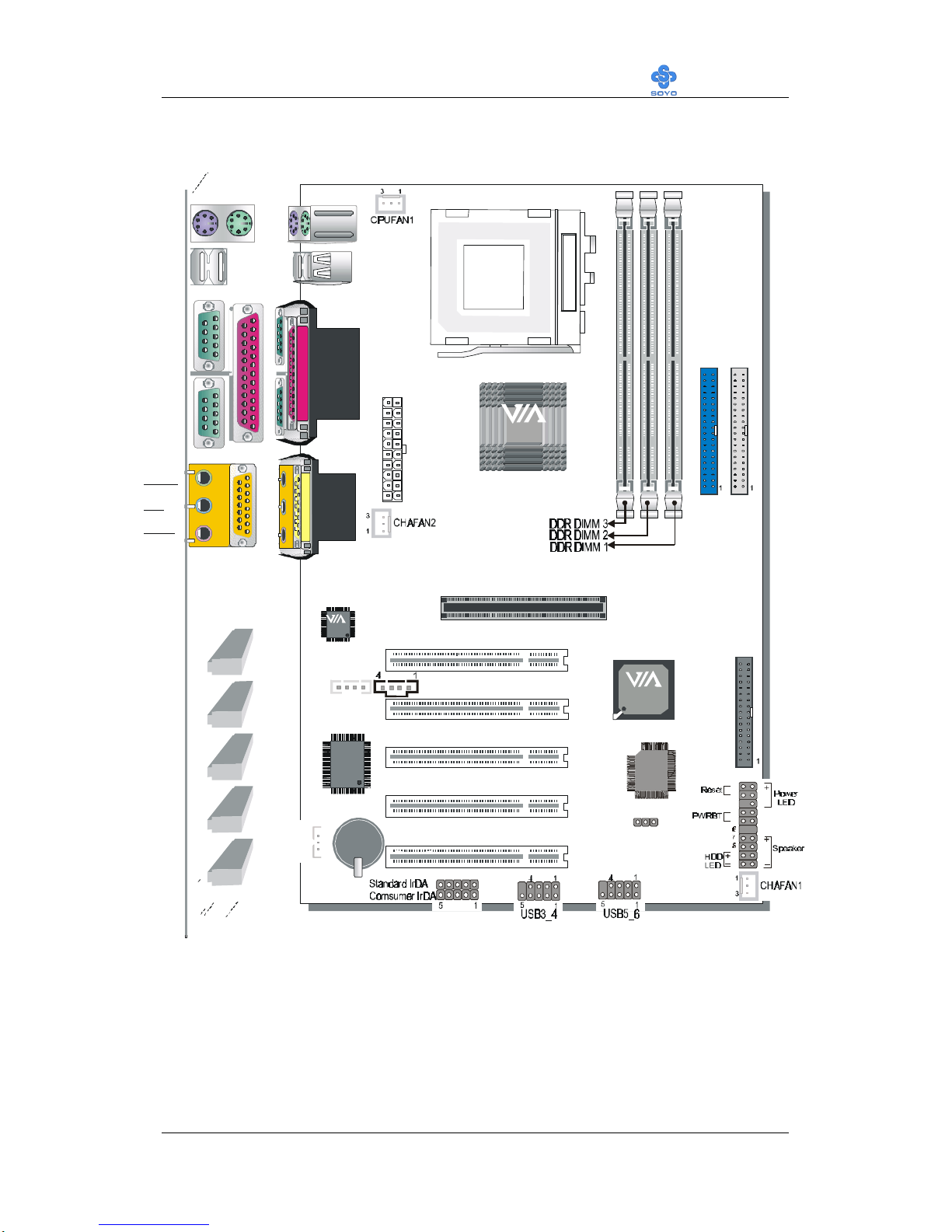
1-5 SY-7VDA MOTHERBOARD LAYOUT
Back Panel SY-7VDA Platform
PRT
PS/2 KB
Connector
PS/2 Mouse
Connector
ATX Power
AOUT
AIN
AMIC
AGAME
COM 1
COM 2
USB 1
USB 2
SDRAM
SDRAM
®
AGP Slot
3V
Lithium
Battery
JP5
1
3
PCI Slot #5
PCI Slot #1
PCI Slot #4
PCI Slot #3
PCI Slot #2
FDC1
IDE 1
IDE 2
Winbond
W83697HF
-AW
3
1
2MB
MX
29F002
Socket 370
JP10
WOL
Header
CDIN2
CDIN1
14
VT8633
®
VT8233
VT1611A
1
2
3
4
5
9
10
11
12
13
14
15
16
17
18
19
20
Other manuals for SY-7VDA
1
Table of contents
Other SOYO Motherboard manuals

SOYO
SOYO SY-6ZE+ Use and care manual

SOYO
SOYO SY-6IEB User manual

SOYO
SOYO SY-5EMA+ User manual

SOYO
SOYO SY-P4I875P DRAGON 2 V1.0 User manual

SOYO
SOYO SY-7SBB User manual

SOYO
SOYO SY-6BA+ Use and care manual

SOYO
SOYO SY-K7V DRAGON Plus User manual

SOYO
SOYO SY-P4X400 DRAGON Lite User manual

SOYO
SOYO 6KB Use and care manual

SOYO
SOYO SY-P4I845PE User manual

SOYO
SOYO SY-KT600 DRAGON Plus User manual

SOYO
SOYO SY-D6IGA Use and care manual

SOYO
SOYO SY-7VEM User manual

SOYO
SOYO SY-7VCM User manual

SOYO
SOYO SY-6BA+ User manual

SOYO
SOYO 82430 TX Use and care manual

SOYO
SOYO 6KF Use and care manual

SOYO
SOYO SY-P4VDA User manual

SOYO
SOYO SY-KT333 DRAGON Plus User manual

SOYO
SOYO SY-7IS2 User manual












