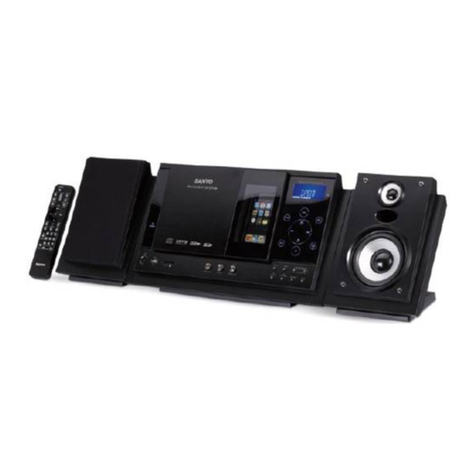
MAJORITY HUNTINGDON Manual

HNT-CDAB-BLK
HUNTINGDON
Compact Music System
Instructions Guide

What’s in the Box?..................................................... 1
Controls And Funcons..............................................2
Support .....................................................................5
Instrucons Guide .................................................... 6
Basic Operaon �������������������������������������������������������� 7
DAB/DAB+ Radio������������������������������������������������������� 8
DAB/DAB+ Preset Staons����������������������������������������11
FM Radio������������������������������������������������������������������ 13
FM Preset Staons��������������������������������������������������� 15
CD Player ����������������������������������������������������������������� 17
Bluetooth Mode ����������������������������������������������������� 20
AUX-In and USB Charging ���������������������������������������� 21
Alarm Sengs����������������������������������������������������������22
Sleep Seng ������������������������������������������������������������23
Sengs: Time and Date�������������������������������������������24
Sengs ��������������������������������������������������������������������25
Addional Features �������������������������������������������������26
Troubleshoong ...................................................... 27
Specicaons .......................................................... 28
Warranty ................................................................. 28
Safety Informaon................................................... 29
Contents
Watch video tutorials and register
your product for a FREE 3-year warranty
at www.majorityradios.co.uk
3YEAR
WARRANTY

1
What’s in the Box?
Box Contents
1. Majority Huntingdon Music System
2. Remote Control
3. Power Adapter
4. Instructions Guide

2
Controls And Funcons
Front View/Control Buttons
18 2019
1
17
2 3
4 5 6 7 8 9
10 11 12 13 14 15 16
1. Disc Port
2. Display Screen
3. Remote Sensor
4. Mode
5. Menu
6. Scan
7. Previous
8. Next
9. Eject
10. Preset
11. Alarm
12. Sleep
13. Select/Volume
14. Equaliser
15. Play/Pause
16. Stop
17. USB Port 1
18. USB Port 2
19. Earphone Jack
20. Aux In

3
Controls And Funcons
Rear View
22 23
21
21. Antenna
22. 9V DC
23. On/O

4
Controls And Funcons
Remote Control
1
4
5
8
10
12
11
15
17
18
20
21
24
25
3
7
6
9
13
16
19
23
22
27
26
30
29
14
2
28
CD DAB FM AUX
VOL+VOL-
SCAN
/PAIR
FOLDER SELECT FOLDER
MENU SLEEP PRESET PROG
INFO ALARM RANDOM EQ
1 2 3 4
5 6 7 8
9 0 A-B REPEAT
NOTE: Remote Control
Operating distance of up to
Meters and operates using x
AAA Batteries.
1. On/Standby
2. Bluetooth - Press for Bluetooth mode
3. Eject - Press to insert or remove disc
4. CD - Press to switch to CD mode.
5. DAB - Press to switch to DAB mode
6. FM - Press to switch to FM mode
7. AUX - Press to switch to AUX mode
8. Volume (-) - Press to reduce volume
9. Volume (+) - Press to increase volume
10. Rewind - Use in CD mode
11. Previous - Go to previous track in some
modes.
12. Play/Pause - Play/Pause media in the
following modes: CD, Bluetooth, AUX
13. Next - Go to next track in some modes.
14. Fast Forward - Use in CD mode
15. Scan/Pair - In DAB or FM mode, press to
scan for radio stations. Press and hold to
activate the Bluetooth pairing function or to
disconnect
16. Stop - Press to stop media in some modes.
17. FOLDER - Previous Directory
18. Select - Press button to select/OK options.
19. FOLDER - Next Directory
20. Menu - Press to open menu settings
21. Sleep - Press to set the sleep timer
22. Preset - Press to set presets and recall them
23. Prog - Press to programme in CD, USB, DAB
& FM
24. Info - Press on DAB or FM mode for info
25. Alarm - Press to set alarms
26. Random Press to play tracks randomly when
in CD mode
27. Equaliser Press to change the Bass and
Treble Settings
28. Number Keys 0-9
29. A-B - Select in CD mode to repeat a section
to play. Follow CD manual guidance.
30. Repeat for CD Disc only

5
Support
Support
Thank you for your purchase of the Majority Huntingdon
radio.
Please follow the guidance of the manual to set up your
new purchase and begin enjoying its features.
If you require further assistance with your new radio,
please contact our support team on the Majority website:
https://www.majorityradios.co.uk/support

6
Instrucons Guide
Navigation Settings
Mode button:
When the radio is switched on, press the button on the front of
the unit to repeatedly switch between modes.
Volume dial/Select:
Rotate the dial clockwise or anticlockwise to change the volume.
To make selections and conrm settings, press down the dial to
select.
Menu button:
Select the Menu button to access radio settings options, DAB
settings and FM settings.
< and > buttons:
Use the previous and next buttons to browse through stations
and settings. Select your choices with the dial.
Play/Pause, Skip Forward/Backward, Stop, Eject CD:
All buttons can be used in CD mode.

7
Basic Operation
Instrucons Guide
Please note all (Ref.) refer to Page 1 Controls and Functions mapping guide.
Plug the connector into the back of the system labelled 9V DC
(Ref.) and the power supply into the mains.
Ensure the antenna (Ref.) is extended as far as possible so that
you can rotate it which will enable you to get the best signal you
can.
Switch the toggle on the rear of the unit to “On” (Ref.). Press
the ‘Mode’ button to turn on the unit (Ref.).
On rst use the ‘Select/Volume’ dial (Ref.)on the unit to select
either English or German language. Press the ‘Select/Volume’ dial
(Ref.) to conrm your choice.
To change the mode, press the‘Mode’ button (Ref.) on the unit
to switch between the options. You can also select your option
on the remote (Ref./4/5/6/ or 7).
When DAB Radio is activated for the rst time it will
automatically start scanning and store all stations that have a
good signal.
To scroll through the stations use the‘Previous’ (Ref.) and ‘Next’
(Ref.) buttons on the unit.
Standby
To put the music system in standby, press and hold the ‘Mode’
button (Ref.) or the ‘ON/STANDBY’ button (Ref.) on the
remote. To turn o fully, switch it o at the mains. The cord must
be out of reach of children.

8
Instrucons Guide
DAB/DAB+ Radio
Press the ‘Mode’button (Ref.) multiple times on the unit to
switch to DAB Radio. On rst use it will automatically scan all
stations and save them.
To select the mode from the remote, press the ‘DAB’ button
(Ref.).
Fully extend the antenna (Ref.). To auto scan, press the ‘Scan’
button (Ref.) on the remote. This will start scanning up the
frequency band and store all stations that have a good signal.
The radio will automatically save all the stations with a strong
signal, up to 240 MHz. After searching has nished it will
automatically play the rst station stored.
To listen to all stations that have been stored use the ‘Next’
(Ref.) and ‘Previous’buttons (Ref.) to scroll through them.
The radio will display station information when you press the
‘Info’ button (Ref.) on the remote. Press it multiple times to
view all information. Please see page 18 for further details.
When you turn on the radio again after it switching o, it will
automatically tune to the same station (DAB or FM) that was last
selected. In DAB mode, the radio will synchronize with the time
and date of the station.
This manual suits for next models
1
Table of contents
Other MAJORITY Stereo System manuals

MAJORITY
MAJORITY KINGS KNG-ALL-BLK Manual

MAJORITY
MAJORITY Humboldt Manual

MAJORITY
MAJORITY Fitzwilliam 3 Manual

MAJORITY
MAJORITY HOMERTON 2 User manual

MAJORITY
MAJORITY Castle CB3A-CDAB-BLK Manual

MAJORITY
MAJORITY HNT-CDAB-BLK User manual

MAJORITY
MAJORITY OAKINGTON Manual

MAJORITY
MAJORITY D40 User manual

MAJORITY
MAJORITY SCAFELL PIKE SKP-BAR-BLK Manual

MAJORITY
MAJORITY CASTLE CB3A-CDAB-WHT Manual