Intel VS440FX Manual

VS440FX
Motherboard
Technical Product Specification
Order Number 281812-003
October 1996
The VS440FX motherboard may contain design defects or errors known as errata. Characterized errata that
may cause the VS440FX motherboard’s behavior to deviate from published specifications are documented in
the VS440FX Motherboard Specification Update.

Revision History
Revision
Revision History Date
-001
Preliminary release of the VS440FX Technical Product Specification. 4/96
-002
Second release of the VS440FX Technical Product Specification. 5/96
-003
Updated to reflect Fab E 10/96
This product specification applies only to standard VS440FX motherboards with BIOS
identifier CS1.
Changes to this specification will be published in the VS440FX Motherboard Specification
Update before being incorporated into a revision of this document.
Information in this document is provided in connection with Intel products. No license, express or implied, by estoppel or
otherwise, to any intellectual property rights is granted by this document. Except as provided in Intel’s Terms and Conditions of
Sale for such products, Intel assumes no liability whatsoever, and Intel disclaims any express or implied warranty, relating to
sale and/or use of Intel products including liability or warranties relating to fitness for a particular purpose, merchantability, or
infringement of any patent, copyright or other intellectual property right. Intel products are not intended for use in medical, life
saving, or life sustaining applications.
Intel retains the right to make changes to specifications and product descriptions at any time, without notice.
The VS440FX motherboard may contain design defects or errors known as errata. Current characterized errata are available
on request.
Contact your local Intel sales office or your distributor to obtain the latest specifications before placing your product order.
†Third-party brands and names are the property of their respective owners.
Copies of documents which have an ordering number and are referenced in this document, or other Intel literature, may be
obtained from:
Intel Corporation
P.O. Box 7641
Mt. Prospect, IL 60056-7641
or call in North America 1-800-879-4683, Europe 44-0-1793-431-155, France 44-0-1793-421-777,
Germany 44-0-1793-421-333, other Countries 708-296-9333.
Copyright 1996, Intel Corporation

iii
Table of Contents
1 Motherboard Description
1.1 Overview......................................................................................................................7
1.2 Motherboard Manufacturing Options ...........................................................................9
1.3 Form Factor.................................................................................................................9
1.4 I/O Shield...................................................................................................................10
1.5 Microprocessor ..........................................................................................................11
1.5.1 Microprocessor Heatsink and Clips .............................................................11
1.5.2 Microprocessor Upgrade .............................................................................11
1.6 Main Memory.............................................................................................................12
1.6.1 EDO DRAM.................................................................................................12
1.6.2 Parity/ECC DRAM .......................................................................................12
1.7 Chipset ......................................................................................................................13
1.7.1 82441FX PCI Bridge and Memory Controller (PMC)...................................13
1.7.2 82442FX Data Bus Accelerator (DBX) ........................................................13
1.7.3 82371SB PCI/ISA IDE Xcelerator (PIIX3)....................................................13
1.7.4 Universal Serial Bus Support.......................................................................14
1.7.5 IDE Support.................................................................................................14
1.8 Super I/O Controller...................................................................................................15
1.8.1 Serial Ports..................................................................................................15
1.8.2 Parallel Port.................................................................................................15
1.8.3 Floppy Controller.........................................................................................15
1.8.4 Keyboard and Mouse Interface...................................................................16
1.8.5 Real-Time Clock, CMOS RAM, and Battery ................................................16
1.8.6 Infrared Support ..........................................................................................17
1.9 Audio Subsystem.......................................................................................................17
1.9.1 Audio Drivers and Utilities............................................................................18
1.9.2 CD-ROM Audio Connector..........................................................................18
1.9.3 Telephony Connector..................................................................................18
1.9.4 Wavetable Connector..................................................................................18
1.10 Management Extension Hardware.............................................................................19
1.11 Motherboard Connectors...........................................................................................20
1.11.1 CD Audio (J1E2)..........................................................................................21
1.11.2 Wavetable Upgrade Connector (J1E1)........................................................21
1.11.3 Telephony Connector (J1F1).......................................................................21
1.11.4 Floppy Drive Connector (J9J2)....................................................................22
1.11.5 PCI IDE Connectors (J9J1, J8J1)................................................................23
1.11.6 Power Supply Connector (J5M1).................................................................23
1.11.7 Microprocessor Fan Connector (J7M1) .......................................................24
1.11.8 Auxiliary Fan Connector (J9A1)...................................................................24
1.11.9 Front Panel Connectors...............................................................................25
1.11.10 Back Panel Connectors...............................................................................27
1.12 Add-in Board Expansion Connectors.........................................................................31

VS440FX Motherboard Technical Product Specification
iv
1.13 Jumper Settings.........................................................................................................33
1.13.1 Processor Configuration (J6D1) ..................................................................34
1.13.2 Password Clear (J6D1)................................................................................34
1.13.3 Clear CMOS (J6D1).....................................................................................35
1.13.4 BIOS Setup Access (J6D1).........................................................................35
1.13.5 BIOS Recovery (J6D1)................................................................................35
1.14 Reliability ...................................................................................................................35
1.15 Environmental............................................................................................................35
1.16 Power Supply Requirements .....................................................................................36
1.17 Power Consumption ..................................................................................................36
1.18 Regulatory Compliance..............................................................................................37
1.18.1 Safety..........................................................................................................37
1.18.2 Electromagnetic Interference (EMI).............................................................38
1.18.3 Product Certification Markings.....................................................................38
2 Motherboard Resources
2.1 Memory Map..............................................................................................................39
2.2 DMA Channels...........................................................................................................39
2.3 I/O Map......................................................................................................................40
2.4 PCI Configuration Space Map ...................................................................................42
2.5 Interrupts ...................................................................................................................42
3 BIOS and Setup Utility
3.1 Introduction................................................................................................................43
3.2 BIOS Flash Memory Organization .............................................................................43
3.3 BIOS Upgrades..........................................................................................................44
3.4 PCI IDE Support........................................................................................................44
3.5 PCI Auto-configuration...............................................................................................45
3.6 ISA Plug and Play......................................................................................................45
3.7 Desktop Management Interface.................................................................................45
3.8 Advanced Power Management..................................................................................46
3.9 Advanced Power Control...........................................................................................47
3.10 Language Support.....................................................................................................47
3.11 Boot Options..............................................................................................................47
3.12 Flash LOGO Area......................................................................................................47
3.13 BIOS Setup Access Jumper ......................................................................................48
3.14 Recovering BIOS Data ..............................................................................................48
3.15 BIOS Setup Utility......................................................................................................48
3.15.1 Overview of the Setup Menu Screens.........................................................48
3.15.2 Main BIOS Setup Screen ............................................................................49
3.15.3 Floppy Options Subscreen..........................................................................50
3.15.4 Primary/Secondary IDE Master/Slave Configuration Subscreens..............51
3.15.5 Boot Options Subscreen .............................................................................53
3.15.6 Advanced Screen........................................................................................56
3.15.7 Peripheral Configuration Subscreen............................................................57
3.15.8 Advanced Chipset Configuration Subscreen...............................................59
3.15.9 Power Management Configuration Subscreen............................................60
3.15.10 Plug and Play Configuration Subscreen......................................................61

Contents
v
3.15.11 Event Logging Configuration Subscreen.....................................................62
3.15.12 Security Screen...........................................................................................63
3.15.13 Security Screen Options..............................................................................64
3.15.14 Exit Screen..................................................................................................65
4 Error Messages and Beep Codes
4.1 BIOS Beep Codes .....................................................................................................67
4.2 PCI Configuration Error Messages ............................................................................68
4.3 BIOS Error Messages................................................................................................69
4.4 ISA NMI Messages....................................................................................................70
5 Compliance with Specifications
5.1 Specifications.............................................................................................................71
5.2 Online Support...........................................................................................................71
Tables
1. PCI Bus Connectors..................................................................................................31
2. ISA Bus Connectors ..................................................................................................32
3. Jumper Settings.........................................................................................................34
4. Jumper Settings for Processor and Host Bus Frequencies........................................34
5. Motherboard Environmental Specifications................................................................35
6. DC Voltage ................................................................................................................36
7. Power Usage.............................................................................................................37
8. Memory Map..............................................................................................................39
9. DMA Channels...........................................................................................................39
10. I/O Map......................................................................................................................40
11. PCI Configuration Space Map ...................................................................................42
12. Interrupts ...................................................................................................................42
13. Flash Memory Organization.......................................................................................43
14. Recommendations for Configuring an ATAPI Device ................................................44
15. Overview of the Setup Menu Screens .......................................................................48
16. Administrative and User Password Functions............................................................64
Figures
1. Motherboard Components...........................................................................................8
2. Motherboard Dimensions.............................................................................................9
3. Back Panel I/O Shield (with Audio option) Dimensions..............................................10
4. Motherboard Connectors...........................................................................................20
5. Front Panel I/O Connectors.......................................................................................25
6. Back Panel I/O Connectors .......................................................................................28
7. Jumper Locations ......................................................................................................33


7
1 Motherboard Description
1.1 Overview
The VS440FX motherboard supports Pentium®Pro microprocessors operating at 150, 166, 180,
and 200 MHz. The Pentium Pro microprocessor includes 16 KB of L1 cache on the chip. A
256 KB or 512 KB L2 cache device is contained in the same package as the microprocessor. The
motherboard features:
• ATX form factor
• Socket 8 Pentium Pro processor socket
Main Memory
• Four 72-pin SIMM†sockets
• Support for up to 256 MB of Extended Data Out (EDO) or fast page memory
• Support for non-parity, parity, or Error Checking and Correcting (ECC) DRAM
Chipset and PCI/IDE Interface
• Intel 82440FX PCIset
• Integrated PCI bus mastering controller
• Two fast IDE interfaces
• Support for up to four IDE drives or devices
• Support for two Universal Serial Bus (USB) interfaces
I/O Features
• PC87308/87307 Super I/O controller
• Integrates standard I/O functions: floppy drive interface, one multi-mode parallel port, two
FIFO serial ports, real-time clock, keyboard and mouse controller, and IrDA†-compatible
interface
Expansion Slots
• Three ISA
• Three PCI
• One shared PCI/ISA
Audio Subsystem
• Crystal†CS4236 Multimedia codec
• Wavetable upgrade header
Other features
• Plug and Play compatible BIOS
• Support for Advanced Power Management (APM)

VS440FX Motherboard Technical Product Specification
8
OM05506
J
L
K
M
Y
X
AA
DCBA
CC
BB
E
OS R PQW TV U
N
F H IG
Z
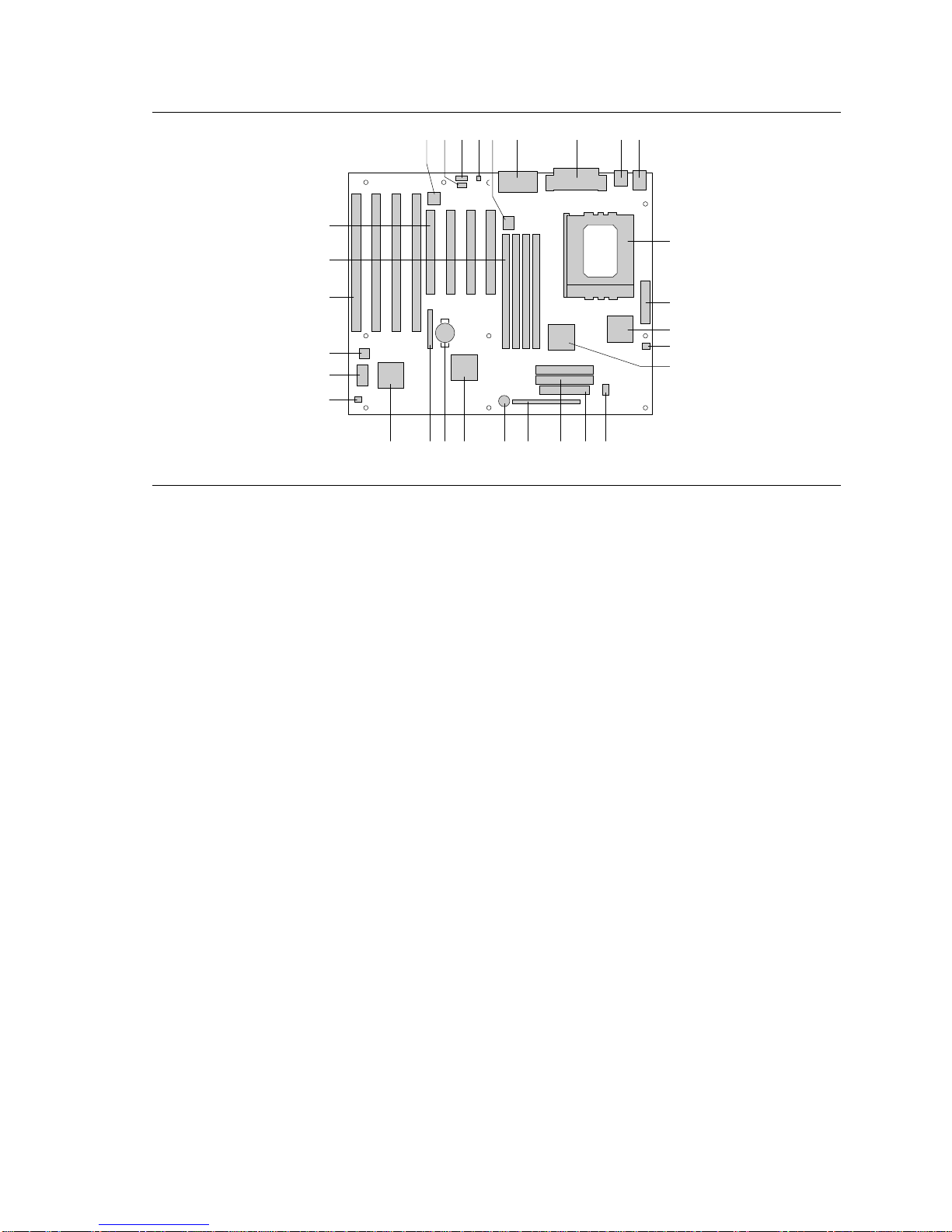
Figure 1. Motherboard Components
A. Optional Crystal Audio device P. Floppy connector
B. Optional CD-ROM audio connector Q. IDE connectors
C. Optional wavetable connector R. Front panel connectors
D. Optional telephony connector S. Onboard speaker
E. VCCP voltage regulator T. Intel 82371SB PIIX3
F. MIDI/game port/audio jacks U. Battery
G. Parallel port/serial connectors V. Jumper block
H. Optional USB connectors W. National PC87308/87307 Super I/O controller
I. Keyboard and mouse connectors X. Auxiliary fan connector
J. Pentium Pro microprocessor / Socket 8 Y. Flash BIOS
K. Power connector Z. Management Extension Hardware ASIC
L. Intel 82441FX AA. ISA add-in board connectors
M. Microprocessor fan connector BB. SIMM connectors
N. Intel 82442FX CC. PCI add-in board connectors
O. VTT voltage regulator

Motherboard Description
9
1.2 Motherboard Manufacturing Options
• Support for USB
• Audio Option
CS4236 audio codec
CD-ROM connector
Wavetable upgrade connector
Telephony connector
MIDI/game port/audio jacks
• Management Extension Hardware ASIC
1.3 Form Factor
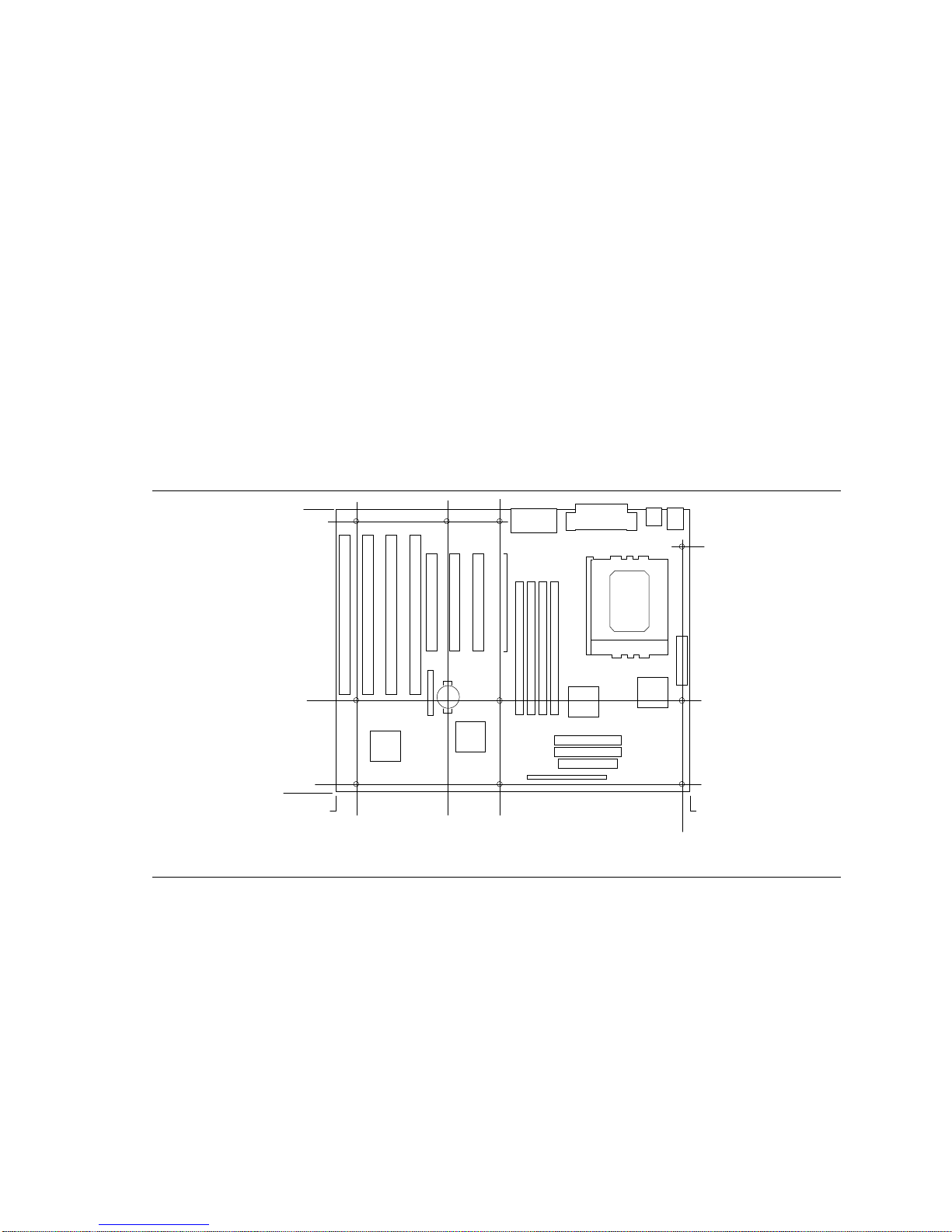
The motherboard is designed to fit into a standard ATX form factor chassis. Figure 2 illustrates the
mechanical form factor for the motherboard. Location of the I/O connectors and mounting holes is
in strict compliance with the ATX specification (refer to Section 5.1).
OM05522
9.20
3.10
0.65
9.60
8.25
0.25
0.0 0.0 12.00
3.75 5.55 11.75
Figure 2. Motherboard Dimensions

VS440FX Motherboard Technical Product Specification
10
1.4 I/O Shield
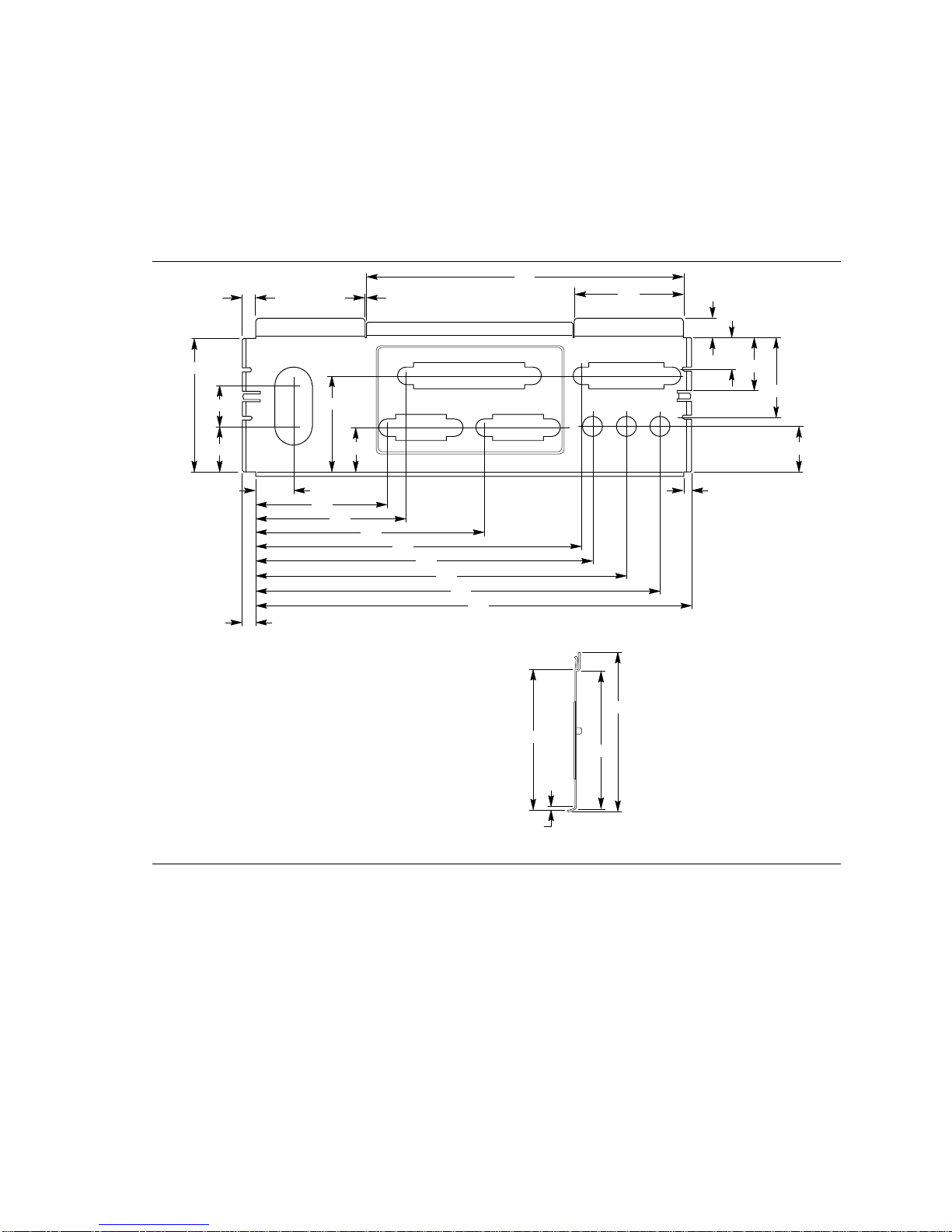
The back panel I/O shield for the VS440FX motherboard must meet specific dimensional and
material requirements. Computers based on this motherboard need the back panel I/O shield in
order to pass certification testing. Figure 3 shows the critical dimensions for both options of the
I/O shield and indicates the position of each cutout.
Left-end View
OM05588
Note: Material = 0.010 ±.0.001 Thick Stainless Steel, Half Hard
0.671
1.955
0.597
0.553
1.911
2.184 3.327
4.735
4.899
5.391
5.883
6.533
0.193
0.768
0.295
0.458
1.158
0.666
4.610
1.590
0.200
1.407
0.652
0.133
0.120
2.055
2.326
2.023
0.050
Figure 3. Back Panel I/O Shield (with Audio option) Dimensions
Table of contents
Other Intel Motherboard manuals

Intel
Intel D865PCK User manual

Intel
Intel XP-P41533E User manual

Intel
Intel D410PT User manual

Intel
Intel D945GNT User manual

Intel
Intel MI810 User manual

Intel
Intel DG965PZ User manual

Intel
Intel EMB-H61A User manual

Intel
Intel D865GRH User manual

Intel
Intel I865PE User manual

Intel
Intel D945GRW - Desktop Board Motherboard User manual

Intel
Intel BOXDG43RK User manual

Intel
Intel D845HV User manual

Intel
Intel ATC6430M User manual

Intel
Intel BLKDX58SO User manual

Intel
Intel BLKDH61CRB3 Configuration guide

Intel
Intel D2550MUD2 User manual

Intel
Intel CH-486-33A User manual

Intel
Intel LGA775 User manual

Intel
Intel DP965LT User manual

Intel
Intel Desktop Board D850EMV2 User manual