IKEA UPPLEVA User manual

UPPLEVA
Design and Quality
IKEA of Sweden
EN
CN
FI
SV
GR
GB
DK
NO


ENGLISH 4
DEUTSCH 21
FRANÇAIS 38
NEDERLANDS 55
DANSK 72
ÍSLENSKA 89
NORSK 106

ENGLISH 4
Contents
1 Important ����������������������������������������������������������������������������������������������������������5
Safety and important notice����������������������������������������������������������������������������������� 5
Disposal of your old product and batteries ��������������������������������������������������������������� 5
Copyright notice��������������������������������������������������������������������������������������������������� 6
Notice for Trademark �������������������������������������������������������������������������������������������� 6
2 Product overview �����������������������������������������������������������������������������������������������7
Sound system bar ������������������������������������������������������������������������������������������������ 7
Rear panel����������������������������������������������������������������������������������������������������������� 8
Remote control ���������������������������������������������������������������������������������������������������� 9
Subwoofer��������������������������������������������������������������������������������������������������������� 10
3 Preparation ������������������������������������������������������������������������������������������������������11
Prepare the remote control���������������������������������������������������������������������������������� 11
4 Connection�������������������������������������������������������������������������������������������������������12
Connecting the right speaker ������������������������������������������������������������������������������� 12
Connecting to a TV ��������������������������������������������������������������������������������������������� 12
Connecting to an analogue output or device����������������������������������������������������������� 12
Connecting to a media device ������������������������������������������������������������������������������ 12
Pairing the subwoofer ����������������������������������������������������������������������������������������� 13
5 Using your sound system ���������������������������������������������������������������������������������14
TV�������������������������������������������������������������������������������������������������������������������� 14
FM radio������������������������������������������������������������������������������������������������������������ 14
Bluetooth ���������������������������������������������������������������������������������������������������������� 14
Choosing sound mode����������������������������������������������������������������������������������������� 15
6 Settings �����������������������������������������������������������������������������������������������������������16
Sound settings��������������������������������������������������������������������������������������������������� 16
Panel display brightness�������������������������������������������������������������������������������������� 16
Change the standby time ������������������������������������������������������������������������������������ 16
UPPLEVA TV ������������������������������������������������������������������������������������������������������ 16
Reset to default settings�������������������������������������������������������������������������������������� 16
7 Specications���������������������������������������������������������������������������������������������������17
8 Troubleshooting�����������������������������������������������������������������������������������������������18
9 Glossary�����������������������������������������������������������������������������������������������������������19
10 Contact IKEA����������������������������������������������������������������������������������������������������19
11 DECLARATION OF CONFORMITY�����������������������������������������������������������������������20

5
1 Important
Safety and important notice
Warning:
• Risk of overheating! Never install the
product in a conned space. Always
leave a space of at least 5 mm around
the product for ventilation� Ensure
curtains or other objects never cover the
ventilation slots on the product�
• Never place the product, remote control
or batteries near naked ames or other
heat sources, including direct sunlight�
• Only use this product indoors� The
apparatus shall not be exposed to
dripping or splashing, no objects lled
with liquids, such as vases, shall be
placed on the apparatus�
• Never place this product on other
electrical equipment�
• The mains plug or an appliance couple
is used as disconnect device, the
disconnect device shall remain readily
operable�
Batteries (battery pack or batteries
installed) shall not be exposed to excessive
heat such as sunshine, re or the like.
This product and the supplied accessories
are marked with "CE" and comply therefore
with the applicable harmonized European
standards: the Low Voltage Directive
2006/95/EC, the EMC Directive 2004/108/
EC, the ErP Directive 2009/125/EC�
Disposal of your old product and
batteries
The crossed-out wheeled bin symbol
indicates that the item should be disposed
of separately from household waste� The
item should be handed in for recycling
in accordance with local environmental
regulations for waste disposal�
By separating a marked item from household
waste, you will help reduce the volume of
waste sent to incinerators or land-ll and
minimize any potential negative impact on
human health and the environment� For
more information, please contact your IKEA
store�

6
Copyright notice
This item incorporates copy protection
technology that is protected by U�S� patents
and other intellectual property rights of
Rovi Corporation� Reverse engineering and
disassembly are prohibited�
Notice for Trademark
HDMI, the HDMI logo and High-Denition
Multimedia Interface are trademarks or
registered trademarks of HDMI Licensing
LLC in the United States and other
countries�
Dolby and the double-D symbol
are registered trademarks of Dolby
Laboratories�
The Bluetooth word mark and logos are
registered trademarks owned by Bluetooth
SIG, Inc� and any use of such marks by
IKEA is under license� Other trademarks and
trade names are those of their respective
owners�
7
2 Product overview
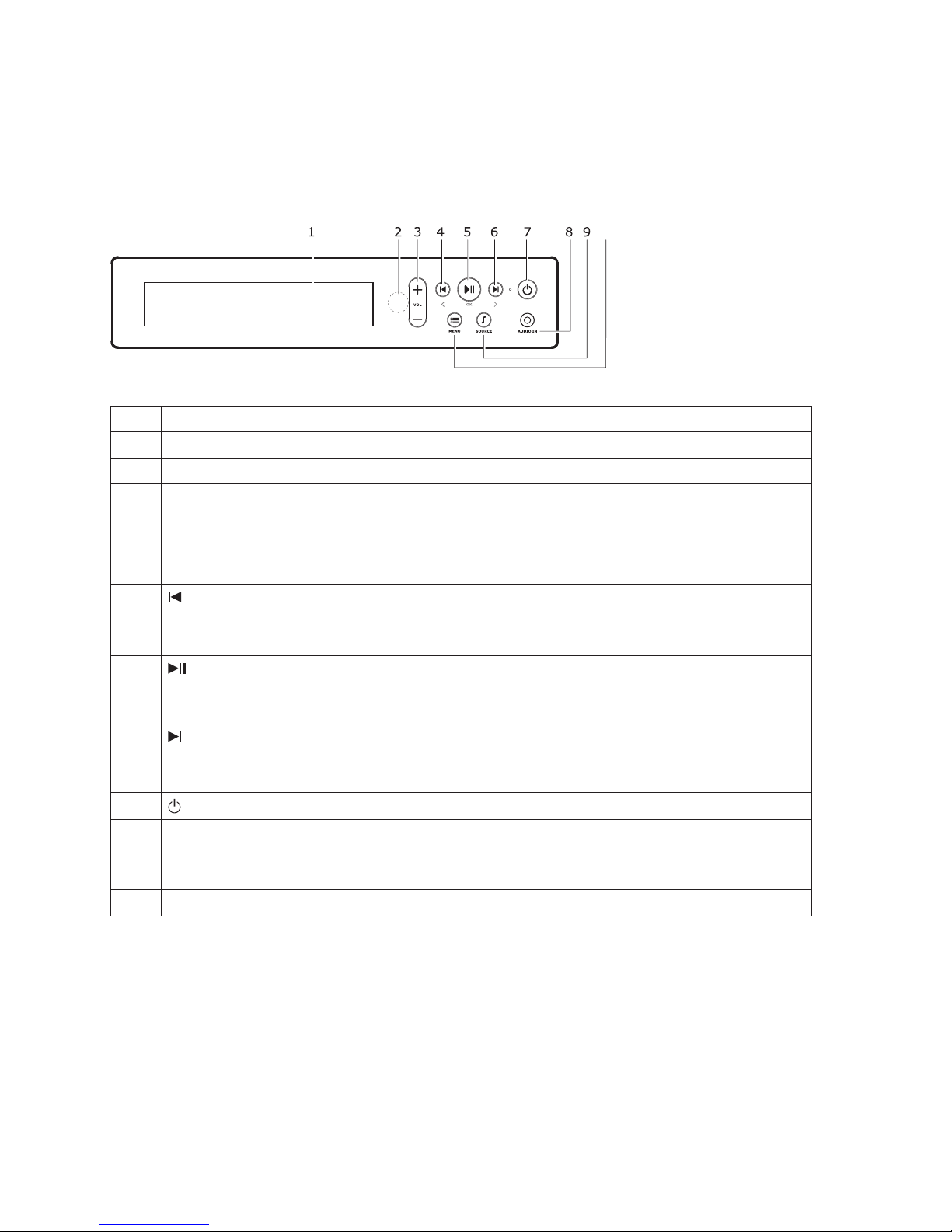
Sound system bar
10
No� Control Function
1 Display panel Shows information about what the sound system is playing�
2IR Sensor Point the remote control at the IR (Infra Red) sensor�
3VOL +
VOL -
Turns up the volume� Press once to turn up the volume one
step� Press and hold to keep turning it up�
Turns down the volume� Press once to turn down the volume
one step� Press and hold to keep turning it down�
4
<
Skip to previous track or FM channel�
Navigate backwards in the Menu�
5
OK
Play/Pause�
Press OK in the Menu�
6
>
Skip to next track or FM channel�
Navigate forwards in the Menu�
7 Press for power on/off�
8AUDIO IN For connecting an audio playback device, for example an MP3
player or CD player�
9SOURCE Press to change Source�
10 MENU Press to enter and exit Menu and Settings�

8
Rear panel
No� Control Function
1 AC IN To connect the power cord for power supply�
2FM 75Ω To connect the antenna for FM radio reception�
3 AUX IN L To connect the left channel of an analogue device,
for example a CD player or media player, to your
UPPLEVA sound system�
4 AUX IN R To connect the right channel of an analogue device,
for example a CD player or media player, to your
UPPLEVA sound system�
5 OPTICAL IN To connect to an optical audio output on the TV or a
digital device�
6 HDMI To connect to the HDMI-ARC input on the TV�
7 SERVICE For service use only�
8 SPEAKERS
(R/L) 4Ω To connect to the right speaker of the UPPLEVA
system�

9
No� Control Function
1 Changes between different sound modes�
2 Play/Pause with connected Bluetooth devices�
3 Skips to previous track/TV channel/FM channel�*
4 Turns your TV on: if the TV is on, this changes the TV source�*
5 Power On or Off� Turns sound system and TV on and off�*
6 Source button� Turns the sound system on� If the sound system
is on, this changes the sound system source�
7 Skips to next track/TV channel/FM channel�*
8 Mutes or unmutes the sound system�
9 + VOL - Turns the volume up or down�
*These functions are only guaranteed to work with these UPPLEVA TVs:
402-565-98, 802-662-13, 202-565-99, 502-662-19, 802-566-00, 102-662-16,
602-566-01, 002-662-12, 002-565-81, 302-662-15, 602-565-78, 902-662-17�
Remote control

10
Subwoofer
No� Control Function
1 Power On or Off� Turns the subwoofer on and off�
2 For pairing the subwoofer with the sound bar�
3 AC IN To connect the power cord for power supply�
Other manuals for UPPLEVA
15
Table of contents
Languages:
Other IKEA Stereo System manuals