
ECS PF4 Extreme User manual


Table of Contents
CHAPTER 1
Introduction..............................................................................................1-1
Package Check List..................................................................................1-1
Feature Summary......................................................................................1-2
Special Features........................................................................................1-3
Major Components...................................................................................1-5
Headers and Connectors...........................................................................1-7
Jumpers.....................................................................................................1-13
Rear Panel................................................................................................1-14
CHAPTER 2
Installing the CPU and the CPU fooling FAN..........................................2-1
Installing Memory Module.......................................................................2-1
Connecting IDE, Floppy and SATA cable..................................................2-2
Installing Motherboard in a case...............................................................2-2
Connecting IDE, Floppy & SATA Device..................................................2-3
Installing Expansion cards........................................................................2-3
Connecting the Power supply cable...........................................................2-4
Powering up..............................................................................................2-4
CHAPTER 3
Entering the BIOS Setup Menu.................................................................3-1
Updating and Recovering the BIOS...........................................................3-1
Using AWARD Flash to update your BIOS..........................................3-1
Using ECS EZ Flash to update your BIOS..........................................3-2
Using ECS Top-Hat Flash to recover your BIOS..................................3-3
The Main Menu.......................................................................................3-3
Standard CMOS Features............................................................3-3
Advanced BIOS Features............................................................3-5
Advanced Chipset Features.........................................................3-8
Integrated Peripherals.................................................................3-9
Power Management Setup.................................................................3-13
PNP/PCI Configurations..................................................................3-16
PC Health Status............................................................................3-17

Frequency/Voltage Control................................................................3-18
Load Fail-Safe Defaults...................................................................3-19
Load Optimized Defaults..................................................................3-19
Set Supervisor/User Password...........................................................3-19
Save & Exit Setup...........................................................................3-20
Exit Without Saving.........................................................................3-20
CHAPTER 4
Software CD Information.........................................................................4-1
Running the Software CD.........................................................................4-1
Setup Tab..................................................................................................4-1
Application Tab........................................................................................4-2
Read Me Tab............................................................................................4-2
Software Utilities Introduction.................................................................4-2
Multi-Language Translations
Legal Notices

Chapter 1
This chapter entails the newest technology and rich
features on the Photon Extreme motherboard.

1.1 Introduction....................................................1-1
1.2 Package Check List...........................................1-1
1.3 Feature Summary...........................................1-2
1.4 Special Features.............................................1-3
1.5 Major Components........................................1-5
1.6 Headers and Connectors................................1-7
1.7 Jumpers........................................................1-13
1.8 Rear Panel...................................................1-14
Reference

1-1
1.1 Introduction
Thank you for choosing the ECS PF4 Extreme motherboard.
The PF4 Extreme is the next generation of high performance motherboard
designed to support the LGA775 socket Intel Pentiun4/Prescott Processors.
This motherboard has an ATX form factor that uses a 6-layer printed circuit
board and measures 305 mm x 244 mm.
The PF4 Extreme motherboard is based on the Intel 915P(Grandsdale)
Northbridge and ICH6 chipsets to set a new benchmark for the best desktop
platform solution. Supporting up to 4 GB of system memory with DDR2
400/533 DDR DIMMs, high resolution graphics via PCI Expess ports,
Dual LAN, USB 2.0, 8-channel audio, Digital S/PDIF in/out, SATA support
and RAID function.
1.2 Package Check List
Motherboard User’s Guide Installation CD
Two Streamlined IDE &
FDD Ribbon Cable
USB+1394 PCI
Bracket & housing
Top Hat Flash I/O ShieldSATA Power Cable
Two SATA Cables Cross Over Cable
*Accessories are subject to change with prior notice.

1-2
1.3 Feature Summary
CPU
Chipset • Intel 915P & ICH6
• North Bridge: Intel 915P
• South Bridge: Intel ICH6
Memory
Expansion
Slots
• 1 x PCI Express x16
• 2 x PCI Express x1
• 3 x PCI Slots
Storage • Supported by ICH6
- 2 x Ultra DMA100/66 devices
- 4 x SATA devices
• Supported by SiS180
- 2 x Ultra DMA133/100/66 devices
- 2 x SATA devices
- RAID 0, RAID 1, RAID 0+1 configuration
IEEE 1394a • VIA VT6307 IEEE1394a controller
• Supports 2 x IEEE1394a portrs
Audio • CMI9880 8-channel audio CODEC
• Compliant with Intel Azalia specification
Dual LAN • Marvel 88E8001 Gigabit LAN Controller
• Realtek8100C 10/100 Mbps Fast Ethernet Controller
Rear panel
I/O
• 1 x PS/2 keyboard connector
• 1 x PS/2 mouse connector
• 4 x USB ports
• 2 x RJ45 LAN connectors
• 1 x Serial port (COM1)
• 1 x Digital SPDIF out
• 1 x Digital SPDIF in
• Line-out/Line-in/Microphone in connectors
• LGA775 Socket for Intel Pentium4/Prescott processor
• FSB 800/533MHz
• Supports Hyper-Threading Technology
• Dual-channel DDR memory architecture
• 4 x 240-pin DDR2 DIMM socket support up to 4 GB
• Supports DDR2 400/533
• Non-ECC, unbuffered 1.8V DDR DIMMs
BIOS features • Award BIOS with 4Mb Flash ROM
• Supports Plug and Play 1.0A, APM 1.2, Multi Boot, DMI
• Supports ACPI revision 1.0B specificaion
Internal I/O • 1 x 24-pin ATX Power Supply Connector & 4-pin 12 V
Connector

1-3
• 1 x Floppy connector- supports 360K ~ 2.88M Bytes, 3
Mode FDDs or LS120
• 2 x IDE connectors
• 6 x Serial ATA connectors
• 2 x USB 2.0 headers support additional 4 USB ports
• 1 x 1394a header
• 1 x SMBus header
• 1 x Front panel switch/LED header
• 1 x Front panel audio header
• 1 x LPT header
• 1 x CHS1 header
• 1 x SMI1 header
• CD in header
• CPUFAN/NB_FAN/SYSFAN connectors
• ATX size
• 305mm x 244mm
Form Factor
1.4 Special Features
Device plug with USB-like
ease!
Extreme PowerExtreme Power
Extreme PowerExtreme Power
Extreme Power
Upgrade your PC to
Server-grade power now!
Slash memory access time!
One-key boot device
selection!
Awesome overclocking!
Uncompromising DVD
audio quality!
The best aluminum
capacitors empowering!
6-layer PCB!
Extreme GuardianExtreme Guardian
Extreme GuardianExtreme Guardian
Extreme Guardian
Auto restart after power
loss!
PC protection tool kit!
A ‘time machine’ to
protect and restore files!
Become your own BIOS
‘doctor’!

1-4
Ultra sound quality!
An dust-proof auto shutter
for optical connector!
Clear & Clean!
All the USB 2.0
connectivity you’ll ever
need!
Extreme GeniusExtreme Genius
Extreme GeniusExtreme Genius
Extreme Genius
Color-coding for easy
connections!
Flash BIOS from
Windows!
Rounded corners for
strength and safety!
Eliminate data highway
roadblocks!
Memory module alert!
Smart LAN!
Fuzzy logic design for
diagnosing PCI slots
health!
Extreme LinkExtreme Link
Extreme LinkExtreme Link
Extreme Link
Add peripherals and
consumer electronics
devices!
PCI 2.3 support!
Server Class Dual LAN
for both Internet &
Intranet!
More port options!
Industrial-strength LAN
power!
Auto-negotiate your 10/
100M LAN!
Double digital audio!
Let your PC as a
fileserver!
1-5
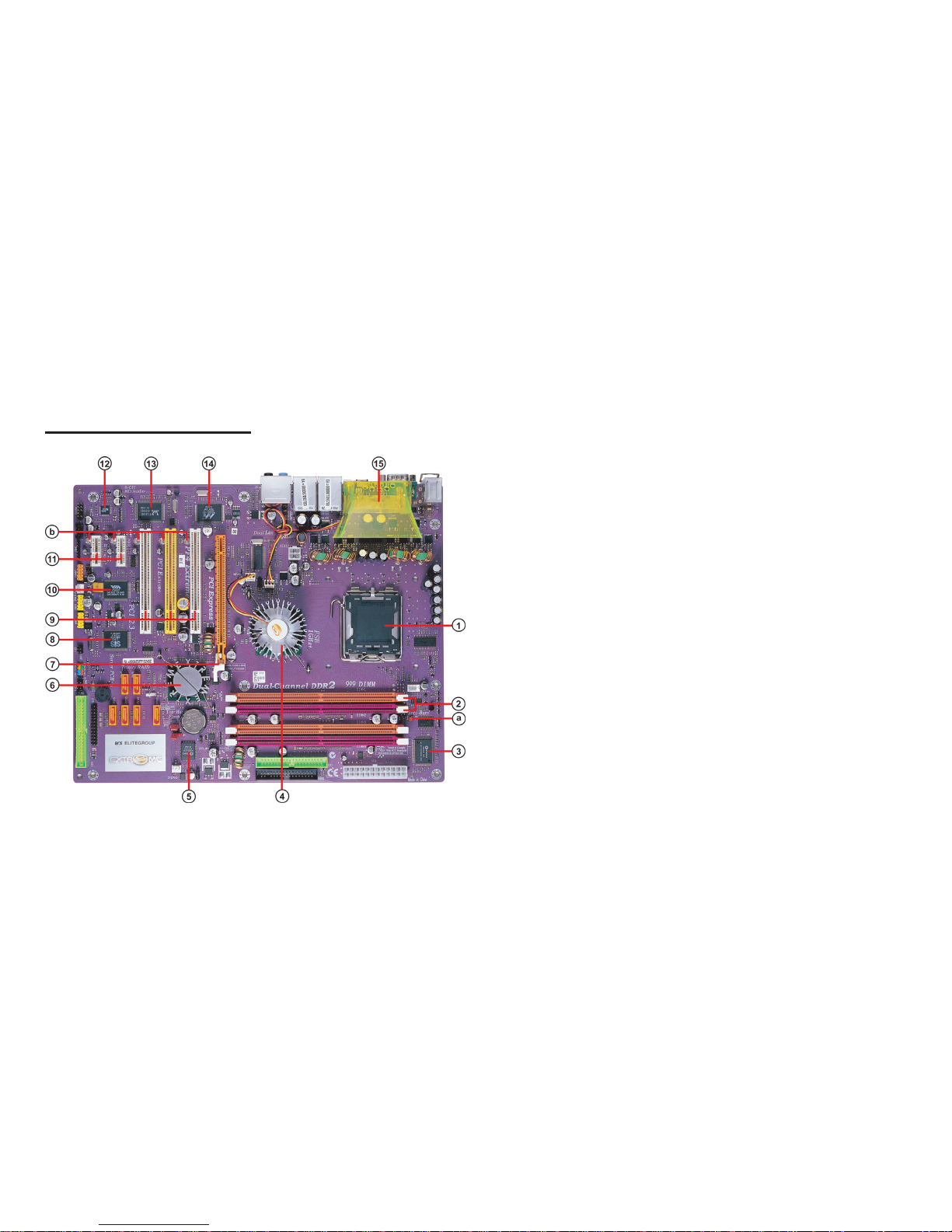
1.5 Major Components
1. CPU socket
LGA775 surface mount, Zero Insertion Force socket for Intel
Pentium4/Prescott Processors support FSB 800/533 MHz that
allows up to 6.4 GB/s data transfer rates.
2. Dual-channel DDR2 DIMM sockets
These four 240-pin DIMM sockets support up to 4GB system
memory using unbuffered DDR2 400/533 DDR DIMMs.
3. Super I/O (83627THF) controller
The Winbond 83627THF Low Pin Count (LPC) interface
provides the commonly used super I/O functionality. The
chipset support a high performance floppy disk controller, a
multi-mode parallel port, one serial port, a game port, the
mouse and keyboard interface.
4. Northbridge controller
915P is a Memory Controller Hub (MCH) designed for use with the
Pentium 4 processor in desktop platforms. It also supports PCI
Express specification.
5. Flash ROM
This 4Mb ROM contains the programmable BIOS program.
6. Southbridge controller
The Intel ICH6 integrated peripheral controller supports various I/O
functions including four Serial ATA connectors, dual channel
UltraDMA100/66/33 master mode EIDE controller, up
Table of contents
Other ECS Motherboard manuals












