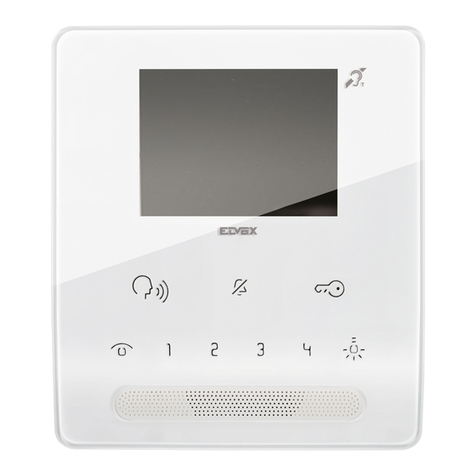
CDVI 2Easy CDV4796KP-DX User manual

01628 531300 www.cdvi.co.uk
The installer’s choice
CDV4796KP-DX KIT MANUAL

The installer’s choice
IMPORTANT:
Limitations of this manual: This is provided to allow basic
installation and set up of this kit, for advanced features please
see device manuals included in each product box.
Note: For WiFi Set up please see the CDV47DX manual Pg. 21
1. Kit Contents
2. CDV96KP Parts and Functions
2.1: Terminals Description & Dip Switches
2.2: Installation
3. CDV-PC6 Parts and Functions
3.1: Product Description
3.2: Terminals Description
4. CDV47DX Part and Functions
4.1: Terminals & Installation
4.2: Mounting
4.3: Main menu
4.4: Installer Setting
4.5: User Code (Monitor ID/Address) setting
4.6: Unlock Time Setting
4.7: Unlock Mode setting
5. Schematics & Wiring
5.1: Basic Bus Wiring
5.2: Multiple Door Panel Bus Wiring
5.3: Parallel (daisy/In-out) Bus Wiring
5.4: Star Bus Wiring
5.5: Lock Connections
5.6: Setting A User Code(PIN)
6: Specifications
6.1: CDV96KP
6.2: CDV-PC6
6.3: CDV47DX
7: Cable Requirements
1 x CDV96KP - 1 Button Video Entry Panel c/w Keypad
1 x CDV-PC6 - Power/Bus Combiner
1 x CDV47DX - TFT Touch screen Internal Monitor
1 x 145mm Din Rail
1 x CDV4796KP-DX Kit Manual
1. CDV4796KP-DX KIT CONTENTS

The installer’s choice
2.1: Terminal Descriptions
2: CDV96KP Parts and Functions
30 mm
1
4 5 6
8 9
0 #
7
2 3
*
[1]
[2]
[3]
[4]
[5]
[6]
[7]
[8]
CDV96KP
Rain Cover
[7] Microphone
[8] Power LED
[4] Touch keypad
[5] Keypad LED
[6] Call button
[1] Camera lens
[2] Camera LED
[3] Speaker
1 2 3
Lock Control Jumper
L1
PL
S1+ GND
Main Connect Port
L2
•
•S1+,GND: Lock power connection port.
Main Connect Port: For connection of the
bus line and the electronic locks.
•Lock Control Jumper: To select the lock
type.
•PL: External lock power input
• L1,L2: Bus line connection,no polarity

The installer’s choice
3: CDV-PC6A Parts and Functions
The PC6A is a power/bus combiner unit, which is designed for the CDV 2Easy 2 wire
system to supply power for the external station, internal monitor and other accessories
on the bus. It can operate as a normal power/bus combiner or auxiliary PSU. The
features are as follows:
3: Mounting
3.1:Description
• Universal AC input/full range
• Multi protection: short circuit, overload, over voltage
• Integrated with CDV-DPS (power separator)
• Support up to 4 to 8 monitors (dependent on models)
• DIN Rail Mounting
1 2
3 4
Drill holes in the wall to match the size of
screws and attach the rain cover to the wall.
Connect the wiring (see pg 4)
Attach the panel to the rain cover Using ascrewdriver secure
the panel

The installer’s choice
LED
CN
1 2 3
BUS(IM) BUS(DS)
N LPG L
100~240 Vac
PG NLL
CN
1 2 3
BUS(IM) BUS(DS)
AC Input
100~240Vac
N LPG L
*
Note:
1. The AC cable is not included in the
package, it must comply to the specific
requirements of country where installed.
PG: Earth ground terminal.
N: AC input terminal.
L: AC input terminal.
LED: Power indicator, on when power connected.
CN: Bus control terminal.
BUS(IM): Indoor monitor connection terminal.
BUS(DS): Door station connection terminal.
Open the AC cover:
1. Push the cover base towards
the centre with your fingers;
2. Lift up and pull out the cover.
After connecting the AC cable, it is
advised to replace the cover.
2. Pins 1&2 should be short-circuited
with a C3-3P link (included in the
package),if the unit operates as a standard
power combiner. If operating as an
auxiliary power combiner, the link should
be removed.
Connect to monitor Connect to door station
3.2:Terminal Descriptions

The installer’s choice
145~160 cm
Mounting screw
x 2(included)
The unit
Mounting box
(size:86x86mm)
Mounting bracket
2 wire cable
USB-Wi-Fi adaptor
1 2 3 4 5 6
ON DIP
L2
L1
DIP Switches
SW+
SW-
RING
GND
NC
1 2 3 4 5 6
ON DIP
4: CDV47 Parts and Functions
L1,L2: Bus line terminal.
4.1:Terminal description
4.2: Mounting
SW+,SW-: Doorbell input
connection port.
Ring,GND: Extension buzzer input
connection port.
NC: Reserved.
DIP switchesBit1~Bit5: Reserved.
Bit6: Video impedance matching
switch.
Set to ON if the monitor is at the
The installation height is suggested to 145~160cm.
1. Use screws to fasten the mounting bracket to the wall with a standard
single gang ush light switch back box.
2. Connect the 2 wire cables to the unit.
3. Mount the unit to the mounting bracket, make sure the unit is securely
attached to the mounting bracket.
end of the line or operates with
CDV-DBC4, otherwise, set to
OFF.

The installer’s choice
Icon Meaning Description
SIP server connection active
and congured
Touch to enter SIP server information interface
in shortcut.
SIP server connection disabled
SIP server connection active and
not connected
Light
Touch to trigger an optional
RLC unit to operate the
light function.
Wi-Fi status
Touch to enter
Wireless setting
options.
SIP cong
Touch to enter SIP cong
interface.
Intercom
Touch to enter intercom
selections.
Monitor
Touch to view outdoor scene.
Call Record
Touch to see calling in/calling
out records or missed calls .
Setting
Press to enter setup interface.
Close
Touch to turn off the screen and
make the monitor in standby
mode.
Call Scene
Touch to activate the functions
of No disturb, Divert call.
Touch this icon to directly
enable the indicated function.
Current date and time.
Touch to enter the date
time set interface.
Status bar
Function status
Touch Unlock button, or touch anywhere of the screen on monitor in standby mode, the
Main menu will appear as follow:
The Main menu is your starting point for using all the applications on your monitor.
Touch to review the missed call in shortcut.
Touch to enter Call Scene interface in shortcut.
No disturb Displayed when the function activated
Displayed when there is missed call
Missed call
6
4.3: Main Menu
Call transfer

The installer’s choice
Icon Meaning Description
Wi-Fi connection active and not
connected
Touch to enter Wi-Fi setting interface in shortcut.
Wi-Fi connection active and
congured
Wi-Fi connection disabled
Setting
Call Tune
General
Installer
Wireless
About
Current addtess [01]
Intercom enable Enable
IPC Setting
Monitor list manage
System settings
Current address
26
Setting
Setting
Call Tune
General
Installer
Wireless
About
Current addtess [01]
Intercom enable Enable
IPC Setting
Monitor list manage
System settings
Touch to set the user code for each monitor.
1. Enter the code by touching the digital number.
2. Touch "OK" to save the code setting, complete and exit.
Notes: 1. If dip switches 1-5 are set the monitor will show the "Dip switch setting page"
2. A maximum of 32 ID's can be set; 0 to 31.
This section contains the device address setting and system settings.
1. Touch to enter installer setting interface.
4.4:Installer Settings
4.5:Users code setting

The installer’s choice
Current addtess [01]
IPC Setting
Monitor list manage
System settings
FW upgrade
Unlock time [03]
Unlock mode [Open]
Auto reboot [Enable]
Reboot
Installer Installer
Call Tune
General
Installer
Wireless
About
Call Tune
General
Installer
Wireless
About
Unlock time
08
Open
Close
Installer
Unlock mode
Setting the unlock mode.
Current addtess [01]
IPC Setting
Monitor list manage
System settings
FW upgrade
Unlock time [03]
Unlock mode [Open]
Auto reboot [Enable]
Reboot
Installer Installer
Call Tune
General
Installer
Wireless
About
Call Tune
General
Installer
Wireless
About
Setting the unlock time.
4.7: Unlock Mode Setting
The unlock time can be changed by
yourself at any time. It can be set from
01 to 99 seconds.
There are two unlock modes:
1.power-on- to-unlock type =Open
2.power-o-to-unlock =Close.
4.6: Unlock Time Setting

The installer’s choice
5.1: Basic Connection
5.2: Multi Door Stations Connection
5: System Wiring and Connections
BUS(IM) BUS(DS)
PC6A
AC~
-
+
L1 L2 PL S1+ GND
Doorbell Button
Switch
Code=00, DIP6=on
1 2 3 4 5 6
ON DIP
L2
L1
DIP Switches
100~240VAC
DBC4A1
A B C D
OFF
ON
Impedance
switch
BUS(IM) BUS(DS)
PC6A
AC~
4# Camera
L1 L2 PL S1+ GND L1 L2 PL S1+ GND L1 L2 PL S1+ GND L1 L2 PL S1+ GND
(Device Address:3)
3# Camera
(Device Address:2)
2# Camera
(Device Address:1)
1# Camera
(Device Address:0)
Table of contents
Other CDVI Intercom System manuals


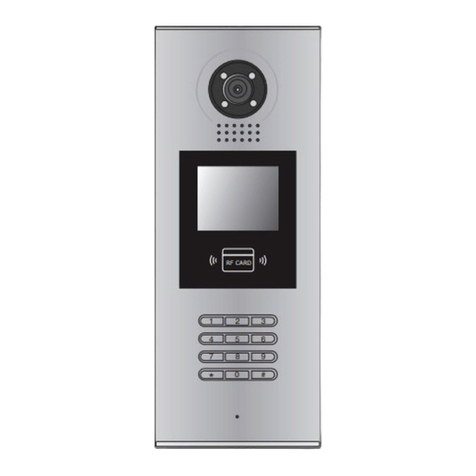

CDVI
CDVI CDV-4791S-DXB User manual

CDVI
CDVI 2EASY CDV-96KP User manual

CDVI
CDVI CDV-91 User manual

CDVI
CDVI CDV4796KP-DX User manual

CDVI
CDVI CDV-17HFA User manual

CDVI
CDVI CDV-471IP User manual

CDVI
CDVI 2EASY CDV-850IP User manual

CDVI
CDVI CDV97-1ID User manual

CDVI
CDVI DMR18S User manual

CDVI
CDVI CD97-4ID User manual