ABB CEM 05100 User manual

Ethernet
Communication
Adapter
CEM 05100
User’s Manual
Rev A

Page 2 of 16
Table of Contents
1GENERAL.................................................................................................................... 3
2PRODUCT DESCRIPTION ....................................................................................... 3
2.1 PRODUCT OVERVIEW............................................................................................... 3
2.2 TYPE DESIGNATION ................................................................................................. 4
3INSTALLATION......................................................................................................... 4
3.1 STATUS LED........................................................................................................... 5
4TROUBLE SHOOTING ............................................................................................. 5
4.1 RESET PORT ............................................................................................................ 5
4.1.1 PREPARING FOR RESET............................................................................. 5
4.1.2 Soft reset......................................................................................................... 5
4.1.3 Factory reset .................................................................................................. 5
5TECHNICAL DATA ................................................................................................... 6
5.1 DIMENSIONS ........................................................................................................... 7
6AUTOMATIC METER READING........................................................................... 7
7THE WEB SERVER.................................................................................................... 7
7.1 ACCESSING THE WEB SERVER.................................................................................. 8
7.2 ODINSINGLE ENERGY RESET .................................................................................. 9
7.3 USER AND SECURITY MANAGEMENT....................................................................... 9
7.3.1 security......................................................................................................... 10
7.3.2 user adding and logging in .......................................................................... 10
7.3.3 guest without Login user-type...................................................................... 11
7.3.4 Removing users ............................................................................................ 11
7.4 CONFIGURING ADAPTER SETTINGS ....................................................................... 12
7.4.1 Assigning IP-address statically.................................................................... 12
7.4.2 Assigning IP-address through DHCP-server. ............................................. 13
7.4.3 Timeout Configuration................................................................................. 14
8 ABBREVIATIONS AND ACRONYMS.................................................................. 15
9CONTACT INFORMATION................................................................................... 15
10 INDEX..................................................................................................................... 16
© 2006-2009 by ABB AB. All rights reserved.
Trademarks
Microsoft, Internet Explorer, Windows, and Windows NT are registered trademarks of Microsoft Corporation.
Other brand and product names are registered trademarks or trademarks of their respective holders.

Page 3 of 16
1GENERAL
This manual contains information about the CEM 05100 Ethernet communication adapter, which is
an adapter of the serial communication adapter (SCA) family for electronic electricity meters
manufactured by ABB AB. Throughout this manual the CEM 05100 Ethernet communication
adapter will be referred to as the SCA or the adapter.
The purpose of this manual is to give the user a good overview and understanding of the features
the CEM 05100 Ethernet communication adapter offers.
WARNING! The voltages connected to the SCA are dangerous and can be lethal. Therefore it must
be insured that the terminals are not touched during operation. When installing the SCA all voltages
must be switched off.
Note: The adapter is equipped with a positive temperature coefficient (PTC) thermistor for overload
protection.
2PRODUCT DESCRIPTION
The CEM 05100 Ethernet communication adapter is an ABB serial communication adapter product
that enables automatic meter reading (AMR) of an ABB electricity meter over an ethernet network
using the standard TCP and UDP protocols. Like all other ABB serial communication adapters, the
ABB Ethernet communication adapter have the size of 2 DIN-modules and follows the ABB’s pro M-
standard, which defines mechanical dimensions, way of mounting (35 mm DIN-rail) and design
outlook. Furthermore the adapter follows and meets the safety requirements of DIN EN 50090-2-2.
The ABB Ethernet communication adapter does also have a built-in web server which provides
easy access of meter data and simple adapter configuration with an ordinary web browser.
2.1 PRODUCT OVERVIEW
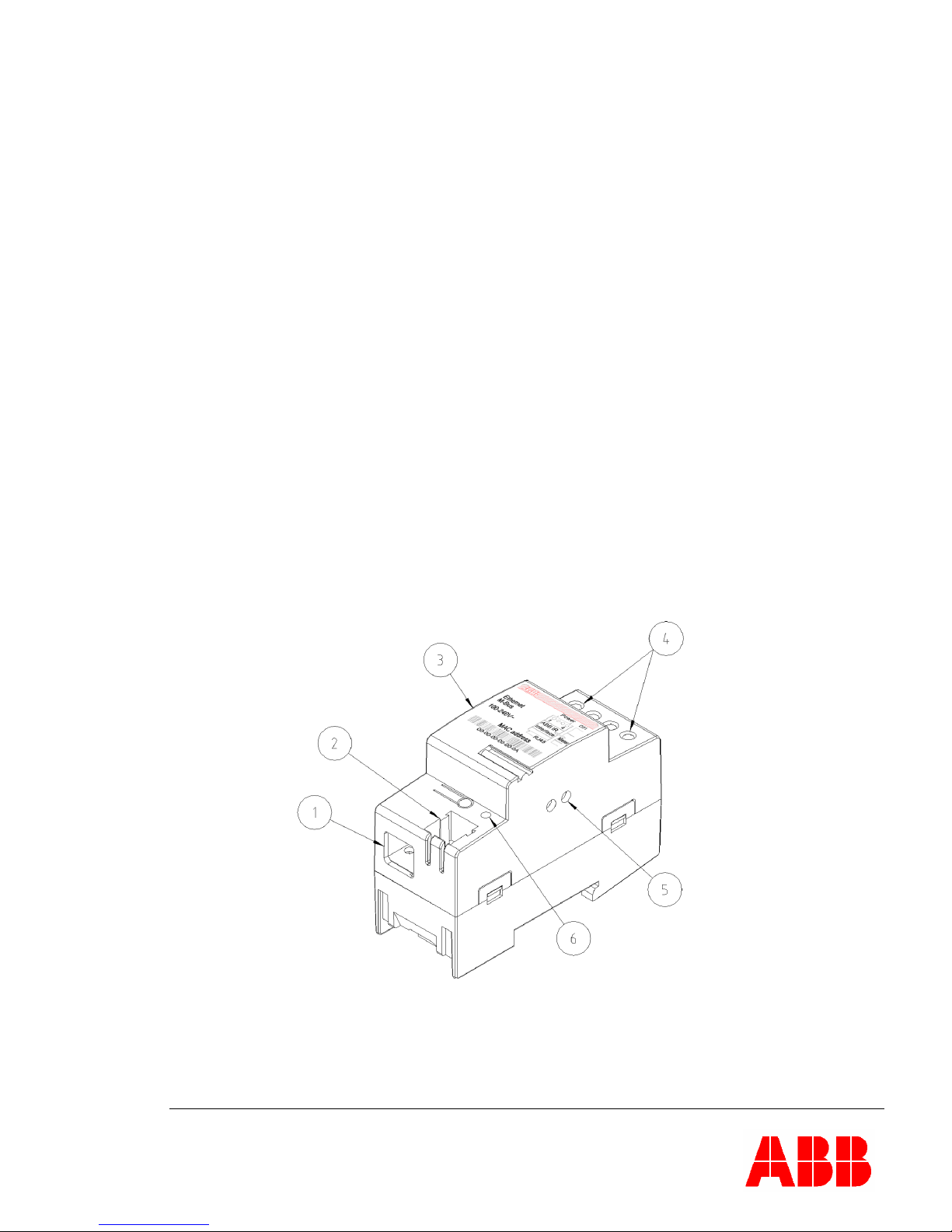
The different parts of the SCA are depicted below.
Figure 1: SCA parts.
1. RJ-45 Ethernet connector.
2. Reset port.
3. Label with the type designation and MAC address.
4. Terminal for connecting power.
5. Infrared communication port
6. Status LED

Page 4 of 16
2.2 TYPE DESIGNATION
Below are tables with explanation for all positions in the type designation for the SCA.
Type
Pos 1 2 3 4 5 6-8
Basic
Serial Communication Adapters C
Media
Power Line, Band A A
Power Line, Band C C
Ethernet E
GSM/GPRS G
RS 232 R
Twisted Pair
T
Protocol
LonWorks L
M-Bus M
0
Supply voltage
Powered by device 4
100 - 240 V 5
220 - 240 V 6
Optional functionality
No options 000
Functional upgrade 100
Table 1: Type designation of ABB Serial Communication Adapters.
3INSTALLATION
1. Disconnect the power supply.
2. Strip the wires and connect them to the top terminals of the SCA.
3. Connect the Ethernet cable to the RJ-45 LAN interface of the SCA, which is located on the
bottom of the SCA.
4. Place the SCA to the left of the meter and snap it on the DIN-rail.
5. Verify that the SCA is correctly wired and the voltage is according to the technical
specification before the power is turned on.
6. Verify that the status LED is green to ensure power on and an active network link
Figure 2: Installation of the SCA.

Page 5 of 16
3.1 STATUS LED
The status LED, part 6 in figure 1, indicates the state of the SCA. The chart below describes the
state of the SCA and how the status LED indicates this.
Status LED SCA Status
Green Link has been established and OK.
Flashing Green Transferring data.
Off No link established or power off
Red Fatal Error.
Table 2: Table over the status LED indication.
4TROUBLE SHOOTING
Status LED Cause Corrective actions
Off No link. Please check the connection of
the network cable.
Off No power to SCA. Please check the connection of
the power line.
Red Fatal error. Please contact your dealer.
Table 3: Trouble shooting guide.
4.1 RESET PORT
The SCA is also equipped with a Reset port, part 2 in figure 1, which can be used to perform a soft
reset or a factory reset. Reset is performed by short circuit the two holes in the reset port. Below
follows a description over the different reset procedures and how these are performed.
4.1.1 PREPARING FOR RESET
Find a piece of hard electric wire, a paper clip or a similar tool which will fit through the holes of the
reset port. Make sure the tool enters the two holes in a straight line to a depth of approximately 7
millimeters from the entrance point.
4.1.2 SOFT RESET
Performing a soft reset means resetting the SCA without restoring the settings of the adapter to the
default factory settings. To perform a soft reset, short circuit the reset port with e.g. a paper clip,
until the status LED starts flashing red. Immediately remove the short circuit before the status LED
stops flashing.
4.1.3 FACTORY RESET
Factory reset means the SCA restores the default factory settings of the adapter. To perform a
factory reset, short circuit the reset port with e.g. a paper clip, until the status LED starts flashing
red. Keep the short circuit active approximately ten seconds until the status LED stops flashing and
starts outputting a steady red light.

Page 6 of 16
5 TECHNICAL DATA
Network Protocol and Standards Compatibility
Data protocols: TCP/IP, UDP, DHCP.
Power Supply
Nominal voltage: 100-240 V AC
Voltage range: -20 % to +15 % of nominal voltage.
Frequency: 50/60 Hz ± 5 %
Power consumption: 0.80 VA at 230 V AC, 50 Hz.
Terminal wire area: 0 – 2.5 mm²
Recommended tightening torque: 0.5 Nm
Mechanical Data
Casing material: Polyamide
Protection class: IP 20
Weight: 90 g
Environmental Specifications
Operating temperature range: -40 °C to +55 °C
Storage temperature range: -40 °C to +70 °C
Humidity: 75% yearly average
95% on 30 days/year
Interface Specifications
LAN: 10BASE-T, 10 Mbps
Connection interface:RJ-45
Standards
Safety: DIN EN 50090-2-2.

Page 7 of 16
5.1 DIMENSIONS
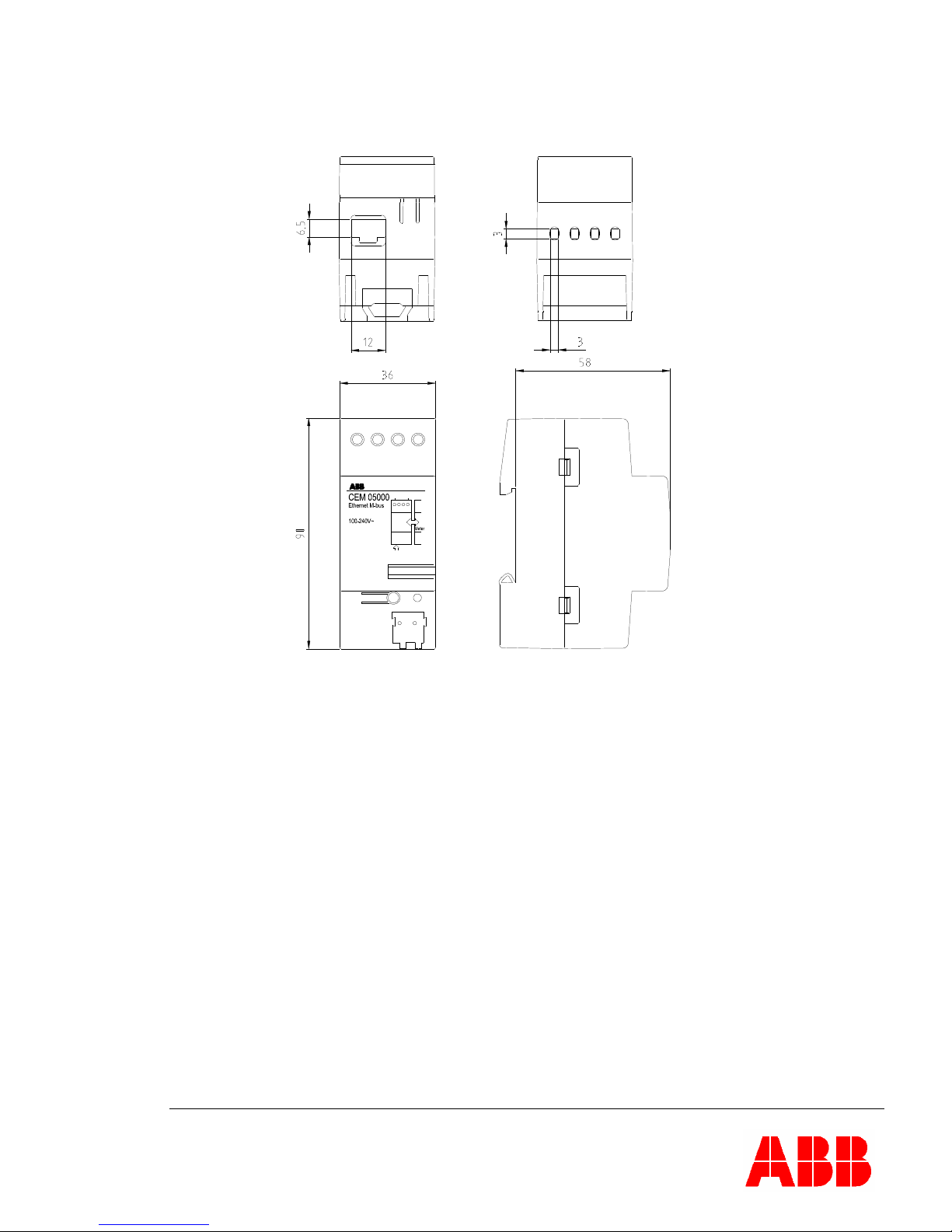
The physical dimensions of the SCA are displayed below.
Power
ABB IR
Interface
Ethernet
1
D51
4
Figure 3: The physical dimensions of the SCA.
6AUTOMATIC METER READING
The ABB Ethernet communication adapter provides Automatic Meter Reading (AMR) using M-Bus
protocol over UDP or TCP over a network. This is done transparently without altering the original M-
Bus telegrams. Please note that the shortest time between readouts is different depending on the
type of the electricity meter; please refer to the User’s Manual of the electricity meter for more
information.
7THE WEB SERVER
Besides providing communication with an AMR-system the ABB Ethernet communication adapter
does also have a built-in Web-server that enables static meter reading over a network using an
ordinary web browser. The web-server provides an easy interface to configure the settings of the
adapter and its users and privileges. The adapter’s IP-address can be assigned either statically or
dynamically by a DHCP-server.
All quantities that can be readout by using the M-Bus protocol on the AMR part of the adapter can
be readout on the built-in web server except the features that are listed below.
Load Profile Values.

Page 8 of 16
Maximum Demand.
Voltage Event Log.
Current harmonics.
Please refer to the User’s Manual of the electricity meter for more information of what quantities can
be readout depending on the type of electricity meter.
7.1 ACCESSING THE WEB SERVER
This section will describe how to access the built-in web server in ABB Ethernet communication
adapter.
To access the SCA for the first time, the IP-range of the local area network used must be
192.168.1.x, with 192.168.1.10 free for the SCA to use.
Open a web browser and type the IP-address (default: 192.168.1.10) of the ABB Ethernet
communication adapter in the web browsers address field.
The page will appear like the one below. The quantities of the electricity meter are being loaded into
one page. This process might take a few moments depending on how much data the electricity
meter transmits. The quantities that appear will be different depending on the model of electricity
meter.
A list of links to every frame received from the meter is located above each frame to make browsing
larger amounts of data easier. A new meter-readout will only occur after a user clicks the Read
meter link again, not while browsing the received meter-data through the list of links to the different
frames.

Page 9 of 16
7.2 ODINSINGLE ENERGY RESET
The Read meter-page of the SCA also has a button to reset the resettable energy-register in the
ODINsingle electricity meter. This button only has an effect on electricity meters with resettable
energy registers. Other meters will ignore the command.
If one or more users are added to the SCA, only an administrator can issue an energy-reset. If no
users exist, then anyone can issue the command.
7.3 USER AND SECURITY MANAGEMENT
This section will deal with the user management feature in the ABB Ethernet communication
adapter. It will discuss how to add and remove users and setting their privileges and settings.
Three kinds of users can be added to the SCA:
Administrator
Guest with login
Guest without login
The administrator has full access to every webpage and function in the SCA. The other two types
can only access the Read meter and About pages. The difference between the two guest types is
that guest with login requires a username and password to access the SCA, while guest without

Page 10 of 16
login requires neither. The guest without login type means that only an administrator can change
settings, but anyone can access the meter-data readout.
7.3.1 SECURITY
From a security-perspective, the SCA is designed to be used in a private network. It is not intended
to be used in a public network like the Internet.
7.3.2 USER ADDING AND LOGGING IN
Enter the Add user menu and add a user by filling in the fields below and submit. Please note that
once the password is set it is non-recoverable, therefore save the password and keep it in a safe
place.
If everything is done correctly, the following message appears.
Table of contents
Other ABB Adapter manuals

ABB
ABB CCA-01 User manual

ABB
ABB FieldKey NHU200 User manual

ABB
ABB RECA-01 User manual

ABB
ABB Tina 2A User manual

ABB
ABB RETA-01 User manual

ABB
ABB FBIP-21 BACnet/IP Installation manual

ABB
ABB Busch-AudioWorld Busch-iDock 8218 U-500 User manual

ABB
ABB RS485 Modbus adapter Installation manual

ABB
ABB FMBT-21 User manual

ABB
ABB FEIP-21 Installation manual

ABB
ABB WBCA Series User manual

ABB
ABB FPBA-01 PROFIBUS DP User manual

ABB
ABB 8209-101-500 User manual

ABB
ABB F Series User manual

ABB
ABB SPA-ZC 400 Guide

ABB
ABB FPBA-01 PROFIBUS DP User manual

ABB
ABB RS485 Modbus adapter User manual

ABB
ABB FPBA-01 PROFIBUS DP Installation manual

ABB
ABB FBIP-21 BACnet/IP Installation manual

ABB
ABB REPL-01 User manual