Zenith Z-100 Series User manual


Regulatory and Registration Information
WARNING - This equipment has been certified to comply within the limits established for a
Class B computing device, pursuant to Subpart J of Part 15 of the rules established by the
FCC. Only peripherals (computer input/output devices, terminals, printers, etc.) certified to
comply within these Class B limits may be attached to this computer. Operation with non-certified
peripherals is likely to result in interference to radio and TV reception.
This equipment generates and uses radio frequency energy for its operation; and if not properly
installed and used, that is, in strict accordance with the instructions in this manual, may cause
interference to radio and television reception. It has been type-tested and found to be within the
RF emission limits for a Class B computing device which is intended to provide reasonable
protection against such interference in a residential environment. However, there is no
guarantee that interference will not occur in any particular environment or location. If this
equipment does cause interference to radio and television reception, which can be determined by
turning this equipment on and off, try to correct the interference by one of more of the following
measures.
•Move the computing device away from the equipment receiving the interference.
•Relocate the computing device with respect to the receiver.
•Reorient (turn) the antenna of the receiving equipment.
•Plug the computing device into a different AC outlet so that the computing device and
receiver are on separate circuits from the fuse or circuit breaker box.
•Disconnect and remove any input/output cables that are not being used since unter-
minated input/output cables are a potential source of high RF emission levels.
•Unplug and remove any serial input/output circuit board cards that are not being used
since unterminated cards can be a potential source of interference.
•Make sure that the computing devices are plugged into grounded outlet receptacles.
Avoid using AC two- to three-wire cheater plugs. Lifting or removing the power cord
ground may increase RF emission levels. Removing the ground circuit also may cause a
lethal shock hazard to the user.
If you need additional help, consult your dealer or ask for assistance from the manufacturer. You
may also find the following booklet helpful: How to Identify and Resolve Radio-TV Interference
Problems. This booklet is available from the U.S. Government Printing Office, Washington, DC
20402, stock number 004-000-00345-4.
Registration
To receive the full benefits of your warranty, complete and mail the accompanying registration
card. Also, record the series and serial numbers of your equipment below. Refer to these
numbers in any correspondence you have with Zenith Data Systems regarding this equipment.
Model Serial Number ___________________________
Series Date purchased _________________________
Place purchased ____________________________________________________________
Any attempt to alter or modify the design, or to use this device in a manner other than described in
this manual, will void the warranty and release the manufacturer from any responsibility for its
operation.

Z-100 Series
Computers
User's Manual

LIMITED RIGHTS LEGEND
Contractor is Zenith Data Systems Corporation of St. Joseph, Michigan 49085. The
entire document is subject to Limited Rights data provisions.
RESTRICTED RIGHTS LEGEND
This computer software and documentation are provided with RESTRICTED RIGHTS.
Use, duplication or disclosure by the Government is subject to restrictions is set
forth in the Governing Rights in Technical Data and Computer Software clause –
subdivision (b)(3)(B) of DAR 7-104.9(a) (May 1981) or subdivision (b)(3)(ii) ofDOD FAR
Supp 252.227-7013 (May 1981). Contractor/Manufacturer is Zenith Data Systems
Corporation, or Hilltop Road, St. Joseph, MI 49085.
Copyright 1982, 1985 by Zenith Data Systems Corporation.
Printed in the United States of America.
Zenith Data Systems Corporation
St. Joseph, Michigan 49085


Welcome
Congratulations on your purchase of the Zenith Data Systems Z-100 Series
Computer. The Z-100 microcomputer represents a truly state-ofthe-art design,
capable of satisfying both your business and personal needs.
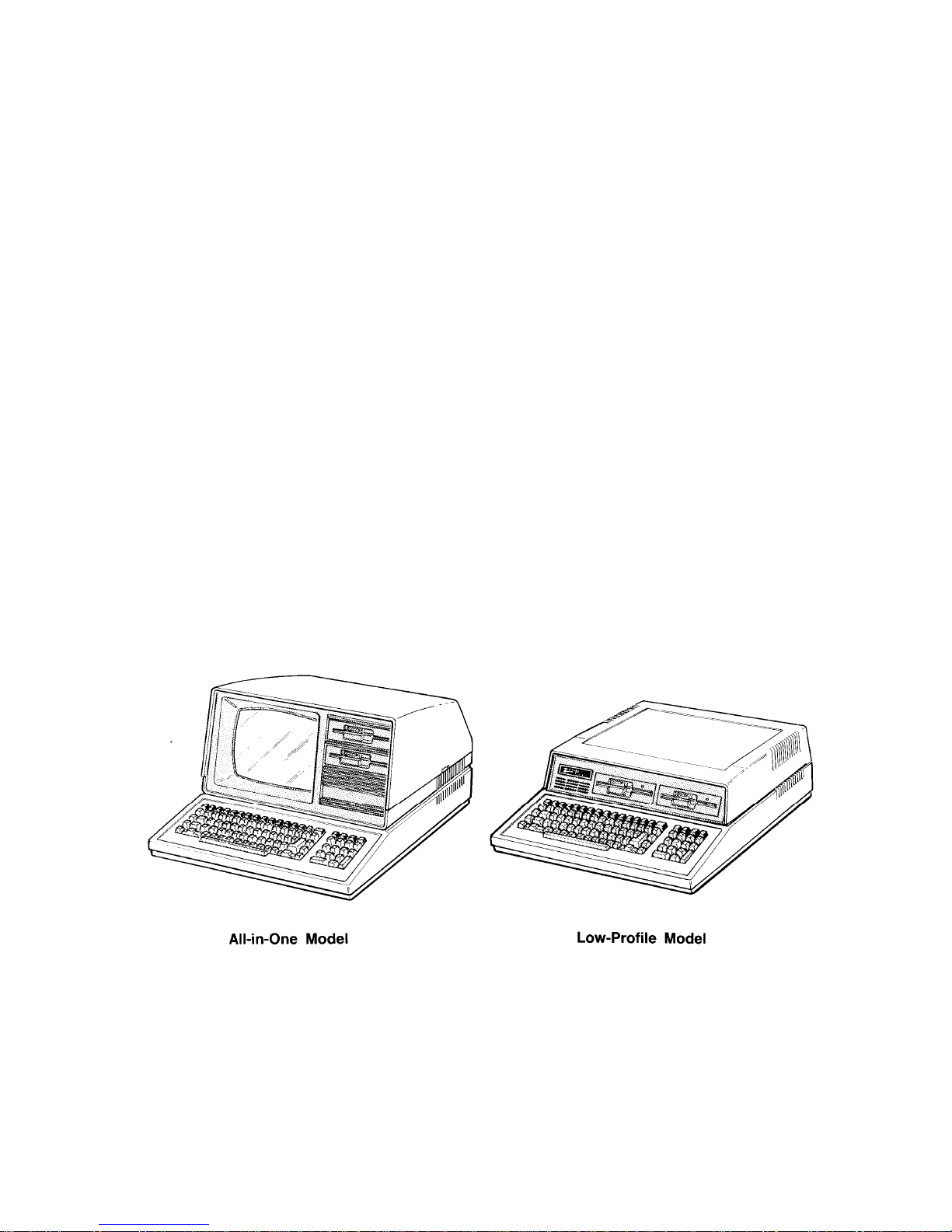
With the Z-1 00 Computer - the All-in-One model or the Low-Profile model - the
future is here today. The Z-100 Computer can act as a simple tool or function
as the heart of a powerful and expandable business automation package.
Combined with Zenith Data Systems software, your new Z-100 Computer
can easily provide the practical and affordable solutions to your
business problems. It can easily satisfy a variety of business applications, such
at data processing, telecommunications, networking, and financial analysis to
aid you in making those all-important business decisions.
This User's Manual has been prepared for you, the new computer owner and
user. Welcome to computing at its best and accept Zenith's assurance and
commitment that the quality goes in before the name goes on.

iii

iv

Preface
This User's Manual is divided into four sections for easy use:
•Operation - The beginning section tells you how to set up your new Z-100
Computer. Then you will turn it on and be introduced to the keyboard and
controls. You will learn about disks and how to use a special
demonstration disk. And finally, there is a section on what to do if you
have a problem with your computer.
•Disk Operating System - This chapter will help you understand and use
your computer. In addition, it will show you how to make extra copies
(called "backups") of the information stored by your computer.
•Computer Programming and BASIC - Here you will be briefly introduced to
the world of programming and learn how to give instructions to your
computer in BASIC, one of the most popular computer "languages."
•Appendices - This last section contains reference material that you may find
informative. It also contains step-by-step disassembly and assembly
information that replaces the equivalent instructions in the installation
manual included with any accessories you may purchase for your
computer.
You will want to become familiar with your computer's many features.
This manual will help you get the most out of your new Zenith Data Systems
Z-1 00 Computer.
v

vi

Contents
Welcome iii
Preface V
Chapter 1 Operation
Your Computer System 1-1
Setting Up 1-3
Back Panel 1-3
Power Connection 1-7
Keyboard 1-8
Alphabetic Keys 1-8
Nonalphabetic Keys 1-9
Other Keys 1-10
Disk Drives 1-13
Disks 1-15
Disk Care 1-18
Power Up 1-19
Z-100 Demonstration Disk 1-20
Introduction 1-20
Master Menu 1-22
Artwork 1-22
Interactive Business Graphics 1-23
In Case of Difficulty 1-26
Service Information 1-29
When You Call for Help 1-29
Chapter 2 Disk Operating System
Introduction 2-1
The Monitor Program 2-2
Autoboot 2-2
The Commands 2-3
B – Boot 2-4
C – Color Bar 2-5
H – Help 2-6
S – System 2-7
V – Version 2-7
Loading MS-DOS 2-8
The MS-DOS Prompt 2-11
Making A Backup 2-11
Backups 2-11
Backing Up Your Disks the First Time 2-12
Labeling Disks 2-14
vii
Other manuals for Z-100 Series
3
Table of contents
Other Zenith Desktop manuals

Zenith
Zenith Z-100 Series User manual

Zenith
Zenith Z-171 Service manual

Zenith
Zenith Z-200 series User manual

Zenith
Zenith Z-171 User manual

Zenith
Zenith SM-Z-89 User manual

Zenith
Zenith Z-150 User manual

Zenith
Zenith Z-100 Series User manual

Zenith
Zenith Z-100 Series User manual

Zenith
Zenith H-100 User manual