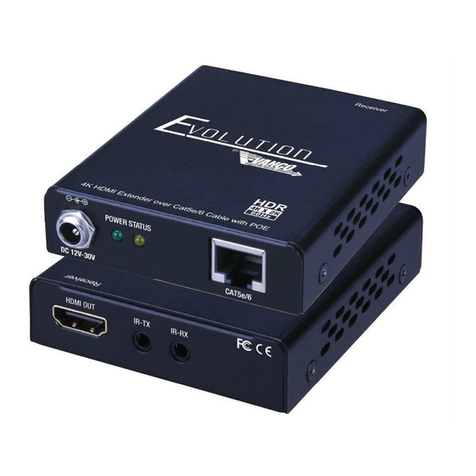
Vanco Evolution HDBASET EVEX2002 User manual

Vanco Part Number
EVEX2002
HDBaseT™ Extender
(230ft/70m)
www.vanco1.com • 800.626.6445
HDBASET™ EXTENDER
(230 ft./ 70m) over single Cat5e/Cat6 Cable

www.vanco1.com 800.626.6445
2
1. Do not expose this unit to water,
moisture, or excessive humidity.
2. Do not install or place this unit in
a built-in cabinet, or other conned
space without adequate ventilation.
3. To prevent risk of electrical shock or
re hazard, due to overheating do not
obstruct unit’s ventilation openings.
4. Do not install near any source of
heat, including other units that may
produce heat.
5. Do not place unit near ames.
6. Only clean unit with a dry cloth.
7. Unplug unit during lightening storms
or when not used for an extended
period of time. A surge protector is
strongly recommended.
8. Protect the power cord from being
walked on or pinched, particularly at
the plugs.
9. Use unit only with accessories
specied by the manufacturer.
10. Refer all servicing to qualied
personnel.
CAUTION
HDMI is a very complex technology requiring continuous authentication of the signal
and the same video resolution and audio settings on all electronic equipment in the
system. When there are multiple sources and displays, the video resolution and
audio setting on all connected units must be adjusted to correspond with that of the
display having the lowest video and audio capability.
WARNING
DEAR CUSTOMER
Thank you for purchasing this product.
For optimum performance and safety, please
read these instructions carefully before connecting,
operating or adjusting this product. Please keep this
manual for future reference.
This product is 100% inspected and tested in the United
States to verify HDMI performance parameters.

www.vanco1.com 800.626.6445 3
INTRODUCTION
The Evolution by Vanco EVEX2002 HDMI Extender over Single Cat5e/6 with HDBaseT
Technology, Bi-directional IR, and PoE extends high denition video and audio signals,
IR, and power at a distance of up to 230ft/70m over a single Cat5e/6 cable. 4K2K
(2160p) resolution compatible, and can be extended up to 131ft/40m. Features HDBaseT
Technology that allows for greater transmission range compared to standard HDMI
extenders. Also features Power over Ethernet (PoE) Technology which transmits power
over Cat5e/6, allowing for either Transmitter or Receiver to be powered without the use
of a power supply. The result is an easy and exible installation with low maintenance.
With only one cost effective Cat5e/6 cable, high denition sources with HDMI outputs
can be connected to high denition displays with HDMI inputs over long distances. Deep
color video, DTS-HD or Dolby TrueHD audio, and HDCP is supported and compatible with
the EVEX2002. In addition, EVEX2002 is also equipped with bi-directional IR pass-through
which allows for source or display control.
The EVEX2002 includes two units: transmitting unit (EVEX2002-TX) and receiving unit
(EVEX2002-RX). The transmitting unit is used to capture the HDMI input with IR signals
and carries the signals via one cost effective Cat5e/6 cable. The receiving unit is
responsible for equalizing the transmitted HDMI signal and reconstructing IR and serial
control signals. The EVEX2002 offers the most convenient solution for HDMI extension
over a single Cat5e/6 with long distance capability, and is the perfect solution for any
application.
FEATURES

www.vanco1.com 800.626.6445
4
HDBaseT Extender 230ft/70m
Part # EVEX2002
• Features HDBaseT Technology, optimized for whole-home or commercial distribution
of uncompressed high-denition signals at twice the distance of HDMI cables without
degradation
• HDBaseT Extender can connect uncompressed full HD digital video, audio, 100BaseT
Ethernet, and various control signals through a single 230ft/70m Cat5e/Cat6 cable
• Features Power over Ethernet (PoE) Technology which transmits power over Cat5e/6,
allowing for either Transmitter or Receiver to be powered without the use of a power
supply. The result is an easy and exible installation with low maintenance.
• 4K2K (2160p) resolution compatible
• HDBaseT Technology that supports HDMI Deep Color, 3D, and up to 4K2K resolution
@ 30hZ
• Transmission Range: Extends 1080p resolutions up to 230ft (70m) over a single
Cat5e/6 cable and 2160p/30hZ (4K2K) resolutions up to 131ft (40m)
• Supports Power Over Ethernet (PoE), integrates power into the Cat5e/6 cable,
requiring no power supply for either the Transmitting unit or Receiving unit (opposite of
unit that is plugged in to power)
• HDCP Compliant
• EDID pass through
• CEC support
• Auto equalization
• Pure unaltered uncompressed 7.1ch digital HDMI over Cat.5/5e/6 cable transmission
• DTS-HD Master Audio and Dolby TrueHD high bit rate audio support
• Wideband IR signal from 20KHz to 60KHz
• Bi-directional IR pass-through
• Wall mountable housing design for a quick and easy installation
• Dimensions: 3.82” (97.1mm) W x 1” (25.4mm) H x 3.58” (91mm) D

www.vanco1.com 800.626.6445 5
SPECIFICATIONS
TECHNICAL SPECS
HDMI Compliance ...................................................... HDMI Deep Color, Full 3D 4K2K @ 30
HDCP Compliance...................................................... Yes
Video Bandwidth ........................................................ Single link 340 MHz (10.2 Gbps)
Video Support ........................................................... 480i/480p/720p/1080i/1080p @60/2160p@30
HDMI over UTP.......................................................... 1080p@60 70m (230 ft) Cat5e
Audio Support ........................................................... Surround Sound (up to 7.1 ch) or stereo digital audio
Equalization............................................................... Auto
Input TMDS Signal ..................................................... 1.2 Volts (peak to peak)
Input DDC Signal........................................................ 5 Volts (peak to peak, TTL)
ESD protection .......................................................... (1) Human body model +/- 19kV (air-gap discharge) &
(contact discharge) (2) Core chipset - +/- 8k V
PCB stack-up ............................................................ 6 layer board (impedance control - differential 100,
single 50
IR pass-thru .............................................................. Bi-directional
POE support.............................................................. Yes
Input ........................................................................ (TX)1xHDMI + 2x3.5mm + 1x mini USB; (RX)1x RJ-
45
Output...................................................................... (TX)1x RJ-45; (RX)1xHDMI + 2x3.5mm + 1x mini
USB
HDMI source control .................................................. Controllable via IR pass-through from RX to TX with
IR extenders
HDMI connector ....................................................... Type A 19 pin female
RJ-45 connector........................................................ WE/SS 8P8C (reverse mode)
3.5mm connector ...................................................... (TX and RX) IR Receiver/ IR blaster
MECHANICAL SPECS
Housing .................................................................... Metal enclosure
Fixedness.................................................................. Wall-mounting case with screws
Power supply............................................................. 24V1A
Power consumption.................................................... Max 12W
Operation temperature............................................... 32-104 degrees F
Storage temperature.................................................. -4 - 140 degrees F
Relative humidity ....................................................... 20-90% RH (no condensation)

www.vanco1.com 800.626.6445
6
PACKAGE CONTENTS
• EVEX2002 (TX and RX)
• IR Blaster (TX)
• IR Receiver (RX)
• (1) DC 24V in line power supply
• Rack-mounting ear set
• Product Manual
1. 24 V DC
2. Power indicator
3. HDMI IN
4. IR Blaster
5. IR Receiver
6. Mini USB (for rmware updates)
7. TX/RX link indicator
8. RJ45 (HDBaseT OUT)
9. 24 V DC
10. Power indicator
11. HDMI OUT
12. IR Blaster
13. IR Receiver
14. Mini USB (for rmware updates)
15. TX/RX link indicator
16. RJ45 (HDBaseT IN)
PANEL DESCRIPTIONS
123 4 5 6
7 8
910 11
1615
141312
Transmitting Unit Receiving Unit

www.vanco1.com 800.626.6445 7
CONNECTION DIAGRAM
CONNECT AND OPERATE
1. Connect a source such as a Blu-Ray Player, game console, A/V Receiver, Cable or
Satellite Receiver, etc. to the HDMI input on the Transmitting unit.
2. Connect a display such as an HDTV or HD Projector to the HDMI output on the
Receiving unit.
3. Connect a single Category 5e/6/7 up to 230ft/70m to the HDBaseT output of the
Transmitting unit, and the other end to the HDBaseT input of the Receiving unit.
4. For power, plug in either the Transmitting unit or Receiving unit with the included power
supply, opposite unit will not have to be plugged in as it features Power over Ethernet
(PoE).
5. Power on each device in the same sequence (receiver and transmitter will already be
powered when either unit is plugged in.)
At this point the display connected should display the source signal connected to the extender set. If no
signal is being displayed, connect a shorter Cat5e/6 cable (jumper or patch cable). If a display is having
difculty receiving a signal, access the display’s menu and adjust the resolution (lowest to highest until signal
is displayed). A 24 Hz vertical refresh rate may work better than 60 Hz or higher. Use the source remote at
the receiver emitter to test IR functionality. If the IR remote function is not responding, check the emitters to
ensure they are placed correctly and are plugged into the correct IR jacks on the Extender set receiving and
transmitting units.

www.vanco1.com 800.626.6445
8
IR PASS-THROUGH
IR Blaster TX IR Receiver RX
IR BLASTER (TX)
To control the source: Plug IR Blaster into IR TX port of transmitter unit (EVEX2002-TX);
place blaster in front of the IR eye of the source.
To control the display: Plug IR Blaster into IR TX port of receiver unit (EVEX2002-RX); place
blaster in front of the IR eye of the display.
IR RECEIVER (RX)
To control the source: Plug IR Receiver into IR RX port of receiver unit (EVEX2002-RX);
place receiver at or near display.
To control the display: Plug IR Receiver into IR RX port of transmitter unit (EVEX2002-TX);
place receiver in position where it is able to receive remote signals.
IR Blaster TX IR Receiver RX
1. IR Signal
2. Grounding
1. IR Signal 20-60 kHz)
2. Grounding
3. Power

www.vanco1.com 800.626.6445 9
NOTICE
1. Vanco HDMI and Cat5e/6 cables are strongly recommended for use with this product
to ensure best results.
2. Incorrect placement of IR Blaster and Receiver may result in the failure of the IR
extenders. Please check carefully before plugging in the IR extender to the respective IR
sockets.
3. The transmission length is largely affected by the type of Cat5e/6 cables utilized, the
type of HDMI sources, and the type of HDMI display. The testing result shows solid UTP
cables (usually in the form of 300m [1,000ft] bulk cables) can transmit a lot longer
signals than stranded UTP cables (usually in the form of xed length patch cords).
Shielded STP cables are better suited than unshielded UTP cables. A solid UTP Cat5e/6
cable shows longer transmission range than stranded STP Cat-6 cable. For long
extension applications, use solid UTP/STP category cables.
4. EIA/TIA-568-B termination (T568B) for Cat5e/6 cables is recommended for better
performance.
5. To reduce the interference among the unshielded twisted pairs of wires in Cat5e/6
cables, one can use shielded STP cables to improve EMI problems, which worsens in
long cable transmission.
6. The quality of Cat5e/6 cables can have a major effect on how long the transmission
limit can achieve and quality of picture, the actual transmission range is subject to the
Cat5e/6 cable utilized. For the best results, Cat6 is recommended.
7. If your HDMI display has multiple HDMI inputs, it is found that the rst HDMI input [HDMI
input #1] generally can produce better transmission performance among all HDMI
inputs.

www.vanco1.com 800.626.6445
10
TROUBLE-SHOOTING
1. Best results are usually achieved when the source and display resolutions are the same.
If resolutions differ, the extenders will try to adjust the signal to match the resolution of
the HDTV with the lowest resolution. This will result in a picture with a lower resolution
on the other HDTV sets.
2. If you do not get audio and video, access the “setup” menu on the TV to adjust the audio
and video settings. If the HDMI control circuit cannot establish a handshake, then there
usually will be no audio or video in addition to a blue or black screen with a statement
similar to “this protocol not supported” or “weak signal”.
3. If the above mentioned messages display, reset the receiver by disconnecting the power
supply. You can also disconnect all of the HDMI and power cables, wait 15 minutes for
any voltages to decay and then reconnect all of the cables.
4. If you are still encountering issues, attempt the “hot-plug concept. With all of the HDMI
cables disconnected, turn on the source and plug in the HDMI cable into it’s output,
then power up the Vanco unit and plug the HDMI cable into it’s input, nally turn on the
display and plug the HDMI cable from the receiver into it. This activates all of the devices
in corresponding order and results in a signal being plugged into a device that is on and
will attempt to connect the signal.
5. Most of the major source and display manufacturers employ a proprietary control
channel to communicate between devices from the same manufacturer. Sometimes this
can interfere with the HDMI control circuit or the authentication of the signal. Call the
manufacturer if you experience this issue. Sometimes a player, an audio/video receiver,
or a cable/satellite box may not have the latest software update, usually this can be
downloaded from the manufacturer’s website.
6. If you have problems with the IR control circuit, make sure that the IR RX pigtail is
plugged into extender receiver and pointed at the display, and the IR TX pigtail is
attached to the extender sender and pointed at the source.
SAFETY AND NOTICE
The EVEX2002 HDMI Extender over Single Cat5e/6 with HDBaseT Technology, Bi-
directional IR, and PoE has been tested for conformance to safety regulations and
requirements, and has been certied for international use. However, like all electronic
equipments, the EVEX2002 should be used with care. Please read and follow the safety
instructions to protect yourself from possible injury and to minimize the risk of damage to
the unit.
• Follow all instructions and warnings marked on this unit.
• Do not attempt to service this unit yourself, except where explained in this manual.
• Provide proper ventilation and air circulation and do not use near water.
• Keep objects that might damage the device and assure that the placement of this unit
is on a stable surface.
• Use only the power adapter and power cords and connection cables designed for this
unit.
• Do not use liquid or aerosol cleaners to clean this unit.
• Always unplug the power to the device before cleaning.
Table of contents
Other Vanco Extender manuals

Vanco
Vanco EVEXVGAHD User manual

Vanco
Vanco 280621 User manual

Vanco
Vanco EVEXHDB2 User manual

Vanco
Vanco Evolution EVEXKVM1 User manual

Vanco
Vanco 280567 User manual

Vanco
Vanco EVEX2006 User manual

Vanco
Vanco HDEX60 User manual

Vanco
Vanco EVOLUTION EVEXARC1 User manual

Vanco
Vanco Evolution EVEX2005 User manual

Vanco
Vanco HDEXWIR User manual

Vanco
Vanco Evolution EVEV4K70 User manual

Vanco
Vanco 280501 User manual

Vanco
Vanco EVEXFBRK1 User manual

Vanco
Vanco 280332 User manual

Vanco
Vanco Evolution EVEX4K50 User manual

Vanco
Vanco Evolution EV4KWHDMI User manual

Vanco
Vanco EVOLUTION EV4K2004 Instruction manual

Vanco
Vanco 280591 User manual

Vanco
Vanco EVEX2003 User manual

Vanco
Vanco AMP202 User manual