
Toa C-CV854D-3 CE User manual

VANDAL RESISTANT
DAY/NIGHT CAMERA
C-CV854D-3 CU
C-CV854D-9 CU
C-CV854D-3 CE
INSTRUCTION MANUAL
Thank you for purchasing TOA’s Vandal Resistant Day/Night Camera. Please carefully follow the
instructions in this manual in order to ensure long, trouble-free use of your color camera.
1. SAFETY PRECAUTIONS .......................... 2
2. GENERAL DESCRIPTION ........................ 4
3. HANDLING PRECAUTIONS ..................... 4
4. NOMENCLATURE...................................... 5
5. INSTALLATION
5.1. Detaching a Dome Cover .................... 6
5.2. Installing a Camera ............................. 6
5.2.1. Unexposed wiring ...................... 6
5.2.2. Open wiring
from the camera's side ............ 8
5.3. Attaching a Dome Cover ................... 10
6. CONNECTION .......................................... 11
7. ADJUSTMENT .......................................... 12
8. ABOUT THE MODE SETTING SWITCH
8.1. Focus adjustment switch ................... 13
8.2. Backlight compensation switch ......... 13
8.3. Flickerless switch .............................. 13
8.4. ATW/AWB selection switch ............... 14
8.5. Mode selection switch ....................... 14
9. TROUBLESHOOTING .............................. 14
10. SPECIFICATIONS .................................... 15
Accessories ............................................... 16
TABLE OF CONTENTS

2
1. SAFETY PRECAUTIONS
• Before installation or use, be sure to carefully read all the instructions in this section for correct and safe
operation.
• Make sure to observe the instructions in this manual as the conventions of safety symbols and messages
regarded as very important precautions are included.
• We also recommend you keep this instruction manual handy for future reference.
Safety Symbol and Message Conventions
Safety symbols and messages described below are used in this manual to prevent bodily injury and property
damage which could result from mishandling. Before operating your product, read this manual first and
understand the safety symbols and messages so you are thoroughly aware of the potential safety hazards.
Do not leave the unit upside-down where it could be exposed to the
rain or elements. Water in the unit may cause shorts that could result
in fire or electrical shock.
WARNING
Indicates a potentially hazardous situation which, if mishandled, could
result in death or serious personal injury.
WARNING
• Use the unit only with the voltage specified on the unit. Using a voltage higher than that which is specified
may result in fire or electric shock.
• Use screws that are appropriate for the ceiling's or wall's structure and composition. Failure to do so may
cause the unit to fall, resulting in material damage and possible personal injury.
• Ensure that all screws and fixing mechanism are securely tightened. If they are not tightened or firmly
secured after installation, the unit could fall down, possibly resulting in personal injury.
• Install the unit only in a location that can structurally support the weight of the unit and the mounting bracket.
Doing otherwise may result in the unit falling down and causing personal injury and/or property damage.
• Avoid installing the unit in locations exposed to sea breeze or corrosive gas. The unit or its mounts may be
subject to corrosion, that might cause it to fall or result in other accidents.
• To prevent a fire or electric shock, never open nor remove the unit case as there are high voltage
components inside the unit. Refer all servicing to qualified service personnel.
• If any of the following irregularities occurs, immediately switch off the power, and inform the shop from where
the unit was purchased. Further using the unit may result in fire or electric shock.
· If you detect smoke or a strange smell coming from the unit.
· If water or any metallic object gets into the unit
· If the unit falls, or the unit case breaks
· If the power supply cord is damaged (exposure of the core, disconnection, etc.)
· If it is malfunctioning (no image appears.)
• Do not mount the unit in locations exposed to constant vibration. The mounting screws and/or bolts may be
loosened by excessive vibration, potentially causing the unit to fall, which could result in personal injury.
• To prevent lightning strikes, install the unit at least five meters away from a lightning rod, and yet within the
protective range (angle of 45°) of the lightning conductor. Lightning strikes may cause a fire, electric shock
or personal injury.
• Do not insert nor drop metallic objects or flammable materials in the ventilation slots of the unit's cover, as
this may result in fire or electric shock.

3
Indicates a potentially hazardous situation which, if mishandled, could
result in moderate or minor personal injury, and/or property damage.
CAUTION
• Leave the installation of the unit to your TOA dealer because the installation requires expert experience and
skills. The unit may fall off if incorrectly installed, resulting in possible personal injury.
• Do not stand or sit on, nor hang down from the unit as this may cause it to fall down or drop, resulting in
personal injury and/or property damage.
• Have the unit checked periodically by the shop from where it was purchased. Failure to do so may result in
corrosion or damage to the unit or its mounting bracket that could cause the unit to fall, possibly causing
personal injury.
• Switch off the power for safety purposes when cleaning or leaving the unit unused for 10 days or more.
Doing otherwise may cause a fire or electric shock.
CU version complies with Part 15 of the FCC Rules.
This device complies with Part 15 of the FCC Rules. Operation is subject to the following two conditions:
(1) this device may not cause harmful interference, and (2) this device must accept any interference
received, including interference that may cause undesired operation.
This Class B digital apparatus compliance with Canadian ICES-003.
Cet appareil numérique de la classe B est conforme à la norme NMB-003 du Canada.
Note
This equipment has been tested and found to comply with the limits for a Class B digital device,
pursuant to Part 15 of the FCC Rules. These limits are designed to provide reasonable protection
against harmful interference in a residential installation. This equipment generates, uses and can
radiate radio frequency energy and, if not installed and used in accordance with the instructions, may
cause harmful interference to radio communications. However, there is no guarantee that interference
will not occur in a particular installation. If this equipment does cause harmful interference to radio or
television reception, which can be determined by turning the equipment off and on, the user is
encouraged to try to correct the interference by one or more of the following measures:
•Reorient or relocate the receiving antenna.
•Increase the separation between the equipment and receiver.
•Connect the equipment into an outlet on a circuit different from that to which the receiver is connected.
•Consult the dealer or an experienced radio/ TV technician for help.
Modifications
Any modifications made to this device that are not approved by TOA Corporation may void the authority
granted to the user by the FCC to operate this equipment.

4
The TOA C-CV854D-3 and C-CV854D-9 are Vandal Resistant Day/Night Camera equipped with a Day/Night
function. It functions as a color camera in the daytime and as a high-sensitivity monochrome camera in
darkness, making it ideal for installation in locations that require around-the-clock monitoring. Noise reduction
function enables clear image to be viewed in lower noise under poor lighting conditions. Its dust-proof and
waterproof (IP66) construction permits it to be mounted to an outdoor wall or ceiling without using a special
device to protect the camera against dust or rain. Since the camera unit is constructed of die-cast aluminum
alloy and its dome cover is made of polycarbonate, the C-CV854D-3 and C-CV854D-9 ensure high resistance
to strong impacts. It features a 3-axis (horizontal, vertical and rotation) adjustment mechanism and a vari-focal
lens which facilitate adjustment of camera orientation and angle of view at the time of installation. The use of
an optional built-in heater unit allows the C-CV854D-3 and C-CV854D-9 to be used at ambient temperatures
as low as -30°C (-22°F).
3. HANDLING PRECAUTIONS
• Do not direct the camera lens to the sun or strong lighting or light reflection. Exposure to direct sunlight could
cause the CCD's color filter to deteriorate, leading to image discoloration.
• Do not give the camera a great shock or vibration, as this will damage the camera.
• It is recommended that the camera be always used in locations where the ambient temperature ranges from
-10°C to +50°C (14°F to 122°F)and humidity levels of less than 90% to ensure that no condensation is formed.
• To clean, wipe with a dry soft cloth. Never use benzene, thinner or chemically processed towel as the
camera's plastic or other parts may be deformed or discolored.
• When dust has settled on the unit's lens, lightly clean using a commercial camera blower or cleaning paper.
• Installing the camera cables in close proximity to fluorescent lamps or other electrical appliances can
downgrade the picture quality. In such cases, change the wiring.
• If there is a strong electric or magnetic field near the camera, such as television transmission antennas,
motors or transformers, this may distort or roll the monitor picture. In such cases, run the entire wiring route
through metal conduit tubing.
• Do not install the unit in locations where solvents or chemicals are used as the unit's dome cover may be
deformed or discolored.
• Use the external power supply unit of the following rating when the camera is operated on 12 V DC.
12 V DC, over 1.0 A
• Since the Day/Night Camera features sealed construction, condensation can build up inside the camera,
causing the inside of the dome cover to fog. Ensure that the camera is installed under low humidity
conditions.
• Avoid installing the Day/Night Camera in locations exposed to cold air or close to an air-conditioner vent, as
the dome cover may become fogged.
2. GENERAL DESCRIPTION

5
LOCK
[Side view with a dome cover attached ]
[Bottom view with a dome cover attached ]
[Side view with an inner cover detached ]
[Bottom view with an inner cover detached ]
4
5
6
7
8
9
10
11 12
1
2
3
(1) Camera power input cable (Red, Black)
(24 V AC or 12 V DC)
(2) Heater power input cable (White, White)
(24 V AC)
(3) Video output terminal (cable with BNC)
(4) Safety wire fixing hole (M4)
(5) Zoom ring fixing screw
(6) Zoom ring
(7) Focus ring fixing screw
(8) Focus ring
(9) Mode setting switch
(10) Iris control
(11) Monitor output terminal (RCA pin jack)
(12) Vari-focal lens
4. NOMENCLATURE

6
LOCK
LOCK
L-type wrench
Dome cover
Case
5. INSTALLATION
Notes
· Do not remove the protective sheet attached to the dome cover until installation work is completed. Damage
to the dome cover could result if the protective sheet is removed during installation.
· A safety wire for connecting between the unit and ceiling is not supplied. Hook a safety wire for the unit itself
to the safety wire-fixing hole (M4, useful thread depth = 6 mm (0.24 inch)) as needed.
· Wrap self-adhesive insulation tape around coaxial cable connections and the power supply lead.
5.1. Detaching a Dome Cover
1. Detach the dome cover from the case.
Remove three screws fixing the dome cover with a supplied L-type wrench.
Notes
· The dome cover is connected to the case by a safety wire.
· You may find that an O-ring placed into the groove of the dome cover is about to come off when detaching
the dome cover. In such cases, replace the O-ring into the groove securely.
· After detaching the dome cover from the case, do not lift the camera unit by the inner cover. If lifted, the
inner cover can be unhooked, and the camera could fall off, possibly resulting in personal injuries or
causing damage to the camera.
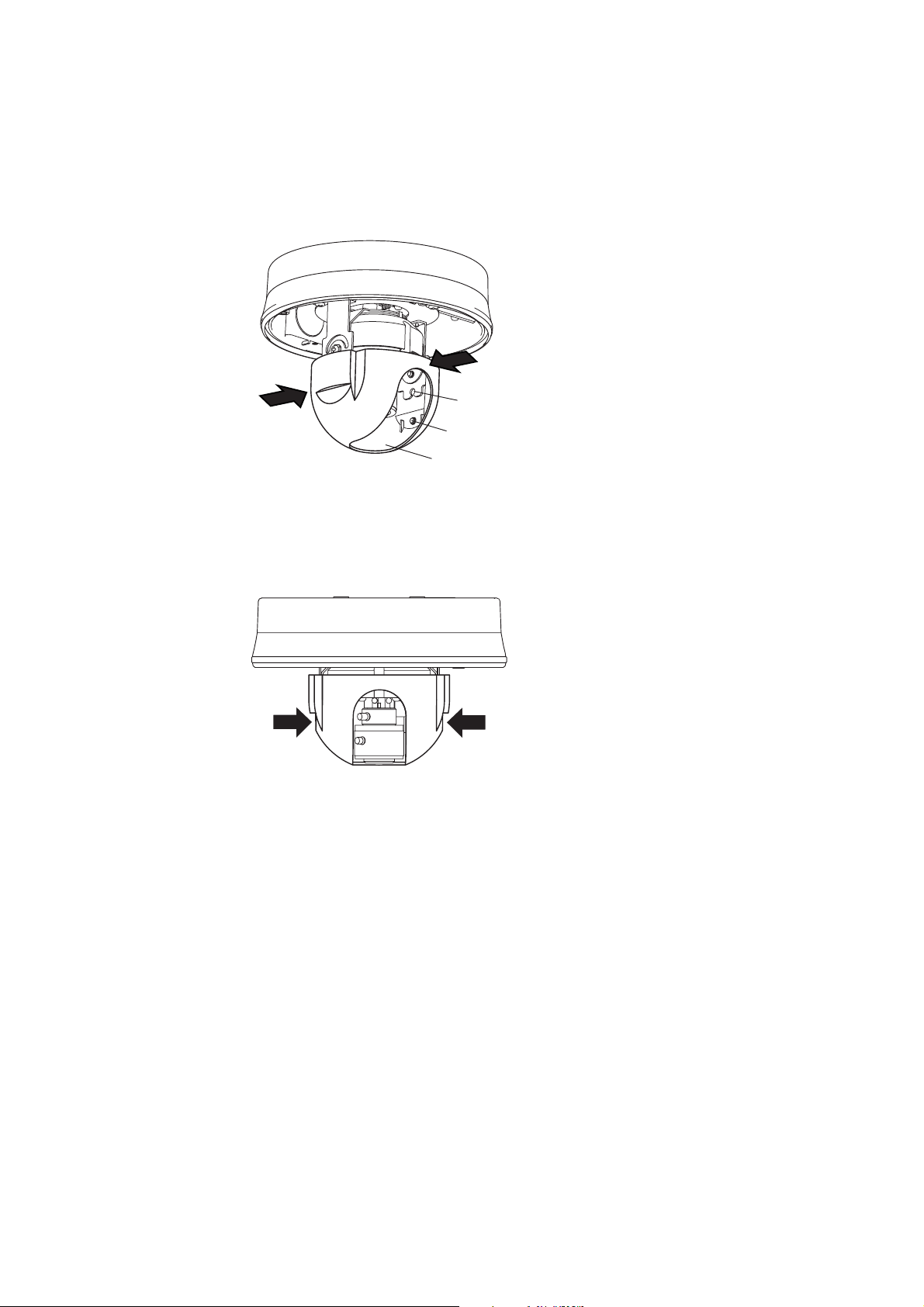
2. Detach the inner cover while pushing two of the sections indicated by arrows.
Push
Inner cover
Push
5.2. Installing a Camera
5.2.1. Unexposed wiring
1. Make a cable entry hole as shown below in the
ceiling or wall.
Note
When mounting the camera to a wall, make sure the
cable entry hole is positioned below the camera
center.
41 (1.6)
83.5 (3.3)
46 (1.8)
Camera unit
mounting hole
Camera center
Cable entry hole ø20 (0.8)Unit : mm (inch)

7
Base gasket
Sealant material
Sealant material (4)
2. Connect a coaxial cable to the Video output terminal, and connect the Camera power input cable and
power wire from the power-supply unit.
3. Fix the camera unit to the ceiling or wall using the four mounting screws.
Attach the supplied base gasket to the camera unit, then install the camera unit to the ceiling or wall. Since
no mounting screws are supplied with the camera, prepare them separately depending on the situation.
(Use screws that are over 4 mm (0.16 inch)in nominal diameter and longer than 25 mm (1 inch).)
Note
The cable trench and four camera mounting holes must be protected with silicone sealant material to prevent
rainwater from leaking into the enclosure. Do not waterproof other holes.
[ Cable trench ] [ Camera mounting holes ]

8
Fixing screw
Pipe receptacle thread cover
Cord bush
Cord bush
2. Push in the cord bush attached to the camera unit from the back to pull out from the case. Run the cable
and lead it out from the camera pipe receptacle thread hole.
Push the cord bush.
5.2.2. Open wiring from the camera’s side
Note
The pipe receptacle thread on the camera's side is compatible with 3/4-inch threaded conduit.
1. Loosen the fixing screw with a standard driver, then detach the camera side-attached pipe receptacle
thread cover.

9
Sealing tape
Pipe
Base gasket
Approx.100 mm (3.9 inch)
Pipe receptacle
thread cover
3. Attach the removed pipe receptacle thread cover to the threaded section at the upper surface of the camera
unit.
4. Wrap two or more layers of sealing tape around the pipe’s threaded section, then screw the pipe into the
camera’s threaded receptacle.
Sealing tape must be wrapped around the pipe’s threaded part. The pipe to be used must be approximately
100 mm (3.9 inch)in length.
5. Connect a coaxial cable to the Video output terminal, and connect the Camera power input cable and
power wire from the power-supply unit.
6. Fix the camera unit to the ceiling or wall using the four mounting screws.
Attach the supplied base gasket to the camera unit, then install the camera to the ceiling or wall. Since no
mounting screws are supplied with the camera, prepare them separately depending on the situation. (Use
screws that are over 4 mm (0.16 inch)in nominal diameter and longer than 25 mm (1 inch).) Further, when
using a coupling, join the pipe mounted to the camera to the pipe coming out of the device to be connected.
When installing the camera unit to a wall, install the camera unit so that its pipe faces down.
Note: The 4 camera mounting holes must be protected with silicone sealant material to protect rainwater
from leaking into the enclosure.
10
5.3. Attaching a Dome Cover
1. After camera’s angle of view and focus adjustment completion, attach the inner cover.
2. Attach the dome cover.
Check to be sure that the safety wire is not pinched between the dome cover and case. Dustproof and
water-resistance features could be adversely affected.
1-2. After attaching the inner cover, check to be sure that inner cover is securely fitted to the camera unit by
pulling down the sections indicated by arrows tightly.
1-1. Put the inner cover in the way that the lens comes to the opening slit of the inner cover. Fit one emboss
of the inner cover at a time in the cover-mounting hole while pushing two of the sections indicated by
arrows.
Cover mounting hole
Embossed section of the inner cover
Push
Push
Opening slit
This manual suits for next models
2
Table of contents
Other Toa Security Camera manuals

Toa
Toa Netcansee N-CC2360 User manual

Toa
Toa Q-CV24VP-3 User manual

Toa
Toa C-CC364 User manual

Toa
Toa C-CC514 Installation guide

Toa
Toa C-CC704 CU User guide

Toa
Toa Netcansee N-CC2564 User manual

Toa
Toa C-CV102-CS User manual

Toa
Toa C-CC774 User manual

Toa
Toa C-CC514 NT User guide

Toa
Toa Netcansee N-CC2360 User manual








