
TAO xm2go TXM1020 User manual

Portable Satellite Radio Receiver
User Guide
Model TXM1020
KEM-PK17163
Warning: This manual contains important
safety and operating information. Please read,
understand and follow the instructions in this
manual. Failure to do so could result in personal
injury, death, and/or damage to your Tao xm2go
receiver, accessories and/or to your vehicle or
other property.
This device complies with Part 15 of the FCC Rules. Operation is subject to the following
two conditions:
1. This device may not cause harmful interference; and
2. This device must accept any interference received, including interference that may cause
undesired operation. The Tao xm2go Satellite Radio Receiver incorporates an FM
transmitter and is therefore classified as an intentional transmitter. Changes or
modifications to the unit not expressly approved by Tao can void your authority to
operate this equipment.
Important: The FCC and FAA have not certified the Tao xm2go Satellite Radio Receiver for
use in any aircraft (neither portable nor permanent installation). Therefore, Tao cannot
support this type of application or installation.
This is the safety alert symbol. It is used to alert you to potential personal injury
hazards. Obey all safety messages that follow this symbol to avoid possible injury or death.
3
In this User Guide
Introducing Tao xm2go . . . . . . . .4
About Tao . . . . . . . . . . . . . . . . .4
About XM Radio . . . . . . . . . . . .5
Getting Started . . . . . . . . . . . . . .6
Controls . . . . . . . . . . . . . . . . . . .6
Main Controls . . . . . . . . . . . . . . .7
Remote Control . . . . . . . . . . . . .8
Display Screen . . . . . . . . . . . . . . .9
On the Flip Side . . . . . . . . . . . .10
What’s in the Box? . . . . . . . . . .11
Setting Up . . . . . . . . . . . . . . . .12
Assembly . . . . . . . . . . . . . . . . .12
Connecting to a Stereo . . . . . .13
Receiving the XM Signal . . . . . .13
Activating Your Tao xm2go . . . .14
Go Ahead . . . . . . . . . . . . . . . . .14
Listening To XM Radio . . . . . . . .15
Changing Channels . . . . . . . . .15
Saving Favorite Channels
into Presets . . . . . . . . . . . . . . .16
Storing Song Information
in Memory . . . . . . . . . . . . . . . .17
TuneSelect™: Finding Your
Favorite Songs or Artists . . . . . .17
My XM Time-shifting
Memory Mode . . . . . . . . . . . . .18
2go: Store and Play Back . . . . . .18
Scheduling a Session . . . . . . . . .19
Making Your Tao xm2go
Your Own . . . . . . . . . . . . . . . . .21
Adjusting Audio . . . . . . . . . . . .21
Changing Display Information . .22
Make any FM Radio
an XM Radio . . . . . . . . . . . . . . .24
Stock Ticker . . . . . . . . . . . . . . . .25
Info Extras . . . . . . . . . . . . . . . . .25
Direct Tune: Select Channels Faster
Setting Time Features . . . . . . . .26
Skipping Channels . . . . . . . . . .27
Returning to Factory Defaults . .27
Using Tao xm2go at Home . . . .28
Aiming the Home Antenna . . . .29
Using Tao xm2go in
Your Vehicle . . . . . . . . . . . . . . .30
Audio Quality . . . . . . . . . . . . . .30
Placing the Antenna . . . . . . . . .31
Mounting Your Tao xm2go
on the Dash . . . . . . . . . . . . . . .33
Using Tao xm2go Anywhere . . .35
Signal Reception Guidelines . . .35
Other Things You
Should Know . . . . . . . . . . . . . . .36
Care . . . . . . . . . . . . . . . . . . . . .36
Important Battery Information—
Please Read . . . . . . . . . . . . . . .36
Accessories (Sold Separately) . . .37
Troubleshooting . . . . . . . . . . . .38
Contacting Technical Support . . .42
Technical Information . . . . . . . .42
Warranty . . . . . . . . . . . . . . . . . .43
4
Introducing Tao xm2go
XM Satellite Radio signed up its first subscriber in 2001.
With millions of XM subscribers and many successful
models of car and home satellite radios, Tao and XM
created together a personal and portable satellite radio
that would be completely wireless—meaning you would
have access to commercial-free music, sports, news, and
talk whenever and wherever you want it. The dream has
become a reality: introducing Tao xm2go, a truly
portable satellite radio receiver.
With your Tao xm2go, you can:
• Listen to live XM programming at home, in your car,
and now virtually anywhere outdoors
(page 15).
• Use the exclusive satellite radio memory mode
feature “My XM” to easily save up to five hours of
the most current XM programming for listening at
another time or where live signal reception may be
limited (page 18).
• Program your Tao xm2go to store fresh XM
programming at a specific time every day (page 19),
and personalize it to suit your lifestyle (page 21).
About Tao
Tao is a part of Giant International LTD, an international
organization leading in the development and production
of wireless telecommunications products for the consumer
market. Our primary goal: to offer innovative—yet
proven—technology for consumer electronics that
delivers communications, information and entertainment
to sophisticated, active consumers when, where and how
they desire.
Now Tao technology has helped make wireless satellite
radio a reality, answering a wide variety of information
and entertainment needs in the vehicle, home, office—or
virtually anywhere.
More information on the Tao product line can be found
on www.taolife.com
5
About XM Radio
One big idea can change everything. And XM Satellite
Radio is one big idea: Radio to the Power of X®.
America’s most popular satellite radio service offers
over 150 digital channels of sheer variety: music,
sports, talk, comedy, drama, news, traffic and weather,
kids’ programming, and more. All original XM
programming music channels are 100% commercial-
free, and XM’s 21 instant traffic and weather channels
provide the most comprehensive, in-depth information
on traffic incidents, delays, and road conditions
available on radio. These services are available for a
low monthly subscription, and additional devices may
qualify for a reduced subscription fee through the XM
Family Plan*.
*XM subscription required for reception of XM service.
Not available in Alaska or Hawaii. Satellite radio
reception depends on the ability of the antenna to
record/receive a signal. The signal may not be available
in buildings or if obstructed (e.g. by mountains, trees,
bridges, etc.).

6
Getting Started
First, some important reminders
We know you’re eager to turn on your brand new Tao
xm2go and listen to XM. Please take a moment to
remember the following:
Warning: This manual contains important
safety and operating information. Please read,
understand, and follow the instructions in this
manual. Failure to do so could result in personal
injury, death, and/or damage to your Tao xm2go
receiver, accessories, and/or to your vehicle or other
property.
Caution: Use your Tao xm2go only with the enclosed
components or approved accessories. Do not modify
wires or other connections in any way; you could
cause a malfunction, which could damage your Tao
xm2go and will void your warranty.
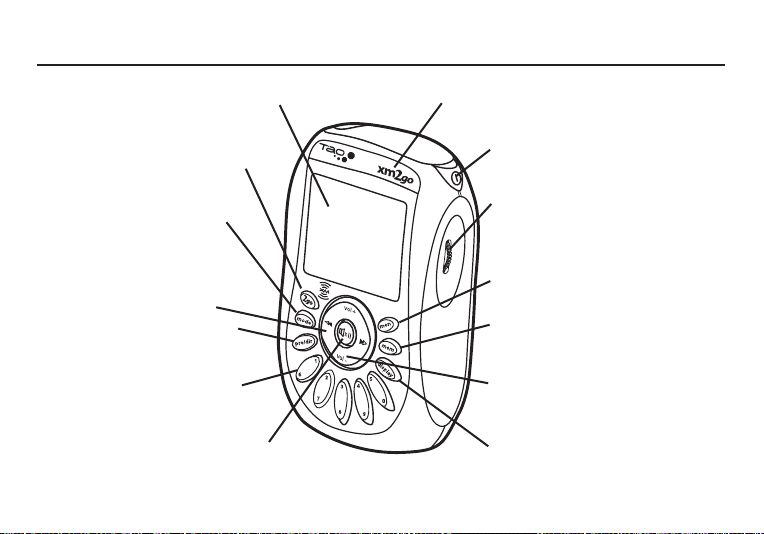
Controls
Before you begin, take a moment to familiarize
yourself with your Tao xm2go’s controls. Most basic
functions can be accessed using the front panel
buttons and the dial. More advanced features are
accessed using the “menu” button and the dial.
Warning: If you use your Tao xm2go in a moving
vehicle or watercraft, keep your eyes on the road or
water, and hands on the wheel or controls. Not doing
so could result in personal injury, death, and/or
damage to your Tao xm2go receiver, accessories,
and/or to your vehicle or other property.
Caution: Your Tao xm2go is not waterproof. Avoid
splashing it with liquids and never submerge it.
We’re always concerned for your safety and want
you to have the best Tao xm2go experience
possible!
7
Main Controls
2go button – Store up to five hours
of XM programming using the “My
XM” Time-shifting Memory Mode
Mode button – Switch between
“live” XM and “My XM” Time-
shifting Memory Mode
Arrow Buttons – Cycle through
channel categories (“Live”); skip to
previous or next song (My XM”)
Preset/direct button – Select
between direct channel entry or up
to 30 presets
Number keys – Enter a channel
directly or select your favorite
presets.
Display – Backlit high-resolution
LCD display
Mute/pause/lock button – Press once
to mute audio (“Live”) or pause
playback (“My XM”); press and hold to
lock or unlock your Tao xm2go controls.
IR lens – Aim your remote
control here
Power button – Press and hold to
turn your Tao xm2go on and off
Dial – Rotate to highlight a
channel or menu option; push in to
make selection, or press and hold
for TuneSelect.
Menu button –
Customize options
and access advanced features
Memory button – Save and recall
song information such as artist and
song title
Volume buttons – Raise or lower
volume only when headphones are
plugged in
Display button – Change the
appearance of the display,
including access to different modes
that display stocks or sports scores.

8
Remote Control
Search button – Search by scanning
presets or by scanning all channels
2go button – Store up to five hours
of XM programming using the “My
XM” time-shifting Memory Mode
Arrow buttons – View channel
categories (“Life”); skip to previous
or next song (“My XM”)
Jump button – Switch to previous
channel
Preset/direct button – Switch
between direct channel entry or up to
30 presets
Number keys – Enter a channel
directly or select your favorite presets
Channel buttons – Preview channels
(Live”); preview songs (“My XM”)
Menu button – Customize options
and access advanced features
XM button – Select channel or menu
option; push and hold to add
artist/song to your TuneSelect list
Pause button – Pause “My XM”
playback
Mute button – Mute live XM
Volume buttons – Raise or lower
volume only when headphones are
plugged in
Power button – Press to turn
your Tao xm2go on and off
Memory button – Save and recall song
information such as artist and song title
Display button - Change the
appearance of the display, including
access to different modes that
display stocks or sports scores.
Mode button – Switch between
“Live” XM and “My XM” Time-
shifting Memory Mode

9
Display Screen
Channel section mode –
direct entry or preset
banks A, B, or C
Signal strength –
0 to 3 bars
Channel name
Additional info –
Volume/playback bars, Stock
Ticker, and Info Extras
Clock
Channel number
Artist name
Song or program title
Listening mode – show
current listening mode
(“Live” or My XM”) Alarm indicator
Lock indicator
Battery level and
charging status

10
On the Flip Side
Battery door latch – Push inward
to slide battery door open
Reset button
Battery compartment
Universal connector
Headphone jack – Your ear buds
or headphones plug in here
Antenna jack – For use with an
external antenna
XM radio ID – Use this to
activate your radio
Belt clip lock
Table of contents
Other TAO Receiver manuals







