
Suunto AMBIT2 S 2.0 User manual

SUUNTO AMBIT2 2.0
USER GUIDE

1 SAFETY .............................................................................................. 6
2 Display icons and segments ............................................................. 8
3 Using buttons ................................................................................... 9
3.1 Using backlight and button lock ........................................... 11
4 Getting started ............................................................................... 12
5 Customizing your Suunto Ambit2 ................................................. 14
5.1 Connecting to Movescount .................................................... 14
5.2 Updating your Suunto Ambit2 .............................................. 15
5.3 Custom sport modes .............................................................. 16
5.4 Suunto Apps ........................................................................... 18
5.5 Inverting display ..................................................................... 19
5.6 Adjusting display contrast ..................................................... 20
6 Using Time mode ........................................................................... 22
6.1 Changing time settings .......................................................... 22
6.2 Using GPS timekeeping .......................................................... 27
7 Timers .............................................................................................. 29
7.1 Activating stopwatch ............................................................. 29
7.2 Using stopwatch ..................................................................... 30
7.3 Countdown timer ................................................................... 31
8 Navigation ...................................................................................... 33
8.1 Using GPS ................................................................................ 33
8.1.1 Getting GPS signal .......................................................... 33
8.1.2 GPS grids and position formats ..................................... 34
8.1.3 GPS accuracy and power saving .................................... 36
8.2 Checking your location .......................................................... 36
8.3 POI navigation ........................................................................ 37
8.3.1 Adding your location as a point of interest (POI) ........ 37
8.3.2 Navigating to a point of interest (POI) ......................... 40
2

8.3.3 Deleting a point of interest (POI) .................................. 43
8.4 Route navigation .................................................................... 46
8.4.1 Adding a route ............................................................... 46
8.4.2 Navigating a route ......................................................... 47
8.4.3 During navigation .......................................................... 51
8.4.4 Deleting a route ............................................................. 53
9 Using Alti & Baro mode ................................................................. 54
9.1 How Alti & Baro works ........................................................... 54
9.2 Getting correct readings ........................................................ 55
9.3 Getting incorrect readings ..................................................... 56
9.4 Matching profile to activity ................................................... 57
9.4.1 Setting profiles ............................................................... 57
9.4.2 Setting reference values ................................................ 58
9.5 Using Altimeter profile .......................................................... 59
9.6 Using Barometer profile ........................................................ 60
9.7 Using Automatic profile ......................................................... 62
9.8 FusedAlti ................................................................................. 63
9.9 Weather indicators ................................................................. 66
10 Using 3D compass ......................................................................... 69
10.1 Calibrating compass ............................................................. 69
10.2 Setting declination value ..................................................... 71
10.3 Setting bearing lock ............................................................. 72
11 Using sport modes ........................................................................ 74
11.1 Sport modes .......................................................................... 74
11.2 Additional options in sport modes ...................................... 75
11.3 Using heart rate belt ............................................................ 77
11.4 Putting on heart rate belt .................................................... 78
11.5 Starting exercise ................................................................... 80
3

11.6 During exercise ..................................................................... 81
11.6.1 Recording tracks ........................................................... 82
11.6.2 Making laps .................................................................. 82
11.6.3 Recording altitude ....................................................... 83
11.6.4 Setting altitude during exercise .................................. 86
11.6.5 Using compass during exercise .................................... 86
11.6.6 Using interval timer ..................................................... 87
11.6.7 Navigating during exercise .......................................... 89
11.6.8 Finding back during exercise ....................................... 90
11.6.9 Using Track back .......................................................... 91
11.6.10 Autopause .................................................................. 92
11.7 Viewing logbook after exercise ........................................... 94
11.7.1 Memory left indicator .................................................. 95
11.7.2 Dynamic exercise summary .......................................... 96
11.7.3 Recovery time ............................................................... 97
11.8 Using planned moves ........................................................... 98
12 Multisport training ..................................................................... 101
12.1 Switching sport modes manually during exercise ............ 101
12.2 Using preconfigured multisport mode .............................. 102
13 Swimming ................................................................................... 104
13.1 Pool swimming ................................................................... 104
13.2 Openwater swimming ........................................................ 105
13.3 Teaching swimming styles to Suunto Ambit2 ................... 107
13.4 Swimming drills .................................................................. 109
14 FusedSpeed ................................................................................. 111
15 Adjusting settings ....................................................................... 114
15.1 Service menu ...................................................................... 118
16 Pairing POD/heart rate belt ....................................................... 120
4

16.1 Using Foot POD .................................................................. 122
16.2 Calibrating power PODs and slope .................................... 124
17 Icons ............................................................................................ 127
18 Care and maintenance ............................................................... 130
18.1 Water resistance ................................................................. 130
18.2 Charging the battery .......................................................... 131
18.3 Replacing HR belt battery .................................................. 133
19 Technical specification ............................................................... 134
19.1 Trademark .......................................................................... 135
19.2 FCC compliance .................................................................. 135
19.3 IC ......................................................................................... 136
19.4 CE ........................................................................................ 136
19.5 Copyright ............................................................................ 136
19.6 Patent notice ...................................................................... 137
19.7 Warranty ............................................................................. 137
Index ................................................................................................ 141
5

1 SAFETY
Types of safety precautions
WARNING: - is used in connection with a procedure or situation
that may result in serious injury or death.
CAUTION: - is used in connection with a procedure or situation
that will result in damage to the product.
NOTE: - is used to emphasize important information.
TIP: - is used for extra tips on how to utilize the features and
functions of the device.
Safety precautions
WARNING: ALLERGIC REACTIONS OR SKIN IRRITATIONS MAY
OCCUR WHEN PRODUCT IS IN CONTACT WITH SKIN, EVEN THOUGH
OUR PRODUCTS COMPLY WITH INDUSTRY STANDARDS. IN SUCH
EVENT, STOP USE IMMEDIATELY AND CONSULT A DOCTOR.
WARNING: ALWAYS CONSULT YOUR DOCTOR BEFORE
BEGINNING AN EXERCISE PROGRAM. OVEREXERTION MAY CAUSE
SERIOUS INJURY.
6

WARNING: ONLY FOR RECREATIONAL USE.
WARNING: DO NOT ENTIRELY RELY ON THE GPS OR BATTERY
LIFETIME, ALWAYS USE MAPS AND OTHER BACKUP MATERIAL TO
ENSURE YOUR SAFETY.
CAUTION: DO NOT APPLY SOLVENT OF ANY KIND TO THE
PRODUCT, AS IT MAY DAMAGE THE SURFACE.
CAUTION: DO NOT APPLY INSECT REPELLENT ON THE PRODUCT,
AS IT MAY DAMAGE THE SURFACE.
CAUTION: DO NOT THROW THE PRODUCT AWAY, BUT TREAT IT
AS ELECTRONIC WASTE TO PRESERVE THE ENVIRONMENT.
CAUTION: DO NOT KNOCK OR DROP THE DEVICE, AS IT MAY BE
DAMAGED.
7
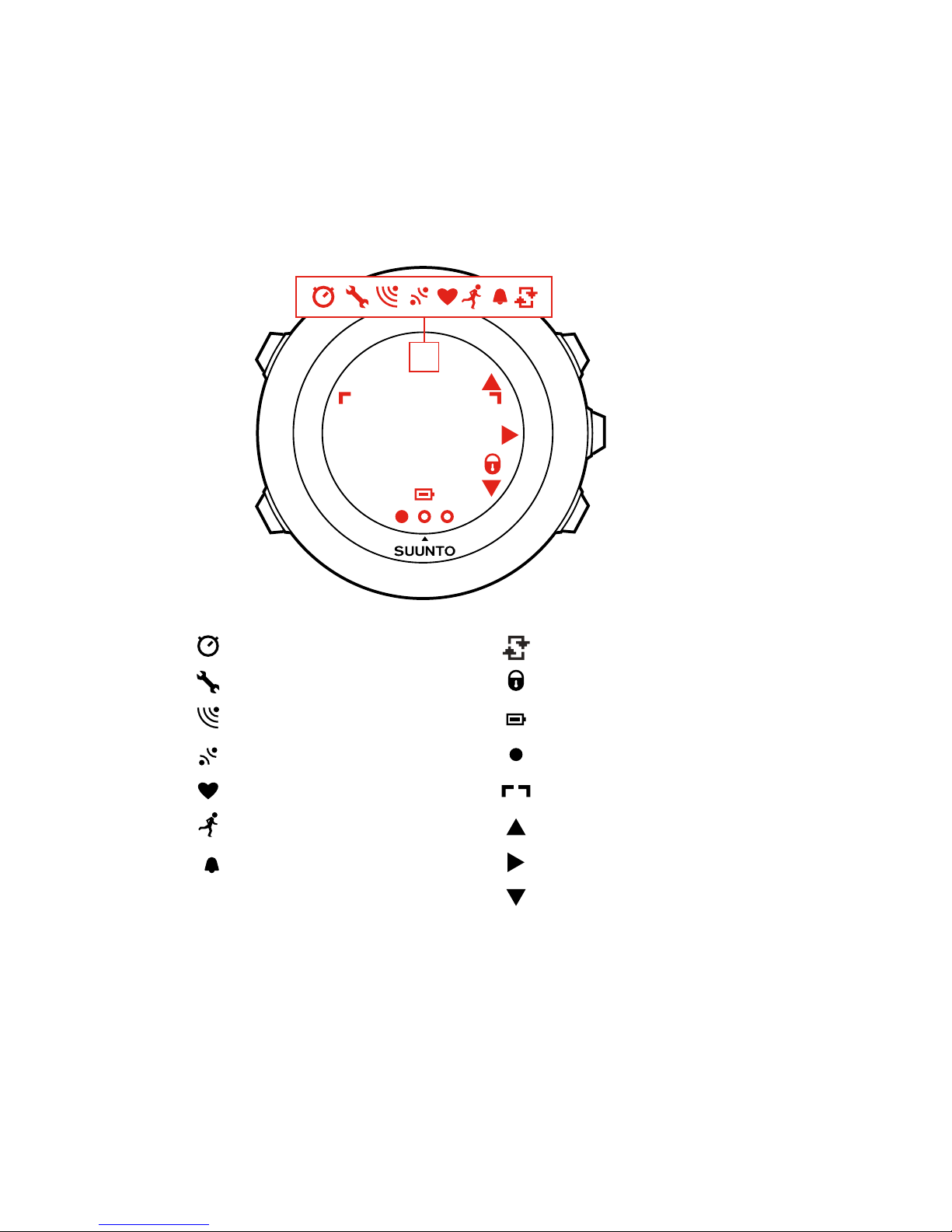
2 DISPLAY ICONS AND SEGMENTS
chronograph
settings
signal strength
pairing
heart rate
sport mode
alarm
interval timer
button lock
battery
current screen
button indicators
up / increase
next / confirm
down / decrease
For a complete list of icons in Suunto Ambit2 , see
17 Icons
.
8
3 USING BUTTONS
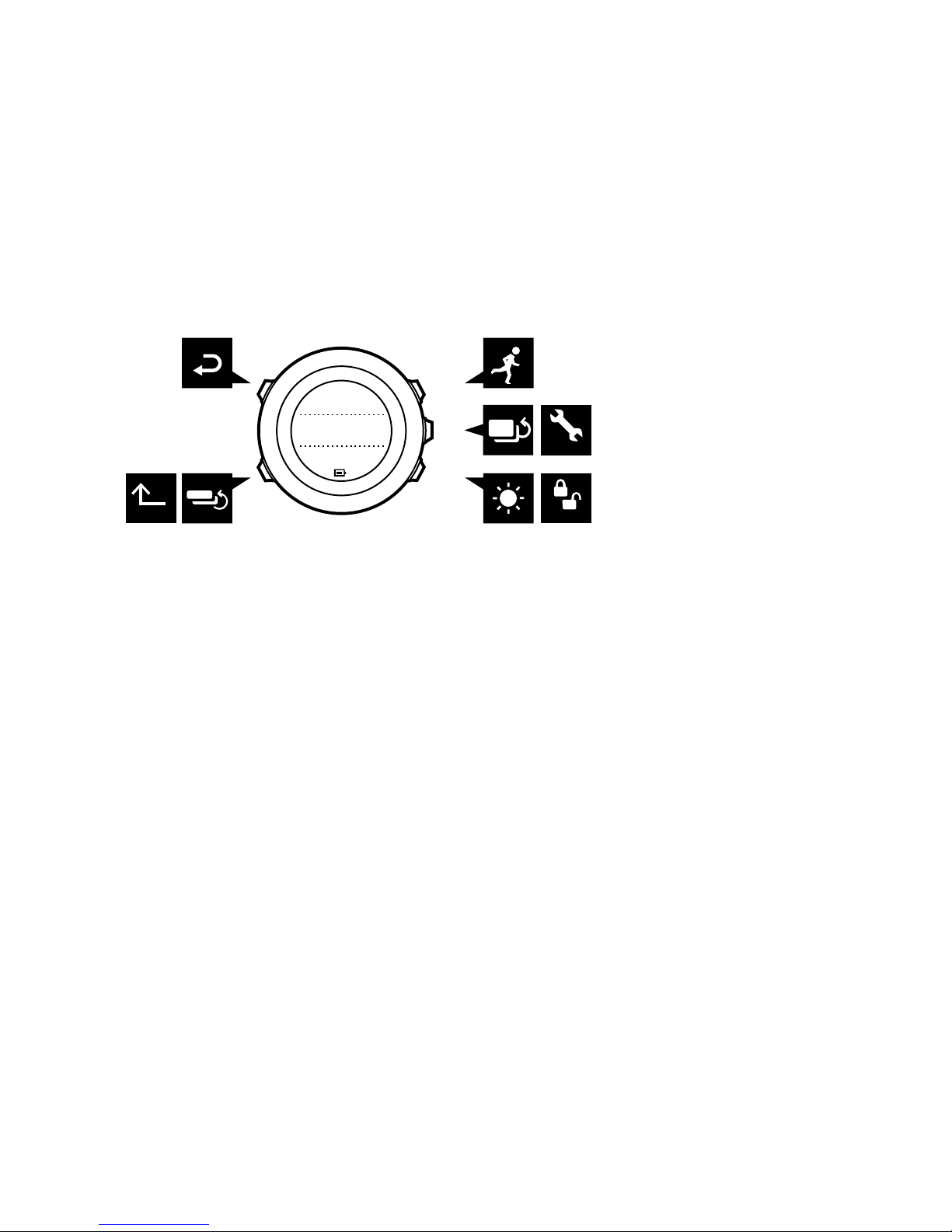
Suunto Ambit2 has five buttons which allow you to access all the
features.
BACK
LAP START
STOP
NEXT
LIGHT
LOCK
VIEW
20.9.
Tuesday
16:30
2sec 2sec
2sec
[Start Stop]:
•access the start menu
•pause or resume an exercise or timer
•keep pressed to stop and save an exercise
•increase a value or move up in the settings
[Next]:
•change between displays
•keep pressed to access/exit the options menu
•keep pressed to access/exit the options menu in sport modes
•accept a setting
[Light Lock]:
•activate the backlight
•keep pressed to lock/unlock the buttons
•decrease a value or move down in the settings
[View]:
•change views in TIME mode and during exercise
9

•keep pressed to toggle the display between light and dark
•keep pressed to access context-sensitive shortcuts (see below)
[Back Lap]:
•return to the previous step
•add a lap during exercise
TIP: When changing the values, you can increase the speed by
keeping [Start Stop] or [Light Lock] pressed until the values start to
scroll faster.
Defining shortcuts
By default, when you keep [View] pressed in TIME mode, you
toggle the display between light and dark. This button push can be
changed to instead access a specific menu option.
To define a shortcut:
1. Keep [Next] pressed to enter the options menu.
2. Browse to the menu item to which you want create a shortcut.
3. Keep [View] to create the shortcut.
NOTE: Shortcuts cannot be created to all possible menu items,
such as individual logs.
In other modes, keeping [View] pressed accesses predefined
shortcuts. For example, when the compass is active, you can access
the compass settings by keeping [View] pressed.
10
Table of contents
Other Suunto Watch manuals

Suunto
Suunto G9 User manual

Suunto
Suunto SPARTAN SPORT WRIST HR 1.9 User manual

Suunto
Suunto X9i User manual

Suunto
Suunto Kailash 1.5 User manual

Suunto
Suunto N3i User manual

Suunto
Suunto AMBIT3 SPORT 1.5 User manual

Suunto
Suunto Altimax User manual

Suunto
Suunto Tank POD Owner's manual

Suunto
Suunto Advizor User manual

Suunto
Suunto SPARTAN SPORT WRIST HR 1.11 User manual

Suunto
Suunto X6HR User manual

Suunto
Suunto OW185 Owner's manual

Suunto
Suunto Observer User manual

Suunto
Suunto X9_en. User manual

Suunto
Suunto CORE User manual

Suunto
Suunto LUMI User manual

Suunto
Suunto RACE OW224 User manual

Suunto
Suunto X6HR User manual

Suunto
Suunto Observer User manual

Suunto
Suunto Stopwatch User manual





