Suunto Observer User manual

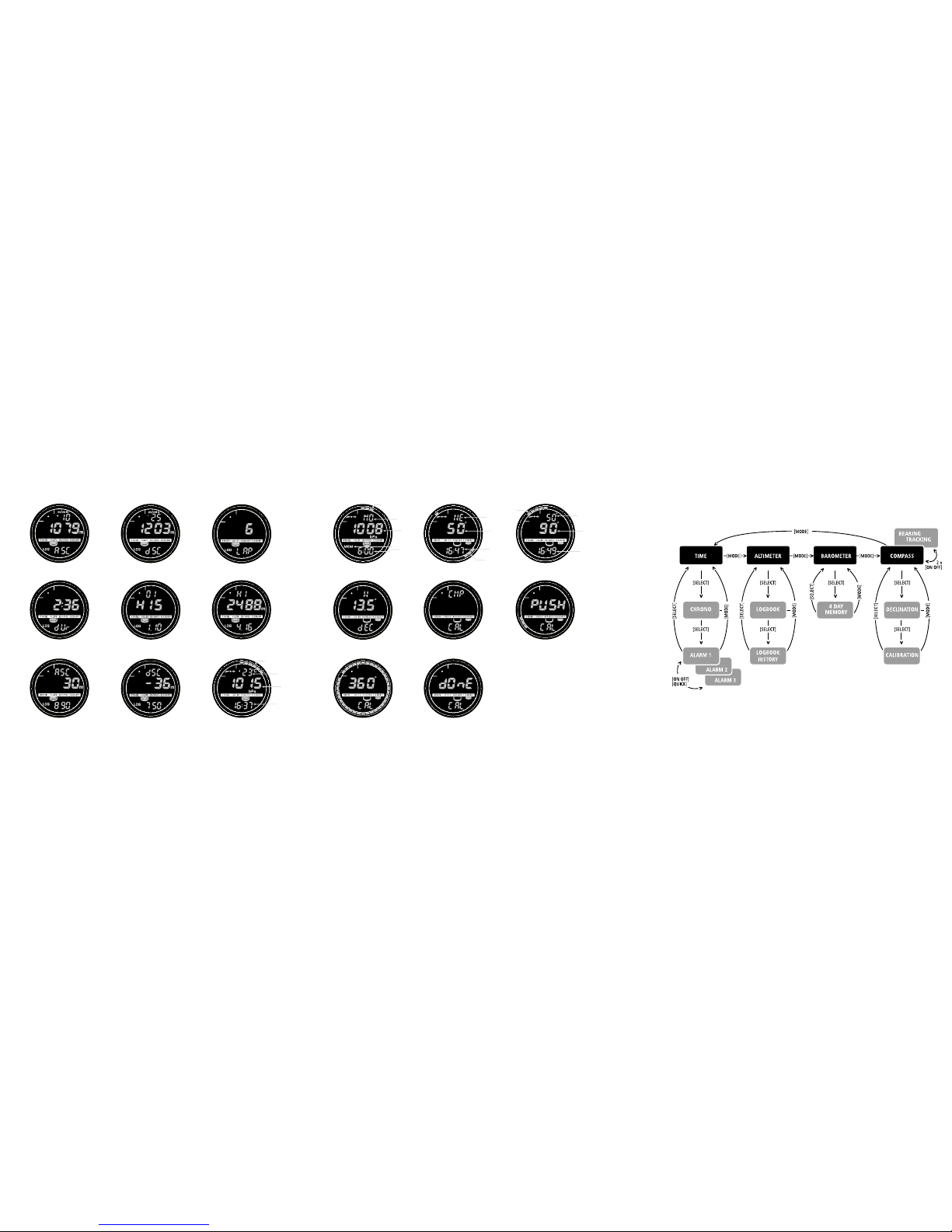
Figure 2.1
a)
b)
c)
e)
d)
Figure 2.2
a)
b)
c)
d)
Figure 2.3
a)
b)
d)
c)
e)
Figure 2.4
a)
b)
Figure 2.5
a)
b)
c)
Figure 2.6
a)
b)
c)
Figure 2.7
a)
b)
c)
Figure 3.1
a)
b)
c)
d)
e)
Figure 3.2

Figure 4.2
a)
b)
c)
d)
Figure 5.1
a)
b)
c)
d)
Figure 5.2
a)
b)
c)
d)
Figure 5.3
Figure 5.4
Figure 5.5
Figure 5.6 Figure 5.7
Figure 3.3
Figure 3.4
Figure 3.5
Figure 3.6
Figure 3.7
Figure 3.8
Figure 3.9
Figure 4.1
a)
b)
c)
d)
Figure 3.10

1
EN
CUSTOMER SERVICE CONTACTS
Suunto Oy Phone +358 9 875870
Fax +358 9 87587301
Suunto USA Phone 1 (800) 543-9124
Canada Phone 1 (800) 776-7770
Suunto Europe Phone +33 3 90 20 74 30
Fax +33 3 90 20 74 40
Suunto Web Site www.suunto.com
Congratulations on the purchase of your Suunto Observer. The Observer is designed
to provide you with the most accurate information during your enjoyment of any
outdoor activity you are engaged in.
Along with this product you will find a Warranty card and this User’s Guide.
We wish you many unforgettable moments with your new Suunto Wristop Computer!

2
TABLE OF CONTENTS
CHAPTER 1 INTRODUCTION .................................................................... 5
1.1 General Information ............................................................................................. 5
1.2 Care and Maintenance ......................................................................................... 5
1.3 Adjusting the Bracelet (St and Tt models) ............................................................ 6
1.4 Main Functions (Modes) ...................................................................................... 7
1.5 Backlight Features ............................................................................................... 7
1.6 Water Resistance ................................................................................................. 7
1.7 Button Functions .................................................................................................. 7
1.8 LCD Display ......................................................................................................... 9
1.9 Measurements and Units ..................................................................................... 9
1.9.1 To Set or Check Unit of Measurement Settings ........................................ 10
1.10 Pressure Sensor Calibration .............................................................................. 10
1.11 Battery Replacement ......................................................................................... 10
CHAPTER 2 TIME MODE ......................................................................... 12
2.1 Setting up the Time and Calendar ..................................................................... 12
2.2 Chronometer Sub Mode ..................................................................................... 13
2.2.1 How to Use the Chronometer ................................................................... 13
2.2.2 To View the Chronometer Memory ........................................................... 14
2.3 Daily Alarm Sub Mode ....................................................................................... 16
2.3.1 Setting the Daily Alarm(s) ......................................................................... 16

3
CHAPTER 3 ALTIMETER MODE .............................................................. 17
3.1 Altimeter-Barometer Use ................................................................................... 17
3.2 Setting the Altimeter ........................................................................................... 18
3.3 Logbook Sub Mode ............................................................................................ 20
3.3.1 Starting and Stopping a Logbook Recording ............................................ 20
3.3.2 To View in the Logbook Mode ................................................................... 21
3.4 Fast Cumulative Feature .................................................................................... 22
3.5 Logbook History Sub Mode ................................................................................ 23
3.5.1 Clearing the Logbook History ................................................................... 24
3.6 Effect of Air Temperature on Altitude Measurement ........................................... 24
CHAPTER 4 BAROMETER MODE ............................................................ 27
4.1 Setting the Sea Level Pressure .......................................................................... 28
4.2 4-Day Memory Sub Mode .................................................................................. 29
4.3 Barometric Trend Indicator ................................................................................. 30
CHAPTER 5 COMPASS MODE ................................................................. 30
5.1 Bearing Tracking Sub Mode ............................................................................... 31
5.2 Declination Adjustment Sub Mode ..................................................................... 32
5.2.1 Setting the Local Declination .................................................................... 32
5.3 Calibrating the Compass .................................................................................... 33
CHAPTER 6 FREQUENTLY ASKED QUESTIONS .................................... 34
COPYRIGHT AND TRADEMARK NOTICE .................................................. 38
CE COMPLIANCE ...................................................................................... 38
LIMITS OF LIABILITY AND ISO 9001 COMPLIANCE ................................ 38

4
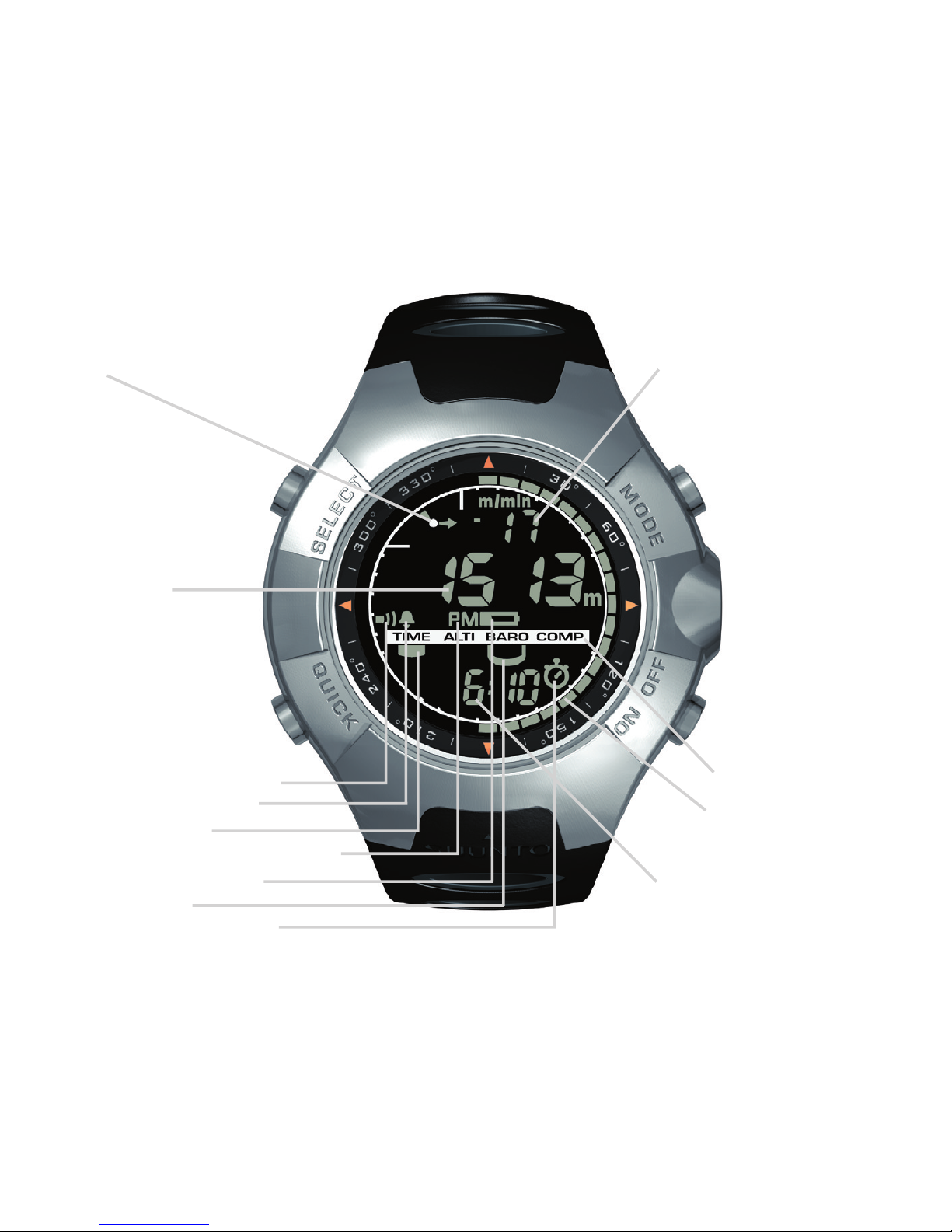
- Altitude Alarm Indicator
- Daily Alarm Indicator
- Mode Indicator
- AM/PM Indicator (12h display)
- Lo Battery Indicator
- Use Indicator
- Chronometer Indicator
a)
b)
c)
d)
e)
f)
SELECT
QUICK
MODE
PRESSURE
SENSOR
ON / OFF
Figure 1.1

5
CHAPTER 1 INTRODUCTION
1.1 GENERAL INFORMATION
The Observer Wristop Computer is a reliable high precision electronic instrument, intended
for recreational use. The outdoor enthusiast who enjoys venturing in sports like skiing,
kayaking, mountain climbing, hiking and biking can rely on the Observer’s accuracy.
NOTE: The Observer should not be substituted for acquiring measurements that require
professional or industrial precision and should not be used to acquire measurements when
skydiving, hang gliding, paragliding, gyrocopter riding and flying small aircraft.
The Observer is available in three different material combinations:
Observer Sr with stainless steel housing and elastomer strap, Observer St with stainless
steel housing and stainless steel / elastomer bracelet and Observer Tt with Titanium housing
and Titanium / elastomer bracelets. All material versions have identical functions and
operation.
1.2 CARE AND MAINTENANCE
Perform only the procedures discussed in this manual.
Never attempt to disassemble or service the Observer.
Protect your Observer from shocks, extreme heat and prolonged exposure to direct sunlight.
If not in use, your Observer should be stored in a clean, dry environment at room temperature.
The Observer can be wiped clean with a lightly moistened (warm water) cloth. Applying a
mild soap to the area can clean stubborn stains or marks.
Avoid exposing the Observer to strong chemicals like gasoline, cleaning solvents, acetone,
alcohol, insect repellents, adhesives, and paint, as they will damage the unit’s seals, case
and finish.
Make sure the area around the sensors (located on the right of the instrument) is kept free of
dirt and sand. Never insert any objects into the sensor openings.

6
1.3 ADJUSTING THE BRACELET (ST AND
TT MODELS)
The metal / elastomer bracelets of the Observer
models St and Tt have to be adjusted for the user.
The steps are
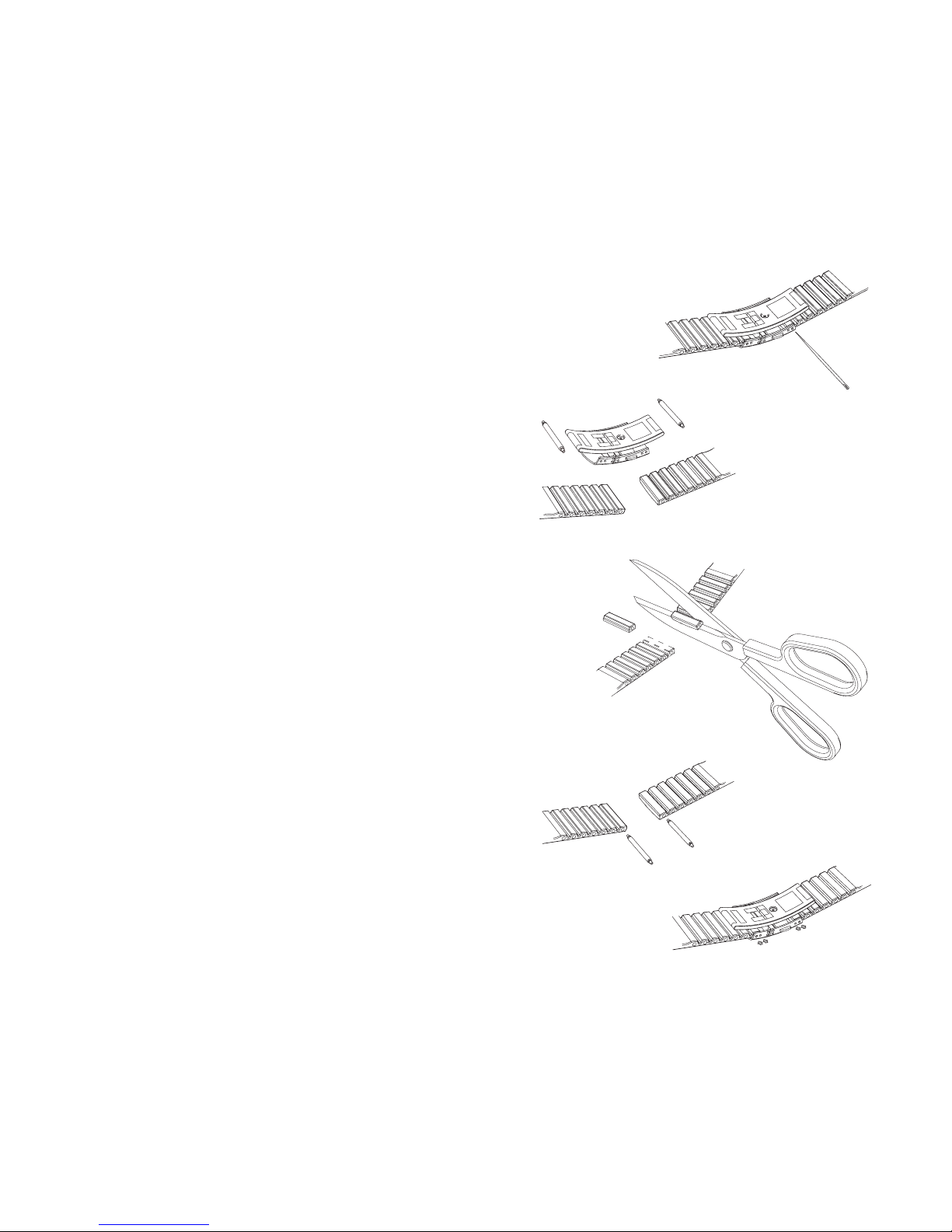
1. Remove the buckle by releasing the spring bars
with pin, paper clip or other sharp object.
2. Remove both spring bars from the pin holes.
3. Shorten the bracelet by cutting along the grooves
on the inner surface of the bracelet. You can do
this for instance with scissors. If you are unsure
of the correct length, cut the pieces one by one
and test the length after cutting each piece. Cut
in turns from both sides of the bracelet to keep
the sides equally long. Be careful in order not to
shorten the bracelet too much.
4. Replace the spring bars into the last pin holes of
both sides of the bracelet.
5. Attach the buckle to the bracelet by placing the
spring bars into the holes in the buckle. In both
sides of the buckle are holes for two different
positions. This can be used for fine adjusting of
the bracelet length. Make sure that the spring
bars are positioned straight in the buckle.

7
1.4 MAIN FUNCTIONS (MODES)
The Observer has four main modes: TIME, ALTIMETER, BAROMETER, and COMPASS.
In each of the features there are associated sub modes providing further enhancements to
its usefulness during your outdoor adventures. All key features and sub features will be
discussed in further detail following this chapter.
1.5 BACKLIGHT FEATURES
The Observer has an electroluminescent backlight. To activate the backlight, press and hold
the [MODE] button for 2 seconds. The backlight will remain on for approximately 10 seconds. If
you press buttons to operate, the backlight remains on 10 seconds from the last pressing.
1.6 WATER RESISTANCE
The Observer is water resistant up to 100m/330ft. However, it is not a diving instrument and
therefore the buttons should not be operated (put in use) while underwater.
1.7 BUTTON FUNCTIONS
The Observer is operated with four buttons as shown in Fig. 1.1: [MODE], [ON OFF], [QUICK],
and [SELECT].
The MODE Button
Located on the top right of the Observer performs the following functions:
• A short press allows you to move from one mode to the next (TIME, ALTI, BARO, COMP).
• While in the sub mode level, a short press returns you to the main mode.
• During the setup process, a short press accepts all changes and exits the set function.
• A long press of 2 seconds activates the backlight feature.

8
The ON OFF Button
Located on the bottom right of the Observer performs the following functions:
• In the TIME Mode, the bottom field view can be scrolled displaying the calendar date,
seconds, or dual time.
• During the setup process, a short press causes the selected value to increase.
• For chronometer, a short press acts as a start/stop.
• In ALTIMETER mode the logbook starts and stops with two short presses.
• In the COMPASS mode, two short presses change between the normal compass and
bearing tracking feature.
The QUICK Button
Located on the bottom left of the Observer performs the following function:
• In the setup process, pressing the [QUICK] button causes the selected value to decrease.
• In the TIME, ALTIMETER, or BAROMETRIC mode, a short press quickly displays the
cumulative information of the current logbook recording. Refer to
Chapter 3, Fast Cumu-
lative Features
for more information
• For chronometer, this button is used for lap times and zeroing.
• In COMPASS mode, a short press locks the bearing.
The SELECT Button
Located on the top left of the Observer performs the following functions:
• In a main mode level, a short press allows you to enter into the sub modes of the particu-
lar function or return to the main mode.
• For entering the setup process, a long press of 2 seconds allows you to initiate changes
to the Observer’s functions.
• While in the setup process, a short press allows you to move between settable units or
values and determine preferences.
Other manuals for Observer
2
Table of contents
Other Suunto Watch manuals

Suunto
Suunto CORE User manual

Suunto
Suunto n6HR User manual

Suunto
Suunto Tank POD Owner's manual

Suunto
Suunto HR 2.6 User manual

Suunto
Suunto CORE User manual

Suunto
Suunto AMBIT3 RUN 2.5 User manual

Suunto
Suunto X6HR User manual

Suunto
Suunto AMBIT2 S 2.0 User manual

Suunto
Suunto COBRA3 User manual

Suunto
Suunto X6 User manual

Suunto
Suunto 9 Peak User manual

Suunto
Suunto VYTEC DS User manual

Suunto
Suunto SPARTAN SPORT 1.8 User manual

Suunto
Suunto Observer User manual

Suunto
Suunto AMBIT3 PEAK 2.5 User manual

Suunto
Suunto Mariner User manual

Suunto
Suunto SPARTAN ULTRA 2.6 User manual

Suunto
Suunto X9i User manual

Suunto
Suunto Spartan Sport User manual

Suunto
Suunto OW194 User manual