SimpLinx SMX-IoT10 User manual

SMX-IoT10 Cloud & Edge Computing
User's Guide
12/2020
man-en-smx-IoT10.docx
man-en-smx-iot10
© 2020 SIMPLINX
- 1 -
Legal Notices
Warning Notice System
The document contains alerts and information indications for the safety of you and your devices.
The symbols and meanings used to draw your attention to these notifications are listed below.
Qualified Personnel
It is assumed that what is described in this document will be applied by qualified personnel for
the specific task.
Disclaimer
We have reviewed the contents of this publication to ensure consistency with the hardware and
software described. Since variance cannot be precluded entirely, we cannot guarantee full
consistency.
The information in this publication is reviewed regularly and any necessary corrections are
included in subsequent editions.
Danger: Indicates the death or severe personal injury will result if proper
precautions are not taken.
Warning: Indicates that death or severe personal injury may result if proper
precautions are not taken.
Info: Indicates advice or information.

man-en-smx-iot10
© 2020 SIMPLINX
- 2 -
Change Log
Version
Date
Description
V1.0
12/2020
Initial Release

man-en-smx-iot10
© 2020 SIMPLINX
- 3 -
Preface
Purpose of the Document
This document contains information about the following topics;
SMX-IoT10 Product Information
SMX-IoT10 Setup
Use of SMX-IoT10
Required Level of Knowledge
In order to fully understand and apply this document, it is necessary to have knowledge of IT,
Automation and Electricity.

man-en-smx-iot10
© 2020 SIMPLINX
- 4 -
Contents
Legal Notices ........................................................................................................................................- 1 -
Warning Notice System ................................................................................................................- 1 -
Qualified Personnel ......................................................................................................................- 1 -
Disclaimer.....................................................................................................................................- 1 -
Change Log ...........................................................................................................................................- 2 -
Preface..................................................................................................................................................- 3 -
Purpose of the Document ............................................................................................................- 3 -
Required Level of Knowledge .......................................................................................................- 3 -
1. Product Description and Certificates...........................................................................................- 5 -
1.1. Properties .......................................................................................................................- 6 -
1.2. Approvals / CE.................................................................................................................- 6 -
2. Physical Properties and Drawings................................................................................................- 7 -
2.1. Drawings.........................................................................................................................- 8 -
3. Setup............................................................................................................................................- 9 -
3.1. Mounting ........................................................................................................................- 9 -
3.2. Removing........................................................................................................................- 9 -
4. Electrical Connection .................................................................................................................- 10 -
5. Device Connections ...................................................................................................................- 10 -
5.1. Ethernet Devices...........................................................................................................- 10 -
5.2. Internet Connection Options........................................................................................- 11 -
5.3. Ethernet Connection with PC (Service IP) (Optional) ...................................................- 11 -
Energizing your device................................................................................................................- 12 -
5.4. Making Basic Settings ...................................................................................................- 12 -
6. Web Interface............................................................................................................................- 13 -
6.1. Ethernet1 and Ethernet2 Pages....................................................................................- 13 -
6.2. Wireless Settings Page..................................................................................................- 14 -
6.3. Advanced Settings Page................................................................................................- 15 -
6.4. Import/Export Page ......................................................................................................- 15 -
6.5. Change Password Page.................................................................................................- 16 -
6.6. Info Page.......................................................................................................................- 16 -
man-en-smx-iot10
© 2020 SIMPLINX
- 5 -
1. Product Description and Certificates
The SMX-IoT10 is a Cloud & Edge Computing device. It can collect, save and display data from the field
devices which are desired to be monitored.
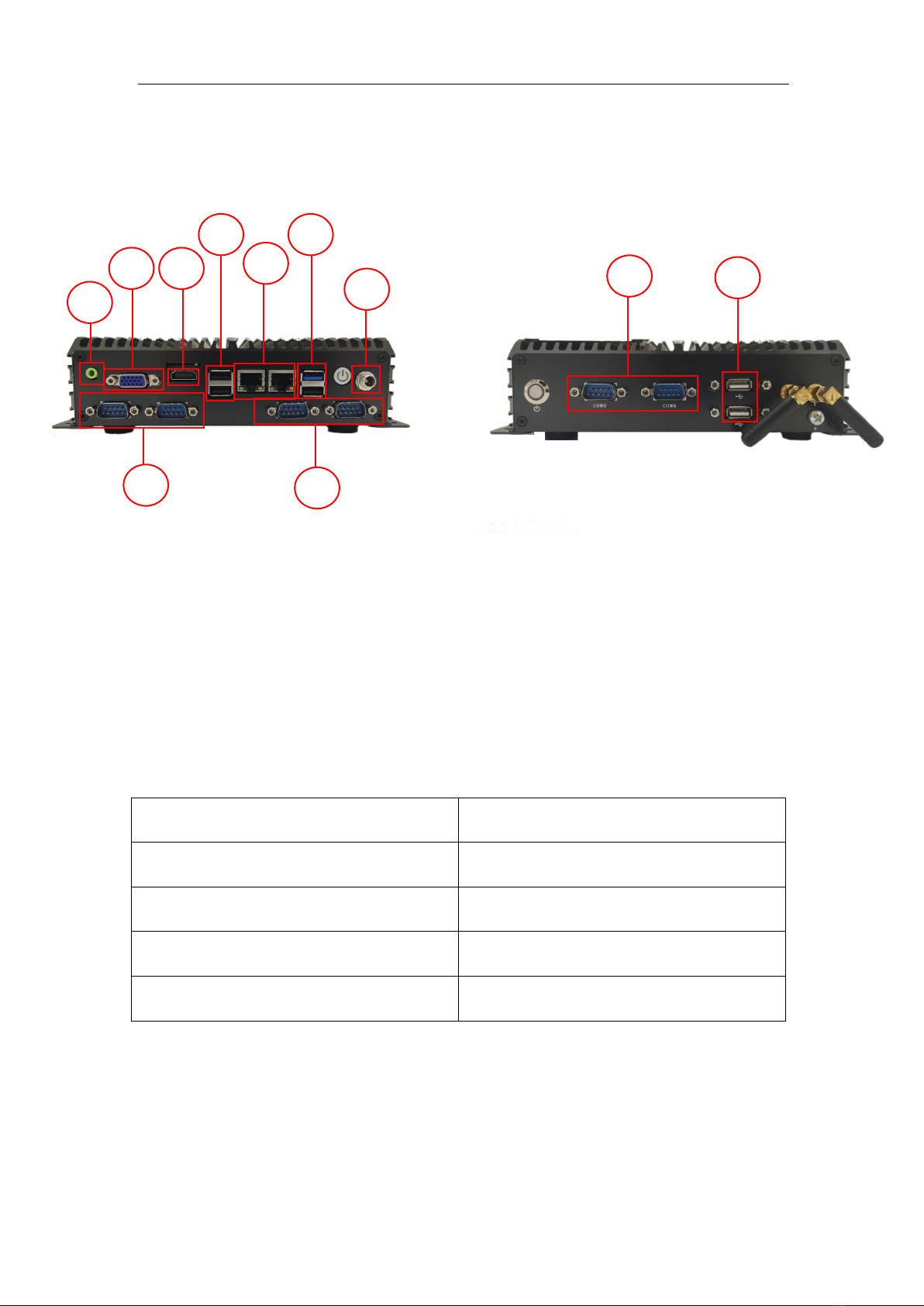
1- USB 2.0 ports
2- USB 3.0 ports
3- Ethernet2/Ethernet1
4- Power supply connection
5- RS-232 Serial Ports
6- VGA Output
7- HDMI Output
8- Audio Output
SMX-IoT10
Processor
Intel®Celeron® J1900 4 Core 2.00Ghz
Ram
Celeron® 4GB
mSATA
64 GB
Wireless ꟾBluetooth
E802.11 b/g/n (Embedded) ꟾBluetooth BT4.1
5
1
5
5
7
2
3
2
6
8
4

man-en-smx-iot10
© 2020 SIMPLINX
- 6 -
1.1. Properties
High degree of robustness.
The SMX-IoT10 module is approved for indoor use only.
Compact design.
Ethernet and USB interfaces.
Embedded Wireless and Bluetooth
1.2. Approvals / CE
The SMX-IOT10 module has received approval from the CE standards.

man-en-smx-iot10
© 2020 SIMPLINX
- 7 -
2. Physical Properties and Drawings
Connection Slots
4x USB 3.0
Type A
2x USB 2.0
Type A
6x RS-232 Serial Port
2x Rj45 Ethernet
10/100/1000 Mbps
1x VGA + 1x HDMI
1x Audio Output
Mounting
Wall Mounted
DIN Rail Mounted (Optional)
Temperature
-10 oC to 60 oC
Work
-20 oC to 60 oC
Storage
Dimensions (mm)
Width : 58,3
Height : 188,6
Depth : 200
Weight (Kg)
1,9

man-en-smx-iot10
© 2020 SIMPLINX
- 8 -
2.1. Drawings

man-en-smx-iot10
© 2020 SIMPLINX
- 9 -
3. Setup
3.1. Mounting
Wall Mounting
The SMX-IoT10 can be mounted to wall from the screws which are placed on the back of the
product.
DIN Rail Mounting (Optional)
Bring the top of the device to the top edge of the standard profile rail and place the device on
the rail track.
Push the device towards the standard profile rail. You will hear the device sitting in place with
the click sound.
3.2. Removing
Wall Mounting
The SMX-IoT10 can be dismounted from the wall by screwing off the with the help of
screwdriver.
DIN Rail Mounting (Optional)
With the help of a screwdriver, pull down the locking spring from the bottom of the device.
Separate the screwdriver from the rail line without separating it from its position, by pulling
towards yourself
Table of contents