
Reconyx Silent Image RM30 User manual

Silent Image Fact Sheet – April 2006
Fact Sheet
Copyright RECONYX, LLP – www.silent-image.com

Silent Image Fact Sheet – April 2006
Inside This Fact Sheet
Getting Started............................................................................................................................................1
Tour of the Camera ....................................................................................................................................2
The Camera.............................................................................................................................................2
Batteries ..................................................................................................................................................3
CompactFlash®(CF) Cards.....................................................................................................................3
Camera Maintenance and Performance...................................................................................................4
Image Data..............................................................................................................................................7
Changing The Camera Settings.................................................................................................................9
Triggers.................................................................................................................................................10
Time Lapse............................................................................................................................................12
Images...................................................................................................................................................13
CodeLoc................................................................................................................................................14
Viewing and Managing The Images........................................................................................................15
Common “MapView” Tasks.................................................................................................................16
Image Viewer........................................................................................................................................17
Warranty Information..............................................................................................................................19
Satisfaction Guarantee ..........................................................................................................................19
Limited Warranty..................................................................................................................................19
Copyright and Trademark Information.................................................................................................21
Copyright RECONYX, LLP – www.silent-image.com

Silent Image Fact Sheet – April 2006
Copyright RECONYX, LLP – www.silent-image.com - 1Getting Started
Getting Started
The Silent ImageTM Model RM30 camera is a digital camera, infrared illuminator, and Passive
InfraRed (PIR) motion detector, all contained within a secure, rugged, and weather-resistant
case. Also included with the camera is “MapView” software. The Silent Image camera helps you
get the best possible pictures in the field, and “MapView” offers you the ability to geographically
organize and access the images, as well as selectively tag images with user-defined metadata for
later analysis.
Silent Image Camera
Silent Image – MapView
This fact sheet includes a tour of the camera and information on changing the camera settings,
viewing and managing the images, and warranty information.
Disclaimer
While every effort has been made to ensure that the information contained in this “Fact
Sheet” is accurate and complete, no liability can be accepted for any errors or omissions.
RECONYX reserves the right to change the specifications of the hardware and software
described herein at any time without prior notice.
RECONYX makes no warranties for damages resulting from corrupted or lost data due to a
mistake in operation or malfunction of the camera, the software, the CompactFlash®(CF)
cards, personal computers, or peripheral devices.
Silent Image Fact Sheet – April 2006
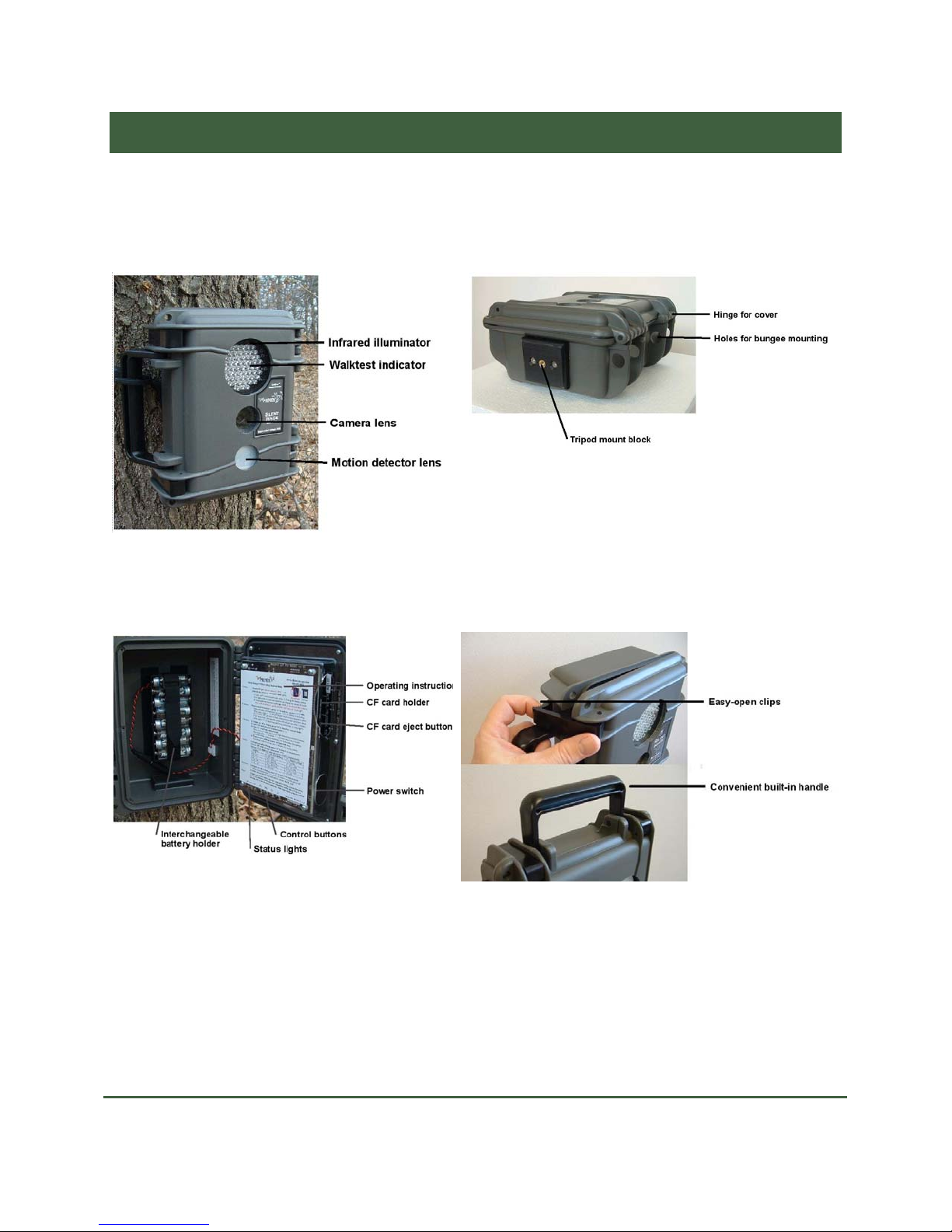
Tour of the Camera
The Camera
Front View
Bottom View
Inside View Carrying and Opening
Copyright RECONYX, LLP – www.silent-image.com Tour of the Camera - 2

Silent Image Fact Sheet – April 2006
Batteries
The Silent ImageTM camera comes with an eight-cell AA battery holder. Because camera
settings, animal activity, and temperature all vary, there is no way to precisely predict a camera’s
run time, the total number of images that can be taken, or the temperature at which the camera
will operate on any given set of batteries. Therefore the following table shows approximate
operating temperatures, run times, and number of images that can be taken with alkaline, nickel-
metal hydride, and lithium AA batteries, and can be used as a guide in determining what type of
batteries will best suit your needs.
Note: Very high and very low temperatures adversely affect the performance of all types of batteries,
some more than others.
AA Battery Type Operating Temperature Run Time Number of Images
Alkaline
(disposable) 20º F (-7º C) and up 1 – 2 weeks Up to 40,000 or more
Nickel-Metal Hydride
(rechargeable) -20º F (-29º C) and up 1 – 2 weeks Up to 40,000 or more
Lithium
(non-rechargeable) -40º F (-40º C) and up 3 – 4 weeks Up to 80,000 or more
Warning!Do not mix battery types! You may run the Silent Image camera on Alkaline, NiMH,
or Lithium batteries – but you should never mix battery types! Damage to the camera can result
and the warranty may be voided if you do so.
C-Cell battery holders and are available from RECONYX if you require more capacity and
longer run times (see www.silent-image.com to order).
CompactFlash®(CF) Cards
The CompactFlash (CF) card is used to store the pictures the camera captures. These images are
transferred to your PC using MapView. The CF card is also used to change the camera’s settings
(see Changing The Camera Settings).
CompactFlash cards have various speeds and capacities. Larger capacity cards are capable of
storing more images. In general, a 256 MB card will hold about 5,000 images and a 2 GB card
will hold about 40,000 images. The largest CF card you can use in the Silent Image camera is
2GB. Cards with higher speed ratings are capable of reading and writing (opening and storing)
Copyright RECONYX, LLP – www.silent-image.com Tour of the Camera - 3

Silent Image Fact Sheet – April 2006
images faster. This is advantageous when taking Rapid Fire NearVideoTM sequences of images
(see Triggers), as faster cards can store up to five images per second.
Inserting and Removing the CompactFlash®Card (Easy access!)
Camera Maintenance and Performance
Keep the Camera Dry
Never open the camera in the rain! Carefully wipe off any moisture on the outside of the camera
before opening the camera. Whether or not the outside of the camera appears dry, carefully wipe
the small crevice along the edges of the camera – especially the top edge – to prevent any
moisture trapped in this area from getting inside the camera when you open it.
If you are using the Silent Image camera in very humid conditions, you may wish to use a
desiccant pack to absorb moisture that may get trapped inside the camera. You can purchase
desiccant packs online (see www.silent-image.com to order).
Cleaning the Camera’s Lenses
There are three windows on the front of the Silent Image camera: the infrared illuminator (top),
the camera lens (middle), and the PIR motion detector lens (bottom). All three windows should
be gently cleaned as needed, using a soft cloth and lens cleaner. Be careful not to put too much
pressure on the lenses, and make sure that the cloth you use is clean; the camera lens window is
Copyright RECONYX, LLP – www.silent-image.com Tour of the Camera - 4

Silent Image Fact Sheet – April 2006
glass and can crack if too much pressure is applied, and the illuminator and motion detector
windows will scratch if there is grit on the cleaning cloth.
Mounting the Camera
The Silent Image camera can be mounted to a tripod or to a tree by using a bungee cord (as
shown in the following photos). It is highly recommended that you use a cable and lock to secure
the camera against possible theft at all times when it is in the field. Cables and locks are
available from RECONYX (see www.silent-image.com to order).
Note: Any locking system can be defeated and RECONYX makes no warranty as to whether its
cable lock system will actually stop a motivated thief.
Copyright RECONYX, LLP – www.silent-image.com Tour of the Camera - 5

Silent Image Fact Sheet – April 2006
Aiming the Camera
For best results, the Silent Image camera should be placed where the sun is not shining directly at
the camera. Photographs taken when the sun is shining into the camera’s lens are often poor in
quality. The performance of the PIR motion detector can also be adversely affected if the sun is
shining directly into the lens, causing an increased number of false triggers.
The field of view of the Silent Image camera, infrared illuminator, and PIR motion detector are
all 40 degrees. The camera has a convenient walktest mode for you to make sure that the camera
is set up to detect motion in the area where you want to take pictures. When the camera is in
walktest mode, a red light flashes in the center of the infrared illuminator each time motion is
detected, allowing you to determine the camera’s precise field of view by walking in front of the
camera, and then adjusting the aim as needed.
Copyright RECONYX, LLP – www.silent-image.com Tour of the Camera - 6

Silent Image Fact Sheet – April 2006
Image Data
Silent Image stores Image Data along with every picture it takes. Some of this information,
including date, time, trigger and sequence information, the infrared illuminator “flash” indicator,
moon phase, temperature, and camera label (see Images) is displayed in Image Data bands
above and below the image (the Image Data bands are added to the pictures taken by the camera
and do not cover any portion of the picture).
Copyright RECONYX, LLP – www.silent-image.com Tour of the Camera - 7

Silent Image Fact Sheet – April 2006
Phases of the moon displayed in the image bands include: (new moon), (waxing crescent),
(first quarter), (waxing gibbous), (full moon), (waning gibbous), (last quarter),
and (waning crescent). Any time the infrared illuminator is used, (the infrared illuminator
“flash” indicator) appears in the Image Data bands.
The information displayed in the Image Data bands is only a fraction of the information that’s
stored with each picture. Image Data includes all of the following information: General (trigger,
date, time, and infrared illumination), Settings (contrast, brightness, sharpness, and motion
sensor sensitivity), Environment (temperature, and light and battery levels), and Miscellaneous
(original filename, serial number, hardware number, firmware number, and more.)
In addition to the Image Data that the camera stores within each image, you can add your own
Image Data to the pictures using MapView. You can add user-defined Image Notes (text that
you add to images, up to 5,000 characters for each image). Image Data can be viewed in its
entirety using “MapView.”
All Image Data can be searched, so that you can find exactly what you’re looking for, even in a
large collection of images.
Copyright RECONYX, LLP – www.silent-image.com Tour of the Camera - 8
Table of contents
Other Reconyx Security Camera manuals








