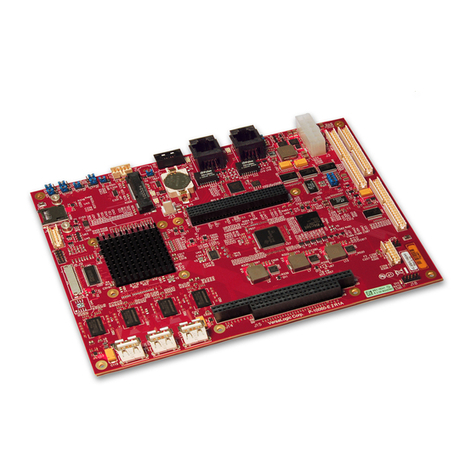
Portwell ROBO-8122VG2R User manual

ROBO-8122VG2R
Copyright © Portwell 2017 ROBO-8122VG2R User's Guide 1
Non‐StandardPICMG1.3SingleHostBoard
Version 1.0
ROBO‐8122VG2R

ROBO-8122VG2R
Copyright © Portwell 2017 ROBO-8122VG2R User's Guide 2
Revision History
R1.0 Preliminary

ROBO-8122VG2R
Copyright © Portwell 2017 ROBO-8122VG2R User's Guide 3
Contents
1 Introduction..............................................................................................................................................................................................................................10
2 Specifications............................................................................................................................................................................................................................11
2.1 Supported Operating Systems.........................................................................................................................................................................................12
2.2 Mechanical Dimensions...................................................................................................................................................................................................13
2.3 Power Consumption.........................................................................................................................................................................................................15
2.4 Environmental Specifications...........................................................................................................................................................................................16
3 Hardware Configuration ...........................................................................................................................................................................................................18
3.1 Jumpers and Connectors.................................................................................................................................................................................................18
3.2 Jumpers Settings.............................................................................................................................................................................................................19
3.3 Connector Settings ..........................................................................................................................................................................................................22
4 Signal Descriptions...................................................................................................................................................................................................................26
4.1 Watch Dog Signal ............................................................................................................................................................................................................26
5 System Resources...................................................................................................................................................................................................................32
5.1 Intel® Skylake-S PCH......................................................................................................................................................................................................32
5.2 Main Memory...................................................................................................................................................................................................................32
5.3 Installing the Single Board Computer...............................................................................................................................................................................33
5.3.1Chipset Component Driver.....................................................................................................................................................................................33
5.3.2 Intel® HD Graphics...............................................................................................................................................................................................34
5.3.3 Intel LAN I210AT/I217LM Gigabit Ethernet Controller...........................................................................................................................................34
6 BIOS Setup Items.....................................................................................................................................................................................................................35

ROBO-8122VG2R
Copyright © Portwell 2017 ROBO-8122VG2R User's Guide 4
6.1 Introduction......................................................................................................................................................................................................................35
6.2 BIOS Setup......................................................................................................................................................................................................................36
6.2.1 Main......................................................................................................................................................................................................................37
6.2.2 Configuration.........................................................................................................................................................................................................39
6.2.3 Security.................................................................................................................................................................................................................72
6.2.4 Boot.......................................................................................................................................................................................................................74
6.2.5 Save & Exit............................................................................................................................................................................................................76
7 Troubleshooting........................................................................................................................................................................................................................78
7.1 Hardware Quick Installation.............................................................................................................................................................................................78
7.2 BIOS Setting....................................................................................................................................................................................................................81
7.3 FAQ................................................................................................................................................................................................................................ 82
8 Portwell Software Service.........................................................................................................................................................................................................87
9 Industry Specifications .............................................................................................................................................................................................................88

ROBO-8122VG2R
Copyright © Portwell 2017 ROBO-8122VG2R User's Guide 5
Preface
This user’s guide provides information about the components, features, connectors and BIOS Setup menus available on the ROBO-8122VG2R. This document
should be referred to when designing PICMG 1.3 application. The other reference documents that should be used include the following:
Intel SkyLake-S Design Guide
Intel SkyLake-S Specification
Please contact Portwell Sales Representative for above documents.
Disclaimer
The information contained within this user’s guide, including but not limited to any product specification, is subject to change without notice.
Portwell provides no warranty with regard to this user’s guide or any other information contained herein and hereby expressly disclaims any implied warranties
of merchantability or fitness for any particular purpose with regard to any of the foregoing. Portwell assumes no liability for any damages incurred directly or
indirectly from any technical or typographical errors or omissions contained herein or for discrepancies between the product and the user’s guide. In no event
shall Portwell be liable for any incidental, consequential, special, or exemplary damages, whether based on tort, contract or otherwise, arising out of or in
connection with this user’s guide or any other information contained herein or the use thereof.
Trademarks
Product names, logos, brands, and other trademarks featured or referred to within this User’s guide or the Portwell website, are the property of their respective
trademark holders. These trademark holders are not affiliated with Portwell, our products, or our website.

ROBO-8122VG2R
Copyright © Portwell 2017 ROBO-8122VG2R User's Guide 6
Warranty
Portwell makes no representation, warranty or guaranty, express or implied regarding the products except its standard form of limited warranty (“Limited
Warranty”). Portwell may in its sole discretion modify its Limited Warranty at any time and from time to time.
Beginning on the date of shipment to its direct customer and continuing for the published warranty period, Portwell represents that the products are new and
warrants that each product failing to function properly under normal use, due to a defect in materials or workmanship or due to non conformance to the agreed
upon specifications, will be repaired or exchanged, at Portwell’s option and expense.
Certification
Portwell is certified to DIN EN ISO 9001:2000 standard.
Technical Support
Portwell technicians and engineers are committed to providing the best possible technical support for our customers so that our products can be easily used and
implemented.
We request that you first visit our website at http://www.portwell.com.tw/support/ for the latest documentation, utilities and drivers, which have been made
available to assist you. If you still require assistance after visiting our website then contact our technical support department by email at
[email protected]for further assistance. Thank you!

ROBO-8122VG2R
Copyright © Portwell 2017 ROBO-8122VG2R User's Guide 7
Handling and Installing SBC
Caution: Do not just hold any single side of the SBC; hold evenly on both sides!
zHeavy processor cooler may bend the SBC when SBC being held just on one side.
zThe bending may cause soldering or components damaged.
Notice
SBC Handling and Installation Notice

ROBO-8122VG2R
Copyright © Portwell 2017 ROBO-8122VG2R User's Guide 8
Fix your SBC in System
Caution: Suggest your S.I or vendor to use a metal bracket to hold/fix the desktop or server grade SBC to avoid the vibration damage during
transportation. Heavy processor cooler may bend the SBC when systems are during transportation without any holder.
Example:
z4U chassis :
ÎUse Ltype mental or plastic or rubber bracket to hold SBC.

ROBO-8122VG2R
Copyright © Portwell 2017 ROBO-8122VG2R User's Guide 9
z2U or 1U chassis: a mental bracket on the bottom of chassis to balance and support SBC from bending.

ROBO-8122VG2R
Copyright © Portwell 2017 ROBO-8122VG2R User's Guide 10
1Introduction
ROBO-8122VG2R, a non-standard PICMG 1.3 Single Host Board (SHB) with the Intel Server grade Xeon E5-2600Lv3 and v4 series processors. Portwell's
ROBO-8122VG2R implements flexible PCI Express Gen 3 expansion by one PCI Express x16 or two PCI Express x 8 or one PCI Express x8 and two PCI
Express x4 from each processor, which is ideal for a range of applications, such as Data Center, Military.
ROBO-8122VG2R adopt Intel C612 PCH. Providing up to 256GB DDR4 RDIMM system memory capacity on right long DIMM sockets. ROBO-8122VG2R build
with Intel® Haswell-EP/Broadwell-EP E5-2600Lv3 and v4 processor family features, and with on-board ASPEED AST1400 GPU to generate for 2D performance.
It supports only VGAoutput on bracket. It supports four SATAIII ports, which two are on board and the others are on backplane. Besides, it also supports six
USB ports (dual USB 3.0 ports on board and four USB 2.0 on backplane), and one Gigabit Ethernet.
The dimension of ROBO-8122VG2R is defined the same as standard PICMG 1.3 SHB, but w/the different golden finger pin definition on section D. It can
provide customers 2nd PCIEx16 lanes route to backplane to save the PCIE switch cost. For Data Center storage application, the system emphasizes not only
memory capacity but also the speed and performance on PCIE lanes. ROBO-8122VG2R can use with dedicated backplanes, such as PBPE-04P/05P and
PBPE-06A/07A/08A, to generate more PCIE Gen 3 lanes for I/O cards, GPU cards, and storage cards, and so on. It’s an ideal solution w/high power
consumption and performance.
Table of contents
Other Portwell Single Board Computer manuals

Portwell
Portwell ROBO-679 User manual

Portwell
Portwell ROBO-8713 Series User manual

Portwell
Portwell WADE-8172 User manual

Portwell
Portwell RICH-61D0 User manual

Portwell
Portwell ROBO-8116G2AR User manual

Portwell
Portwell ROBO-8712E Series User manual

Portwell
Portwell COM Express PCOM-B645VGL User manual

Portwell
Portwell PICO-6260 User manual

Portwell
Portwell ROBO-698 User manual

Portwell
Portwell ROBO-8710VLA User manual