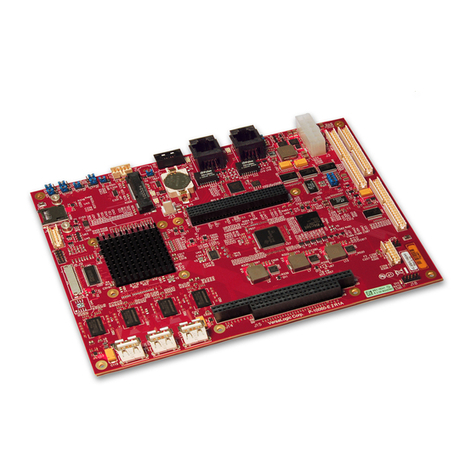
Portwell ROBO-8115VG2AR User manual

ROBO-8115VG2AR
Copyright © Portwell 2021 ROBO-8115VG2AR User's Guide
1
PICMG1.3SingleHostBoard
Version 1.0
ROBO‐8115VG2AR

ROBO-8115VG2AR
Copyright © Portwell 2021 ROBO-8115VG2AR User's Guide
2
Revision History
R1.0 Preliminary

ROBO-8115VG2AR
Copyright © Portwell 2021 ROBO-8115VG2AR User's Guide
3
Contents
1Introduction............................................................................................................................................................................................................................10
2Specifications..........................................................................................................................................................................................................................11
2.1Supported Operating Systems ................................................................................................................................................................ 12
2.2Mechanical Dimensions ......................................................................................................................................................................... 13
2.3Power Consumption .............................................................................................................................................................................. 15
2.4Environmental Specifications ................................................................................................................................................................. 16
3Hardware Configuration.........................................................................................................................................................................................................18
3.1Jumpers and Connectors ....................................................................................................................................................................... 18
3.2Jumpers Settings .................................................................................................................................................................................. 20
3.3Connector Settings ................................................................................................................................................................................ 23
J8/J15:USB2.0/3.0connector(Pitch2.0mm): ...................................................................................................................................................... 26
J19/J20/J23/J24:COM1/COM2/COM3/COM4PinHeader(Pitch2.54mm) .......................................................................................................... 31
4Signal Descriptions................................................................................................................................................................................................................37
4.1Watch Dog Signal ................................................................................................................................................................................. 37
4.2GPIO Signal ......................................................................................................................................................................................... 41
5System Resources.................................................................................................................................................................................................................44
5.1Intel® Comet lake-S PCH ...................................................................................................................................................................... 44
5.2Main Memory ........................................................................................................................................................................................ 44
5.3Installing the Single Board Computer ...................................................................................................................................................... 45
5.3.1 Chipset Component Driver ................................................................................................................................................................ 45

ROBO-8115VG2AR
Copyright © Portwell 2021 ROBO-8115VG2AR User's Guide
4
5.3.2 Intel® HD Graphics 630 .................................................................................................................................................................. 46
5.3.3 Intel LAN I210AT/I219LM Gigabit Ethernet Controller ......................................................................................................................... 46
6BIOS Setup Items..................................................................................................................................................................................................................47
6.1Introduction .......................................................................................................................................................................................... 47
6.2BIOS Setup .......................................................................................................................................................................................... 47
6.2.1 Main .............................................................................................................................................................................................. 49
6.2.2 Configuration ................................................................................................................................................................................. 52
6.2.3 Security ........................................................................................................................................................................................... 88
6.2.4 Boot ................................................................................................................................................................................................ 89
6.2.5 Save & Exit ...................................................................................................................................................................................... 91
7Troubleshooting.....................................................................................................................................................................................................................93
7.1Hardware Quick Installation ................................................................................................................................................................... 93
7.2BIOS Setting ......................................................................................................................................................................................... 94
7.3FAQ ..................................................................................................................................................................................................... 95
8Portwell Software Service......................................................................................................................................................................................................97
9Industry Specifications...........................................................................................................................................................................................................98
9.1Industry Specifications ........................................................................................................................................................................... 98

ROBO-8115VG2AR
Copyright © Portwell 2021 ROBO-8115VG2AR User's Guide
5
Preface
This user’s guide provides information about the components, features, connectors and BIOS Setup menus available on the ROBO-8115VG2AR. This
document should be referred to when designing PICMG 1.3 application. The other reference documents that should be used include the following:
Intel Comet Lake-S Design Guide
Intel Comet Lake-S Specification
Please contact Portwell Sales Representative for above documents.
Disclaimer
The information contained within this user’s guide, including but not limited to any product specification, is subject to change without notice.
Portwell provides no warranty with regard to this user’s guide or any other information contained herein and hereby expressly disclaims any implied warranties
of merchantability or fitness for any particular purpose with regard to any of the foregoing. Portwell assumes no liability for any damages incurred directly or
indirectly from any technical or typographical errors or omissions contained herein or for discrepancies between the product and the user’s guide. In no event
shall Portwell be liable for any incidental, consequential, special, or exemplary damages, whether based on tort, contract or otherwise, arising out of or in
connection with this user’s guide or any other information contained herein or the use thereof.
Trademarks
Product names, logos, brands, and other trademarks featured or referred to within this User’s guide or the Portwell website, are the property of their respective
trademark holders. These trademark holders are not affiliated with Portwell, our products, or our website.

ROBO-8115VG2AR
Copyright © Portwell 2021 ROBO-8115VG2AR User's Guide
6
Warranty
Portwell makes no representation, warranty or guaranty, express or implied regarding the products except its standard form of limited warranty (“Limited
Warranty”). Portwell may in its sole discretion modify its Limited Warranty at any time and from time to time.
Beginning on the date of shipment to its direct customer and continuing for the published warranty period, Portwell represents that the products are new and
warrants that each product failing to function properly under normal use, due to a defect in materials or workmanship or due to non conformance to the agreed
upon specifications, will be repaired or exchanged, at Portwell’s option and expense.
Certification
Portwell is certified to DIN EN ISO 9001:2000 standard.
Technical Support
Portwell technicians and engineers are committed to providing the best possible technical support for our customers so that our products can be easily used and
implemented.
We request that you first visit our website at http://www.portwell.com.tw/support/ for the latest documentation, utilities and drivers, which have been made
available to assist you. If you still require assistance after visiting our website then contact our technical support department by email at
[email protected]for further assistance. Thank you!

ROBO-8115VG2AR
Copyright © Portwell 2021 ROBO-8115VG2AR User's Guide
7
Handling and Installing SBC
Caution:Donotjusthold any single side of the SBC; hold evenly on both sides!
Heavy processor cooler may bend the SBC when SBC being held just on one side.
The bending may cause soldering or components damaged.
Notice
SBC Handling and Installation Notice

ROBO-8115VG2AR
Copyright © Portwell 2021 ROBO-8115VG2AR User's Guide
8
Fix your SBC in System
Caution: Suggest your S.I or vendor to use ametal bracket to hold/fix the desktop or server grade SBC to avoid the vibration damage during transportation. Heavy processor
cooler may bend the SBC when systems are during transportation without any holder.
Example:
4U chassis :
Use Ltype mental or plastic or rubber bracket to hold SBC.

ROBO-8115VG2AR
Copyright © Portwell 2021 ROBO-8115VG2AR User's Guide
9
2U or 1U chassis: a mental bracket on the bottom of chassis to balance and support SBC from bending.

ROBO-8115VG2AR
Copyright © Portwell 2021 ROBO-8115VG2AR User's Guide
10
1 Introduction
ROBO-8115VG2AR, a PICMG 1.3 Single Host Board (SHB) with the latest Intel 10th Generation Core processors supported from W series Xeon processors to
Core i3 processors. Portwell's ROBO-8115VG2AR implements flexible PCI Express Gen 3 expansion by one PCI Express x16 or two PCI Express x 8 or one
PCI Express x8 and two PCI Express x4 with dedicated processor sku, which is ideal for a range of applications, such as IndustrialAutomation, Digital Signage,
and Medical.
ROBO-8115VG2AR adopt Intel W480E and Q470E PCH. Providing up to 128GB DDR4 2666 Long-DIMM system memory supported with ECC or non-ECC
option. ROBO-8115VG2AR with the 10th generation Intel® processor family features and integrated, enhanced graphics engine which provides significant 3D
performance, up to DirectX® 12. It supports triple display function via DVI-I (VGAand DVI-D) and HDMI up to 4Kx2K. Rich I/O functions are also provided by
ROBO-8115VG2AR single host board, which is 6x USB 3.2(Gen2), 8x USB 2.0 (4 ports via backplane), 5x SATAIII ports (dual ports via backplane), 2x RS232
ports, 2x smart COM ports which select RS232/422/485 mode by bios adjustment, and dual Intel GbE LAN ports. It also supports on boardTPM 2.0 to secure
your applications.
For the industries who already have large install based systems, ROBO-8115VG2AR not only provides a way to upgrade to use the latest Intel processors, but
also supporting legacy elements such as VGA, four PCI expansion, four Serial ports and PS/2 Keyboard and Mouse.
Table of contents
Other Portwell Single Board Computer manuals

Portwell
Portwell WADE-8172 User manual

Portwell
Portwell COM Express PCOM-B645VGL User manual

Portwell
Portwell PCOM-B634VG User manual

Portwell
Portwell ROBO-8116G2AR User manual

Portwell
Portwell ROBO-8710VLA User manual

Portwell
Portwell ROBO-8712EVG2A User manual

Portwell
Portwell ROBO-698 User manual

Portwell
Portwell RICH-61D0 User manual

Portwell
Portwell ROBO-8712E Series User manual

Portwell
Portwell ROBO-679 User manual