Planet WNL-U553 User manual

802.11n Wireless USB Adapter
WNL-U553
User’s Manual
Version: 2.00
Date: August 2008

Copyright
Copyright ©2008 by PLANET Technology Corp. All rights reserved. No part of this publication may be
reproduced, transmitted, transcribed, stored in a retrieval system, or translated into any language or computer
language, in any form or by any means, electronic, mechanical, magnetic, optical, chemical, manual or
otherwise, without the prior written permission of PLANET.
PLANET makes no representations or warranties, either expressed or implied, with respect to the contents
hereof and specifically disclaims any warranties, merchantability or fitness for any particular purpose. Any
software described in this manual is sold or licensed "as is". Should the programs prove defective following
their purchase, the buyer (and not PLANET, its distributor, or its dealer) assumes the entire cost of all
necessary servicing, repair, and any incidental or consequential damages resulting from any defect in the
software. Further, PLANET reserves the right to revise this publication and to make changes from time to time
in the contents hereof without obligation to notify any person of such revision or changes.
All brand and product names mentioned in this manual are trademarks and/or registered trademarks of their
respective holders.
Federal Communication Commission Interference Statement
This equipment has been tested and found to comply with the limits for a Class B digital device, pursuant to
Part 15 of FCC Rules. These limits are designed to provide reasonable protection against harmful
interference in a residential installation. This equipment generates, uses, and can radiate radio frequency
energy and, if not installed and used in accordance with the instructions, may cause harmful interference to
radio communications. However, there is no guarantee that interference will not occur in a particular
installation. If this equipment does cause harmful interference to radio or television reception, which can be
determined by turning the equipment off and on, the user is encouraged to try to correct the interference by
one or more of the following measures:
1. Reorient or relocate the receiving antenna.
2. Increase the separation between the equipment and receiver.
3. Connect the equipment into an outlet on a circuit different from that to which the receiver is
connected.
4. Consult the dealer or an experienced radio technician for help.
FCC Caution
To assure continued compliance. (example-use only shielded interface cables when connecting to computer
or peripheral devices). Any changes or modifications not expressly approved by the party responsible for
compliance could void the user’s authority to operate the equipment.
This device complies with Part 15 of the FCC Rules. Operation is subject to the Following two conditions: ( 1 )
This device may not cause harmful interference, and ( 2 ) this Device must accept any interference received,
including interference that may cause undesired operation.
Federal Communication Commission (FCC) Radiation Exposure
Statement
This equipment complies with FCC radiation exposure set forth for an uncontrolled environment. In order to
avoid the possibility of exceeding the FCC radio frequency exposure limits, human proximity to the antenna
shall not be less than 20 cm (8 inches) during normal operation.
R&TTE Compliance Statement
This equipment complies with all the requirements of DIRECTIVE 1999/5/CE OF THE EUROPEAN
PARLIAMENT AND THE COUNCIL OF 9 March 1999 on radio equipment and telecommunication terminal
Equipment and the mutual recognition of their conformity (R&TTE). The R&TTE Directive repeals and
replaces in the directive 98/13/EEC (Telecommunications Terminal Equipment and Satellite Earth Station
Equipment) As of April 8,2000.
Safety
This equipment is designed with the utmost care for the safety of those who install and use it. However,
special attention must be paid to the dangers of electric shock and static electricity when working with
electrical equipment. All guidelines of this and of the computer manufacture must therefore be allowed at all
times to ensure the safe use of the equipment.
EU Countries Intended for Use

The ETSI version of this device is intended for home and office use in Austria Belgium, Denmark, Finland, and
France (with Frequency channel restrictions). Germany, Greece, Ireland, Italy, Luxembourg .The Netherlands,
Portugal, Spain, Sweden and United Kingdom.
The ETSI version of this device is also authorized for use in EFTA member states Iceland, Liechtenstein,
Norway and Switzerland.
WEEE regulation
To avoid the potential effects on the environment and human health as a result of the presence of
hazardous substances in electrical and electronic equipment, end users of electrical and
electronic equipment should understand the meaning of the crossed-out wheeled bin symbol. Do
not dispose of WEEE as unsorted municipal waste and have to collect such WEEE separately.
Revision
User’s Manual for PLANET 802.11n Wireless USB Adapter
Model: WNL-U553
Rev: 2.0 (August 2008)
Part No. EM-WNLU553v2

Table of Contents
CHAPTER 1: INTRODUCTION ........................................................................................................................ 5
1-1 FEATURES ................................................................................................................................................. 5
1-2 SAFETY INFORMATION................................................................................................................................5
1-3 SPECIFICATION .......................................................................................................................................... 5
1-4 PACKAGE CONTENTS ................................................................................................................................. 6
1-5 MINIMUM SYSTEM REQUIREMENTS ............................................................................................................. 6
CHAPTER 2: INSTALLATION.......................................................................................................................... 7
Hardware Installation ................................................................................................................................9
CHAPTER 3: GENERAL CONFIGURATION ..................................................................................................11
3-1 LINK INFORMATION....................................................................................................................................11
3-2 CONFIGURATION ...................................................................................................................................... 12
3-3 SITE SURVEY .......................................................................................................................................... 15
3-4 PROFILE.................................................................................................................................................. 16
3-5 WPS ...................................................................................................................................................... 17
3-6 ABOUT .................................................................................................................................................... 22
CHAPTER 4: TROUBLESHOOTING ............................................................................................................. 23

Chapter 1: Introduction
Complying with the most innovative 802.11n technology, PLANET delivers a reliable and cost effective
solution - WNL-U553. WNL-U553 is a USB2.0 wireless adapter which integrates one transmit channel and
two concurrent receive channels; thus, it supports up to 150Mbps upload and 300Mbps download data rate.
Using 2.4GHz frequency band; it is backward compatible with 802.11b and 802.11g for users to create a new
wireless environment based on existing wireless network.
The WNL-U553 provides WEP , WPA(2)-PSK, WPA(2) EAP-TLS high-level security mechanisms, to protect
the information exchange through wireless. Moreover, in order to simplify the security configurations, WPS
(Wi-Fi Protected Setup) is enhanced in WNL-U553. This design helps inexperienced users to secure their
wireless network quickly and easily.
The WNL-U553 supports most popular operating systems, Windows 2000 / XP / Vista. With advanced
features and high speed capability, the WNL-U553 gives users the greatest performance anytime anywhere.
1-1 Features
z2.4GHz ISM band, unlicensed operation
zCompliant with IEEE 802.11b, IEEE 802.11g, IEEE 802.11n (draft 2.0)
zUSB 2.0 attached interface
zAntenna: Internal two Antennas with one TX and two RX
zProvides up to 300Mbps download and 150Mbps upload data rate
zSupports Wi-Fi Protected Setup (WPS)
zSupports WEP , WPA(2)-PSK, WPA(2) EAP TLS high-level security mechanisms
zSupports most popular operating systems including Windows 2000 , XP and Vista
1-2 Safety Information
In order to keep the safety of users and your properties, please follow the following safety instructions:
1. This USB wireless network card is designed for indoor use only. DO NOT expose this network card to
direct sun light, rain, or snow.
2. DO NOT put this network card at or near hot or humid places, like kitchen or bathroom. Also, do not left this
wireless network card in the car in summer.
3. This network card is small enough to put in a child’s mouth, and it could cause serious injury or could be
fatal. If they throw the network card, the card will be damaged. PLEASE KEEP THIS NETWORK CARD
OUT THE REACH OF CHILDREN!
4. This network card will become hot when being used for long time (This is normal and is not a malfunction).
DO NOT put the network card on a paper, cloth, or other flammable objects after the network card has been
used for a long time.
5. There’s no user-serviceable part inside the network card. If you found that the network card is not working
properly, please contact your dealer of purchase and ask for help. DO NOT disassemble the network card
by your self, warranty will be void.
6. If the network card falls into water, DO NOT USE IT AGAIN BEFORE YOU SEND THE CARD TO THE
DEALER OF PURCHASE FOR INSPECTION.
7. If you smell something strange or even see some smoke coming out from the network card, switch the
computer off immediately, and call dealer of purchase for help.
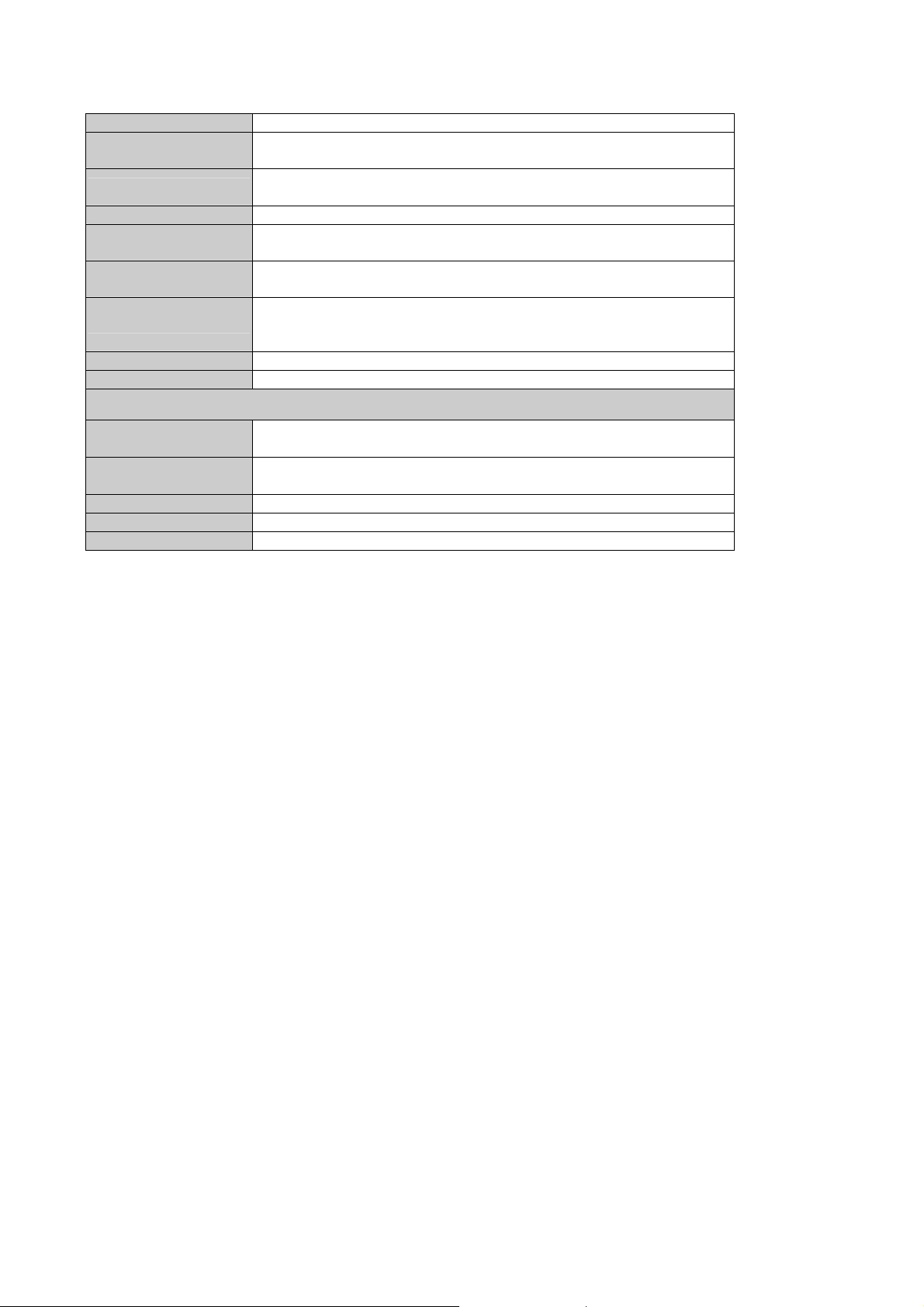
1-3 Specification

Interface USB 2.0
Standards
Conformance Compliant with 802.11b / 802.11g / 802.11n (draft 2.0)
Range Coverage Indoor: Up to 100 meters (depends on environment)
Outdoor: Up to 300 meters (depends on environment)
Operating Mode Infrastructure / Ad-Hoc Mode
Security WEP 64/128bit, WPA-PSK, WPA2-PSK,
WPA EAP-TLS, WPA2 EAP-TLS
RF Modulation DBPSK/DQPSK/CCK/OFDM
(BPSK/QPSK/16-QAM/64-QAM)
Output Power
11n mode: 14dBm
11g mode: 14dBm
11b mode: 15dBm
Frequency Band 2412-2484MHz
Operating systems Windows 2000 / XP / Vista
Environmental & Mechanical Characteristics
Temperature Operating: 0 - 40 Degree C
Storage: -10 - 70 Degree C
Operating Humidity Operating: 0 - 85%
Storage: 0 - 95% Non-Condensing
Dimensions 86.5 x 30 x 13 mm (D x W x H)
Weight 22g
Certifications FCC, CE
1-4 Package Contents
Before you begin the installation, please check the items of your package. The package should include the
following items:
WNL-U553 x 1
USB Cable x 1
Quick Installation Guide x 1
CD x 1 (Included driver and User’s Manual)
If any above item is missing, contact your supplier as soon as possible.
1-5 Minimum System Requirements
Before installation, please check the following requirements with your equipment.
•Make sure your computer is running at least a 300MHz or above processor with 256MB RAM or above
•Make sure the USB ports are is USB 2.0 port
•The operating system on your computer must be the following: Windows 2000 (Service Pack 4), XP
(Service Pack 2), Windows Vista
•A draft 802.11n or 802.11b/g access point.
•Make sure the environment has minimal interference and obstructions.

Chapter 2: Installation
Note 1: If you had ever installed the other Wireless Cards before,
please uninstall the existed drivers and utilities first.
Note 2: Please do NOT insert WNL-U553 to PC’s USB port before
installing utility.
1. Insert Drivers and User’s manual CD to your CD drive, then a welcome web will appear.
2. Please click the utility hyper link to start install driver and utility. If the web screen doesn’t
appear, please click the “Start” and choose “Run”. When dialog box appears, enter
“E:\Utility\setup.exe”.
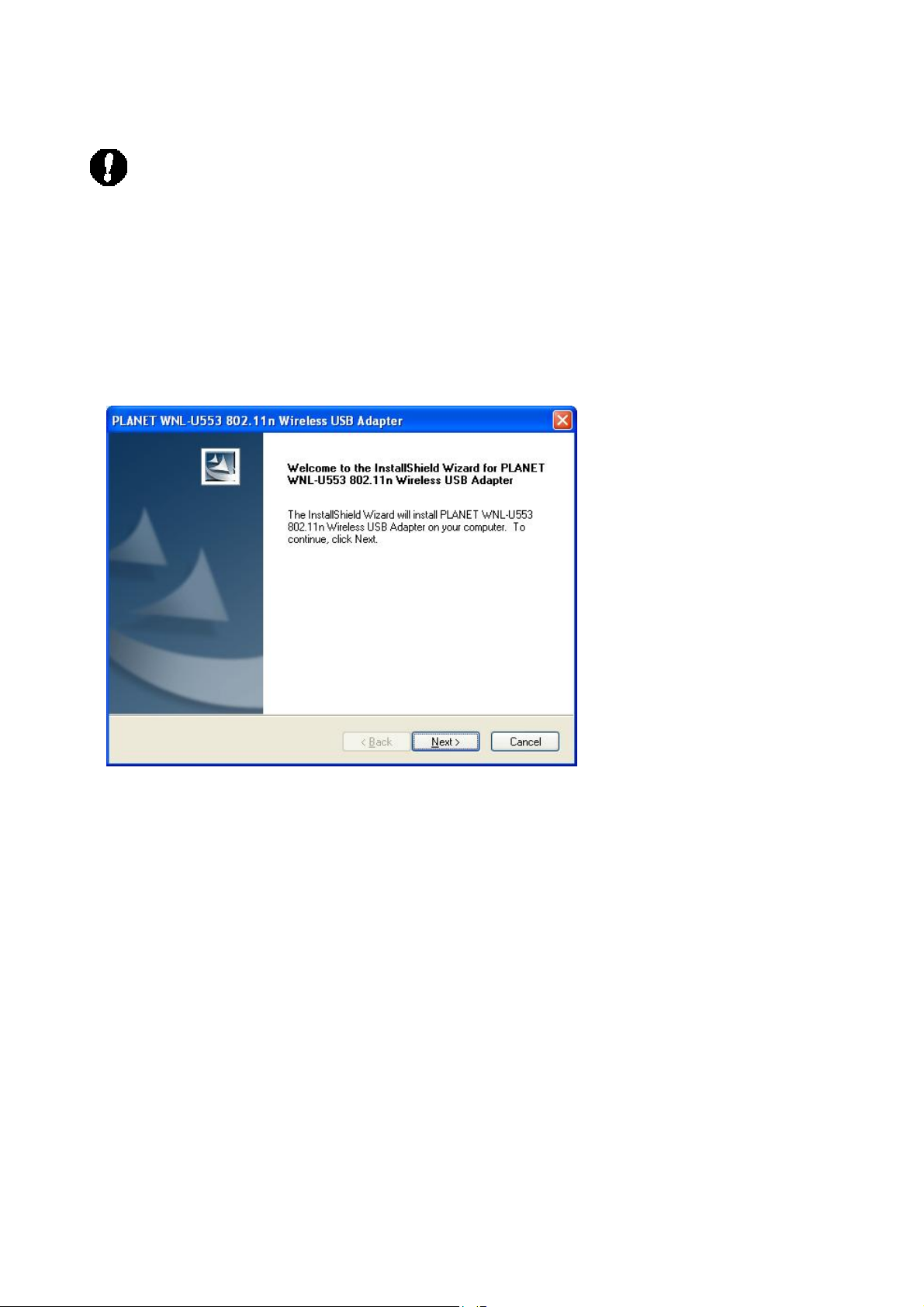
3. When this screen appears, please press “Next” to continue.
4. Installation will start copy driver and utility to your OS.

5. When this dialog box appear, please click “Continue Anyway”.
6. Please click “Finish” to complete the installation.

Hardware Installation
1. Please connect WNL-U553 to your PC’s USB port. If your PC’s USB interface is not
USB 2.0, Windows will prompt you there is a “High-Speed USB Device Plugged into
non-High-Speed USB hub”. Please don’t worry about this and keep installing.
2. After properly connect the WNL-U553 to your PC, Windows will detect WNL-U553 and
show you this dialog box. You can see the device name in this dialog box. If the device
name is correct, please press ”Next” to the driver installation.
3. Windows may show you this driver is not passed Windows Logo test, please select

“Continue Anyway” to continue.
4. After the driver installation complete appears. Please click “Finish”.
Other manuals for WNL-U553
3
Table of contents
Other Planet Adapter manuals

Planet
Planet POE-100 User manual

Planet
Planet VIP-161W User manual

Planet
Planet BT-200U User manual

Planet
Planet WNL-U556M User manual

Planet
Planet UE-9520 User manual

Planet
Planet WNL-U554A User manual

Planet
Planet WNL-U554A User manual

Planet
Planet ENW-3700 User manual

Planet
Planet ENW-9801 User manual

Planet
Planet ENW-9504 User manual

Planet
Planet ENW-9801 User manual

Planet
Planet WL-U357 User manual

Planet
Planet WNL-U554M User manual

Planet
Planet ENW-980X Series User manual

Planet
Planet ENW-9801 User manual

Planet
Planet WML-8315 User manual

Planet
Planet VIP-161W User manual

Planet
Planet WL-U356R User manual

Planet
Planet ATA-150S User manual

Planet
Planet VIP-156 User manual