
Matermacc IRRIGAMATIC PRO45 Manual

Use and Maintenance Handbook
IRRIGAMATIC
PRO45 - PRO35
Matermacc S.p.A.
Via Gemona, 18 - 33078 - San Vito al Tagliamento (PN) ITALIA
Cod.58330261
Irrigamatic
PRO35
Irrigamatic
PRO45
Use and Maintenance
Handbook
Carefully read this Handbook before using

Use and Maintenance Handbook

Use and Maintenance Handbook
INTRODUCTION
This manual guide contains a description of the work and the necessary instructions for performing basic operations and
regular maintenance of the device.
This guide is for convenience divided into easily-dened chapters.
These instructions are intended for professional users only, who are to possess specic knowledge about how to use the
device, special admittance and training.
It is recommended to use original spare parts and accessories. Non-original parts in addition to forfeiture of the guarantee
can be dangerous and may affect the durability and specications of the machine.
This symbol indicates that it is necessary to pay maximum attention to the discussed issue.
It is possible that some devices, described in the manual, will not be present in your device, depending on the selected
equipment and the intended market .
UPDATING THE MANUAL
Information, descriptions and illustrations contained herein shall reect the state of the equipment at the time of its sale.
The manufacturer reserves the right to perform from time to time possible changes in the equipment for technical or
commercial reasons. Such changes do not require the Producer to intervene in sold up devices and do not render this
publication inappropriate.
Possible additions the manufacturer nds necessary to provide in the future should be kept together with this manual
guide and shall be an integral part thereof.
COPYRIGHT
Copyright on this manual is owned by the manufacturer of the equipment. This guide contains texts, drawings and tech-
nical schedule, which can not be released or transferred to a third party in whole or in part without the written permission
of the manufacturer of the device.

Use and Maintenance Handbook
WARRANTY
● Verify on delivery that the equipment has not been da-
maged during the transport and that the accessories
are integral and complete.
● Any claims must be made in writing within 8 days from
reception.
● The warranty against any defect of the materials is valid
one year from the delivery date of the equipment.
● The warranty does not include shipment expenses (the
material travels at risk and danger of the addressee).
● Any damage caused to people or things are excluded
from the warranty.
● The warranty is limited to the repair or free replacement
of the faulty piece.
● The retailers and the users are not entitled to any in-
demnication from the manufacturer for any damages
(costs for work, transport, defective job, direct or indi-
rect incidents, no prot on harvests, etc).
WARRANTY DECLINE
Besides what is reported in the supply
contract the warranty declines:
● In case the limits referred to in the technical data table
or in other tables in the handbook are exceeded.
● In case the instructions described in this handbook
have not been followed carefully.
● In case of wrong use, faulty maintenance or mistakes
made by the client.
● In case of non original spare parts.
● The contractual guarantee is not applied if the cited
conditions are not respected even only partially.
● The use of spare parts not approved by the Manufac-
turer invalidates every guarantee and releases the
Manufacturer of Retailer from every liability due to
malfunctioning or incidents.
● The removal or modication of the shelters and pro-
tections releases the Manufacturer from every liability
due to damages to things and/or people.
● However, the Manufacturing Company is available to
assure an immediate and accurate technical attendan-
ce and all that can be necessary for the better functio-
ning maximum production of the equipment.

Use and Maintenance Handbook
NOTES ON SAFETY
For the safe operation of the device rst read carefully
these notes.
Power supply
The device is designed for the specied type of current.
Maintenance
Maintenance procedures performed by the operator are
described in the documentation supplied to the customer
with the product.
Do not perform maintenance operations, which are not
specied in the client documentation.
Cleaning
Before proceeding to cleaning, disconnect the power cord
from the device.
Use specic multifunctional cleaning spray, since the use
of other cleansers may result in breakage and possible
incidents.
Electrical safety
Use only the power cord supplied with the equipment.
Do not place the unit where there is a chance of stepping
on the power cord.
Do not put any objects on the device.
In the case of one of the below mentioned situations,
immediately turn off the device and disconnect the power
cord.
● The device produces noise or an unusual smell.
● Power cable is damaged or worn.
● Some liquid spilled into device.
● Any part of the device is damaged.
To resolve this issue, contact an authorized service
center.
Operational safety
Do not perform maintenance procedures, if they are not
described in the documentation, or no training was provi-
ded to the operator by the authorized regional dealer.
Always follow all warnings and instructions marked on the
device or supplied with it.
Always pay utmost care when moving or transferring the
device.
Always install the device in a spacious room, so you can
perform the maintenance.
Do not place the device near a source of heat.
Recycling and processing
In accordance with European standards electrical and
electronic devices should not be recycled together with
domestic waste.
In the member states of the European Union you are to
take electrical appliances to special places free of charge
.
For further information please contact the local agency
responsible for recycling.
For further information, contact the local agency responsi-
ble for recycling, or ask for special instructions.

Use and Maintenance Handbook

Use and Maintenance Handbook
INDEX
INTRODUCTION
UPDATING THE MANUAL
COPYRIGHT
WARRANTY
WARRANTY DECLINE
NOTES ON SAFETY
1. Generalfeatures..........................................................................................................................01
2. Interface......................................................................................................................................02
3. Instructions for use.................................................................................................................03
3.1 Start up and main menu.....................................................................................................03
3.2 Accesso ai menu................................................................................................................03
3.3 Programming an irrigation cycle.......................................................................................04
3.4 Programming example of an irrigation cycleSTANDARD...................................................05
3.5 Programming example of an irrigation cycleOPTIONAL..................................................09
3.6 Calibrating the machine...................................................................................................14
3.7 Conguring the machine...................................................................................................14
3.8 Calendarsetting................................................................................................................14
3.9 Counter setting.................................................................................................................14
4. Work parameters.......................................................................................................................15
4.1 Password-protected user parameters...........................................................................16
5. Error messages........................................................................................................................17

Use and Maintenance Handbook
6. Using the GSM module (optional)...........................................................................................19
6.1 Sim card assembly instructions......................................................................................19
6.2 Managing the contact list..............................................................................................19
6.2.1 Adding a number to the list.................................................................................19
6.2.2 Deleting a number from the list..........................................................................20
6.2.3 Enabling/disabling messages to a user..............................................................20
6.2.4 Reading the list.........................................................................................................20
6.2.5 Querying the machine status...............................................................................20
6.2.6 Querying the return speed..................................................................................20
6.2.7 Changing the current return speed.................................................................21
6.2.8 Starting and stopping the machine remotely.................................................21
6.3 SMS commands..............................................................................................................22
7. TEST..........................................................................................................................................25

Use and Maintenance Handbook
1 GENERAL FEATURES
FUNCTIONS: (Irrigamatic PRO35 - PRO45)
• Current date and time.
• Measurement of wound and unwound
• Start delay 0...120 min.
• Regulation of the retrieval speed (from 4 to 850m/h)
(Irrigamatic PRO35).
• Regulation of the operating speed of up to 4 sectors
(from 4 to 850m/h) (Irrigamatic PRO45).
• Display of the actual time and irrigation end time.
• Setup of job end time and automatic updating of spe-
ed and pauses.
• Final pause 0...120 min.
• Auxiliary irrigator control
• Unwound end signalling.
• Available irrigation units:
• 1) m/h (STANDARD)
• 2) mm (mil) pluviometric (OPTIONAL)
2.a) with ow meter,
2.b) xed ow rate,
3.c) calculated ow rate by gun Pushure, nozzle
diameter, LANE WIDTH.
• Operations once the irrigation is over.
• Automatic shut-off for energy saving.
OPTIONALS:
• Pushure switch
• Rain & wind sensor
• Digital or analog ow-meter
• Speed measurement by sensor on pinion (default) or
on roller.
• Integrated GSM/GPRS 4 band module allowing:
-SMSalertsandstatusnoticationsend
-SMScommandsreceive(i.e.START/STOP/ALT,
speed/mmH2Oadjust,...)
01
Use and Maintenance Handbook
2 USER INTERFACE
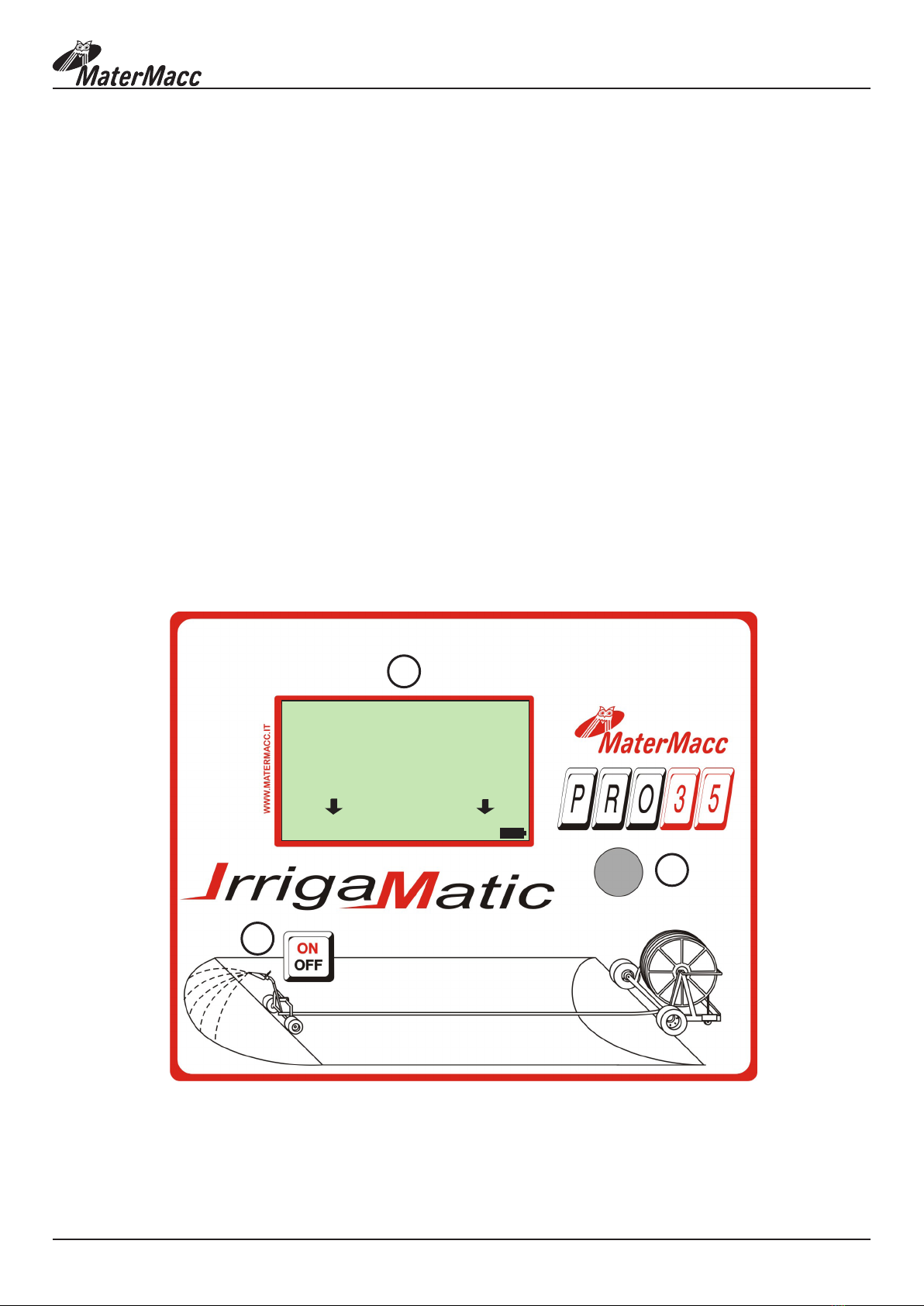
The user interface is made up of a panel comprising:
1. A graphic LCD 128X64 pixel with backlight.
2. Push button to switch ON/OFF the console
3. Incremental encoder with switch setting and command operation.
During an irrigation cycle the display shows actual speed, end job time, remaining unwounded hose, remaining pause
time
In case of anomalies appropriate messages are shown,.
During device setup the backlight of the LCD display is always on. It turns off automatically if the encoder is idle for a
preset period of time.
The backlight switches on again automatically at rst action on the knob.
02
IRR. 2K7 PRO
OPERATION
CALIBRATION
CONFIGURATION
CALENDAR
COUNTER
15/06/11 14:00:00
2
1
3
This manual suits for next models
1
Table of contents
Other Matermacc Desktop manuals





