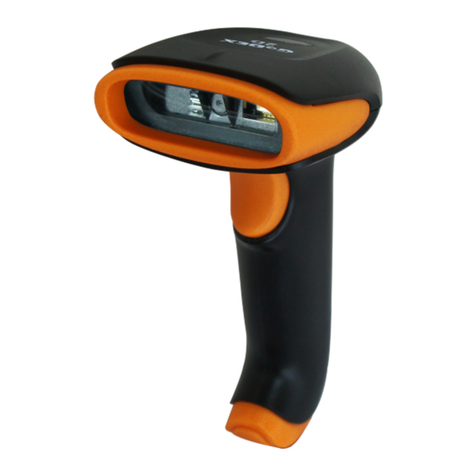
Godex GS220 User manual

Configuration Guide
GS220

iii
Table of Contents
Introduction
Bar Code Configuration Methods.............................................................. 1–1
Single-Code Method .............................................................................. 1–1
Multi-Code Method ................................................................................ 1–1
Need to Start Over?.................................................................................. 1–2
Code Types and Decode Rules
UPC/EAN.................................................................................................. 2–1
Code 128 .................................................................................................. 2–2
Code 39 .................................................................................................... 2–2
2 of 5 Codes ............................................................................................. 2–4
Codabar .................................................................................................... 2–6
Code 93 .................................................................................................... 2–6
Code 11 .................................................................................................... 2–6
Telepen..................................................................................................... 2–7
Plessey Codes.......................................................................................... 2–7
Additional Decode Features...................................................................... 2–8
Configurable Code Lengths ...................................................................... 2–9
Supplements ....................................................................................3–1
GS1 Databar .....................................................................................4–1
GS1 Databar Limited ................................................................................ 4–2
GS1 Databar Expanded............................................................................ 4–2
ISBT Code 128 Implementation
Configuration Mode .................................................................................. 5–1
Concatenation Configuration Mode .......................................................... 5–2
Pre-Defined Concatenation Configuration Mode ...................................... 5–2
User-Defined Concatenation Configuration Mode .................................... 5–3
Communications..............................................................................6–1

iv
Scanner Operation
Configuration Mode Options......................................................................7–1
Scan Buffers..............................................................................................7–1
Redundant Scans......................................................................................7–2
Miscellaneous Decode Features ...............................................................7–2
Same Symbol Timeouts ............................................................................7–3
LED Options ..............................................................................................7–3
Beeper Options .........................................................................................7–4
Data Transmission Delays.........................................................................7–6
Communication Timeout Options ..............................................................7–7
Host Scanner Commands .........................................................................7–8
Test Modes..............................................................................................7–10
Prefixes/Suffixes
User Configurable Prefixes, All Data .........................................................8–1
User Configurable ID Characters, Code Specific ......................................8–2
Standard Prefix Characters .......................................................................8–4
Standard Suffix Characters .......................................................................8–6
Longitudinal Redundancy Check...............................................................8–7
Block Check Character..............................................................................8–7
Character Replacements...........................................................................8–8
User Configurable Suffixes, All Data .........................................................8–9
Special Formats ......................................................................................8–10
Code Formatting
UPC/EAN Formatting ................................................................................9–1
Codabar Formatting ..................................................................................9–3
Code 39 Formatting...................................................................................9–4
Code 11 Formatting...................................................................................9–4
Telepen .....................................................................................................9–4
Plessey......................................................................................................9–5
2 of 5 Code Formatting..............................................................................9–5

v
RS232
Parity Features ....................................................................................... 10–1
Baud Rate............................................................................................... 10–1
Data/Stop Bits......................................................................................... 10–2
Hardware Handshaking .......................................................................... 10–2
Software Handshaking............................................................................ 10–4
Miscellaneous ......................................................................................... 10–5
Keyboard
Enable Keyboard Emulation ................................................................... 11–1
Country/Scan Code Table Selects.......................................................... 11–1
Keyboard/System Type........................................................................... 11–2
’Dumb’ Terminal Selections .................................................................... 11–3
Special Keyboard Features..................................................................... 11–4
InterScan Code Delays........................................................................... 11–6
Control Sets ............................................................................................ 11–7
OCIA................................................................................................12–1
Light Pen Parameters....................................................................13–1
Set Narrow Element Width...................................................................... 13–2
IBM 46xx Configuration
IBM Port.................................................................................................. 14–1
IBM Reserve Codes................................................................................ 14–1
USB..................................................................................................15–1
Code Bytes Usage
Code Bytes 0-9....................................................................................... 16–1
Reserved Codes ..................................................................................... 16–2
Code Type Table .................................................................................... 16–2
ASCII Reference Table........................................................................... 16–3
Extended Key Code Reference Table .................................................... 16–7

vi
Miscellaneous Features
Custom Defaults......................................................................................17–1
Serial Program Mode..............................................................................17–2
Contact Information .......................................................................18–1

1–1
Introduction
Your new scanner has been factory configured with a set of default
parameters. Since many host systems have unique formats and protocol
requirements, GoDEX provides a wide range of configurable features that
may be selected using this bar code based configuration tool. Once the
configuration is completed, the scanner stores the settings in nonvolatile
memory (NOVRAM). NOVRAM saves the settings when the power is off.
Note:Bar code descriptions marked with an asterisk ( * ) define a feature that
is a factory default. Bar codes marked with a tilde ( ~ ) require the
Multi-Code configuration method.
Bar Code Configuration Methods
The GS220 scanner can be bar code configured in two ways: the Single-Code
Methodand the Multi-Code Method.
Single-Code Method
Most features can be enabled or disabled using the Single-Code Method.
1. Power-up the scanner.
2. Scan the bar code for the desired feature.
3. The scanner will emit a multi-toned beep to indicate the configuration
has been saved to NOVRAM.
Multi-Code Method
All features can be enabled or disabled using the Multi-Code Method.
A feature marked with a tilde ( ~ ) requires the Multi-Code Method.
1. Power-up the scanner.
2. Scan the enter/exit configuration mode bar code (3 beeps).
3. Scan the bar code for the desired feature (1 beep). Multiple features
can be enabled/disabled before scanning the enter/exit configuration
mode bar code.
4. Scan the enter/exit configuration mode bar code (3 beeps) and save
the new configuration. To abort a configuration change, power off the
scanner before scanning the enter/exit code.
Enter/Exit Configuration Mode
³ 9 9999 9
1

1–2
Need To Start Over?
Scan the Recall Defaults bar code to erase all previous settings and return
the scanner to its factory default communication protocol. Keyboard Wedge
interface scanners will load keyboard wedge defaults. All other scanners load
RS232 defaults.
Recall Defaults
³ 9 9999 8

2–1
Code Types and Decode Rules
Bar code descriptions marked with an asterisk ( * ) define a feature that is a
factory default. Bar codes marked with a tilde ( ~ ) require the Multi-Code
configuration method.
UPC/EAN
³100116
* Enable UPC/EAN
³100106
Disable UPC/EAN
³100216
* Enable UPC-A
³100206
Disable UPC-A
³100210
* Enable UPC-E
³100200
Disable UPC-E
³100211
* Enable EAN-13
³100201
Disable EAN-13
³100214
* Enable EAN-8
³100204
Disable EAN-8
2

2–2
Code 128
³100113
* Enable Code 128
³100103
Disable Code 128
³100314
Enable UCC/EAN-128 ‘]C1’ Code Formatting –
For Coupon Code 128, see page 3–3.
³100304
* Disable UCC/EAN-128 ‘]C1’ Code Formatting
³100711
Ignore <FNC4> Code 128 Characters
³100701
* Use <FNC4> to Determine Extended ASCII
Characters
Code 39
³100111
* Enable Code 39
³100101
Disable Code 39
³100213
Enable MOD 43 Check Digit on Code 39 –The
scanner only scans Code 39 bar codes that have
a valid Modulo 43 check digit.
³100203
* Disable MOD 43 Check Digit on Code 39
³100217
Enable Full ASCII Code 39
³100207
* Disable Full ASCII Code 39

2–3
³100215
Enable PARAF (Italian Pharmaceutical Codes)
Support –Code 39 bar codes are converted to
PARAF format.
³100205
* Disable PARAF Support
³100307
* Allow PARAF Codes Only
³100317
Allow Non-PARAF Codes
³100312
Enable TRI-OPTIC Code
³100302
* Disable TRI-OPTIC Code
³100702
* Use Standard Code 39 Framing
³100712
Try Code 39 Codes Without 5 Bar Multiples
³100416
Enable ITF/Code 39 Filters
³100406
* Disable ITF/Code 39 Filters
³100914
Enable Self-Service Library Code 39
³100904
*Disable Self-Service Library Code 39
³107715
Transmit MOD 43 Check Digit – with Self
Service Library Code 39
³107705
* Do Not Transmit MOD 43 Check Digit – with
Self Service Library Code 39
Other manuals for GS220
3
Table of contents
Other Godex Barcode Reader manuals

Godex
Godex EZ-2000 PLUS User manual

Godex
Godex EZ100 Series User manual

Godex
Godex EZ2050 User manual

Godex
Godex RT700i User manual

Godex
Godex G500 User manual

Godex
Godex RT200i User manual

Godex
Godex RT700 SERIES User manual

Godex
Godex G300 User manual

Godex
Godex GS200 User manual

Godex
Godex EZPi1000 Series User manual