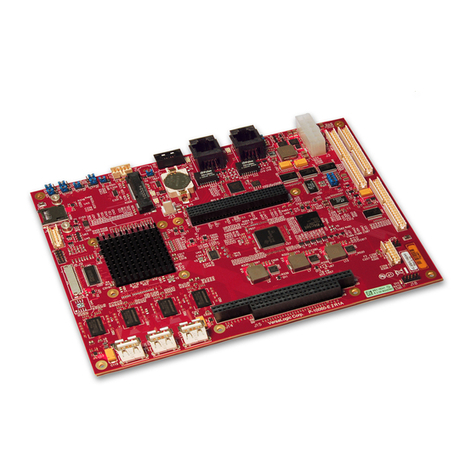
Embest SBC8600B User manual

SBC8600B
Single Board Computer
Quick Start Guide
Version 1.1
23rd Jan 2014

Copyright Statement:
SBC8600B and its related intellectual property are owned by
Shenzhen Embest Technology Co., Ltd.
Shenzhen Embest Technology has the copyright of this document and
reserves all rights. Any part of the document should not be modified,
distributed or duplicated in any approach and form without prior
written permission issued by Embest Technology Co., Ltd.
Revision History:
Version
Date
Description
1.0
21/12/2012
Original Version
1.1
23/01/2014
Localisation

Table of Contents
1 Product Overview .............................................................. 1
1.1 Introduction....................................................................1
1.2 Kit Contents....................................................................1
1.3 Board Interfaces..............................................................2
1.4 System Block Diagram .....................................................3
1.5 Physical Dimensions.........................................................4
2 Hardware Features ............................................................ 6
2.1 Processor .......................................................................6
2.2 On-Board Memory ...........................................................6
2.3 On-Board Interfaces ........................................................6
2.4 Operational Parameters ....................................................7
3 Hardware Details............................................................... 8
3.1 Introduction to CPU .........................................................8
3.2 CPU Features ..................................................................8
3.2.1 Clock........................................................................................ 8
3.2.2 Reset ....................................................................................... 8
3.2.3 General-Purpose Interfaces......................................................... 9
3.2.4 Programmable Real-Time Unit Subsystem..................................... 9
3.2.5 3D Graphics Engine.................................................................... 9
3.3 Introduction to Peripherals................................................9
3.3.1 NAND Flash H27U4G8F2DTR-BC .................................................. 9
3.3.2 DDR H5TQ2G83CFR-H9C .......................................................... 10
3.3.3 Ethernet AR8035 ..................................................................... 10
3.3.4 MAX3232 ................................................................................ 10
4 Hardware Interfaces ....................................................... 11

4.1 MINI8600B ...................................................................11
4.1.1 CN1 Interface.......................................................................... 11
4.1.2 CN2 Interface.......................................................................... 15
4.2 Extension Board ............................................................19
4.2.1 Power Jack.............................................................................. 19
4.2.2 TFT_LCD Interface ................................................................... 20
4.2.3 Audio Output Interface ............................................................. 22
4.2.4 Audio Input Interface ............................................................... 23
4.2.5 USB HOST Interface ................................................................. 23
4.2.6 USB OTG Interface................................................................... 23
4.2.7 TF Card Interface..................................................................... 24
4.2.8 LAN Interface .......................................................................... 24
4.2.9 Serial Interface........................................................................ 25
4.2.10 CAN&RS485 Interface............................................................. 25
4.2.11 ADC Interface........................................................................ 26
4.2.12 SPI Interface ......................................................................... 26
4.2.13 Extension Interface ................................................................ 27
4.2.14 Buttons................................................................................. 28
4.2.15 LEDs .................................................................................... 28
5 Linux Operating System .................................................. 29
5.1 Introduction.................................................................. 29
5.2 Software Resources .......................................................29
5.3 Software Features .........................................................30
5.4 System Development .....................................................31
5.4.1 Establishment of development environment ................................ 31
5.4.2 Installing Cross Compilation Tools.............................................. 31
5.4.3 Addition of environment variables .............................................. 32
6 Establishment of Android Development Environment ...... 33
6.1 System Compilation .......................................................33
6.1.1 Preparation ............................................................................. 33
6.1.2 Compilation of boot code .......................................................... 34

6.1.3 Kernel compilation ................................................................... 34
6.2 Generation of the file system .......................................... 34
6.2.2 Android system compilation ...................................................... 35
6.3 System Customization....................................................36
6.3.1 Modification of Kernel Configuration ........................................... 36
6.3.2 Compilation............................................................................. 37
6.4 Introduction to Drivers ...................................................38
6.4.1 NAND ..................................................................................... 38
6.4.2 SD/MMC ................................................................................. 39
6.4.3 LCDC...................................................................................... 40
6.4.4 Audio in/out ............................................................................ 41
6.5 Driver Development .......................................................42
6.5.1 Driver for the gpio_keys ........................................................... 42
6.5.2 Driver for the gpio_leds ............................................................ 47
6.6 Updating the System......................................................50
6.6.1 Updating the TF card system image ........................................... 50
6.6.2 Updating NAND Flash ............................................................... 54
6.7 Instructions ..................................................................56
6.7.1 Selecting the Display Mode ....................................................... 56
6.7.2 Using a 4.3” LCD Display .......................................................... 57
6.7.3 Using a 7” LCD Display ............................................................. 58
6.7.4 Using a VGA Display................................................................. 58
6.7.5 Using an LVDS Display ............................................................. 58
6.8 Testing.........................................................................58
6.8.1 LED Testing............................................................................. 58
6.8.2 KEYPAD Testing....................................................................... 58
6.8.3 Touch Screen Testing ............................................................... 60
6.8.4 Backlight Testing ..................................................................... 60
6.8.5 RTC Testing ............................................................................ 61
6.8.6 TF Card Testing ....................................................................... 62
6.8.7 USB DEVICE Testing ................................................................ 63
6.8.8 USB HOST Testing ................................................................... 65
6.8.9 AUDIO Testing......................................................................... 66

6.8.10 Network Testing..................................................................... 68
6.8.11 CAN Testing........................................................................... 69
6.8.12 RS485 Testing ....................................................................... 71
6.8.13 Serial Interface Testing ........................................................... 72
6.8.14 Buzzer Testing....................................................................... 72
6.8.15 CDMA8000-U Module.............................................................. 73
6.9 Demo........................................................................... 73
6.9.1 Android System Demonstration ................................................. 73
6.9.2 TISDK System Demonstration ................................................... 75
6.10 Application Development ..............................................77
6.10.1 Development example: LED application program ....................... 77
7 WinCE Operating System ................................................. 79
7.1 Introduction.................................................................. 79
7.2 Software Resources .......................................................79
7.3 Software Features .........................................................80
7.4 System Development .....................................................81
7.4.1 Installation of Integrated Development Environment .................... 81
7.4.2 Extract BSP and project files to the IDE ...................................... 81
7.4.3 Sysgen & Build BSP.................................................................. 82
7.4.4 Driver Introduction .................................................................. 83
7.5 Updating the System Image............................................84
7.5.1 Update TF Card Image ............................................................. 84
7.5.2 Update NAND Flash image ........................................................ 90
7.6 Instructions for Use ....................................................... 90
7.6.1 How To Use openGL ES Demo ................................................... 90
7.7 Application Development ................................................91
7.7.1 Application Program Interfaces and Examples ............................. 91
7.7.2 GPIO Application Program Interfaces and Examples ..................... 91
Appendix 1: Installing an Ubuntu Linux System ................. 94
1.1 Installing VirtualBox.......................................................94

1.2 Installing the Ubuntu Linux System..................................99
Appendix 2: Driver Installation Of Linux USB Ethernet/RNDIS
Gadget 105
Appendix 3: Making a Linux Boot Disk.............................. 108
Appendix 4: TFTP Server Setup ........................................ 113
Appendix 5: ESD Precautions & Handling Procedures....... 115
Appendix 6: Technical support & Warranty ...................... 116
6.1 Technical support service.............................................. 116
6.2 Maintenance service clause ........................................... 117
6.3 Basic guidelines for protection and maintenance of LCDs .. 118
6.4 Value Added Services................................................... 119

Page | 1
1Product Overview
1.1 Introduction
Measuring only 60mm by 27mm, the MINI8600B processor card is a small
form-factor controller board based on TI’s Sitara AM3359 ARM Cortex-A8
processor. The tiny module integrates 2x256MB of DDR3 SDRAM and 512MB
of NAND Flash and uses two 0.4mm space 2x40-pin board-to-board male
expansion connectors to bring out many hardware peripheral signals and
GPIOs from the CPU.
Embest has designed a single board computer SBC8600B which has an
expansion board to carry the Mini8600B. The flexible design allows the fast
and easy way of realizing and upgrading the controller’s capabilities. In
addition to those features offered by Mini8600B, the SBC8600B features 5
serial ports (including 2 RS232 and 3 TTL), 2 USB Host and 1 USB OTG, 2
Ethernet ports, CAN, RS485, LCD, Touch screen, Audio, ADC and many
other peripherals. The SBC8600B is a ready-to-run platform with support for
Linux 3.2.0, Android 2.3 and WinCE 7 operating systems.
1.2 Kit Contents
SBC8600B Board
12V Power Adapter
Cross Over Serial Cable
Ethernet Cable
DVD
Optional 4.3” or 7” LCD

Page | 2
1.3 Board Interfaces
Figure 1: SBC8600B Interfaces

Page | 3
1.4 System Block Diagram
Figure 2: SBC8600B System Block Diagram
Other manuals for SBC8600B
3
Table of contents
Other Embest Single Board Computer manuals


Popular Single Board Computer manuals by other brands

WIN Enterprises
WIN Enterprises PL-80910 user manual

AXIOMTEK
AXIOMTEK SBC81206 Series user manual

SeaLevel
SeaLevel SBC-R9 user manual

SMART Embedded Computing
SMART Embedded Computing ATCA-8310 quick start guide

WinSystems
WinSystems PPM-LX800-G Operation manual

GIGAIPC
GIGAIPC QBiX-PPC Series quick start guide