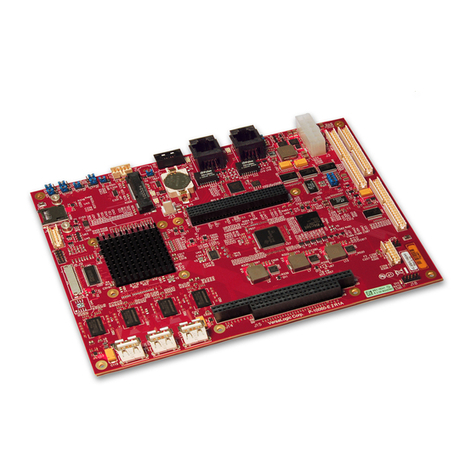
Embest SBC8140 User manual

SBC8140
Single Board Computer
User Manual
Version 1.1
22nd Jan 2014

Copyright Statement:
SBC8140 and its related intellectual property are owned by
Shenzhen Embest Technology Co., Ltd.
Shenzhen Embest Technology has the copyright of this document
and reserves all rights. Any part of the document should not be
modified, distributed or duplicated in any approach and form
without prior written permission issued by Embest Technology Co.,
Ltd.
Revision History:
Version
Date
Description
1.0
20/03/2013
Original Version
1.1
22/01/2014
Localisation

Table of Contents
1 Product Overview ............................................................ 1
1.1 Introduction ................................................................. 1
1.2 Kit Contents ................................................................. 1
1.3 Product Features........................................................... 2
1.3.1 Mini8510 Core Board ............................................................... 2
1.3.2 Expansion Board ..................................................................... 4
1.4 Interfaces on the SBC8140 ............................................. 6
1.5 System Block Diagram ................................................... 7
1.6 Hardware Dimensions .................................................... 8
1.6.1 MINI8510 Core Board .............................................................. 8
1.6.2 Expansion Board ..................................................................... 9
1.7 Modules Supported by SBC8140 .....................................10
2 Introduction to Hardware .............................................. 11
2.1 CPU Introduction..........................................................11
2.1.1 Clock ................................................................................... 11
2.1.2 Reset ...................................................................................11
2.1.3 General Interfaces .................................................................11
2.1.4 Display Subsystem.................................................................12
2.1.5 3D Graphics Acceleration System .............................................12
2.2 Peripheral ICs around CPU.............................................13
2.2.1 TPS65930 Power Management IC .............................................13
2.2.2 H9DA4GH2GJAMCR Memory .................................................... 14
2.2.3 DM9000 Ethernet Controller..................................................... 14
2.2.4 FE1.1 USB Hub ...................................................................... 14
2.2.5 TFP410 Flat Panel Display IC.................................................... 14
2.2.6 MAX3232 Transceiver ............................................................. 15
2.3 Hardware Interfaces and LEDs on Mini8510 ......................16
2.3.1 CN1 90pin DIP Interface (right row) ..........................................16

2.3.2 CN2 90pin DIP Interface (left row) ............................................21
2.3.3 CN3 JTAG Interface ................................................................ 25
2.3.4 CN4 Camera Interface ............................................................ 25
2.3.5 LED Indicators.......................................................................27
2.4 Interfaces on Expansion Board .......................................27
2.4.1 Power Jack ........................................................................... 28
2.4.2 TFT_LCD Interface .................................................................28
2.4.3 Audio Output Interface ........................................................... 31
2.4.4 Audio Input Interface.............................................................. 31
2.4.5 Serial Interface...................................................................... 31
2.4.6 Ethernet Interface..................................................................32
2.4.7 USB OTG Interface ................................................................. 32
2.4.8 USB HOST Interface ............................................................... 33
2.4.9 SD Card Interface .................................................................. 33
2.4.10 LED Indicators .....................................................................34
2.4.11 Buttons ..............................................................................34
3 Linux Operating System ................................................. 35
3.1 Structure of the Embedded Linux System.........................35
3.2 Software Features ........................................................36
3.3 System Development Process ........................................37
3.3.1 Building Development Environment...........................................37
3.3.2 System Compilation ............................................................... 38
3.3.3 Customizing the System.......................................................... 41
3.4 Introduction to Drivers..................................................42
3.4.1 NAND Flash Driver ................................................................. 45
3.4.2 SD/MMC Driver......................................................................46
3.4.3 Display Subsystem Driver........................................................ 47
3.4.4 Video Capture Driver .............................................................. 48
3.4.5 Audio Input/Output Driver .......................................................50
3.5 Driver Development .....................................................51
3.5.1 GPIO_Keys Driver ..................................................................51
3.5.2 GPIO_LEDs Driver .................................................................. 56

3.6 System Update ............................................................61
3.6.1 Updating System in an SD Card................................................61
3.6.2 Updating System in NAND Flash ...............................................70
3.7 Display Mode Configuration ...........................................72
3.8 Tests and Demonstrations .............................................74
3.8.1 Testing LEDs ......................................................................... 74
3.8.2 Testing a Touch-Screen........................................................... 75
3.8.3 Testing the RTC ..................................................................... 75
3.8.4 Testing an SD Card ................................................................ 76
3.8.5 Testing a USB Device.............................................................. 77
3.8.6 Testing USB HOST ................................................................. 79
3.8.7 Testing the Audio Function ...................................................... 80
3.8.8 Testing the Network Connection ...............................................81
3.8.9 Testing the Camera ................................................................ 82
3.8.10 Testing the CDMA8000-U Module ............................................ 83
3.8.11 Testing the WCDMA8000-U Module .........................................83
3.8.12 Demonstration of the Android System......................................84
3.8.13 Demonstration of the DVSDK System ......................................86
3.9 Development of Applications ..........................................88
4 WinCE Operating System................................................ 90
4.1 Software Resources ......................................................90
4.2 BSP Package Contents ..................................................91
4.3 Process of System Development.....................................93
4.3.1 Installing the IDE...................................................................93
4.3.2 Uncompressing/Copying the BSP and Example Projects ................93
4.3.3 Compiling Sysgen and the BSP .................................................94
4.4 Introduction to Drivers..................................................95
4.5 System Update ............................................................98
4.5.1 Updating the System in an SD Card .......................................... 98
4.5.2 Updating the System in NAND Flash ........................................ 102
4.6 Other Operations ....................................................... 103

4.6.1 OpenGL ES demo ................................................................. 103
4.6.2 CAM8000-A Module .............................................................. 104
4.6.3 CAM8000-D Module.............................................................. 105
4.7 GPIO API and Example Applications .............................. 107
Appendix 1: Installing an Ubuntu Linux System............... 111
1.1 Installing VirtualBox ................................................... 111
1.2 Installing the Ubuntu Linux System............................... 116
Appendix 2: Driver Installation Of Linux USB
Ethernet/RNDIS Gadget.................................................. 123
Appendix 3: Making a Linux Boot Disk ............................. 126
Appendix 4: TFTP Server Setup ....................................... 131
Appendix 5: FAQ ............................................................. 133
Appendix 1: ESD Precautions & Handling Procedures....... 134
Appendix 2: Technical support & Warranty...................... 135
2.1 Technical support service ............................................ 135
2.2 Maintenance service clause.......................................... 136
2.3 Basic guidelines for protection and maintenance of LCDs .. 137
2.4 Value Added Services ................................................. 138

Page | 1
1Product Overview
1.1 Introduction
The SBC8140 is a Single Board Computer designed by Embest using the
MINI8510 processor card as the CPU core board. The MINI8510 is built
around the DM3730 microcontroller featuring 256MByte DDR SDRAM,
512MByte NAND Flash, RTC, LEDs, Camera interface and a 10-pin JTAG
interface on board. It is connected with the SBC8140 expansion board
through two 1.27mm space 2x45-pin dip connectors. The SBC8140
expansion board utilises many of other features of the DM3730 through
headers and connectors including serial ports, USB Host, OTG, Ethernet,
Audio In/Out, Keyboard, LCD/Touch Screen interface, VGA, SD card, etc.
The board targets those applications requiring high definition video or
large-scale data processing such as:
2D/3D game console products,
Portable media devices,
High-end industrial equipment,
Medical devices,
Intelligent home systems.
1.2 Kit Contents
SBC8140
Cross-over serial cable (DB9 to DB9)
10-pin JTAG cable
JTAG8000 module
5V/2A power adapter
DVD-ROM
Optional LCD screen (available in 4.3”480x272 or 7”800x480)

Page | 2
1.3 Product Features
1.3.1 Mini8510 Core Board
Figure 1: Back of MINI8510 Figure 2: Top of MINI8510
Operational Parameters:
Dimensions: 67x37mm
Operation Temperature: 0 ~ 70°C
Operating Humidity: 20% ~ 90% (Non-condensing)
Power Supply: 3.3V/0.17A
Processor:
TI DM3730 integrating a 1GHz ARM Cortex™-A8 core
800-MHz TMS320C64x+™ DSP
NEON™ SIMD co-processor
POWERVR SGX™ graphic accelerator
32KB instruction buffer, 32KB data buffer, 256KB L2 cache, 64KB
RAM and 32KB ROM

Page | 3
On-Board Memories:
256MB 32bit DDR SDRAM
512MB 16bit NAND Flash
Interfaces and Signals:
Camera interface (supports external CCD or CMOS camera)
JTAG interface
Two 1.27mm-pitch 90-pin DIP connectors
Six LED indicators (two power indicators and four custom user
indicators)
Two SPIs: SPI1 and SPI2
GPMC bus (16-bit data, 10-bit address, four CS and some control
signals)
Three UARTs (5-wire, support hardware flow control)
ULPI (USB1 HS)
Audio input and output
IIC bus (IIC3)
Two McBSPs: McBSP1 and McBSP3 (McBSP3 is multiplexed on
UART2)
Two MMCs/SDs:MMC1 (8-wire) and MMC2 (4-wire)
24-bit DSS interface

Page | 4
1.3.2 Expansion Board
Figure 3: SBC8140 Expansion Board
Operational Parameters:
Dimensions: 165x115mm
Operation temperature: 0 ~ 70°C
Operating Humidity: 20% ~ 90% (Non-condensing)
Power Supply: 5V/2A
Audio/Video Interfaces:
LCD/touch-screen interface (24-bit RGB full-colour output; 50-pin
FPC connector)
Standard VGA interface, supports 1024x768 resolution by default
Audio input interface (3.5mm audio jack)
Dual-channel audio output interface (3.5mm audio jack)
Data transfer interface:
Other manuals for SBC8140
1
Table of contents
Other Embest Single Board Computer manuals


Popular Single Board Computer manuals by other brands

WIN Enterprises
WIN Enterprises PL-80910 user manual

AXIOMTEK
AXIOMTEK SBC81206 Series user manual

SeaLevel
SeaLevel SBC-R9 user manual

SMART Embedded Computing
SMART Embedded Computing ATCA-8310 quick start guide

WinSystems
WinSystems PPM-LX800-G Operation manual

GIGAIPC
GIGAIPC QBiX-PPC Series quick start guide